- Author: Scott Reilly
- Version: 5.0
- First released: 2005-04-14
- Last update: 2025-08-15
- Compatibility: WP 5.5 – 6.8.3
- Download: [ zip ]
- Description:
Preserve formatting of code for display by preventing its modification by WordPress and other plugins while also retaining whitespace.
-
Extended Description
This plugin preserves formatting of code for display by preventing its modification by WordPress and other plugins while also retaining whitespace.
NOTE: This plugin does NOT handle posts containing blocks. For such posts, use the built-in code or preformatted blocks to format your code for display. However, this plugin would still be needed if you have text-based posts from before using the blocks-based editor.
NOTE: Use of the visual text editor will pose problems as it can mangle your intent in terms of
codetags. I strongly suggest you not use the visual editor in conjunction with this plugin as I have taken no effort to make the two compatible.Notes:
Basically, you can just paste code into
code,pre, and/or other tags you additionally specify and this plugin will:- Prevent WordPress from HTML-encoding text (i.e. single- and double-quotes will not become curly; “–” and “—” will not become en dash and em dash, respectively; “…” will not become a horizontal ellipsis, etc)
- Prevent most other plugins from modifying preserved code
- Prevent shortcodes from being processed
- Optionally preserve whitespace (in a variety of methods)
- Optionally preserve code added in comments
Keep these things in mind:
- ALL embedded HTML tags and HTML entities will be rendered as text to browsers, appearing exactly as you wrote them (including any
brtags). - By default this plugin filters ‘the_content’ (post content), ‘the_excerpt’ (post excerpt), and ‘get_comment_text (comment content)’.
Example:
A post containing this within
codetags:$wpdb->query(" INSERT INTO $tablepostmeta (post_id,meta_key,meta_value) VALUES ('$post_id','link','$extended') ");Would, with this plugin enabled, look in a browser pretty much how it does above, instead of like:
$wpdb->query(—
INSERT INTO $tablepostmeta
(post_id,meta_key,meta_value)
VALUES ('$post_id','link','$extended')
―);
Links: Plugin Homepage | Plugin Directory Page | GitHub | Author Homepage
Find out more at the plugin’s WordPress Plugin Repository page.
-
Screenshots
Click to see full-size image.
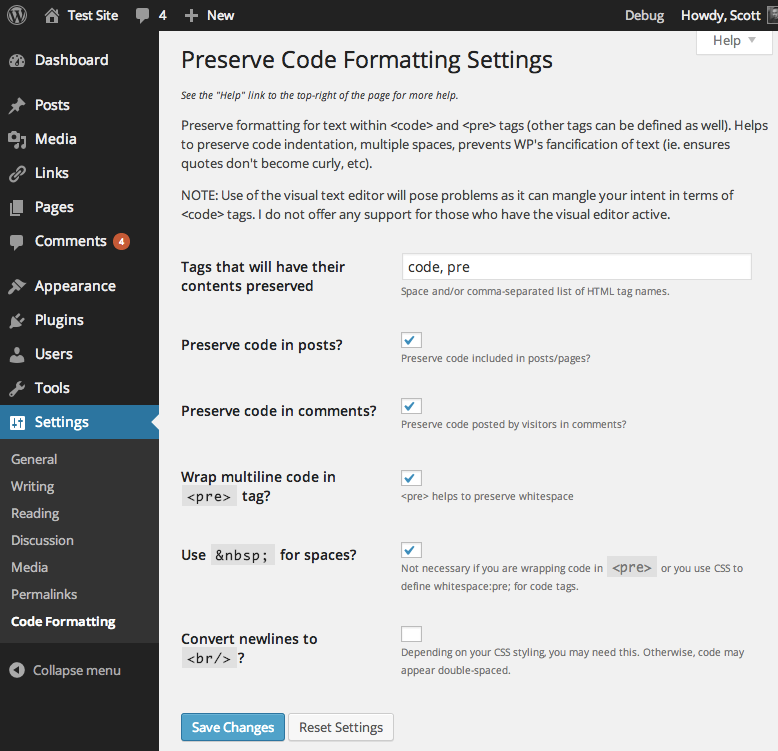
A screenshot of the plugin’s admin options page.
-
Installation
- Whether installing or updating, whether this plugin or any other, it is always advisable to back-up your data before starting
- Install via the built-in WordPress plugin installer. Or download and unzip
preserve-code-formatting.zipinside the plugins directory for your site (typicallywp-content/plugins/) - Activate the plugin through the ‘Plugins’ admin menu in WordPress
- Go to the
Settings->Code Formattingadmin settings page (which you can also get to via the Settings link next to the plugin on the Manage Plugins page) and customize the settings. - Write a post with code contained within opening and closing
codetags. If you are using the block editor (aka Gutenberg), then this plugin is only useful for maintaining code formatting for posts written before WP 5.0 (or whenever you started creating posts with the block editor). You should be using the built-in code or preformatted blocks when including code into the block editor. Otherwise, if you are actively using the classic editor, be sure to use the HTML (aka “Text”) editor and not the “Visual” editor or you’ll encounter formatting issues.
-
Release Log
5.0 (2025-08-10)
- Security and hardening:
- Hardening: Prevent regex pattern injection vulnerability
- Hardening: Prevent object injection vulnerability. Props Patchstack.
- Hardening: Prevent bypassing preprocessor by removing any explicit pseudo-tags from content
- Hardening: Prevent processing of excessively large content
- Hardening: Prevent unintended markup in translated strings before display
- Hardening: Prevent content-native usage of token string used internally to chunk data
- Performance:
- Change: Improve performance of processing tags to be preserved
- Change: Bail early if there are no tags configured to be preserved
- Change: Skip tags that have no content
- Change: Centralize regex patterns in new
get_preprocess_regex_pattern()andget_postprocess_regex_pattern() - Change: Use more efficient
preg_replace_callback()for tag extractions
- Block editor and content handling:
- New: Prevent processing of all block editor content (plugin was designed for text view, not block editor)
- Fix: Prevent unintended greediness when multiple instances of a tag are present
- UI and styling:
- New: Output class of “preserve-code-formatting” for all tags that were processed
- Change: Output example ‘code’ and ‘pre’ tags within ‘code’ tags within setting page description
- Framework and compatibility:
- Change: Update plugin framework to 070
- Change: Note compatibility through WP 6.8+
- Change: Drop compatibility with versions of WP older than 5.5
- Change: Note compatibility through PHP 8.3+
- Change: Update copyright date (2025)
- Code quality and documentation:
- New: Add FAQ entry explaining nested tag deficiency
- Change: Update
get_c2c_string()to add new strings - Change: Improve some docblock documentation
- Change: Tweak some
README.mdformatting - Change: Tweak installation instructions
- Change: Reduce number of tags defined in readme.txt
- Change: Note removal of development and testing related files from release packaging
- Change: Add missing release dates for earlier releases, as well as add an omitted release
4.0.1 (2021-04-14)
- Fix: Update plugin framework to 061 to fix a bug preventing settings from getting saved
4.0 (2021-04-03)
- This recommended release prevents potential conflicts with other plugins (such as SyntaxHighlighter), updates the plugin framework, and notes compatibility through WP 5.7+.
Details:
- Change: Use
{!{and}!}instead of[[and]]to prevent interpretation as shortcodes, fixing conflict with SyntaxHighlighter. Props azito122. - Change: Update plugin framework to 060
- 060:
- Rename class from
c2c_{PluginName}_Plugin_051toc2c_Plugin_060 - Move string translation handling into inheriting class making the plugin framework code plugin-agnostic
- Add abstract function
get_c2c_string()as a getter for translated strings - Replace all existing string usage with calls to
get_c2c_string()
- Add abstract function
- Handle WordPress’s deprecation of the use of the term “whitelist”
- Change: Rename
whitelist_options()toallowed_options() - Change: Use
add_allowed_options()instead of deprecatedadd_option_whitelist()for WP 5.5+ - Change: Hook
allowed_optionsfilter instead of deprecatedwhitelist_optionsfor WP 5.5+
- Change: Rename
- New: Add initial unit tests (currently just covering
is_wp_version_cmp()andget_c2c_string()) - Add
is_wp_version_cmp()as a utility to compare current WP version against a given WP version - Refactor
contextual_help()to be easier to read, and correct function docblocks - Don’t translate urlencoded donation email body text
- Add inline comments for translators to clarify purpose of placeholders
- Change PHP package name (make it singular)
- Tweak inline function description
- Note compatibility through WP 5.7+
- Update copyright date (2021)
- 051:
- Allow setting integer input value to include commas
- Use
number_format_i18n()to format integer value within input field - Update link to coffee2code.com to be HTTPS
- Update
readme_url()to refer to plugin’s readme.txt on plugins.svn.wordpress.org - Remove defunct line of code
- Change: Move translation of all parent class strings into main plugin file
- Change: Note compatibility through WP 5.7+
- Change: Update copyright date (2021)
- Security and hardening:
-
Copyright & Disclaimer
Copyright © 2005-2025 by Scott Reilly (aka coffee2code)This program is free software; you can redistribute it and/or
modify it under the terms of the GNU General Public License
as published by the Free Software Foundation; either version 2
of the License, or (at your option) any later version.This program is distributed in the hope that it will be useful,
but WITHOUT ANY WARRANTY; without even the implied warranty of
MERCHANTABILITY or FITNESS FOR A PARTICULAR PURPOSE. See the
GNU General Public License for more details.You should have received a copy of the GNU General Public License
along with this program; if not, write to the Free Software
Foundation, Inc., 51 Franklin Street, Fifth Floor, Boston, MA 02110-1301, USA. -
Discussion / Support
Have any questions, comments, or suggestions? Please provide them via the plugin’s WordPress.org support forum. I’ll do my best to reply in a timely fashion and help as best I can.
Unfortunately, I cannot provide guaranteed support, nor do I provide support via any other means.
Was this plugin useful useful to you? Consider giving it a rating. If you’re inclined to give it a poor rating, please first post to the support forum to give me a chance to address or explain the situation.
Categories


17 replies on “Preserve Code Formatting”
[…] Hey, this seems to be exactly what I was looking for! This plugin seems to do exactly what I am looking for, enable users to write code in comments. Preserve Code Formatting […]
[…] Preserve Code Formatting from Scott Reilly preserves formatting of code for display by preventing its modification by WordPress and other plugins while retaining original whitespace and characters. For WP 2.0+, 2.2+, 2.3+ and 2.5+ Verwandte Artikel […]
[…] 2: just found the preserve code formatting plugin. Fighting wordpress (which was completely screwing up the code tag) was no […]
[…] Preserve Code Formatting 2.0 Preserve formatting of code for display by preventing its modification by WordPress and other plugins while retaining original whitespace and characters. Often, I want to post code and not content. This plugin stops WordPress’ texturize function (i.e., the way it publishes and stylizes certain characters) to garble up the code formatting. […]
[…] Preserve Code Formatting: Permet de garder le formatage du code dans WordPress mais au final, rien de bon […]
[…] P.S. If you want to actually display code in your posts when in a <code> tag, get this plugin. […]
[…] code (displayed using the preserve code formatting wp plugin). <object width="210" height="320"><param […]
[…] sind einige Plugins entwickelt worden, die Abhilfe schaffen sollen. Vier davon habe ich getestet: Preserve Code Fromatting, WP-Syntax, Code Autoescape und Code Markup. Preserve Code Formatting hatte Probleme mit dem […]
[…] the rest here: Preserve Code Formatting | coffee2code.com Share and […]
[…] a few years I have used the Preserve Code Formatting plugin, since it allows me to wrap all the code in <pre>…</pre> tags, and it honors […]
[…] plugin of choice right now is Scott Reilly’s Preserve Code Formatting. Scott’s plugin prevents modification by WordPress and other plugins while retaining original […]
[…] it works just fine. The plugin that allows you to preserve code in WordPress posts or pages is the Coffee2Code plugin which works like a […]
[…] 2011 by David Latapie Les blogueurs informaticiens sous WordPress comprendront : coffee2code.com/wp-plugins/preserve-code-formatting/ This entry was posted in Non classé and tagged code, plugin, typographie, WordPress by David […]
[…] inmaculado. Voy a hablaros de una que adoptado yo y en breve activaré en el blog: el plugin Preserve Code Formatting, de Scott Reilly (alias […]
[…] other plugins while retaining original whitespace and characters. Version 3.1 | By Scott Reilly | Visit plugin site This entry was posted in Uncategorized by Justin. Bookmark the […]
[…] code without WordPress parsing it requires a plugin. I tried a few, and found Scott Reilly’s Preserve Code Formatting really easy to use. If you (unlike me) post code regularly, it might be worth checking out. D.S. […]
[…] to get the ASCII art to display in plain text without warping to the left. Then I found the Preserve Code Formatting plugin. It works! I just have to keep the art from getting too close to the left margin, that seems […]