.png)
A free tool to edit Windows Defender settings
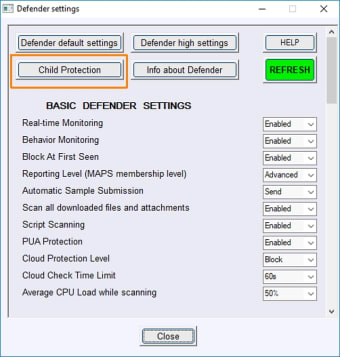
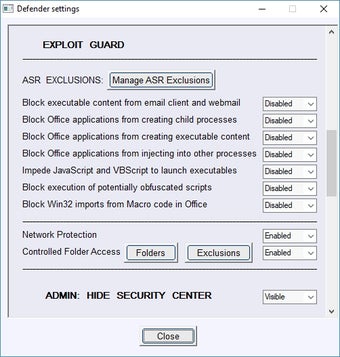
ConfigureDefender allows you to configure your Windows Defender settings more than the base program initially allows. This Windows Defender editing tool allows users to unlock configuration functions that only the developers have access to. This allows ConfigureDefender users to change the Windows antivirus software to suit more specific needs.
This Defender editor tool allows users to turn things off, set different rules for different profiles, and allows direct registry editing. It is a little similar to 3UTools and TinyTask in how they work by unlocking functions without altering or adding to the base code.
Does this program improve security?
In the strictest sense, no, it does not. But, with this tool, you can turn up the Windows Defender security features to the max. This may produce a lot of false positives but is good for people who need to put security above convenience. One could create situational exceptions using this tool, too.
Is ConfigureDefender a Windows Defender add-on?
The tool doesn't change the code for the Windows Defender. It simply unlocks functions that are already present. It then offers the functions in a GUI to make them easier to use. Be sure to reset the Defender settings before uninstalling this program.
Expands the use of Windows Defender
As any ConfigureDefender review will attest, this tool gives you access to hidden functions in Windows Defender. It expands its use, makes it more customizable, and experts can use it to make their devices safer.
Has a number of safe uses
Most people will never need this tool, but it is handy for program testers, coders, security testers, and computers with several user profiles. It allows users to change built-in Defender anti-virus settings. It is also handy if you want to keep Windows Defender active/inactive while using certain custom software.