
Popis
The Custom Login Page Customizer is an excellent solution for your WordPress website if you want to customize the login page to match your website’s branding. By customizing the login page, you can provide your users with a better experience, improve the security of your website, and make your website look more professional and trustworthy.
Pomocí Custom Login Page Customizer můžete změnit pozadí přihlašovací stránky, barvy a fonty a přidat vlastní loga nebo obrázky. Přizpůsobení přihlášení Vám navíc umožňuje vytvořit přihlašovací stránku, která odpovídá designu webu, takže je vizuálně atraktivnější a profesionálnější.
Proč používat Login Customizer?
Plugin Login Customizer je vynikajícím řešením pro majitele webbů WordPress, kteří chtějí upravit přihlašovací stránku tak, aby odpovídala značce jejich webu. Zde jsou některé z výhod používání Login Customizer:
-
Customization options: The plugin offers a wide range of customization options that allow you to change the login page’s appearance to match your website’s branding. You can customize the logo, background image, color scheme, font size, and more.
-
User experience: By customizing the login page, you can give your users a better experience. A branded login page makes your website look more professional and trustworthy, which can help increase user engagement and loyalty.
Features of Login Customizer
Plugin Login Customizer má mnoho funkcí, které Vám umožňují přizpůsobit přihlašovací stránku tak, aby odpovídala značce Vašeho webu. Zde jsou některé z klíčových funkcí:
-
User-Friendly Interface: LoginCustomizer has a user-friendly interface that makes it easy for both beginner and advanced developers. You don’t need coding or technical knowledge to customize your login page and form.
-
Easy Customization: Custom Login Page Customizer allows you to customize every aspect of your login page, including the logo, background color, text color, font size, button style, and many more. You can also add custom CSS code to enhance the customization further.
-
Live Preview: With the live preview feature, you can see your changes to your login page and form in real time. It lets you make quick and easy adjustments until you achieve the desired look and feel.
-
Responsive Design: The plugin is fully responsive, which means your custom login page and form will look great on all devices, including desktops, laptops, tablets, and smartphones.
-
Multisite Support: Custom Login Page Customizer is compatible with WordPress multisite. You can customize the login page and form for all sites in your network from a single location.
-
Custom Logo: You can upload your logo to the login page and adjust its size and position.
-
Background Image: You can add a background image to the login page, a static image, or a slideshow.
-
Color Scheme: You can choose from various color schemes or create your custom color scheme.
-
Font Size: You can adjust the font size for the login form, links, and other elements on the login page.
-
Custom CSS: You can add your own CSS to customize the login page further.
Snímky obrazovky
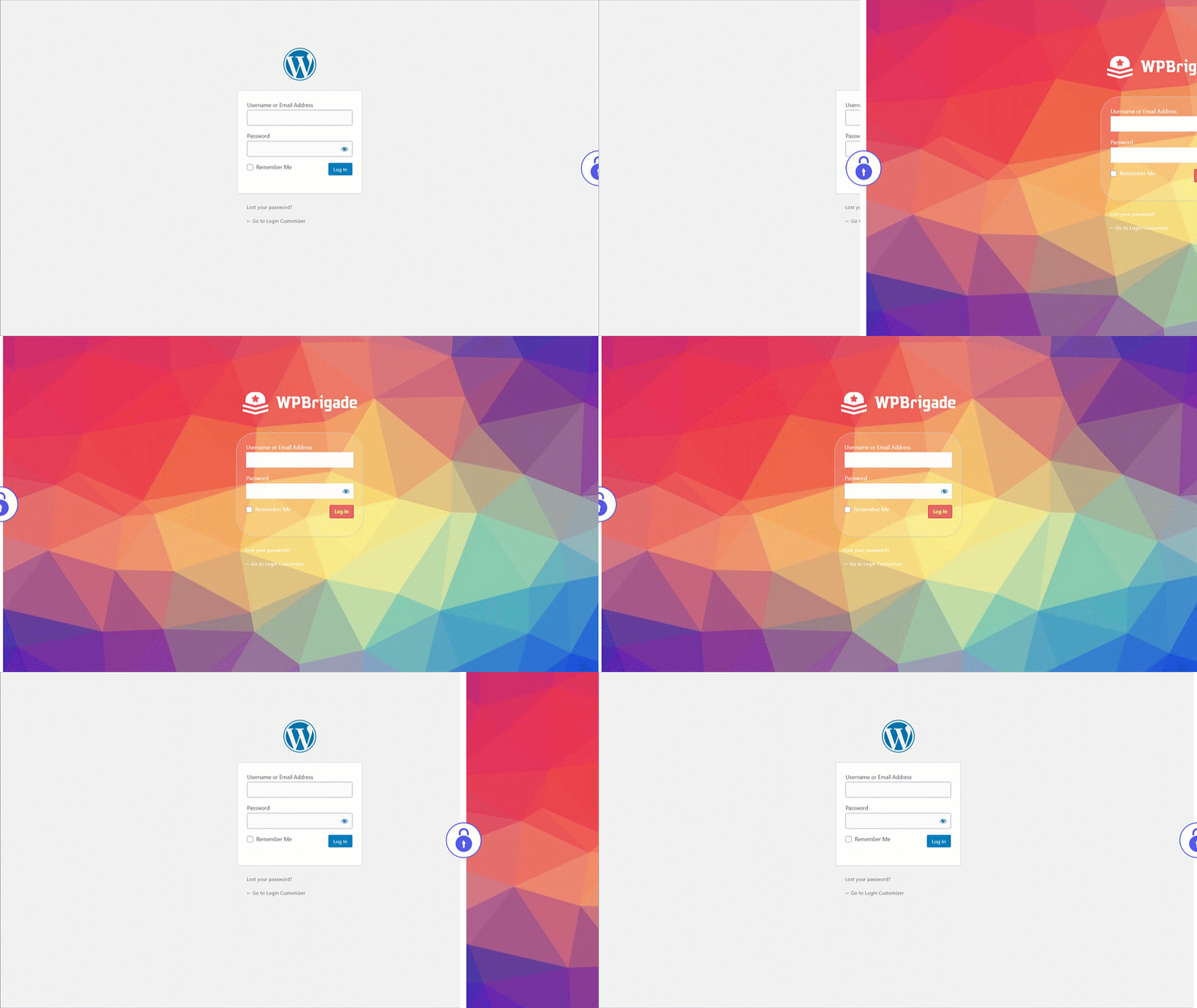
Custom Login – Before and After customized login page demo after setting up Login Customizer 
Custom Login – Select Login Page Templates from settings 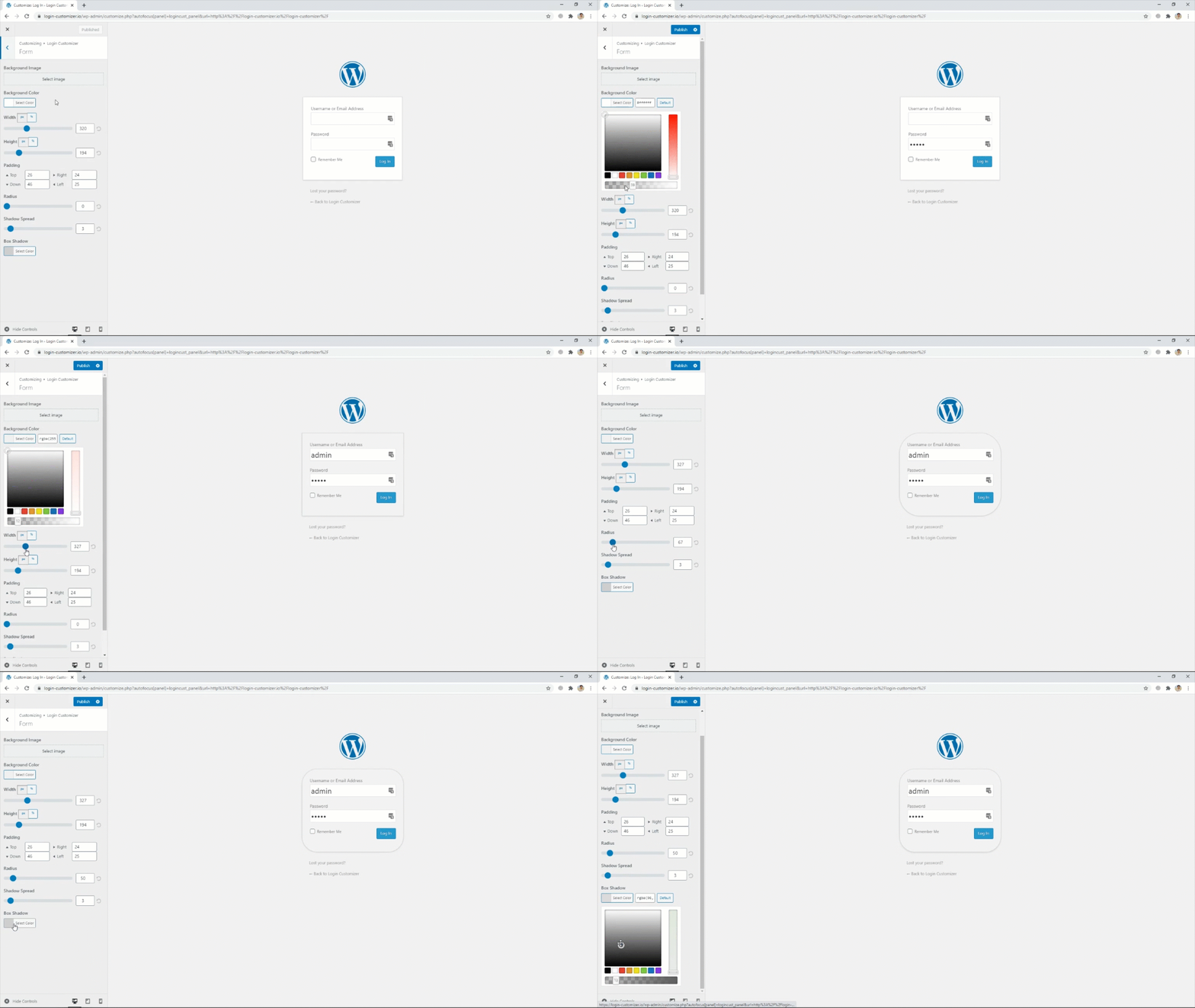
Custom Login – Login Form settings 
Custom Login – Select login page background images 
Custom Login – Add logo of your own choice from settings


Instalace
- Upload the plugin to your ‚wp-content/plugins‘ directory, or download and install automatically through your admin panel.
- Activate the plugin through the ‚Plugins‘ menu in WordPress.
Nejčastější dotazy
-
Co je Login Customizer?
-
Login Customizer is a WordPress plugin that allows you to customize your WordPress website’s default login page.
-
Jak nainstaluji Login Customizer?
-
Plugin Login Customizer můžete nainstalovat přímo z úložiště pluginů WordPress nebo můžete plugin vyhledat na řídicím panelu WordPress a stáhnout si ho z webu úložiště pluginů.
-
Jaké možnosti přizpůsobení jsou dostupné s Login Customizer?
-
Pomocí Login Customizer můžete upravit přihlašovací stránku webu různými způsoby, například změnou loga, obrázku na pozadí, barevného schématu a velikosti písma. Můžete také přidat vlastní CSS.
-
Je Login Customizer kompatibilní se všema šablonama WordPressu?
-
Ano, Login Customizer je kompatibilní se všemi WordPress šablonami. Funguje s výchozí přihlašovací stránkou WordPress a nahradí ji přizpůsobenou přihlašovací stránkou.
-
Can I preview my changes before making them live?
-
Ano, Login Customizer umožňuje zobrazit náhled změn v reálném čase před jejich uložením. Tato funkce zajišťuje, že budete se změnami spokojeni, než je provedete na webu.
-
Does Login Customizer slow down my website?
-
No, Login Customizer is a lightweight plugin that does not significantly affect your website’s performance or speed.
-
Can I revert to the default login page if I don’t like the changes I made?
-
Ano, na výchozí přihlašovací stránku se můžete kdykoli vrátit vypnutím nebo odinstalováním pluginu Login Customizer.
-
Je Login Customizer zdarma?
-
Ano, Login Customizer je bezplatný plugin, který si můžete zdarma stáhnout a používat na svém WordPress webu.
-
Jak darovat nebo přispět?
-
Please visit this link for more info.
Recenze


Autoři
Custom Login Page Customizer je otevřený software. Následující lidé přispěli k vývoji tohoto pluginu.
Spolupracovníci

Plugin „Custom Login Page Customizer“ byl přeložen do 8 jazyků. Děkujeme všem překladatelům za jejich pomoc.
Přeložte “Custom Login Page Customizer” do svého jazyka.
Zajímá vás vývoj?
Prohledejte kód, podívejte se do SVN repozitáře, nebo se přihlaste k odběru protokolu vývoje pomocí RSS.
Přehled změn
2.5.3 – 2025-08-06
- Enhancement: Excluded the
Login Customizerpage from theRank Math SEOplugin’s sitemap. - Compatibility: Compatible with WordPress 6.8
2.5.2 – 2025-04-19
- Bugfix: Redirect issue on the plugin settings page open 1st time installation.
- Bugfix: Set min height of the login form.
- Compatibility: Compatible with WordPress 6.8
2.5.1 – 2025-02-20
- Enhancement: Updated the Freemius latest SDK v2.11.0.
- Compatibility: Compatible with WordPress 6.7
2.5.0 – 2025-01-03
- Bugfix: PHP Warning for translation hook.
- Compatibility: Compatible with WordPress 6.7
2.4.1 – 2024-11-18
- Bugfix: Apply Customized style on the Password Reset page.
- Compatibility: Compatible with WordPress 6.7
2.4.0 – 2024-07-08
- Bugfix: Remove the depreciated warning from login customizer.
- Vylepšení: Aktualizace Freemius SDK na nejnovější verzi 2.7.2
- Compatibility: Compatible with WordPress 6.6
2.3.2 – 2023-12-21
- Enhancement: Excluded the
Login Customizerpage from sitemap. - Compatibility: Compatible with WordPress 6.4
2.3.1 – 2023-11-07
- Vylepšení: Aktualizace Freemius SDK na nejnovější verzi 2.6.0.
- Compatibility: Compatible with WordPress 6.4
2.3.0 – 2023-10-25
- Bugfix: Reset Password button styling issues on login page.
- Enhancement: Update the rage control layout in login customizer.
- Compatibility: Compatible with WordPress 6.3
2.2.3 – 2023-07-20
- Vylepšení: Aktualizace Freemius SDK na nejnovější verzi 2.5.10.
- Compatibility: Compatible with WordPress 6.2
2.2.2 – 2023-07-10
- Vylepšení: Aktualizace Freemius SDK na verzi 2.5.9.
2.2.1 – 2023-03-24
- Vylepšení: Aktualizace Freemius SDK na verzi 2.5.5.
- Enhancement: Update the .pot file.
- Compatibility: Compatible with WordPress 6.2
2.2.0 – 2023-01-26
- New Feature: Introduced Help Page with System Info.
- Compatibility: Compatible with WordPress 6.1
2.1.9 – 2022-05-19
- BugFix: Uninstall plugin settings from database for Multi-sites.
- Compatibility: Compatible with WordPress 6.0
2.1.8 – 2022-03-08
- Security Fix: Updated the Freemius SDK v2.4.3.
2.1.7 – 2022-02-18
- New Feature: Introducing Language Switcher (On / Off) setting.
- Compatibility: Compatible with WordPress 5.9.
2.1.6 – 2021-09-07
- Bugfix: Fixed PHP error for default Logo Height.
- Bugfix: Login Customizer Page deletion issue.
- Enhancement: Create Uninstall.php for removing plugin options from DB & Login Customizer Page on uninstalling the plugin.
2.1.5 – 2021-07-23
- Enhancement: Optimized Code.
- Compatibility: Compatible with WordPress 5.8.
2.1.4 – 2021-06-16
- New Feature: Introducing a new control for change wp-login.php page title.
- Enhancement: Optimized Code & fix PHP 8.0 Error.
2.1.3 – 2021-04-17
- Enhancement: Compatible with 2FA Two Factor Authentication plugin.
- Compatibility: Compatible with WordPress 5.7.
- Compatibility: Compatible with PHP 8.0.
2.1.2 – 2021-02-20
- New Feature: Introducing new control for customizing privacy policy link on login page.
2.1.1 – 2021-01-27
- New Feature: Introducing new Login Customizer settings page.
- New Feature: Introducing „Remember Me“ option already checked on login form.
- New Feature: Introducing „Custom Register Password Fields“ which creates custom password field so you don’t have to reset the password for the first time through a link in order to login (settings will be shown only if you enable register users for your site).
- New Feature: Introducing „Login Order“, Enable users to login using their username or email address or both.
- New Feature: Introducing „Log Data Page“ with System Info for troubleshooting.
- Enhancement: Code optimization and plugin speed improvements.
- Enhancement: Introducing Login Customizer dashicon.
- Compatibility: Compatible with WordPress 5.6.
2.1.0 – 2021-01-12
- Bugfix: Fixed live preview issues.
- Bugfix: Fixed WordPress function deprecation error.
- Bugfix: Fixed customizer settings irregularities.
- Enhancement: Optimized Code.
- Compatibility: Compatible with WordPress 5.6.
2.0.0 – 2018-08-06
- Added Template Feature
- Added Instant Refresh for Controls
- Fixed issue with Security plugins and Multisite
2.0 – 2018-03-09
- Opraveny problémy s bezpečnostními pluginy
- Added Instant Refresh
- Vylepšeno UX
- Added more controls
1.2.1 – 2018-01-05
- Vylepšuje kompatibilitu s nejnovější verzí WordPress.
- Sync ThemeIsle SDK.
1.2.0 – 2017-10-16
- Adds tested up to wp 4.8.
- Improvements to dashboard widget, rollback.
Nově ve verzi 1.0.8
- Odebrány oznámení
Nově ve verzi 1.0.7
- Improved customizer settings
- V bezplatné verzi byly odstraněny zmínky o bezpečnostních doplňcích
