
WordPress.org

Deutsch

  • Themes
  • Plugins
  • News
  • Support
  • Über
    • Learn WordPress
    • Documentation (en)
    • Foren
    • Developers (en)
    • WordPress.tv
  • Meetups
  • Mitmachen
  • FAQ
  • Hol dir WordPress
Hol dir WordPress
WordPress.org

Plugin Directory

Disable Users

  • Ein Plugin einreichen
  • Meine Favoriten
  • Anmelden
  • Ein Plugin einreichen
  • Meine Favoriten
  • Anmelden
Image

Dieses Plugin ist nicht mit den jüngsten 3 Hauptversionen von WordPress getestet worden. Es wird möglicherweise nicht mehr gewartet oder unterstützt und kann Kompatibilitätsprobleme haben, wenn es mit neueren Versionen von WordPress verwendet wird.

Image

Disable Users

Von Jared Atchison
Herunterladen
  • Details
  • Rezensionen
  • Installation
  • Entwicklung
Support

Beschreibung

This plugin gives you the ability to disable specific user accounts via a profile setting.

Once installed and activated, a checkbox appears on the user profile settings (only for admins). When checked, the users account will be disabled and they will be unable to login with the account. If they try to login, they are instantly logged out and redirected to the login page with a message that notifies them their account is disabled.

This can be useful in a few situations.

  • You are working on a site for a client who has an account, but do not want him to login and/or make changes during development.
  • You have a client who has an unpaid invoice.

This plugin is on GitHub! Pull requests are welcome. If possible please report issues through Github.

Screenshots

  • Image
    User profile setting available to administrators.
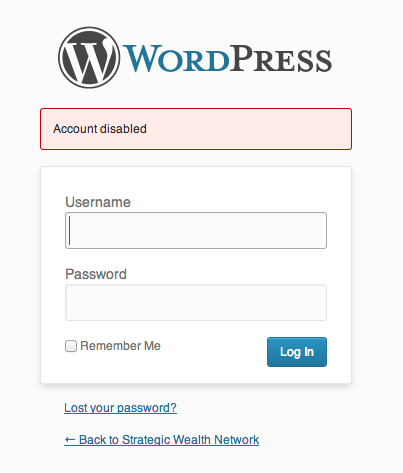
  • Image
    Message when a disabled user tries to login.

Installation

  1. Upload disable-users to your /wp-content/plugins/ directory.
  2. Edit any user and then look for the „Disable User Account“ checkbox.

FAQ

Installation Instructions
  1. Upload disable-users to your /wp-content/plugins/ directory.
  2. Edit any user and then look for the „Disable User Account“ checkbox.
Can I change the message a disabled user sees?

Yes, there is a filter in place for that, ja_disable_users_notice.

Rezensionen

Image

good and simple

Jakob Helmer 22. Mai 2020
Despite not updated for a while (which might not be needed, because it’s only just a few lines of code), it just works.
Image

Works perfectly

lobogc 20. Oktober 2017
Works perfectly with WP 4.8.2
Image

Does exactly what it says on the tin

Rufus McDufus 3. September 2016
Perfect. Is there a way of listing disabled accounts afterwards? The ‚Disabled‘ column isn’t sortable and I can’t figure a way of listing them.
Image

Does what it says it will do

jesselperry 3. September 2016
Seems like a simple request, right? Disable a specific user account without deleting the user. Surprisingly this isn’t a feature built into Wordpress, and even more surprising there isn’t another plugin out there that does this. There are other simple plugins that say they do this — but they don’t work. There are other plugins that do things based on user role — but those are too complicated to set up user roles just to disable an account. This does exactly what I needed — a simple plugin that lets me disable a user with just a checkbox. Simple.
Image

nice little feature

skater4life80 3. September 2016
Great idea for limiting access to others (admins or other users) while doing updates or maintenance on the backend.
Image

Brazilian Portuguese translation.

dbiagi 3. September 2016
I just created a .mo file for this plugin in pt_BR. Here is the files: https://drive.google.com/open?id=0B45nMNzIYUITenh1RWhDVzBHbmc. PS: Thanks for the plugin. Works fine.
Alle 18 Rezensionen lesen

Mitwirkende und Entwickler

„Disable Users“ ist Open-Source-Software. Folgende Menschen haben an diesem Plugin mitgewirkt:

Mitwirkende
  • Image Jared Atchison

Übersetze „Disable Users“ in deine Sprache.

Interessiert an der Entwicklung?

Durchstöbere den Code, sieh dir das SVN Repository an oder abonniere das Entwicklungsprotokoll per RSS.

Änderungsprotokoll

1.0.5 (11/11/2015)

  • Added pl_PL transnation – Props Dominik Kocuj

1.0.4 (6/21/2015)

  • Bug fix for Disabled column to manage user screen

1.0.3 (6/15/2015)

  • Added Disabled column to manage user screen. Props @basteln3rk (flexponsive).
  • Cleaned up code slightly and updated README information

1.0.2

  • Removed accidental PHP short form

1.0.1

  • Fixed notice that would show if WP_DEBUG was on. Props @vegasgeek.

1.0.0

  • Initial launch

Meta

  • Version 1.0.5
  • Zuletzt aktualisiert vor 8 Jahren
  • Aktive Installationen 2.000+
  • WordPress-Version 4.0.0 oder höher
  • Getestet bis 4.3.34
  • Sprache
    English (US)
  • Schlagwörter
    disableloginusers
  • Erweiterte Ansicht

Bewertungen

4.7 von 5 Sternen.
  • 16 5-Sterne-Rezensionen 5 Sterne 16
  • 0 4-Sterne-Rezensionen 4 Sterne 0
  • 1 3-Sterne-Rezension 3 Sterne 1
  • 0 2-Sterne-Rezensionen 2 Sterne 0
  • 1 1-Sterne-Rezension 1 Stern 1

Meine Rezension hinzufügen

Alle Rezensionen anzeigen

Mitwirkende

  • Image Jared Atchison

Support

Möchtest du etwas mitteilen? Brauchst du Unterstützung?

Support-Forum anzeigen

Spenden

Möchtest du die Weiterentwicklung dieses Plugins unterstützen?

Für dieses Plugin spenden

  • Über
  • News
  • Hosting (engl.)
  • Datenschutz
  • Showcase (engl.)
  • Themes
  • Plugins
  • Vorlagen
  • Learn
  • Support
  • Entwicklung (engl.)
  • WordPress.tv ↗
  • Mitwirken (engl.)
  • Veranstaltungen
  • Spenden (engl.) ↗
  • Five for the Future (engl.)
  • WordPress.com ↗
  • Matt (engl.) ↗
  • bbPress (engl.) ↗
  • BuddyPress (engl.) ↗
WordPress.org
WordPress.org

Deutsch

  • Das X-Konto (früher Twitter) von WordPress.org besuchen
  • Das Bluesky-Konto von WordPress.org besuchen
  • Das Mastodon-Konto von WordPress.org besuchen
  • Das Threads-Konto von WordPress.org besuchen
  • Die Facebook-Seite von WordPress.org besuchen
  • Das Instagram-Konto von WordPress.org besuchen
  • Das LinkedIn-Konto von WordPress.org besuchen
  • Das TikTok-Konto von WordPress.org besuchen
  • Den YouTube-Kanal von WordPress.org besuchen
  • Das Tumblr-Konto von WordPress.org besuchen
Code ist Poesie.
Advertisement