

Beschreibung
Umfassender Schutz deiner E-Mail-Adressen vor Spam-Bots, E-Mail-Harvestern und anderen Robotern. Keine Konfiguration erforderlich.
Es schützt auch Telefonnummern oder andere Texte mithilfe unseres integrierten Shortcodes [eeb_protect_content] oder href-Attribut-Encodierung.
Funktionen
- Seitenweiter Schutz für alle deine E-Mail-Adressen.
- Sofortige Ergebnisse (keine Konfiguration erforderlich)
- Schützt Mailto-Links, E-Mail-Adressen, E-Mail-Eingabefelder, RSS-Feeds und vieles mehr.
- Schützt Telefonnummern-Links, FTP, Skype, Dateien und andere individuelle Link-Attribute.
- Automatische Erkennung der Schutztechnik (Unser Plugin wählt automatisch die beste Schutztechnik für jede E-Mail-Adresse aus)
- Beiträge und Seiten können vom Schutz ausgeschlossen werden
- Wandelt automatisch E-Mail-Adressen in Mailto-Links um.
- Wandelt automatisch E-Mail-Adressen in PNG-Bilder um.
- Unterstützt Rot13-Kodierung, Escape-Kodierung, CSS-Textrichtungen, Entitätskodierung und vieles mehr.
- CSS-Textrichtungen können manuell deaktiviert werden, um die Abwärtskompatibilität für Browsers zu gewährleisten.
- Shortcode-Unterstützung:
[eeb_protect_emails],[eeb_protect_content],[eeb_mailto],[eeb_form] - Unterstützung von Template-Tags:
eeb_protect_emails(),eeb_protect_content(),eeb_mailto(),eeb_form() - Schützt Telefonnummern (oder beliebigen Text oder HTML)
- Sonderzeichen wie é, â, ö, chinesische Schriftzeichen usw. werden ebenfalls unterstützt
- Verwende das Encoder-Formular, um verschlüsselte Skripte manuell zu erstellen
Kompatibilität
- Das Plugin funktioniert mit fast allen Themes und Plugins. Einige spezielle erfordern eine besondere Behandlung. Weiter unten kannst du mehr darüber erfahren.
- Kompatibel mit dem Maintenance-Plugin von WP Maintenance
- Das Divi-Theme ist ebenfalls vollständig integriert.
- Das „Jetpack Image carousel“ ist ebenfalls kompatibel.
Kostenlose Prüfung der Website
Wir bieten ein kostenloses Werkzeug, mit dem du überprüfen kannst, ob deine Website ungeschützte E-Mail-Adressen enthält. Du kannst unseren Website-Checker nutzen, indem du hier klickst.
Benutzerfreundlich
Nach der Aktivierung des Plugins sind alle E-Mail-Adressen auf deiner Website sofort geschützt.
Wir bieten auch individuelle Shortcodes und Templatefunktionen zum Schutz von Telefonnummern oder anderen Texten an.
Support
- Dokumentation – Überprüfe nach der Aktivierung des Plugins den Tab „Hilfe“ auf der Seite mit den Plugin-Optionen.
- Dokumentation auf wpemailencoder.com
- FAQ
Du magst dieses Plugin?
Bitte hinterlasse eine Rezension
Danksagungen
- Adam Hunter für die Encode-Methode „JavaScript Escape”, die aus seinem Plugin Email Spam Protection stammt.
- Tyler Akins für die Kodierungsmethode „JavaScript ASCII Mixer”
- Das Titel-Symbol auf der Seite „Admin-Optionen“ wurde von Jack Cai erstellt.
Screenshots
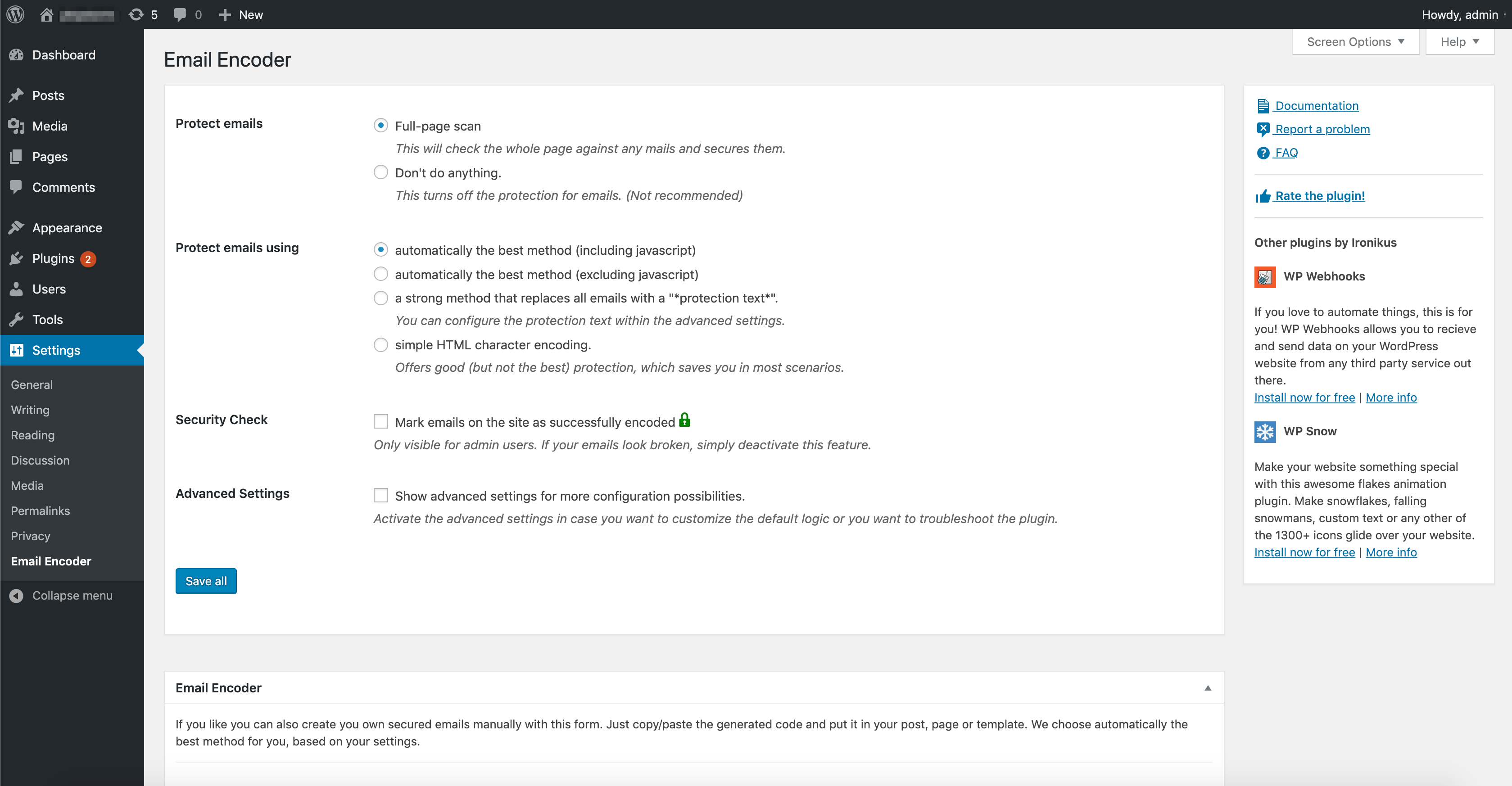
Admin-Optionen-Seite 
Überprüfung verschlüsselter E-Mails/Inhalte, wenn man als Administrator angemeldet ist 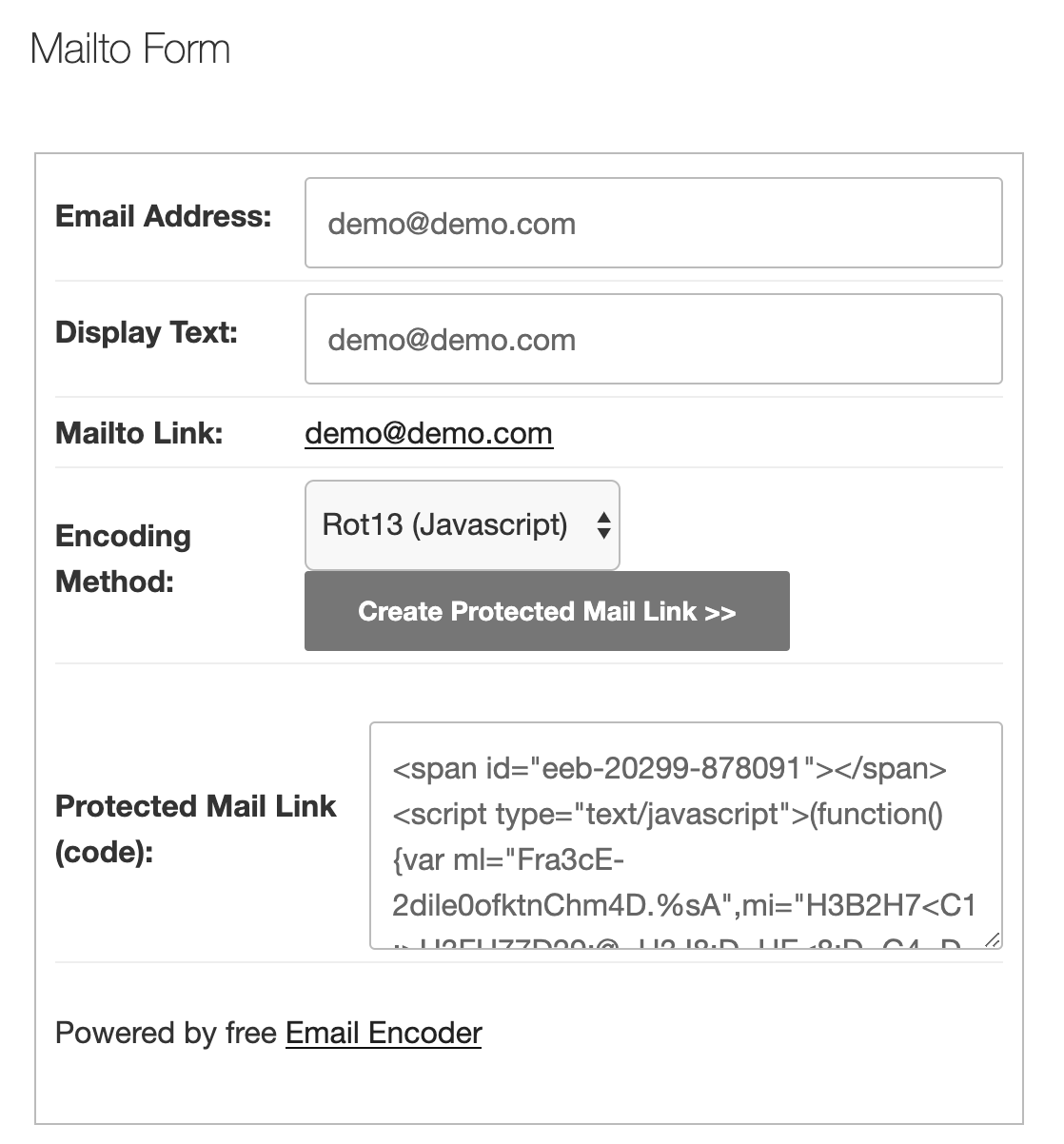
E-Mail-Verschlüsselungsformular auf der Website


Installation
- Gehe im Admin-Menü zu
Plugins. - Klicke auf den Button
Plugin hinzufügen. - Suche nach
Email Encoderund klicke auf „Jetzt installieren“ oder klicke auf den ButtonPlugin hochladen, um die Dateiemail-encode-bundle.ziphochzuladen. - Klicke auf
Plugin aktivieren. - Die Seite mit den Einstellungsoptionen findest du unter „Einstellungen -> Email Encoder” in deinem Admin-Dashboard.
FAQ
-
Wie kann ich testen, ob eine E-Mail-Adresse (oder andere Inhalte) verschlüsselt ist?
-
Du kannst dies auf drei verschiedene Arten testen.
Der einfachste (und effizienteste) Weg ist die Verwendung unseres Website-Checkers, der deine Website überprüft und ungeschützte E-Mail-Adressen erkennt. Er ist völlig kostenlos und du findest ihn hier auf unserer Website.
Die zweite Möglichkeit besteht darin, die Plugin-Option (im Admin-Panel) namens „Sicherheitsprüfung“ zu aktivieren.
Wenn du angemeldet bist und die Seite aufrufst, wird rechts neben jeder E-Mail-Adresse ein Symbol angezeigt, das bestätigt, dass sie erfolgreich verschlüsselt wurde. (Dies gilt nur für E-Mails, die innerhalb des Body-Tags als HTML angezeigt werden. E-Mails innerhalb von Datenattributen oder der Kopfzeile zeigen dieses Symbol nicht an, da dies sonst zu einer Fehlfunktion der Website führen würde.)Die dritte Möglichkeit besteht darin, den Quellcode selbst zu überprüfen, indem du mit der rechten Maustaste auf die Seite klickst und Quellcode anzeigen auswählst (der genaue Text hängt vom Browser ab).
Nun wird dein (echter) Quellcode angezeigt. Deine E-Mail-Adresse sollte im Quellcode nicht lesbar angezeigt werden.Wichtig: Im Element-Inspektor des Browsers wird die E-Mail-Adresse fast immer angezeigt, mache dir also keine Sorgen. Das liegt daran, dass der Inspektor eine Echtzeitdarstellung der Seite anzeigt. Das bedeutet, dass eine verschlüsselte E-Mail-Adresse bereits entschlüsselt und für den Besucher der Seite nutzbar gemacht wurde.
-
Wie verschlüssele ich meine E-Mail-Adresse(n)?
-
Alle E-Mail-Adressen sind standardmäßig automatisch geschützt, sodass keine weiteren Konfigurationen erforderlich sind.
Falls du diese anpassen möchtest, bieten wir dir auch einige weitere Einstellungen, Shortcodes und Templatefunktionen an. Bitte überprüfe die Einstellungsseite innerhalb deiner WordPress-Website oder unsere Dokumentation.
Die Besucher sehen alles wie gewohnt, aber die Quelle dahinter ist nun verschlüsselt.
Weitere Informationen findest du auf der folgenden Seite.
-
Wie verschlüssele ich Telefonnummern oder anderen Text?
-
Verwende einfach den folgenden Shortcode in deinen Beiträgen:
[eeb_protect_content]35-01235-468113[/eeb_protect_content]Für andere Bestandteile deiner Website kannst du die Template-Funktion
eeb_protect_content()verwenden. -
Meine Website sieht nach der Aktivierung des Plugins fehlerhaft aus. Was kann ich tun?
-
Erstens: Keine Panik!
Erstelle einfach eine Supportanfrage im Supportforum und wir werden uns so schnell wie möglich mit einer Lösung bei dir melden. -
Wie kann ich Inhalte von BBPress, WP E-Commerce oder anderen Plugins verschlüsseln?
-
Alle Inhalte werden automatisch geschützt. Falls du etwas findest, das bei dir nicht funktioniert, helfen wir dir gerne weiter!
Unser Plugin ist vollständig kompatibel mit WP Webhooks und Plugins, die über Pluginplate erstellt wurden. -
Kann ich Sonderzeichen (wie z. B. chinesische Schriftzeichen) verwenden?
-
Ja, seit Version 1.3.0 werden auch Sonderzeichen unterstützt.
Rezensionen


Mitwirkende und Entwickler
„Email Encoder – Protect Email Addresses and Phone Numbers“ ist Open-Source-Software. Folgende Menschen haben an diesem Plugin mitgewirkt:
Mitwirkende
„Email Encoder – Protect Email Addresses and Phone Numbers“ wurde in 6 Sprachen übersetzt. Danke an die Übersetzenden für ihre Mitwirkung.
Übersetze „Email Encoder – Protect Email Addresses and Phone Numbers“ in deine Sprache.
Interessiert an der Entwicklung?
Durchstöbere den Code, sieh dir das SVN Repository an oder abonniere das Entwicklungsprotokoll per RSS.
Änderungsprotokoll
2.3.8: December 26, 2025
- Fehlerbehebung: Fehler wurden behoben.
2.3.7: December 25, 2025
- Fehlerbehebung: Fehler wurden behoben.
2.3.6: December 24, 2025
- Fehlerbehebung: Fehler wurden behoben.
2.3.5: December 24, 2025
- Fehlerbehebung: Ein Problem beim Hinzufügen von JS- und CSS-Dateien auf einigen Serverkonfigurationen wurde behoben.
- Optimierung: Kleinere Verbesserungen
2.3.4: December 23, 2025
- Fehlerbehebung: Ein Problem in 2.3.0 wurde behoben, das die ordnungsgemäße Funktion des Plugins verhindert hat.
- Änderung: PHP Version 7.4 ist die Mindestanforderung für PHP.
- Optimierung: Verschiedene kleine Optimierungen, Fehlerbehebungen und Verbesserungen
- Optimierung: Verbesserte Kompatibilität mit der alten PHP-Version 7.4
2.3.3: December 23, 2025
- Fehlerbehebung: Die Version 2.2.5 wurde vorübergehende als Rollback eingestellt, da die neueste Version einen Fehler enthielt.
2.3.0: December 22, 2025
- Fehlerbehebung: Sicherheitspatch (XSS)
- Optimierung: Die Dateistruktur wurde geändert, der Code für zukünftige Upgrades modernisiert und abwärtskompatibel gehalten.
2.2.5: November 11, 2025
- Fehlerbehebung: Ein Fehler bei der Bilderzeugung wurde behoben.
2.2.4: October 28, 2025
- Optimierung: Kompatibilität mit dem HivePress-Plugin
2.2.3: October 16, 2025
- Fehlerbehebung: Ein paar PHP 8.4+ Hinweise wurden behoben
- Fehlerbehebung: Übersetzungen werden rechtzeitig geladen
- Optimierung: Kompatibilität mit WordPress 6.8.3
2.2.1: February 11, 2024
- Optimierung: Sicherheitspatch
- Tweak: Provide compatibility if GD Library Not Enabled
- Optimierung: Kompatibilität mit WordPress 6.4.3
- Fehlerbehebung: Ein paar PHP 8.2+ Hinweise wurden behoben
- Fehlerbehebung: Ein Problem bei automatischen Übersetzungen mit WPML wurde korrigiert: https://wpml.org/errata/email-encoder-protect-email-addresses-and-phone-numbers-there-is-a-problem-connecting-to-automatic-translation/
2.2.2: June 15, 2024
- Optimierung: Kleiner Sicherheitspatch (Multisite)
- Optimierung: Der HTML-Linebreak-Tag mit / wurden zu den erlaubten HTML-Tags für Shortcodes hinzugefügt.
- Optimierung: Inhaltsfilterung wird angewendet, bevor Shortcodes für [eeb_protect_content] ausgeführt werden.
2.2.1: February 11, 2024
- Optimierung: Sicherheitspatch
- Tweak: Provide compatibility if GD Library Not Enabled
- Optimierung: Kompatibilität mit WordPress 6.4.3
- Fehlerbehebung: Ein paar PHP 8.2+ Hinweise wurden behoben
- Fehlerbehebung: Ein Problem bei automatischen Übersetzungen mit WPML wurde korrigiert: https://wpml.org/errata/email-encoder-protect-email-addresses-and-phone-numbers-there-is-a-problem-connecting-to-automatic-translation/
2.2.0: January 11, 2024
- Feature: Exclude pages with query parameters from being protected (Advanced setting: Exclude URL parameters from protection)
- Tweak: Optimized performance for Javascript and Style enqueues
- Dev: Added new filter hook „eeb/frontend/apply_protection“ to manually prevent protection of certain pages
- Dev: Added new filter hook „eeb/validate/is_query_parameter_excluded“ to filter the query parameter exclusions
2.1.10: January 09, 2024
- Optimierte Hilfedateien
- Verbesserungen für PHP 8.x
- Sicherheitspatch
2.1.9: November 11, 2023
- wp.org-Links wurden optimiert
- Sicherheitspatch
2.1.8: August 27, 2023
- Sicherheitspatch für XSS-Sicherheitslücke innerhalb des Shortcodes [eeb_mailto] bei Verwendung des Tags „email“ (Dank an Wordfence)
2.1.7: June 23, 2023
- Optimierung: Kompatibilität mit dem Avada-Builder wurde sichergestellt.
2.1.6: May 10, 2023
- Tweak: Provide compatibility with Bricks Builder
- Tweak: Optimized performance for integrations
2.1.5: May 10, 2023
- Feature: New advanced settings to protect admin and ajax requests
- Feature: New advanced setting to enable the Email Encoder form within the frontend
- Tweak: Better validation for script tags
- Tweak: Changed old links from ironikus.com to wpemailencoder.com
- Tweak: Optimzied the Encoder Form logic to save performance
- Tweak: Various performance optimizations
- Tweak: Deprecated the „Activate the encoder form“ setting
- Fix: In some occasions, backenbd sites did not work correctly with buffered content
2.1.4: April 06, 2023
- Provided compatibility for HTML attributes that start with an @ character ()
- Excluded additional file types from auto-encoding of images containing the @ sign: webp, bmp, tiff, avif
- Deprecated the widget filter as it was of no use anymore
- Fix deprecated preg_split message about the $limit set to null
2.1.3: February 04, 2021
- Tweak: Email Encoder runs now on its own website: https://wpemailencoder.com/
- Tweak: The eeb_mailto function now supports the default encoding methods if no specific method is given
- Tweak optimized text and descriptions
- Fix: Prevent error with undefined $id_base property
2.1.2: July 30, 2021
- Fix: Prevent notice on undefined post within the global object
- Fix: Revalidate Display Text for the frontend encoder form (via [eeb_form] or eeb_form();) to prevent userbased cross site scripting
- Fix: Fatal error if the content was not given
- Tweak: Centrlalized encoding icon for a better usability
- Dev: New filter eeb/validate/get_encoded_email_icon to cusotmize the encoding icon
2.1.1: April 07, 2021
- Tweak: Added svg images to the image exclude list
- Dev: New filter eeb/validate/excluded_image_urls to filter the excluded image list
2.1.0
- Feature: New advanced setting to automatically protect custom link attributes such as tel:, file:, ftp:, skype:, etc. (Protect custom href attributes)
- Tweak: Adjust JS documentation
- Tweak: Adjust readme file
2.0.9
- Fix: Issue with not properly validated soft-encoded attribute tags on the dom attributes
- Fix: Issue with not properly validated soft-encoded attributes on special softencoded tags for the content filter
- Tweak: Optimized performance for soft attribute filtering
- Dev: Added new filter to allow customization of the mailto text: https://wpemailencoder.com/filter-email-encoder-mailto-text/
2.0.8
- Feature: The shortcode [eeb_protect_content] now supports a new attribute called do_shortcode=“yes“ which allows you to execute all shortcodes within the given content area
- Tweak: Add new link for the Email Checker (Allows you to check if all of your emails are being encoded)
- Tweak: Optimize layout and texts
- Fix: The documentation link on the settings page was not working
- Dev: The eeb/frontend/shortcode/eeb_protect_content filter now contains a new variable called $original_content (https://wpemailencoder.com/filter-eeb_protect_content-shortcode/)
2.0.7
- Feature: Underline emails that are converted to an image (Cutsomizable)
- Feature: Integration for the Google Site Kit plugin – https://wordpress.org/plugins/google-site-kit/
- Feature: Integration for the events calendar plugin – https://de.wordpress.org/plugins/the-events-calendar/
- Tweak: Softening the regex to recognize spaces before the closing tags
2.0.6
- Feature: We fully removed all external marketing advertisements! Enjoy our plugin without distrations! 🙂
- Feature: Full support for Oxygen builder
- Tweak: Optimize PHPDocs and comments
- Tweak: Optimize is_post_excluded functionality
- Dev: New filter: eeb/validate/filter_page_content – https://wpemailencoder.com/filter-to-manipulate-raw-page-content/
- Dev: New filter: eeb/validate/filter_content_content – https://wpemailencoder.com/filter-to-manipulate-raw-hook-content/
- Dev: New filter: eeb/validate/is_post_excluded – https://wpemailencoder.com/filter-excluded-posts-list/
- Dev: New filter: eeb/settings/pre_filter_fields – https://wpemailencoder.com/pre-filter-email-encoder-settings/
2.0.5
- Feature: Soft-Encode all HTML tags + new settings item (This will prevent complex plugins from breaking)
- Dev: New filter for randomization of javascript escaping methods
2.0.4
- Feature: Exclude script tags from being encoded
- Fix: Revalidate and strip escape sequences for encode_escape function
- Fix: Return shortcode content of eeb_mailto instead of outputting it
2.0.3
- Feature: Integration for Divi Theme included
- Tweak: Optimize Jetpack integration to also filter against image attribute description tags
- Tweak: Soft-filter html placeholder tags
- Tweak: Allow template tags to work as well with the plugin settings set to „Do nothing“
- Fix: Only one match of the soft attributes was soft encoded properly
- Fix: The escape js function stripped away all zeros from emails
2.0.2
- Feature: New settings item to include custom scripts within the footer and not in the header
- Feature: Support for the „Maintenance“ plugin from WP Maintenance
- TweaK: Remove our main translation handler to make plugin translations on WordPress.org available again.
- Tweak: Optimize PHP code to WordPress standards
- Tweak: Enqueue dashicons as well if only „show_encoded_check“ is checked and protection is set to „Do nothing“
- Tweak: Make eeb_mailto link available with protection set to „Do nothing“ as well
- Fix: WP CLI did not work with this plugin in an active state (Due to the active buffer filter)
- Fix: Emails have been not encoded properly if „Do nothing“ was chosen as a setting and the eeb_mailto shortcode was used
2.0.1
- Fix: Include missing template functions requirement
- Tweak: Clear languages
2.0.0
- PLEASE READ BEFORE UPDATING
- THIS IS A COMPLETELY REFACTORED VERSION OF THE PLUGIN. EVEN WITH INVESTING TONS OF TIME INTO MAKING THIS PLUGIN AS MUCH BACKWARDS COMPATIBLE AS POSSIBLE, WE WOULD STILL APPRECIATE IF YOU TEST THIS VERSION BEFORE YPU UPDATE.
- THE PLUGIN GOT A COMPLETE OVERHAUL AND OFFERS NOW MORE OPTIMIZED FEATURES AND A SUPER SIMPLE USER INTERFACE. PLEASE FIND ALL CHANGES DOWN BELOW.
- Feature: Completely rewritten version of your beloved plugin
- Feature: Introduce FULL SITE PROTECTION (Automatically protect ALL emails within your page)
- Feature: Simplified settings (We cleaned the settings a lot, but you can still get some your old settings page back by activating the advanced checkbox 🙂 )
- Feature: Feature to automatically detect the best protection method
- Feature: Choose from four new settings the strength of your protections
- Feature: Added admin security check icon to encoded input fields and encoded plain emails/texts, as well as to all shortcodes
- Feature: Also protect every single shortcode content
- Feature: Create images out of email addresses
- Feature: Protect header section automatically
- Feature: Added and refactored shortcodes. For a full list of shortcodes, please check this article: https://wpemailencoder.com/available-shortcodes/
- Feature: Setting to deactivate the Encoder Form completely
- Feature: Choose converting plain emails to mailto links as an additional feature
- Feature: Change filter apply from „wp“ to „init“ (This allows you to also grab some ajax values to parse them directy encoded)
- Feature: Website checker to search your site for unprotected emails. Follow this URL for more information: https://wpemailencoder.com/email-protection-checker/
- Tweak: Backward compatibility to the new plugin settings
- Tweak: Completely performance optimized (We removed everything that is not necessary, included a better object caching and much more)
- Tweak: Optimized filter combinations
- Fix: The old logic broke some email encodings, especially with custom tags. We fixed all of them
- Fix: We fixed tons of bugs from the previous version
- Dev: Code rewritten on the newest WordPress standards
- Dev: Tons of new WordPress filters and actions. For a full list, please check https://wpemailencoder.com/
- Deprecated: We removed the deprecated functions. Please make sure to update your custom logic to the newest standards.
1.53
- PLEASE READ BEFORE UPDATE
- THIS PLUGIN WILL BE REFACTORED WITH THE NEXT UPDATE
- TO PREPARE YOURSELF, YOU WILL FIND A LIST DOWN BELOW WITH THE CHANGES THAT AWAIT YOU
-
- The plugin will be simplified using automatically the best protection for your site
-
- The plugin will protect yout site out-of-the-box
-
- We introduce a site-wide protection, not only based on WordPress shortcodes (This includes protection for your FULL site)
-
- You will be able to choose the protection type. Available will be: Automatically (using Javascript), Automatically (Without Javascript), Protection Text, Entity encode
-
- The plugin structure will be optimized using the current WordPress standards
-
- Switch between full site protection and only WordPress filters
-
- (Optional) Protect emails by converting them to PNG images (where applicable)
-
- Round-robin method for javascript based protection (Choose the best method automatically from similar protection methods)
-
- Jede Menge Fehler wurden behoben.
-
- All settings will be fully compatible in any combination
-
- The encoding form will continue to exists
-
- All settings that have been available in the old version and will be available in the new version are backwards compatible
-
- Display admin notice to all encoded emails (where applicable)
- ###################
- THE UPDATE WILL BE LAUNCHED WITHIN OCTOBER
- Tweak: Introduce our new partner MailOptin
1.5.2
- Tweak: Add popup window for admin success message of hidden email
- Fix: Fix bug for non-available antispambot() function
- WP Webhooks takes over development (https://wp-webhooks.com)
1.51
- 25.03.2019
- Kleinere Fehlerbehebungen
- 161,000 downloads; 30,000 installs
1.4.6
- Fixed bug retina png and gif images
1.4.5
- Fixed ? params bug
1.4.4
- Fixed skip responsive images containing @
1.4.3
- Changed content
1.4.2
- Fixed potential xss vulnerability
1.4.1
1.4.0
- Fixed bug prefilled email address in input fields
- Added option protection text for encoded content (other than email addresses)
1.3.0
- Also support special chars for the javascript methods, like é, â, ö, Chinese chars etcetera
- Fixed bug unchecking options „use shortcode“ and „use deprecated“
1.2.1
- Fixed bug index php error
1.2.0
- Added filter for Encoder Form content (eeb_form_content)
1.1.0
- Added filters for changing regular expression for mailto links and email addresses
- Fixed bug don’t encode when loading admin panel
1.0.2
- Fixed bug wrong „settings“ link
- Fixed bug removing shortcodes RSS feed
1.0.1
- Fixed PHP support (same as WordPress)
1.0.0
- NOW ONLY SUPPORT FOR WP 3.4.0+
- Fixed bug deleting setting values when unregister (will now be deleted on uninstall)
- Fixed bug also possible to set protection text when RSS disabled
- Fixed bug saving metaboxes settings
- Added option support shortcodes in widgets
- Added option removing shortcodes for RSS feed
- Removed „random“ method option
- Changed names for action and shortcode (prefixed with eeb_), optional the old names will still be supported
- Added template function for creating the encoder form
- Changed class en id names of the Encoder Form
0.80
- Added screen settings
- Registered metaboxes
- Fixed bug random method
- Workaround for display with special characters (like Chinese), works only with enc_html
0.71
- Option to make own menu item (in admin panel) for this plugin
- Option for showing „successfully encoded“ check
- Fixed bug showing errors for calling wrong translate function
- Fixed bug always showing encoded check on site (for html encode method)
- Added workaround for saving disabled checkboxes in options table
- Fixed bug where encoded check was also applied on output of encoding form
0.70
- Fixed bug with extra params
- Changed texts and added help tabs on admin options page
- Changed visual check for encoded mails/content by showing icon and success message
- Solved that all attributes of mailto links remain when encoding
0.60
- Added hook „init_email_encoder_form“ to add custom filters (of other plugins)
- Added JavaScript code encapsulation for ASCII method
- Solved reinstalling bug for setting right encoding method
- Fixed bug shortcodes encoded with HTML method
0.50
- Added encode method for all kind of contents (template function and shortcode „encode_content“)
- Added extra param for additional html attributes (f.e. target=“_blank“)
- Added option to skip certain posts from being automatically encoded
- Added option custom protection text
- Removed „method“ folder. Not possible to add own methods anymore.
- Other small changes and some refactoring
0.42
- Widget Logic options bug
0.41
- Fixed bug by improving regular expression for mailto links
- Changed script attribute
languagetotype - Script only loaded on options page (hopefully this solves the dashboard toggle problem some people are experiencing)
- Added support for widget_content filter of the Logic Widget plugin
0.40
- Added option for setting CSS classes
- Improved RSS protection
- Removed Lim_Email_Encoder class (now all handled by the main class)
- Enabled setting checkbox for filtering posts
- Fixed PHP / WP notices
- Added param for encode methods: $obj
0.32
- Fix IE bug
- Bug plain emails
- Optional „method“ param for tag and template function, f.e. [encode_email email=“[email protected]“ method=“ascii“]
- Small adjustments
0.31
- Fixed tiny bug (incorrect var-name $priority on line 100 of email-encoder-bundle.php)
0.30
- Added protection for emails in RSS feeds
- Improved filtering tags [encode_email … ]
- Improved ASCII and Escape method and added noscript message
- Solved an option bug (encode mailto links VS encode plain emails)
- Made some cosmetical adjustments on the options page
- Code refactoring
0.22
- First decodes entities before encoding email
- Added more wp filters for encoding
0.21
- Changed Encoder Form: HTML markup and JavaScript
- Made some minor adjustments and fixed little bugs
0.20
- Implemented internalization (including translation for nl_NL)
- Improved user-interface of the Admin Settings Page and the Encoder Form
- Added template function: encode_email_filter()
- Kept and added only high-quality encoding methods
- Refactored the code and changed method- and var-names within the classes
- Removed 3rd param $encode_display out of the encoding methods, display should always be encoded
- Added prefix ‚lim_email_‘ to the encoding methods
0.12
- Nothing changed, but 0.11 had some errors because /methods directory was missing in the repository.
0.11
- also possible to use encode tag in widgets by activating the „filter widget“ option
0.10
- Works with PHP4 and PHP5
- Methods: default_encode, wp_antispambot, anti_email_spam, email_escape, hide_email
- Use the tags:
[email_encode email=".." display=".."],[email_encoder_form] - Template function:
email_encode()
