
Beschreibung
Verbessere ganz einfach die Sicherheit deiner Website mit WordPress Hardening, Zwei-Faktor-Authentifizierung (2FA), Login-Schutz, Sicherheitslückenerkennung und SSL-Zertifikat.
Wirklich einfache, effektive und leistungsstarke WordPress-Sicherheit
Really Simple Security ist das leichtgewichtigste und benutzerfreundlichste Sicherheits-Plugin für WordPress. Es schützt deine WordPress-Website durch die Erstellung von SSL-Zertifikaten, einschließlich korrekter 301-HTTPS-Weiterleitung und SSL-Durchsetzung, das Scannen nach möglichen Sicherheitslücken, Login-Schutz und die Implementierung wichtiger WordPress-Härtungsfunktionen.
Wir sind der Meinung, dass Sicherheit nur minimale Auswirkungen auf die Leistung einer Website, die Benutzererfahrung und die Wartbarkeit haben sollte. Daher ist Really Simple Security:
- Leichtgewicht: Jede Sicherheitsfunktion wird mit einem modularen Ansatz und mit Blick auf die Leistung entwickelt. Deaktivierte Funktionen werden keinen überflüssigen Code laden.
- Benutzerfreundlich: 1-Minute-Konfiguration mit kurzem Onboarding-Setup.
Sicherheitsmerkmale
Einfache SSL-Migration
Migriert deine Website zu HTTPS und erzwingt SSL mit nur einem Klick.
- 301-Umleitung über PHP oder .htaccess
- Gesicherte Cookies
- Let’s Encrypt: Installiere ein SSL-Zertifikat, wenn dein Hosting-Provider die manuelle Installation unterstützt.
- Server-Gesundheitscheck: Deine Serverkonfiguration ist ebenso wichtig für die Sicherheit deiner Website.
WordPress-Härtung
Optimiere deine Konfiguration und sorge dafür, dass WordPress gestärkt und sicher ist, indem du potenzielle Schwachstellen beseitigst.
- Codeausführung im Uploads-Ordner verhindern
- Login-Feedback verhindern und Benutzeraufzählung deaktivieren
- XML-RPC deaktivieren
- Deaktivieren der VerzeichnisdurchsuchungKlicken, um Alternative zu verwenden
- Einschränkungen des Benutzernamens (Blockierung von „admin“ und öffentlichen Namen)
- und vieles mehr..
Erkennung von Schwachstellen
Werde benachrichtigt, wenn Plugins, Themen oder der WP-Kern Sicherheitslücken aufweisen und entsprechende Maßnahmen erforderlich sind.
Schutz bei der Anmeldung
Erlaube oder erzwinge die Zwei-Faktor-Authentifizierung (2FA) für bestimmte Benutzerrollen. Benutzer erhalten einen Zwei-Faktor-Code per E-Mail.
Erhöhe deine Sicherheit mit Really Simple Security Pro
Erweiterte SSL-Erzwingung
- Mixed Content Scan & Fixer. Erkenne Dateien, die über HTTP angefordert werden und korrigiere sie zu HTTPS, sowohl im Front- als auch im Backend.
- Aktiviere HTTP Strict Transport Security und konfiguriere deine Website für die HSTS Preload-Liste.
Firewall
Really Simple Security Pro enthält eine leistungsstarke und effiziente WordPress-Firewall, um Bots, Crawler und böswillige Akteure mit IP- und Benutzernamen-Sperren zu stoppen.
- 404-Blockierung – Blockiert Crawler, da diese eine ungewöhnlich hohe Anzahl von 404-Fehlern auslösen.
- Regionssperre – Erlaube oder sperre den Zugriff auf deine Website nur aus bestimmten Regionen.
- Automatisierte und anpassbare Firewall-Regeln.
- IP-Sperrliste und Zulassungsliste.
Sicherheitskopfzeilen
Sicherheits-Header schützen deine Website-Besucher vor dem Risiko von Klickjacking, Website übergreifende Fälschungsangriffe, dem Diebstahl von Anmeldedaten und Malware.
- Unabhängig von deiner Serverkonfiguration, funktioniert auf Apache, LiteSpeed, NGINX, etc.
- Schütze deine Website-Besucher mit X-XSS-Schutz, X-Content-Type-Options, X-Frame-Options, einer Referrer Policy und CORS-Headern.
- Generiere automatisch deine auf WordPress zugeschnittene Sicherheitsrichtlinie für Inhalte.
Vulnerability Measures (Maßnahmen zur Gefährdung)
Wenn eine Sicherheitslücke in einem Plugin, Thema oder WordPress-Kern entdeckt wird, wirst du entsprechend benachrichtigt. Mit Vulnerability Measures kannst du einfache, aber effektive Maßnahmen konfigurieren, um sicherzustellen, dass eine kritische Sicherheitslücke nicht unbeaufsichtigt bleibt.
- Aktualisierung erzwingen: Ein Aktualisierungsprozess wird mehrmals versucht, bis davon ausgegangen werden kann, dass die Entwicklung eines Themas oder Plugins aufgegeben wird. Du wirst während dieser Schritte benachrichtigt.
- Quarantäne: Wenn ein Plugin oder Thema nicht aktualisiert werden kann, um eine Sicherheitslücke zu schließen, kann Really Simple Security das Plugin unter Quarantäne stellen.
Erweiterte Website-Härtung
- Wähle eine benutzerdefinierte Anmelde-URL
- Automatisierte Prüfung und Korrektur von Dateiberechtigungen
- Umbenennen und Zufallsgenerierung des Datenbankpräfixes
- Ändere den Speicherort der Datei debug.log in einen nicht-öffentlichen Ordner
- Anwendungskennwörter deaktivieren
- Kontrolle der Admin-Erstellung
- Deaktivierung von HTTP-Methoden, Reduzierung von HTTP-Anfragen
Schutz bei der Anmeldung
Sichere den Anmeldeprozess auf deiner Website und die Benutzerkonten mit leistungsstarken Sicherheitsmaßnahmen.
- Zwei-Schritt-Verifizierung (E-Mail-Anmeldung)
- 2FA (Zwei-Faktor-Authentifizierung) mit TOTP
- Passwortlose Anmeldung mit Passkey-Anmeldung
- Erzwinge sichere Passwörter und häufige Passwortwechsel
- Login-Versuche begrenzen
Mit begrenzten Login-Versuchen kannst du einen Schwellenwert konfigurieren, um IP-Adressen oder (nicht existierende) Benutzernamen vorübergehend oder dauerhaft zu blockieren. Du kannst auch ein CAPTCHA nach einem fehlgeschlagenen Login auslösen (hCaptcha oder Google reCaptcha)
Zugangskontrolle
- Beschränke den Zugang zu deiner Website für bestimmte Regionen.
- Füge bestimmte IP-Adressen oder IP-Bereiche zur Blockier- oder Zulassungsliste hinzu.
Nützliche Links
- Dokumentation
- Sicherheitsbestimmungen
- Übersetze Really Simple Security
- Issues & pull requests
- Funktionswünsche
Gefällt dir Really Simple Security?
Wenn du die Weiterentwicklung dieses Plugins unterstützen möchtest, erwäge bitte den Kauf von Really Simple Security Pro, das einige hervorragende Sicherheitsfunktionen und Premium-Support umfasst.
Über Really Simple Plugins
Unsere Mission ist es, komplexe WordPress-Anforderungen wirklich einfach zu machen. Really Simple Security wurde von Really Simple Plugins entwickelt.
Zur Generierung von SSL-Zertifikaten verwendet Really Simple Security die le acme2 PHP Let’s Encrypt-Client-Bibliothek, die uns freundlicherweise von „fbett” zur Verfügung gestellt wurde. Die Sicherheitslückenerkennung erfolgt über WP Vulnerability, eine Open-Source-Initiative von Javier Casares. Möchtest du als Mitwirkender dabei sein? Wir sind auch auf GitHub vertreten!
Screenshots
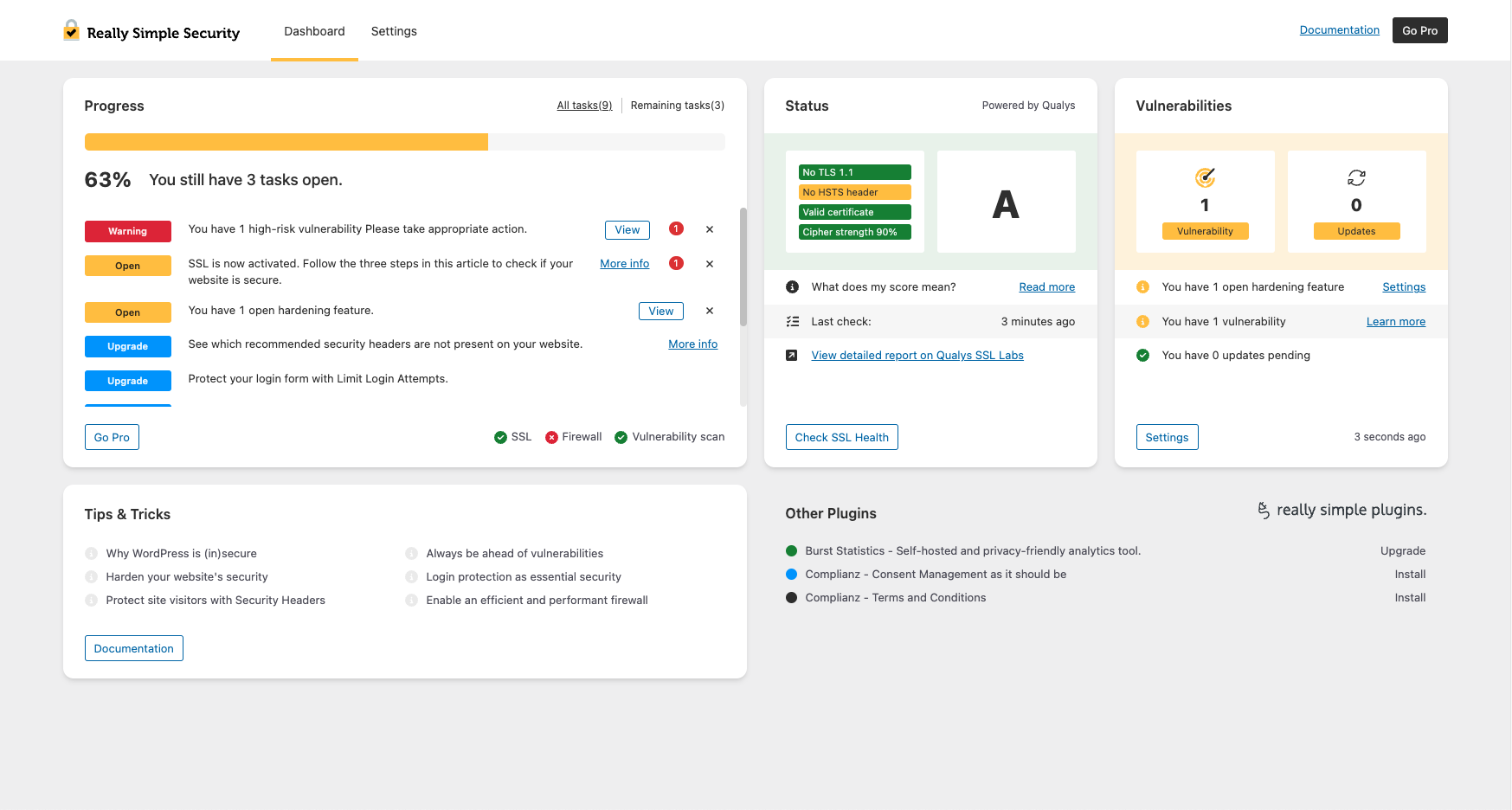
Das Really Simple Security Dashboard bietet einen schnellen Überblick über die Sicherheit. 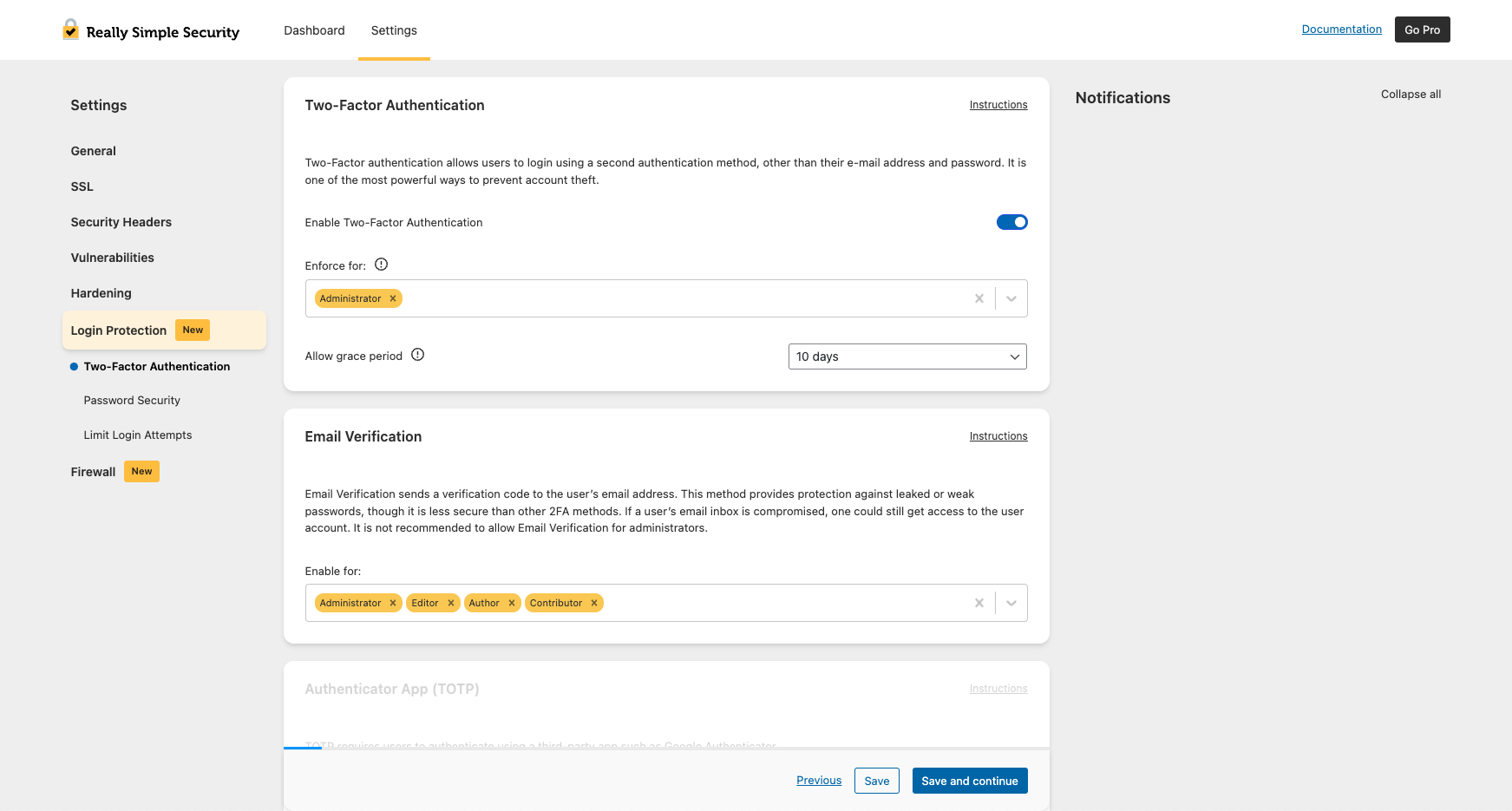
2FA pro Benutzerrolle aktivieren oder erzwingen. 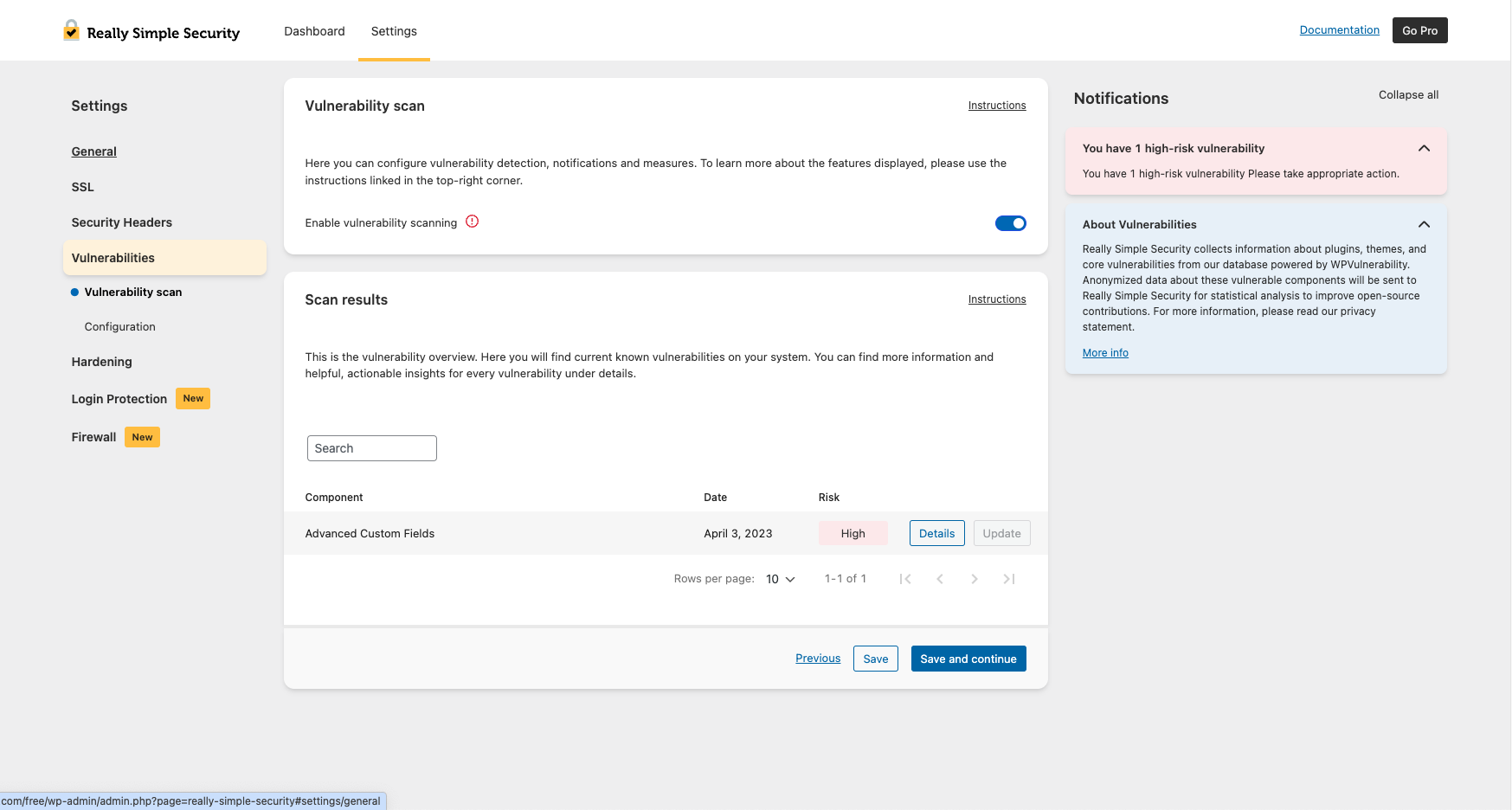
Bleibe Plugin-, Themen- und WP-Core-Sicherheitslücken immer einen Schritt voraus. 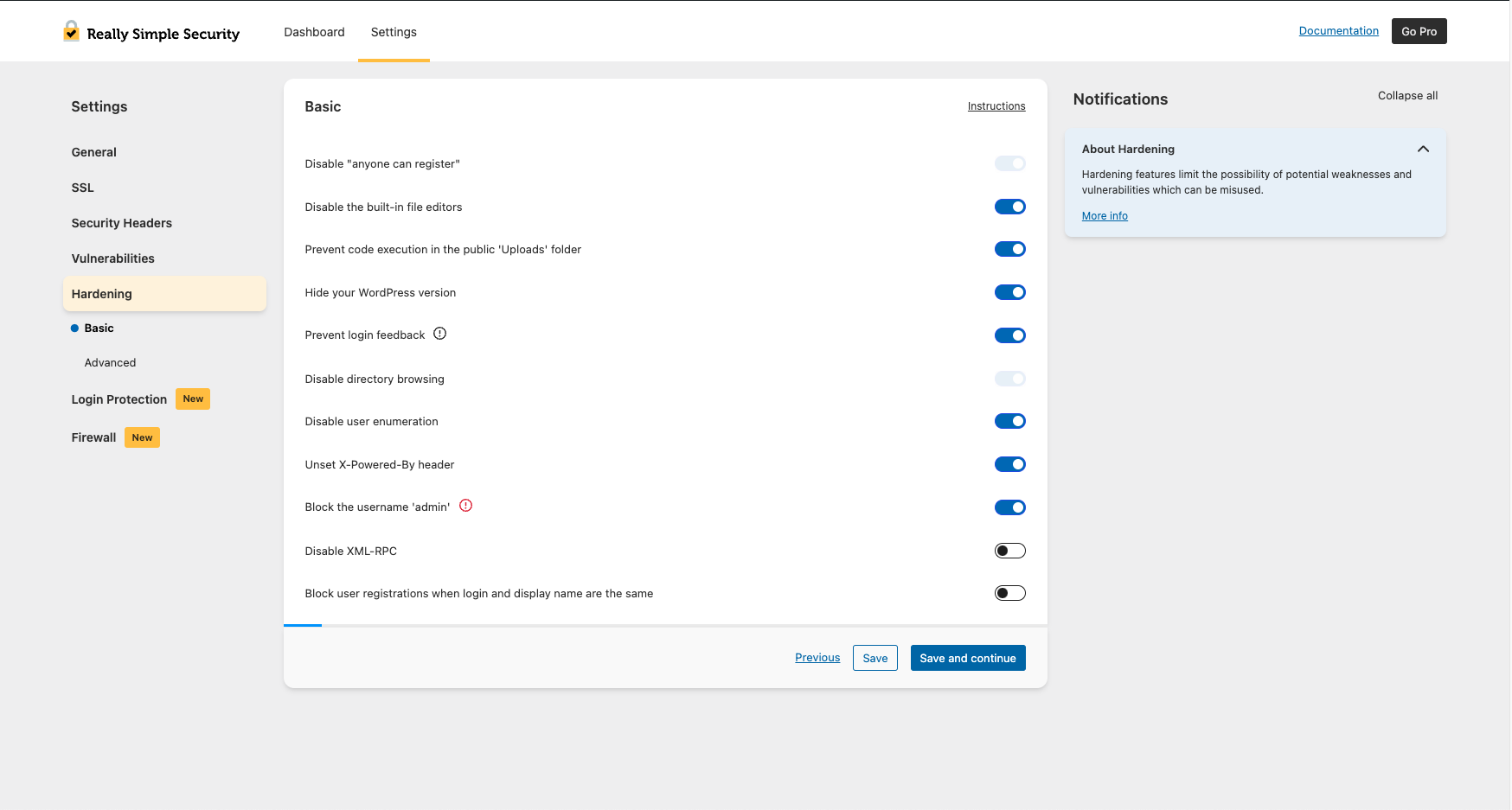
Verbessere die Sicherheit deiner Website mit grundlegenden Härtungsfunktionen. 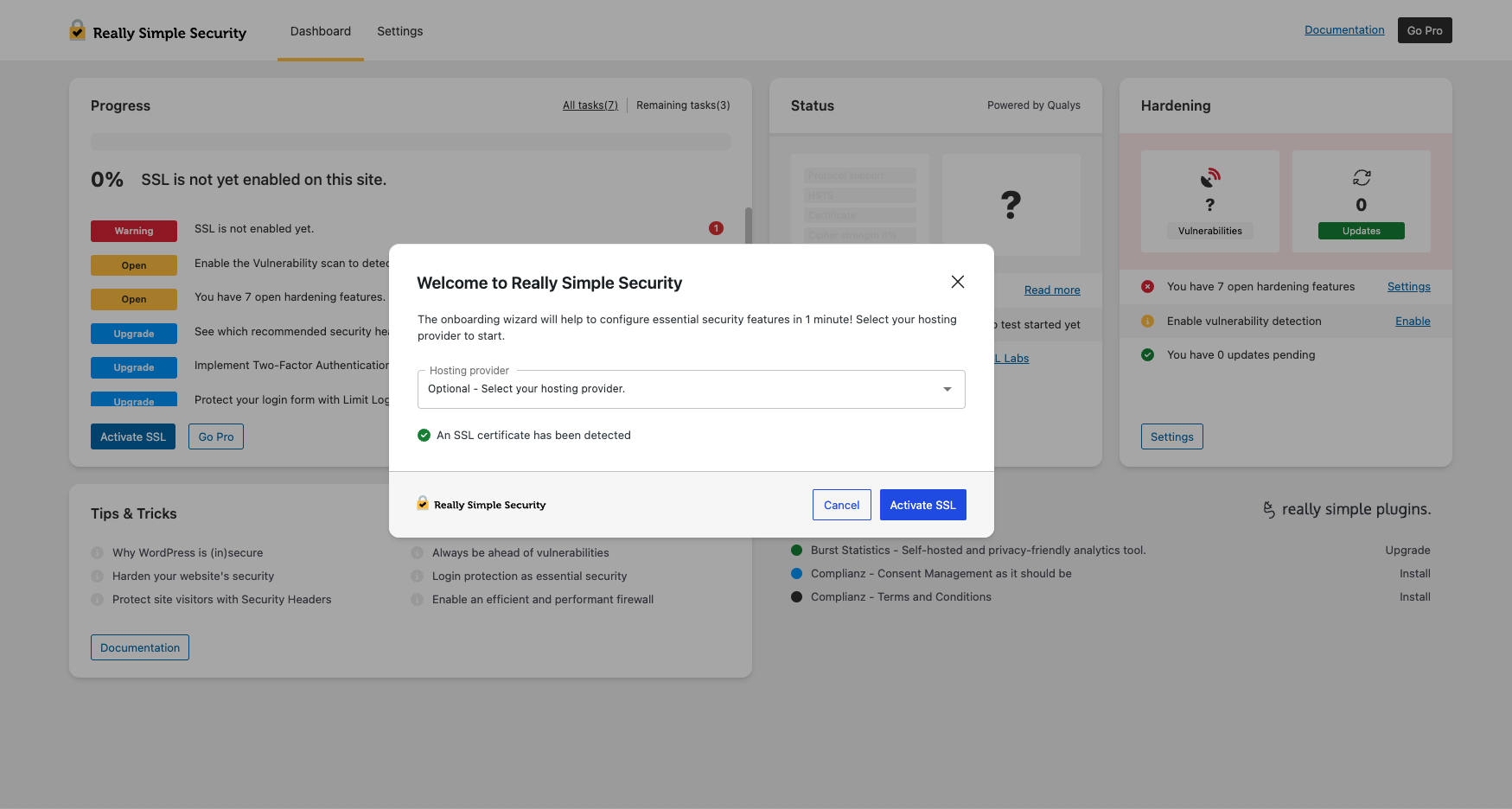
1-minütige Konfiguration mit kurzer Sicherheits-Einführung.


Installation
Um dieses Plugin zu installieren:
- Erstelle ein Backup! Siehe unsere Empfehlungen.
- Herunterladen des Plugins.
- Lade das Plugin in das Verzeichnis /wp-content/plugins/ hoch.
- Gehe in deinem WordPress-Admin zu „Plugins“ und klicke auf „Aktivieren“.
- Du siehst nun den Onboarding-Prozess von Really Simple Security, der dich schnell durch den Konfigurationsprozess führt.
FAQ
-
Wissensdatenbank
-
Ausführlichere Erläuterungen und Dokumentationen zu allen Funktionen von Really Simple Security findest du in der Wissensdatenbank.
-
Was ist mit Really Simple SSL geschehen?
-
Alle Funktionen, die Really Simple SSL zum leistungsstärksten und benutzerfreundlichsten Plugin für die SSL-Generierung und -Weiterleitung gemacht haben, sind weiterhin Teil von Really Simple Security. Das Plugin wurde nach einem modularen Ansatz entwickelt: Wenn du nicht alle Sicherheitsfunktionen nutzen möchtest, wird der nicht verwendete Code nicht geladen und hat keinen Einfluss auf die Leistung deiner Website.
-
Warum Really Simple Security?
-
Unserer Erfahrung nach sind Sicherheitslösungen für WordPress oft schwer zu konfigurieren, lösen viele Fehlalarme aus und beeinträchtigen die Leistung der Website erheblich. Seit Jahren erhalten wir Anfragen von unseren Nutzern, die WordPress-Sicherheit zu vereinfachen, und so ist dies zu unserer Mission geworden!
-
Du könntest uns nicht glücklicher machen! Really Simple Security ist GPL-lizenziert und wurde gemeinsam mit der WordPress-Community entwickelt. Wir freuen uns über jedes Feedback, das uns dabei hilft, die Bedürfnisse unserer Nutzer besser zu verstehen. Für Code-Beiträge oder Vorschläge findest du uns auf GitHub. Für Vorschläge eröffne bitte ein Support-Ticket. Du kannst deine Wertschätzung auch durch eine Bewertung zum Ausdruck bringen.
-
Was sind Probleme mit gemischten Inhalten?
-
Die meisten Probleme mit gemischten Inhalten werden durch URLs in CSS- oder JS-Dateien verursacht. Ausführliche Anweisungen zum Auffinden gemischter Inhalte findest du in diesem Artikel.
-
Erzeugen eines Let’s Encrypt SSL-Zertifikats
-
Wir haben in unserem Really Simple Security-Assistent die Möglichkeit hinzugefügt, ein kostenloses SSL-Zertifikat mit Let’s Encrypt zu generieren. Eine aktualisierte Liste aller möglichen Integrationen findest du hier. Bitte hinterlasse ein Feedback zu einer anderen Integration, falschen Informationen oder wenn du Hilfe benötigst.
-
Wie behebe ich eine Weiterleitungsschleife?
-
Wenn auf deiner Website Weiterleitungsschleifen auftreten, befolge bitte diese Anweisungen. Dies kann manchmal während der Migration zu HTTPS oder aufgrund widersprüchlicher Weiterleitungsregeln vorkommen.
-
Ist das Plugin multisite kompatibel?
-
Ja. Es gibt eine spezielle Seite für die Netzwerkeinstellungen, auf der du die Einstellungen für dein gesamtes Netzwerk auf einmal steuern kannst.
-
Wie setze ich starke Passwörter durch?
-
Unter „Anmeldeschutz“ kannst du Mindestanforderungen für die Passwortstärke festlegen und Benutzer dazu verpflichten, ihre Passwörter nach einem festgelegten Zeitraum zu ändern. Es empfiehlt sich, die Verwendung schwacher Passwörter zu deaktivieren.
-
Wie kann ich meine Anmelde-URL ändern?
-
Unter „Erweiterte Website-Härtung“ kannst du eine benutzerdefinierte Anmelde-URL festlegen, um Brute-Force-Angriffe und Bots zu verhindern, die auf wp-login.php abzielen.
-
Leitet dieses Plugin HTTP zu HTTPS um?
-
Ja. Das Plugin erzwingt HTTPS und übernimmt alle erforderlichen Weiterleitungen, optional unter Verwendung von .htaccess oder PHP.
-
Kann ich Really Simple Security zusätzlich zu WordFence verwenden?
-
Really Simple Security und WordFence überschneiden sich in Bezug auf ihre Funktionalität stark. Wenn du bestimmte Funktionen beider Plugins nutzen möchtest, empfehlen wir dir dringend, ähnliche Funktionen nicht doppelt zu aktivieren. Der Vorteil von Really Simple Security besteht darin, dass deaktivierte Funktionen keinen Code laden und somit keinen Einfluss auf die Leistung der Website haben.
Rezensionen


Mitwirkende und Entwickler
„Really Simple Security – Simple and Performant Security (formerly Really Simple SSL)“ ist Open-Source-Software. Folgende Menschen haben an diesem Plugin mitgewirkt:
Mitwirkende


„Really Simple Security – Simple and Performant Security (formerly Really Simple SSL)“ wurde in 58 Sprachen übersetzt. Danke an die Übersetzenden für ihre Mitwirkung.
Interessiert an der Entwicklung?
Durchstöbere den Code, sieh dir das SVN Repository an oder abonniere das Entwicklungsprotokoll per RSS.
Änderungsprotokoll
9.5.5 – 2025-12-16
- Fixed: JavaScript error when using custom roles with 2FA
- Fixed: fatal error caused by hosts class being instantiated twice
- Fixed: fatal error when upgrading from older plugin versions
- Fixed: WP-CLI activate_ssl command now works correctly on first attempt
- Changed: removed two unused files from the plugin
- Changed: updated readme to align with standards
9.5.4 – 2025-11-18
- Fixed: 2FA login error when user has no assigned roles
- Fixed: fatal error when wp-config.php path is empty
- Changed: added file locking to .htaccess and wp-config.php to prevent race conditions
- Changed: clarified .htaccess directory indexing comment
- Changed: replaced site_url() with home_url() in the 404 resource check on the homepage
- Changed: security functions now skip cron jobs and CLI environments
- Changed: Let’s Encrypt wizard final step now shows only SSL activation button
- Changed: added a license.txt file
9.5.3.1
- Fixed: WP-CLI commands not working correctly
9.5.3
- Fixed: text domain loaded too early warning from unused translation
- Fixed: deactivation modal now always displays
- Changed: refactored the onboarding code
9.5.2.3
- Fixed: 2FA reset now correctly calls the 2FA reset service
9.5.2.2
- Fixed: 2FA TypeError when updating from older plugin versions
9.5.2
- Fixed: all users will now appear in the 2FA list
- Fixed: tasks will now always display on multisite
- Changed: activate_ssl WP-CLI command supports –force to skip confirmation
9.5.1
- Fixed: missing getmyuid function check to prevent errors
- Fixed: Right-To-Left CSS now works correctly when SCRIPT_DEBUG is enabled
- Changed: standardized REST namespaces to really-simple-security
9.5.0.2
- Fixed: prevent empty content from being written into .htaccess
9.5.0.1
- Fixed: .htaccess protected from empty overwrites, auto-creation requires filter opt-in
9.5.0
- Fixed: whitelisted LiteSpeed Cache crawler in .htaccess to prevent redirect issues
- Fixed: 2FA grace period email logic to avoid reminders to users with active 2FA
- Fixed: updated hosting provider name from „XXL Hosting“ to „Superspace“
- Changed: reworked .htaccess handling with insert_with_markers and WP Rocket integration
- Changed: SBOM added to plugin
- Changed: improved text consistency and updated geopolitical terminology
9.4.3
- Fixed: user ID could be empty in 2FA
- Fixed: learn more button in vulnerability email now links to correct page
- Fixed: rsssl_user_can_manage undefined error when downloading system status
- Changed: improved compatibility with plain permalinks
- Changed: updated links in the plugin
9.4.2
- Fixed: .htaccess redirect requirements for subfolder configurations
- Fixed: re-send email button on 2FA page now shows confirmation message
- Fixed: restored SCSS files
- Fixed: plugin kept redirecting to settings page after activation
- Changed: updated plugin installation via onboarding and dashboard page
- Changed: added notice with option to force verify email address
- Changed: updated minimum WordPress version to 6.6
9.4.1
- Fixed: text domain loaded too early warning
9.4.0
- Fixed: plugin initialization timing to prevent textdomain warning
- Fixed: feedback when email is resent during 2FA setup
- Fixed: Single Sign On link now supports custom login URLs
- Added: SimplyBook in onboarding and other plugins sections
- Changed: more detailed feedback when using CLI commands
- Changed: detect EXTENDIFY_PARTNER_ID and run activate_recommended_features
- Changed: standardized onboarding hoster list to brand names
- Changed: user enumeration now returns 401 instead of 404
9.3.5 – 2025-04-29
- Fixed: 2FA methods can now be set on profile page
- Changed: tested up to WordPress 6.8
- Changed: translation updates
- Changed: check for autoloader in cron
9.3.3 – 2025-04-02
- Changed: added multiple WP-CLI commands to align with recent plugin features
- Changed: added support for custom/multiple roles in Two Factor Authentication
9.3.2.1 – 2025-03-20
- Fixed: properly handle unknown plugins in upgrade requests
9.3.2 – 2025-03-05
- Fixed: removed default checkbox behavior from configuration settings
- Fixed: handle multiple tooltip reasons for disabled select fields
- Changed: added filters to customize Let’s Encrypt Wizard behavior
9.3.1 – 2025-02-12
- Fixed: all instruction links are now correct
- Fixed: undefined array key „m“ when showing vulnerability details
- Fixed: prevent errors when downgrading to free
- Fixed: 2FA compatibility with JetPack WordPress.com login
- Changed: email functions require verified email address
9.2.0 – 2025-01-20
- Fixed: added nonce check to certificate re-check button
- Fixed: review notice was not properly dismissible in some cases
9.1.4
- Fixed: shields in UI datatables no longer cut off
- Changed: do not track 404s for logged in users
- Changed: implemented rsssl_wpconfig_path filter in all wp-config functions
- Changed: faster onboarding completion after clicking Finish button
9.1.3 – 2024-11-28
- Fixed: remove duplicate site URL
- Fixed: rsssl_sanitize_uri_value() now always returns a string
- Fixed: multisite 2FA role enforcement for users with multiple roles
- Fixed: Skip Onboarding button undefined page with email method
- Fixed: translation loading updated for WordPress 6.7
- Changed: improved 2FA lockout notice
- Changed: catch use of short init in advanced-headers file
- Changed: string improvements and translator comments
- Changed: Bitnami support for rsssl_find_wordpress_base_path()
- Changed: integrate Site Health notifications with Solid Security
- Changed: enhanced random password generation in Rename Admin User
- Changed: always return string in wpconfig_path() function
9.1.2
- Security: authentication bypass fix
9.1.1.1 – 2024-11-05
- Fixed: 2FA grace period was kept active after a reset
9.1.1 – 2024-10-30
- Fixed: 2FA grace period kept active after reset
- Changed: safe-mode.lock file deactivates Firewall, 2FA and LLA for debugging
- Changed: update to system status
- Changed: textual changes
- Changed: updated instructions URLs
- Changed: site health notices changed from critical to recommended
- Changed: dropped obsolete react library
9.1.0 – 2024-10-22
- Fixed: prevent potential errors with login feedback
- Fixed: catch type error when $transients is not an array
- Changed: allow scanning for security headers via scan.really-simple-ssl.com
- Changed: remove unnecessary rsssl_update_option calls
9.0.2
- Fixed: issue with deactivating 2FA
9.0.0 – 2024-09-16
- Fixed: instructions URL in the Firewall settings
- Fixed: incorrect instructions URL
- Fixed: Let’s Encrypt returning old certificate on auto-renewed certificates
- Changed: dropped X-Frame-Options header in favor of frame-ancestors
- Changed: save and continue in vulnerabilities overview not working correctly
8.3.0.1
- Fixed: issues with the decryption model
8.3.0 – 2024-08-12
- Fixed: some strings were not translatable
- Fixed: premium support link did not work
- Fixed: links in emails were sometimes incorrect
- Fixed: fatal error on permission detection
- Added: password security scan detects weak and compromised passwords
- Changed: disable cron schedules on deactivation
- Changed: custom license check header improves hosting compatibility
- Changed: added option to disable X-powered-by header
- Changed: new improved encryption method for some settings
8.1.5 – 2024-06-21
- Fixed: documentation links to website broken
- Changed: some text changes in helptexts
- Changed: new structure to upgrade database tables
8.1.4 – 2024-06-11
- Fixed: cookie expiration change not loading
- Fixed: Visual Composer compatibility with Enforce Strong Password
- Fixed: multiple CloudFlare detected notices in onboarding
- Fixed: checkbox position in onboarding
- Changed: dropdown in onboarding not entirely visible
- Changed: styling of locked XML RPC overview
8.1.3 – 2024-05-16
- Fixed: WP Rocket compatibility when advanced-headers.php does not exist
8.1.2 – 2024-05-16
- Fixed: advanced-headers.php now supports early inclusion
8.1.1 – 2024-05-14
- Fixed: upgrade from <6.0 to >8.0 causing fatal error
- Fixed: URL to details of detected vulnerabilities was incorrect
- Added: detection of non-recommended permissions on files
- Added: configure region restrictions for your site
- Changed: textual change on premium overlay
- Changed: upgraded minimum required PHP version to 7.4
- Changed: compatibility with Bitnami
- Changed: compatibility of Limit Login Attempts with WooCommerce
- Changed: remove duplicate X-Really-Simple-SSL-Test from advanced-headers-test.php
- Changed: clear notice about .htaccess writable if do_not_edit_htaccess is enabled
8.1.0
- Fixed: show ’self‘ as default in Frame Ancestors
- Added: Limit Login Attempts Captcha integration
- Changed: some string corrections
- Changed: catch not existing rsssl_version_compare
- Changed: check for openSSL module existence
- Changed: set default empty array for options, for legacy upgrades
- Changed: disable custom login URL when plain permalinks are enabled
- Changed: drop renamed folder notice, not needed anymore
- Changed: enable advanced headers in onboarding
- Changed: is_object check in updater
8.0.1
- Fixed: enable 2FA during onboarding when not selected by user
- Fixed: upgrading to Pro preserves settings when clear on deactivation enabled
- Fixed: catch several array key not existing errors
- Changed: better CSP defaults
8.0.0
- Added: hide remember me checkbox
- Added: extend blocking of malicious admin creation to multisite
- Changed: drop prefetch-src from Content Security Policy
- Changed: disable two-fa when login protection is disabled
7.2.8
- Fixed: clear cron schedules on deactivation
- Changed: translations update
- Changed: info notice about automatic free and pro plugin merge
7.2.7
- Changed: added integration with FlyingPress and Fastest Cache
- Changed: fix exiting a filter, causing compatibility issue with BuddyPress
7.2.6
- Fixed: custom 404 pages with custom login URL
- Added: option to limit login cookie expiration time
- Changed: text changes
- Changed: CSS on login error message
- Changed: header detection improved by checking the last URL in redirect chain
7.2.5
- Fixed: IP detection header order
- Fixed: table creation on activation of LLA module
7.2.4
- Fixed: PHP warning in Password Security module
- Fixed: change login URL feature not working with password protected pages
- Changed: move database table creation to Limit Login Attempts module
- Changed: prevent PHP error caused by debug.log file hardening feature
7.2.3
- Fixed: CSP data not showing in datatable
7.2.2
- Changed: improved check for PharData class
7.2.1
- Fixed: config for CSP preventing Learning mode from completing
- Fixed: datatable styling
- Fixed: using deactivate_https with WP-CLI did not remove htaccess rules
- Changed: add query parameter to enforce email verification
- Changed: CSS for check certificate manually button
7.2.0
- Fixed: changed link to article
- Fixed: remove flags .js file which was added twice
- Fixed: typo in missing advanced-headers.php notice
- Changed: catch PHP warning when script src is empty when using hide WP version
- Changed: new save & continue feedback
- Changed: datatable styling
- Changed: new react based modal
- Changed: menu re-structured
- Changed: re-check vulnerability status after core update
- Changed: vulnerability notification emails now link to specific details
7.1.3 – 2023-10-11
- Fixed: React ErrorBoundary preventing Let’s Encrypt generation to complete
7.1.2 – 2023-10-06
- Fixed: hook change in integrations loader causing modules not to load
7.1.1 – 2023-10-05
- Fixed: incorrect function usage
7.1.0 – 2023-10-04
- Changed: detection if advanced-headers.php file is running
7.0.9 – 2023-09-05
- Changed: typo update word
- Changed: translatability in several strings
7.0.8 – 2023-08-08
- Fixed: handling of legacy options in PHP 8.1
- Fixed: count remaining tasks
- Changed: WordPress tested up to 6.3
- Changed: improve file existence check json
7.0.7 – 2023-07-25
- Fixed: handling of legacy options in PHP 8.1
- Fixed: prevent issues with CloudFlare when submitting support form
- Fixed: translations singular/plural for Japanese translations
- Changed: modal icon placement in wizard on smaller screens
- Changed: expire cached detected headers five minutes after saving settings
7.0.6 – 2023-07-04
- Fixed: translations not loading for chunked react components
- Changed: support custom wp-content directory in advanced-headers.php
- Changed: prevent usage of subdirectories in custom login URL
- Changed: added manual vulnerability recheck parameter
7.0.5
- Fixed: reverted redirect method to fix non-www site login issues
7.0.4 – 2023-06-14
- Fixed: feedback on hardening features enable action not showing as enabled
- Changed: notice informing about the new free vulnerability detection feature
- Changed: improved the PHP redirect method
- Changed: make the wp-config.php not writable notice dismissable
7.0.3
- Fixed: fix false positives on some plugins
- Changed: vulnerability notifications in site health, if notifications are enabled
7.0.2
- Changed: improve matching precision on plugins with vulnerabilities
7.0.1
- Fixed: REST API ajax fallback now works correctly
7.0.0
- Added: Vulnerability Detection (Beta)
- Changed: move onboarding rest api to do_action rest_route
- Changed: catch several edge situations in SSL Labs api
- Changed: SSL Labs block responsiveness
- Changed: more robust handling of wp-config.php detection
6.3.0
- Changed: added support for the new Let’s Encrypt staging environment
6.2.5
- Fixed: capability mismatch in multisite
- Changed: add warning alert option
6.2.4
- Fixed: catch non array value from notices array
- Fixed: typo in documentation link
- Changed: optionally enable notification emails in onboarding wizard
- Changed: onboarding styling
6.2.3
- Changed: back-end react to functional components
- Changed: multisite notice should link to network admin page
- Changed: detect existing CAA records to check Let’s Encrypt compatibility
- Changed: tested up to WP 6.2
- Changed: UX improvement learning mode
6.2.2
- Fixed: capability mismatch for non-administrator in multisite admin
6.2.1
- Fixed: race condition when activating SSL through WP-CLI
- Fixed: missing disabled state in textarea and checkboxes
- Fixed: some strings not translatable
- Fixed: Let’s Encrypt renewal with add on
- Changed: permissions check re-structuring
- Changed: notice on subsite within multisite environment about wildcard updated
6.2.0
- Added: optional email notifications on advanced settings
- Changed: added tooltips
- Changed: added warnings for .htaccess redirect
- Changed: don’t send user email change on renaming admin user
- Changed: use BASEPATH only for wp-load.php, symlinked folders load based on ABSPATH
- Changed: improved support for environments where Rest API is blocked
6.1.1
- Fixed: WP-CLI SSL activation fix when site not visited before
- Changed: prevent ‚undefined‘ status showing up in api calls on settings page
- Changed: notice for incompatible Let’s Encrypt shell add-on versions
6.1.0
- Fixed: empty menu item visible in Let’s Encrypt menu
- Changed: some UX changes
- Changed: limit number of notices in the dashboard
- Changed: load rest api request URL over https if website is loaded over https
6.0.14
- Fixed: settings page when using plain permalinks
6.0.13
- Fixed: CSS for blue labels in progress dashboard below 1080px
- Fixed: WP-CLI SSL activation not working due to capability checks
- Fixed: catch invalid account error in Let’s Encrypt generation
- Fixed: do not block user enumeration for gutenberg
- Changed: improve method of dropping empty menu items in settings dashboard
- Changed: dynamic links in auto installer
- Changed: change rest_api method to core wp apiFetch()
- Changed: scroll highlighted setting into view after clicking „fix“ on a task
- Changed: HTTP method tests run in batches to prevent CURL timeouts
- Changed: clean up code-execution.php file after test
- Changed: notification when DISABLE_FILE_EDITING is set to false
- Changed: drop some unnecessary translations
- Changed: WP version test uses options for better persistence
6.0.12
- Fixed: multisite admin username test uses correct database prefix
- Changed: allow submenu in back-end react application
- Changed: skip value update when no change has been made
- Changed: no redirect on dismiss of admin notice
- Changed: remove obsolete warning
- Changed: qtranslate support on settings page
6.0.11
- Fixed: login check works when HTTP_X_WP_NONCE unavailable
- Fixed: admin notices now dismiss immediately
6.0.10
- Fixed: Apache 2.4 compatibility for upload directory code blocking
- Fixed: Varnish cache compatibility for REST API requests
- Fixed: manage_security capability added for upgraded users
- Fixed: allow for custom rest api prefixes
- Fixed: Let’s Encrypt DNS verification save and action issues
- Fixed: REST API error handling prevents blank settings page
- Changed: simplify user enumeration test
- Changed: catch unexpected response in SSL Labs object
- Changed: z-index on onboarding modal on smaller screen sizes
- Changed: hide username field if no admin username is present
6.0.9
- Fixed: incorrectly disabled email field in Let’s Encrypt wizard
- Changed: on rename admin user, catch existing username, and strange characters
- Changed: catch openBaseDir restriction in cpanel detection function
- Changed: removed 6.0 update notices from subsites
6.0.8
- Changed: Let’s Encrypt wizard CSS styling
- Changed: re-add link to article about Let’s Encrypt
- Changed: let user choose a new username when selecting „rename admin user“
6.0.7
- Fixed: restricted .htaccess rewrite to prevent plugin conflicts
6.0.6
- Fixed: drop upgrade of .htaccess file in upgrade script
6.0.5
- Fixed: .htaccess race condition with simultaneous updates
6.0.4
- Fixed: .htaccess redirect compatibility with upload code blocking
- Fixed: deactivation now fully removes wp-config.php changes
6.0.3
- Fixed: Rest Optimizer no longer deactivates other plugins
6.0.2
- Fixed: do not show WP_DEBUG_DISPLAY notice if WP_DEBUG is false
- Fixed: empty cron schedule
- Fixed: auto installer used function not defined yet
- Fixed: rest api optimizer causing an error in some cases
- Changed: several typos and string improvements
6.0.1
- Fixed: translations not loading for scripts
6.0.0
- Added: Server Health Check – powered by SSLLabs
- Added: WordPress Hardening Features
- Changed: User Interface
- Changed: Tested up to WordPress 6.1.0
