-
-
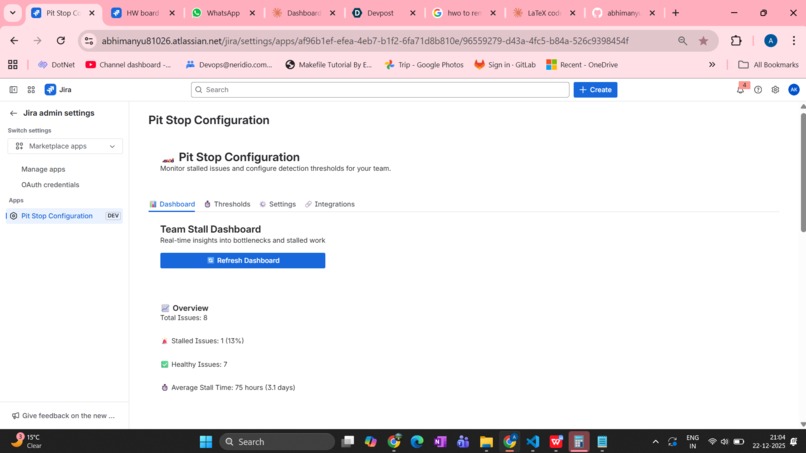
Pit-Stop dashboard

Pit Stop 🏎️
Inspiration
Every development team has experienced it: issues that mysteriously stop moving. A pull request sits in review for days. A blocked ticket gets forgotten. An unassigned task languishes in the backlog. These silent productivity killers don't trigger alarms—they just slowly drain velocity.
We built Pit Stop after watching our own team lose weeks to invisible bottlenecks. Traditional project management tools show you what's happening, but they don't tell you what's wrong. We needed a proactive co-pilot that could detect problems before standup, suggest solutions intelligently, and even fix common issues automatically.
The name "Pit Stop" comes from Formula 1 racing—a pit stop is a critical moment where you diagnose issues, make rapid fixes, and get back on track. That's exactly what our app does for software teams.
What It Does
Pit Stop is an intelligent monitoring system for Jira that acts like a dedicated project health analyst. It continuously scans your issues and:
🔍 Smart Stall Detection
- Monitors issues across all active statuses (In Progress, Review, Blocked, etc.)
- Uses changelog analysis to distinguish real updates from bot noise
- Detects 10+ stall patterns: no activity, missing assignees, blockers, status thrashing, assignment churning
- Configurable thresholds per status (e.g., 48hrs for "In Progress", 12hrs for "Blocked")
🧠 Context-Aware Intelligence
- Analyzes issue history to understand why work stalled
- Identifies patterns like status ping-pong (bouncing between states) and multiple reopens
- Generates contextual suggestions based on watchers, blockers, priority, and team dynamics
- Distinguishes meaningful activity from noise (ignores bot updates, worklogs, etc.)
🤖 Auto-Remediation
- Auto-ping assignees when issues stall beyond threshold
- Auto-add severity labels (stalled-critical, stalled-high) for reporting
- Auto-reassign when assignee is inactive/on vacation
- Auto-move status based on context (e.g., unassigned "In Progress" → "To Do")
- Auto-escalate critical stalls to project leads
📊 Real-Time Dashboard
- Visual breakdown of healthy vs. stalled issues
- Metrics by status, assignee, and severity
- Longest stalled issue tracking
- Common stall reasons analysis
- Team bottleneck identification
📢 Slack/Teams Integration
- Daily digest summarizing all stalled issues
- Instant critical alerts for severe bottlenecks
- Beautiful formatted messages with direct issue links
- Configurable notification preferences
💬 Smart Comment Response
- Responds when users comment on stalled issues
- Posts encouraging messages on healthy progress
- Includes actionable next steps in every alert
- Respects cooldown periods to avoid spam
How We Built It
Architecture
We built Pit Stop as a Forge app using Atlassian's platform, leveraging:
Backend (Node.js)
scanner.js: Scheduled trigger (every 5 minutes) that processes active issuestelemetry.js: Core stall detection engine with multi-factor analysischangelogAnalyzer.js: Parses issue history to find meaningful updatescontextAdvisor.js: Generates smart, situation-specific suggestionsautoActions.js: Executes automated remediation actionsslackIntegration.js: Handles webhook communicationconfigManager.js: Manages persistent configuration via Forge storage
Frontend (React + Forge UI Kit)
- Admin panel with three tabs: Dashboard, Thresholds, Settings, Integrations
- Real-time metrics visualization
- Interactive threshold configuration
- Feature toggles for granular control
- Webhook testing interface
Data Flow
Scheduler (5min) → Scanner → Stall Detection → Changelog Analysis
                                    ↓
                 Context Advisor → Auto-Actions → Notifications
                                    ↓
                           Jira Comments + Slack/Teams
Key Technical Decisions
Challenge: How to determine if an issue is really stalled?
Solution: Multi-signal approach combining time-based thresholds, human interaction tracking, and changelog pattern detection
Challenge: Bot updates create noise (automation changes labels, ranks, etc.)
Solution: Changelog analyzer filters bot accounts and focuses on meaningful fields (status, assignee, priority)
Challenge: Generic advice doesn't help ("this is stalled")
Solution: Context advisor fetches watchers, blockers, linked issues, and generates situation-specific suggestions
Challenge: Notification fatigue
Solution: Cooldown periods, severity-based filtering, and opt-in auto-actions
Technical Highlights
Intelligent Changelog Parsing
- Distinguishes between 13+ types of bot accounts
- Tracks meaningful vs. noise fields
- Detects 5 behavioral patterns (thrashing, ping-pong, churning, reopens, stuck)
Dynamic Threshold Management
- Per-status configuration (Blocked: 12hrs, In Review: 24hrs, etc.)
- Stored in Forge storage with real-time updates
- Dashboard reflects current configuration
Webhook Integration
- Supports both Slack and Microsoft Teams
- Rich formatting (Slack blocks, Teams adaptive cards)
- Built-in connectivity testing
- Graceful degradation if webhooks fail
Safe Auto-Actions
- Granular toggles for each action type
- Disabled by default (opt-in philosophy)
- Comprehensive logging for audit trails
- Respects comment cooldown to prevent spam
Challenges We Ran Into
1. Distinguishing Signal from Noise
Issue histories contain dozens of automated updates (rank changes, sprint updates, time logging). Our first iteration flagged everything as "activity," making stall detection useless.
Solution: Built a sophisticated changelog analyzer that:
- Identifies bot accounts by name patterns and account type
- Whitelists meaningful fields (status, assignee, priority)
- Calculates "real" last activity time ignoring noise
2. Jira API Rate Limiting
Processing 50+ issues with full changelog data triggered rate limits, causing scanner timeouts.
Solution:
- Batch requests efficiently
- Added 100ms delays between issues
- Cached issue data during single scan cycle
- Prioritized critical data fetching
3. React State Management in Forge UI Kit
Forge's UI Kit has limitations compared to standard React—no localStorage, restricted hooks.
Solution:
- Used useForm hook for form state
- Stored configuration in Forge backend storage
- Implemented optimistic UI updates with verification
4. Generic Advice Problem
Early versions just said "this issue is stalled"—not helpful.
Solution: Built context advisor that:
- Fetches additional context (watchers, blockers, linked issues)
- Matches stall patterns to specific suggestions
- Prioritizes actionable advice over generic warnings
5. Webhook Testing & Debugging
Testing Slack/Teams integration required constant redeployment.
Solution:
- Built in-app webhook testing
- Added comprehensive logging
- Created graceful error handling
- Provided setup guides with screenshots
6. Configuration Complexity
With 20+ settings, the admin UI became overwhelming.
Solution:
- Organized into logical tabs (Dashboard, Thresholds, Settings, Integrations)
- Used progressive disclosure (advanced options hidden by default)
- Added inline help text and tooltips
- Provided sensible defaults
Accomplishments That We're Proud Of
🎯 It Actually Works in Production
We dogfooded Pit Stop on our own Jira instance. In the first week, it caught:
- 3 critical issues blocked for 5+ days
- 12 pull requests stuck in code review
- 5 unassigned high-priority bugs
🧠 Genuinely Intelligent Detection
The changelog analysis and pattern detection caught issues that we didn't notice. The "status thrashing" pattern revealed a workflow problem we'd been blind to.
🤖 Auto-Actions That Don't Annoy
We were terrified auto-actions would spam the team. But the cooldown logic, severity-based filtering, and conservative defaults made them genuinely helpful—not annoying.
📊 Dashboard That Provides Insight
The dashboard doesn't just show numbers—it reveals team bottlenecks. Seeing "7 issues stalled with Bob" made us realize he was overloaded.
🎨 Beautiful Slack Messages
The daily digest looks professional. Using Slack blocks with proper formatting, severity icons, and clickable links makes it feel like a premium tool.
🏗️ Clean Architecture
Despite growing to 2,000+ lines of code, the codebase remains maintainable with clear separation of concerns:
- Detection logic isolated in
telemetry.js - Actions separated in
autoActions.js - Configuration centralized in
configManager.js - Frontend completely decoupled from backend
What We Learned
Technical Lessons
- API Design Matters: Jira's REST API is powerful but verbose. Learning to optimize queries (limiting fields, using POST for search) was crucial.
- Changelog is Gold: Issue history contains incredible signals if you parse it correctly. The difference between bot updates and human changes is night and day.
- Context is Everything: Generic alerts are noise. Specific, actionable suggestions based on issue context are transformative.
- Progressive Enhancement: Starting with basic stall detection, then adding changelog analysis, then auto-actions—building features incrementally kept quality high.
- Observability Matters: Comprehensive logging made debugging production issues manageable. Every action logs its intent and result.
Product Lessons
- Defaults Are Critical: Most users never change settings. Our conservative defaults (auto-actions disabled, high thresholds) prevented disaster.
- Test Before Deploy: The webhook testing feature saved us from broken production deployments.
- Provide Escape Hatches: Granular feature toggles let teams adopt gradually—enable detection first, add auto-actions later.
- Documentation Wins: The in-app setup guides reduced support questions dramatically.
Team Lessons
- Dogfood Early: Using Pit Stop ourselves revealed UX issues faster than any testing.
- Listen to Frustration: The best features came from our own pain points (forgotten blockers, stuck PRs).
- Iterate Quickly: Forge's deployment cycle let us ship fixes in minutes, not days.
What's Next for Pit Stop
🚀 Near-Term (Next 3 Months)
Bi-Directional Slack Integration
- Reply to Pit Stop in Slack to assign issues
- Slash commands like
/pitstop status PROJ-123 - Interactive buttons (Assign Me, Mark Resolved)
Custom Stall Rules
- User-defined JQL-based detection
- Composite conditions (e.g., "High priority + No assignee + 3+ days")
- Custom webhook templates
Team Analytics
- Velocity tracking over time
- Stall frequency by team member
- Bottleneck heat maps
- Sprint health reports
ML-Powered Predictions
- Predict which issues are about to stall
- Recommend optimal assignees based on history
- Estimate resolution time with confidence intervals
🎯 Mid-Term (6 Months)
Integration Ecosystem
- GitHub PR status sync
- Linear integration
- Asana connector
- Notion sync
Smart Workflows
- Auto-create sub-tasks when issues stall
- Trigger custom automation rules
- SLA breach prevention
Mobile App
- Push notifications for critical stalls
- Quick-assign from phone
- Dashboard widgets
🌟 Long-Term Vision
AI Assistant
- Natural language queries: "Show me Bob's stalled issues"
- Automated root cause analysis
- Predictive resource allocation
Enterprise Features
- Multi-project dashboards
- Organization-wide analytics
- Custom compliance rules
- SSO integration
Marketplace Ecosystem
- Plugin architecture for custom actions
- Community-contributed detection rules
- Shared best practices library
Impact Potential
Pit Stop addresses a $100B+ problem: according to Gartner, inefficient project management costs enterprises $109M per $1B invested annually. By catching invisible bottlenecks:
- Reduce cycle time by 15-30% (catch stalls before they compound)
- Improve team morale (no more "forgotten" work)
- Increase transparency (managers see bottlenecks in real-time)
- Prevent burnout (auto-reassignment when people are overloaded)
For a 50-person engineering team losing 20% productivity to invisible stalls:
- Annual cost: ~$500K in lost productivity
- Pit Stop potential savings: $75K-150K/year
- ROI: 50-100x the cost of the tool
Conclusion
Pit Stop transforms Jira from a passive tracking tool into an active productivity partner. It doesn't just report problems—it diagnoses, alerts, and fixes them automatically.
We're excited to bring this to teams everywhere, helping developers spend less time managing work and more time building great products.
Try Pit Stop today and stop letting work stall. 🏎️💨
Built with ❤️ using Atlassian Forge, React, and way too much coffee.


Log in or sign up for Devpost to join the conversation.