-
-
-

canva integration search wikipedia
-
flexible template draftboard
-


Inspiration
Inspired by a reddit post about engineers complaining about their software.
What it does
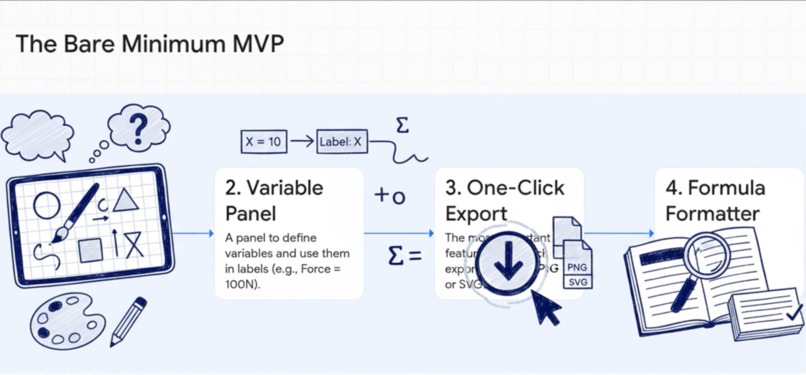
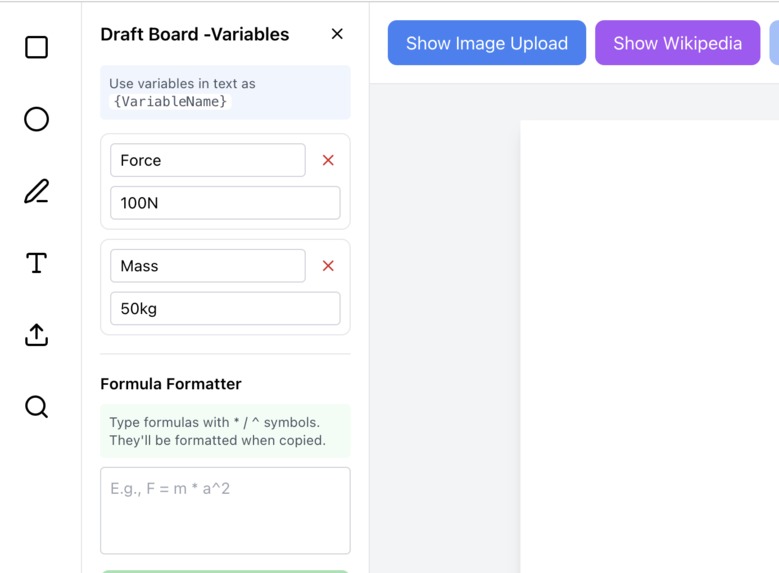
Draftboard variables Panel is a tiny, sharp tool built to solve one very real pain: engineers waste hours wrestling with screenshots, formatting, and ugly diagrams just to make reports look professional. Draftboard fixes that with elegance. It does two things well:
Parameter-driven sketches. Create clean engineering diagrams where every dimension is controlled by variables. Change a length from 2.5 m to 3 m and the sketch updates instantly—no redrawing, no mess.
Formatted calculation blocks. A crisp, professional space to write calculations and formulas with proper formatting, ready to copy and paste anywhere.. Export any sketch or calculation as a high-resolution PNG
Draftboard is a Canva-like design tool starter kit for creating visual diagrams and designs in the browser. It provides a drag-and-drop canvas interface where users can add shapes, text, images, and manage design elements. It provides a side area to add apps similar to Canva. featuring Wiki Panel *: A app that brings Wikipedia's vast knowledge directly into your design. * Canva Wiki Panel: A Canva app that brings Wikipedia's vast knowledge directly into your design .integrated Canva MCP
How we built it
Built with AI assisted development, Draftboard is a modern design tool built with:
- React 19 for the UI
- Tailwind CSS for styling
- Wikipedia API for content search
- Canvas API for rendering
- integrated Canva MCP
Developed with AI-assisted coding using Kiro spec ,steering, hooks, and Canva MCP, demonstrating how AI tools can accelerate modern web development. Kiro assisted in Draftboard base template, the canvas form ,Properties window, main Draftboard IDE.
Challenges we ran into
One of our biggest challenges was keeping Draftboard tiny and elegant, user friendly while solving a problem that normally requires heavyweight engineering tools. Parameter-driven sketches sound simple, but building a system that updates cleanly, instantly, and without visual glitches needs planning. We also struggled with formatting math in a layman way . Engineers expect calculation blocks to look professional—perfect alignment, clean symbols, readable structure—without needing LaTeX-level effort. Getting that level of polish while keeping the editor dead simple was a balancing act. exported lines as PNG had some issues.
Accomplishments that we're proud of
Starter skeleton developed base class and component foundation of Draftboard
Interactive drawings in canvas akin to Canva . Calculations formatted in diagram
- modern web feel
- Smooth draggable shapes, text , images and lines
- saves development time
- extended Kiro by using Canva MCP . built companion app Wikipedia search for Canva and Draftboard
What we learned
insights into building engineer mindset with its limitations and forte ✅ Honest effort ✅ Impressive (AI-assisted is still cool!) ✅ Accurate coding with AI ✅ Professional drawing
- integration of Canva MCP
What's next for Draft-board
Image prediction ML model
Built With
- canvas-api
- kiro
- react
- tailwind
- wikipedia-api


Log in or sign up for Devpost to join the conversation.