-
-
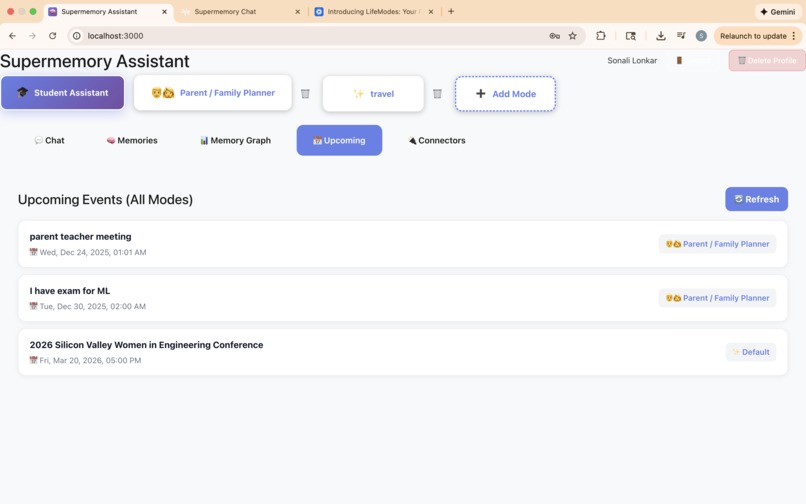
Upcoming events tab
-
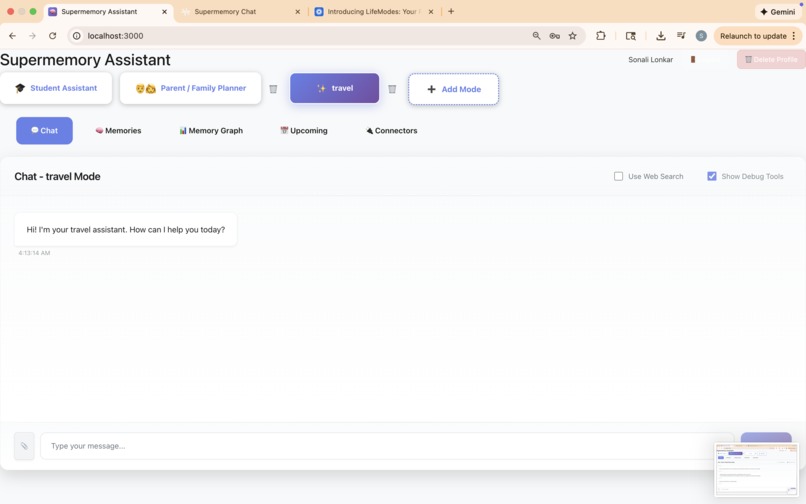
travel mode
-
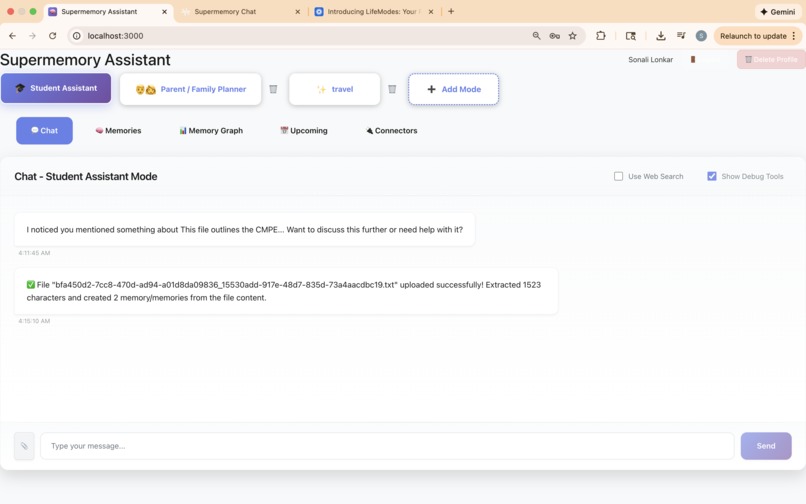
Student mode
-
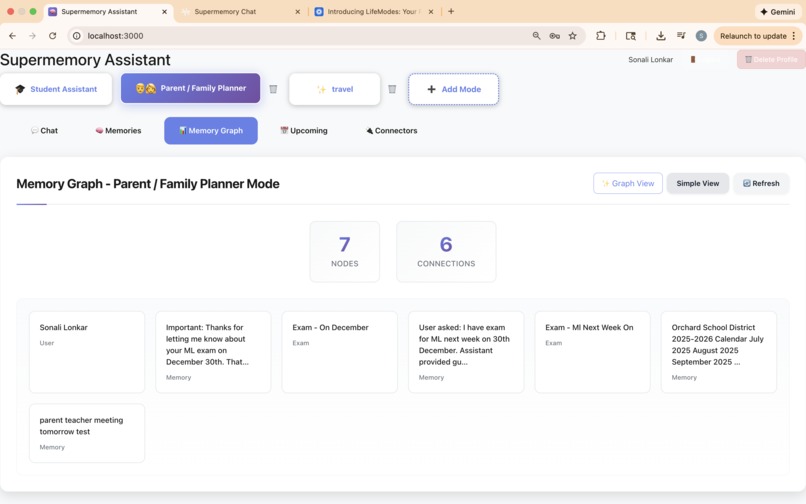
memory tiles
-
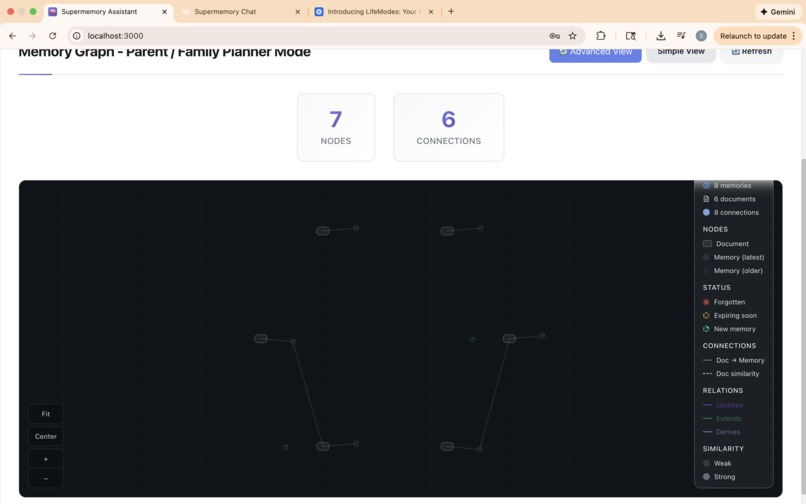
Simple memory graph
-
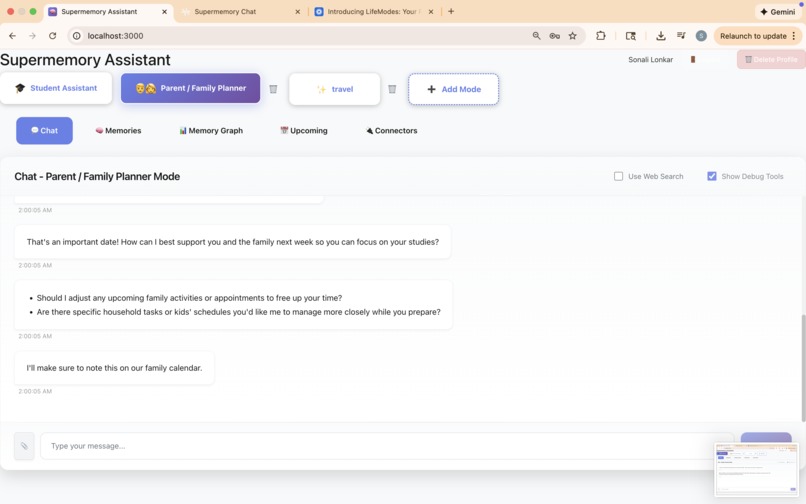
Parent mode
-
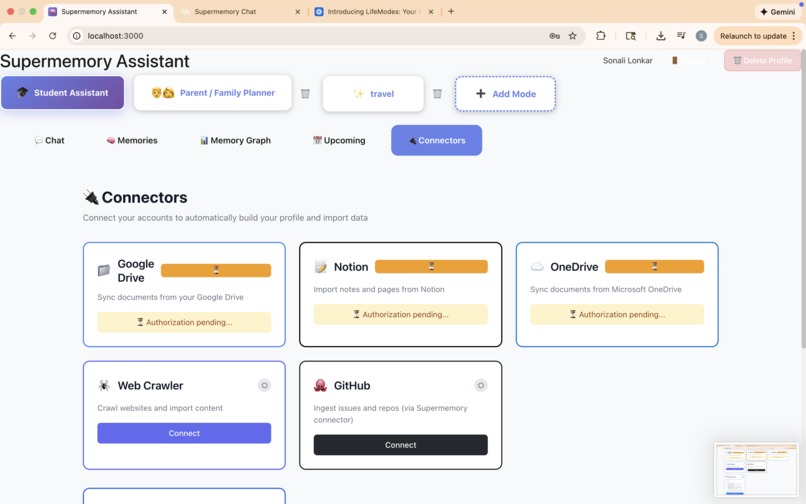
Connectors
-
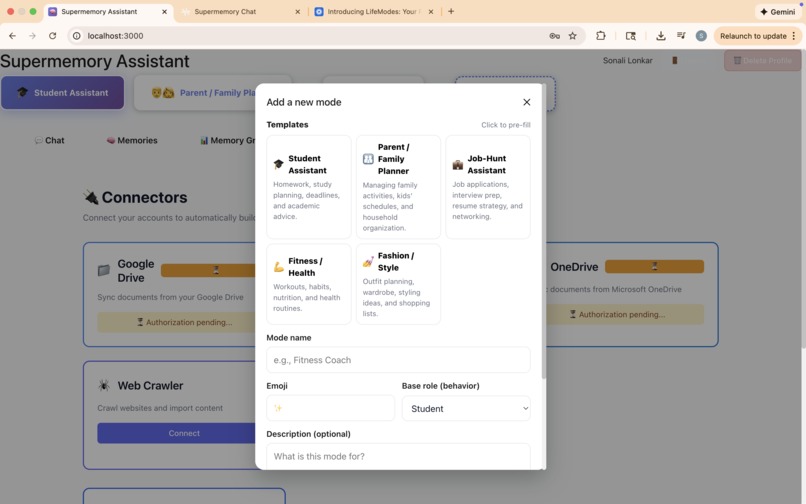
Add a new mode
-
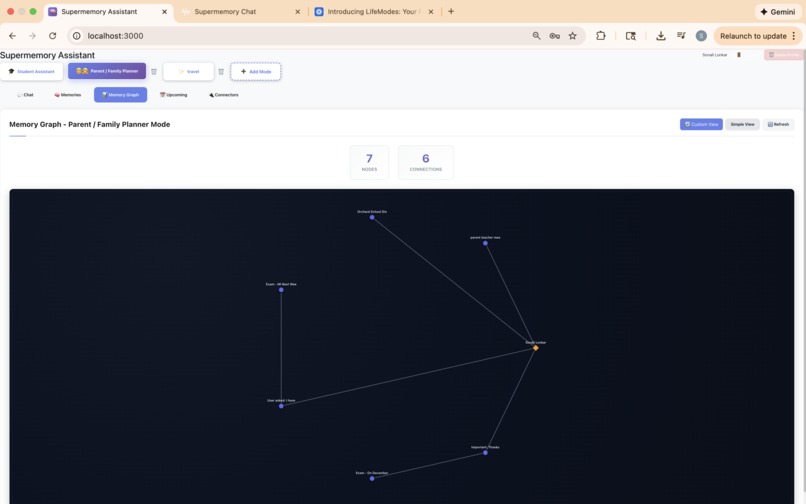
Advance supermemory graph
-
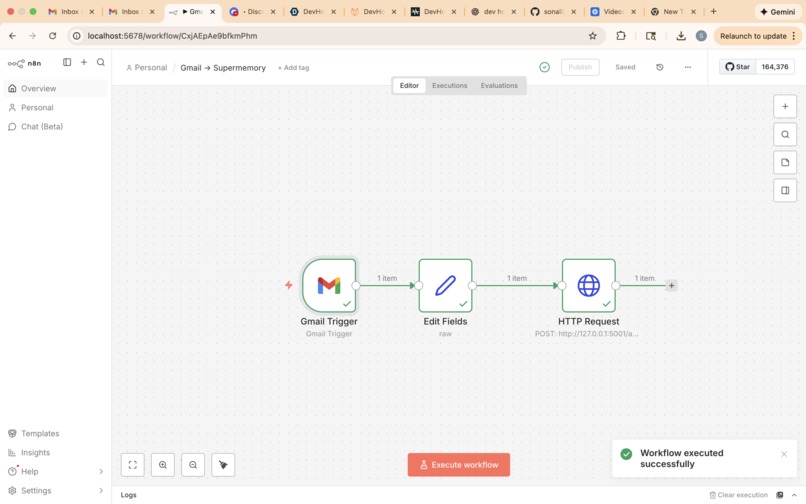
n8n workflow for Gmail integration


Project Story: LifeModes - A Super-memory Assistant
What Inspired Me
The inspiration for Supermemory Assistant came from a personal frustration I've experienced juggling multiple roles in my daily life. As a student, I have assignments and exams to manage. As someone looking for opportunities, I track job applications and networking. And in my personal life, I have fitness goals, family commitments, and various other responsibilities.
Traditional AI assistants treat everything as one big conversation. When I ask about my machine learning exam in "Student mode," I don't want to see reminders about job interviews or fitness routines mixed in. But at the same time, I want the AI to be smart enough to connect relevant information - like knowing that my career goals might influence which courses I take.
This led me to ask: How can we create an assistant that maintains strict separation for different life roles while still leveraging a unified memory system for intelligent context awareness?
The Supermemory API provided the perfect foundation - a powerful memory system that could store and retrieve information across contexts. The challenge was building an architecture that could isolate memories by mode in the UI while allowing intelligent cross-context borrowing in the backend.
What I Learned
Technical Learnings
Context Engineering & Memory Orchestration
- Learned how to build sophisticated context bundles for LLM interactions
- Understood the balance between context size and relevance
- Implemented re-ranking algorithms to select the most relevant memories
- Mastered container tags for memory isolation in Supermemory API
Full-Stack Architecture
- Designed a clean separation between frontend UI isolation and backend intelligence
- Implemented per-mode chat history using localStorage for instant UI separation
- Built mode-aware memory filtering that maintains strict boundaries in the UI while allowing backend flexibility
React & Next.js Deep Dive
- Mastered React hooks, state management, and component lifecycle
- Implemented lazy loading for heavy components like the memory graph
- Built custom markdown rendering for rich text display
- Created error boundaries for graceful error handling
API Integration Patterns
- Integrated with multiple external APIs (Supermemory, Gemini, Parallel.ai)
- Built webhook endpoints for n8n integration
- Implemented OAuth flows for connector services
- Handled file uploads with multiple format support (PDF, images with OCR, DOCX, etc.)
Database Design
- Designed SQLite schema for user modes, connectors, and conversations
- Implemented database migrations and schema evolution
- Learned about SQLAlchemy ORM patterns
Conceptual Learnings
The Power of Separation
- UI separation doesn't mean backend isolation - you can have both
- Users need clear boundaries, but AI needs context flexibility
- The best UX hides complexity while maintaining intelligence
Proactive vs Reactive AI
- Learned to generate context-aware, actionable suggestions
- Understood the importance of mode-specific messaging
- Implemented filtering to avoid generic, unhelpful prompts
Memory Classification
- Learned to automatically classify memories by type (fact, event, document)
- Implemented durability-based expiry for time-sensitive information
- Built event extraction from natural language and calendar files
How I Built It
Architecture Overview
I built Supermemory Assistant as a full-stack application with clear separation of concerns:
Backend (Flask + Python)
- Flask REST API server handling all business logic
- SQLite database for local state (modes, connectors, conversations)
- Service layer architecture:
memory_orchestrator.py: Builds context bundles for LLM turnsllm.py: Handles Gemini API integration and prompt engineeringsupermemory_client.py: Wraps Supermemory API callsfile_processor.py: Extracts text from various file formatsmemory_classifier.py: Classifies memories by type and durability
Frontend (Next.js + React)
- Next.js 14 with App Router for routing
- React components for Chat, Memories, Memory Graph, Mode Selector, Connectors
- CSS Modules for component styling
- localStorage for per-mode chat history persistence
Key Features Built:
Dynamic Mode System
- Created database schema for user-defined modes
- Built CRUD API endpoints for mode management
- Implemented mode templates for quick setup
- Added mode deletion with safeguards for built-in modes
Memory Isolation
- Implemented container tags (
{userId}-{modeKey}) for strict filtering - Built frontend filters as belt-and-suspenders approach
- Created per-mode chat history in localStorage
- Implemented container tags (
Cross-Mode Context Borrowing
- Designed automatic context borrowing system
- Built
build_cross_role_static()to create safe profile slices - Implemented memory search across modes when relevant
- Ensured UI stays clean while backend is intelligent
Proactive Messaging
- Built pre-filtering to find actionable memories
- Implemented mode-specific LLM prompts with examples
- Added post-processing validation to filter generic responses
- Made messages appear as regular chat messages (not floating UI)
File Upload & Processing
- Integrated PyMuPDF for PDF extraction
- Added pytesseract for OCR on images
- Implemented python-docx, openpyxl, pandas for various formats
- Created full-content extraction (not just summaries)
Memory Graph Visualization
- Integrated
@supermemory/memory-graphpackage for advanced view - Built custom SVG-based graph with different node shapes
- Added refresh button and detail panels
- Implemented error boundaries for graceful failures
- Integrated
Connectors & Integrations
- Built connector management system with OAuth support
- Created calendar import via ICS file parsing
- Implemented n8n webhook bridge for unsupported services
- Added manual sync triggers
Upcoming Events
- Built unified event aggregation across all modes
- Implemented deduplication logic
- Created clean display showing only title and date
Development Process
Started with Core Chat
- Basic Flask backend with Gemini integration
- Simple React frontend with chat interface
- Supermemory API integration for memory storage
Added Mode System
- Designed database schema
- Built mode creation and selection UI
- Implemented mode-aware memory filtering
Enhanced Memory Features
- Added memory graph visualization
- Implemented memory editing and deletion
- Built proactive messaging system
Added Integrations
- File upload with multiple format support
- Connector system for external services
- Calendar import functionality
- n8n webhook bridge
Polished & Refined
- Fixed UI/UX issues (markdown rendering, button visibility)
- Improved proactive message relevance
- Added mode deletion and user profile management
- Enhanced error handling and loading states
Challenges I Faced
1. Memory Isolation Without Losing Context
Challenge: How to maintain strict UI separation while allowing intelligent cross-mode context borrowing?
Solution:
- Used container tags for backend filtering (
metadata.mode) - Implemented frontend filters as additional safeguard
- Built
build_cross_role_static()to create small, safe profile slices - Ensured cross-mode borrowing happens only in backend, never visible in UI
Learning: Separation in UI doesn't mean isolation in backend - you can have both.
2. Proactive Message Relevance
Challenge: Initial proactive messages were generic ("You mentioned an assignment") and not actionable.
Solution:
- Implemented pre-filtering to find actionable memories
- Enhanced LLM prompt with mode-specific instructions and examples
- Added post-processing validation to filter generic patterns
- Reduced temperature for more focused output
- Made messages appear as regular chat (not floating UI)
Learning: LLM prompting requires careful engineering - examples, constraints, and post-processing are crucial.
3. Memory Graph Rendering
Challenge: The @supermemory/memory-graph package had limitations - couldn't customize node shapes, styling was difficult.
Solution:
- Built custom SVG-based graph visualization
- Used MutationObserver to detect when package rendered
- Created toggle between "Advanced View" (package) and "Custom View" (SVG)
- Implemented custom node shapes (circles, squares, diamonds) and styling
Learning: Sometimes you need to build custom solutions when third-party packages have limitations.
4. File Upload Content Extraction
Challenge: Initially stored only summaries, but user wanted full content available.
Solution:
- Changed approach to extract and store full content
- Created chunked memories for large files (>4000 chars)
- Stored
is_summaryandis_contentflags in metadata - Maintained chunk indexing for reconstruction
Learning: User feedback is crucial - what seems efficient (summaries) might not match user needs (full content).
5. Mode Key Normalization
Challenge: Mode keys had random suffixes (e.g., student-722f) making them hard to manage.
Solution:
- Removed random suffix generation
- Implemented database migration to normalize existing keys
- Updated all code to use slugified names without suffixes
- Added logic to return existing mode if key already exists
Learning: Database migrations are essential when changing data models.
6. Cross-Mode Context Configuration
Challenge: Initially had UI for users to configure cross-mode sources, but it was confusing.
Solution:
- Removed UI configuration
- Made cross-mode borrowing automatic for all modes
- Backend decides what's relevant based on conversation context
- Simplified UX while maintaining intelligence
Learning: Sometimes removing features improves UX - automatic intelligence beats manual configuration.
7. Calendar Import & Event Extraction
Challenge: Needed to parse ICS files and extract events, then classify them correctly.
Solution:
- Built ICS parser using
icalendarlibrary - Implemented event extraction from natural language
- Created deduplication logic to prevent duplicate events
- Filtered out assistant responses from event list
Learning: Data parsing requires careful handling of edge cases and formats.
8. Frontend State Management
Challenge: Per-mode chat history needed to persist and not mix between modes.
Solution:
- Used localStorage with keys like
sm-chat:{userId}:{mode} - Loaded history on mode switch
- Cleared state appropriately on logout
- Added backend filtering as additional safeguard
Learning: localStorage is powerful for client-side persistence, but backend validation is still needed.
Impact & Reflection
Building Supermemory Assistant taught me that the best solutions come from understanding real user problems. The challenge wasn't just technical - it was designing an architecture that balances separation with intelligence, simplicity with power.
The project demonstrates that you can have both:
- UI Separation: Clean, isolated views for each mode
- Backend Intelligence: Context-aware responses that borrow relevant information
- User Control: Ability to create, manage, and delete modes
- Automatic Intelligence: Cross-mode borrowing happens automatically
This project pushed me to think deeply about:
- How to structure full-stack applications
- How to integrate multiple APIs effectively
- How to design for both user experience and technical elegance
- How to iterate based on user feedback
The most rewarding part was seeing how small changes - like making proactive messages appear as regular chat, or storing full file content instead of summaries - dramatically improved the user experience. It reinforced that great software comes from understanding users and iterating based on their needs.
Next Steps
Looking forward, I'd like to:
- Add mobile app support for on-the-go access
- Implement voice interface for hands-free interaction
- Build advanced analytics for memory graph insights
- Add more connector integrations as Supermemory API expands
- Create community templates for common n8n workflows
But most importantly, I want to continue learning from user feedback and iterating to make the assistant even more helpful across all life roles.


Log in or sign up for Devpost to join the conversation.