-
-
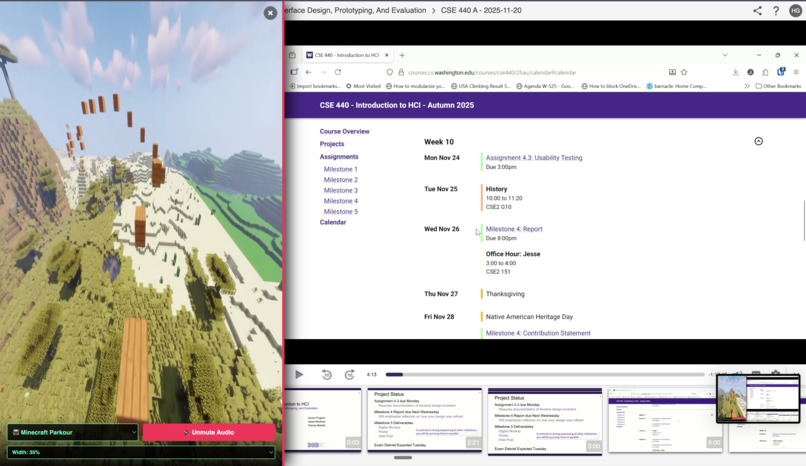
Brainrot on the side
-
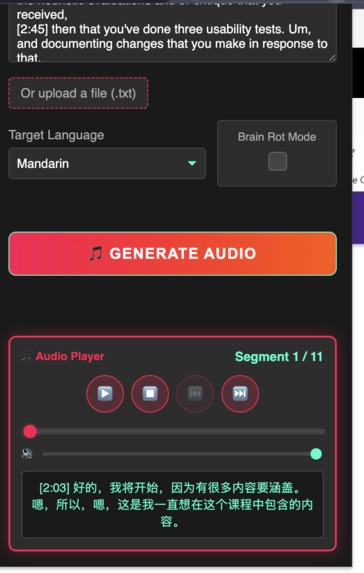
Generate foreign language transcripts
-
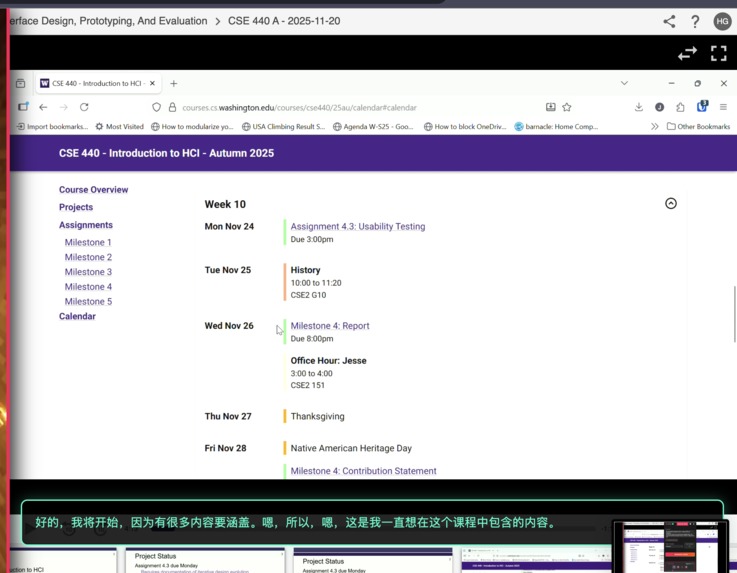
Automatic subtitles


https://cap.so/s/zk5z77w95w8qctf is the demo link
Inspiration
Traditional language learning can be dry and disengaging, especially when trying to absorb lecture transcripts or educational videos. We noticed the internet phenomenon of "brain rot" content - videos like Subway Surfers or Minecraft parkour that keep viewers engaged through constant visual stimulation. We wondered: what if we could harness this attention-grabbing format to make language learning more engaging? That's how Rotify was born - combining transcript translation with brain rot visuals to help students stay focused while learning new languages.
What it does
Rotify is a Chrome extension that:
- Downloads transcripts from Panopto lecture videos with one click
- Translates transcripts into 7+ languages (Mandarin, Spanish, French, German, Japanese, Korean, Hindi)
- Generates audio narration of translated text using OpenAI's text-to-speech API
- Activates "Brain Rot Mode" - overlaying popular engagement videos (Minecraft parkour, Subway Surfers, slime cutting) on the side of your screen while you listen
- Displays synchronized subtitles showing the translated text
- Provides an audio player with full playback controls (play/pause, timeline scrubbing, volume control)
Users can paste any text transcript, upload a .txt file, or extract transcripts directly from Panopto videos, then generate audio translations with optional brain rot visuals to maintain engagement during language learning.
How we built it
Technologies:
- Chrome Extension Manifest V3 - Modern extension framework with service workers
- JavaScript - Core functionality for content scripts, popup interface, and background processing
- OpenAI API - ChatGPT for translation and text-to-speech for audio generation
- YouTube Embed API - Controlled playback of brain rot background videos
- Web Audio API - Custom audio player with full controls
- HTML/CSS - Responsive popup interface with custom styling
Architecture:
manifest.json- Extension configuration and permissionspopup.html/js- Main interface for transcript input and audio generationcontent.js- Injected into web pages for Panopto integration and brain rot overlaybackground.js- Service worker for cross-tab communication and audio processingoffscreen.js/html- Offscreen document for secure audio encoding
The extension uses Chrome's message passing API to coordinate between the popup, content scripts, and background worker, ensuring smooth communication across different contexts.
Challenges we ran into
Audio Processing in Manifest V3 - The transition to Manifest V3 removed support for executing code directly in background scripts. We had to create an offscreen document to handle audio encoding and Base64 conversion, adding complexity to the architecture.
Panopto DOM Manipulation - Panopto's dynamic interface required careful mutation observers and timing logic to reliably detect when transcripts loaded. We implemented a stabilization check that waits for the transcript item count to remain steady before extraction.
YouTube Iframe Aspect Ratios - Maintaining proper 16:9 aspect ratio while allowing dynamic sidebar resizing required calculating scale factors based on viewport dimensions and updating them on window resize events.
Audio Segmentation - Breaking long transcripts into manageable chunks for API limits while maintaining natural language flow required careful text parsing and segment management.
Cross-Origin Communication - Controlling muted/unmuted states of YouTube embeds required using the YouTube IFrame API with postMessage, which had specific initialization requirements.
Accomplishments that we're proud of
Seamless Panopto Integration - Our one-click transcript extraction works reliably across different Panopto interfaces, automatically finding and clicking the transcript tab, waiting for content to load, and extracting formatted text with timestamps.
Polished Brain Rot Mode - The overlay system is highly customizable with 5 different video modes, adjustable width (20%-70%), mute controls, and maintains proper aspect ratios across all screen sizes.
Full-Featured Audio Player - We built a complete audio player with segment navigation, timeline scrubbing, volume control, and synchronized subtitle display.
User Experience - The interface is clean and intuitive with real-time progress tracking, smooth animations, and helpful status messages throughout the translation and audio generation process.
Multi-Language Support - Successfully integrated with OpenAI's GPT and TTS APIs to support 7 major world languages with natural-sounding voice synthesis.
What we learned
- Chrome Extension Architecture - Deep understanding of Manifest V3, content scripts vs service workers, offscreen documents, and cross-context messaging
- Async Coordination - Managing complex async workflows between API calls, DOM mutations, and user interactions
- Audio Processing - Working with Web Audio API, audio encoding, and handling Base64 audio data
- API Integration - Best practices for chunking requests, handling rate limits, and managing streaming responses from OpenAI
- User-Centered Design - The importance of progress indicators, error handling, and clear feedback for async operations
What's next for Rotify
- More Languages - Expand to support 20+ languages including Arabic, Portuguese, Russian, and more
- Custom Voice Options - Allow users to select different voice styles and accents
- Transcript Highlighting - Sync highlighting of transcript text with audio playback
- Custom Video Upload - Let users upload their own background videos for brain rot mode
- Spaced Repetition - Integrate flashcard generation from translated transcripts for better retention
- Platform Expansion - Support for YouTube, Coursera, edX, and other educational platforms beyond Panopto
- Mobile Support - Develop iOS/Android versions for on-the-go language learning
- Social Features - Share translated transcripts and compete with friends on learning streaks
Built With
- chrome
- claude
- extension
- openai
- whisper


Log in or sign up for Devpost to join the conversation.