-
Uptimer home page
-
Uptimer log-in page
-
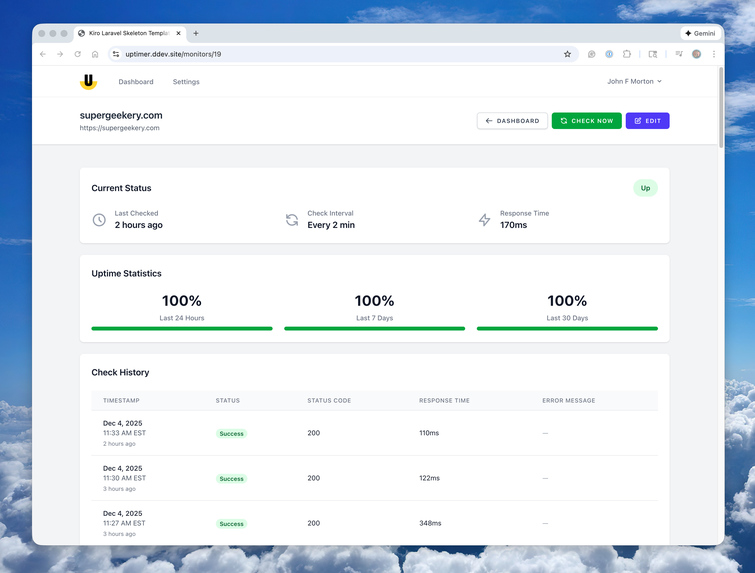
Site monitoring detail page
-
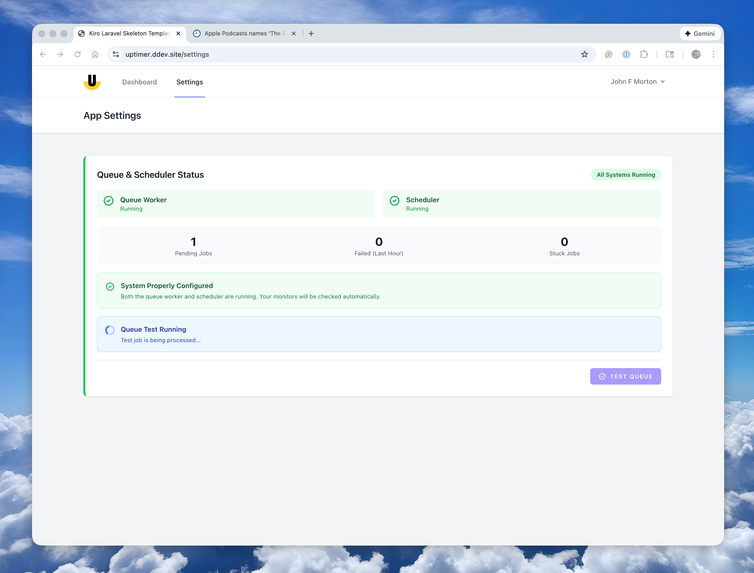
Helpful testing of your queue system is built in - step 1, begin testing
-

Helpful testing of your queue system is built in - step 2, confirmation of working queue


Uptimer: Building a Self-Hosted Uptime Monitor in 6 Hours
Inspiration
The irony wasn't lost on me: my uptime monitoring service was causing so much server overhead that it would fail and stop monitoring my sites. The very tool designed to alert me when things went wrong was itself the problem.
I had been relying on a self-hosted third-party application to monitor my websites, but its resource requirements and Docker configuration kept crashing my server.
With my Kiro Laravel Skeleton installed and a clear vision of what I needed, I decided to create exactly the monitoring tool I wanted—lightweight, self-hosted, and tailored to my needs. Using Kiro's AI-assisted development workflow, I had a fully working application in less than a day.
What It Does
Uptimer is a Laravel-based uptime monitoring application that tracks website availability and sends instant notifications when sites go down or recover. But what makes it special isn't just what it does—it's how it does it.
The application runs effortlessly on a standard Nginx PHP server. Since I use Laravel Forge for hosting, deploying a Laravel app couldn't be simpler. Uptimer has minimal server overhead which is exactly what I wanted.
The interface is clean and utilitarian. No unnecessary features, no bloated dashboards—just the essential information you need to monitor your sites effectively. It displays current status, uptime percentages (24-hour, 7-day, and 30-day), response times, and a detailed check history.
Perhaps most importantly, because I host it myself, there are no arbitrary limitations tied to subscription tiers. Need to monitor 5 sites? 50 sites? 500 sites? Add as many as you want without worrying about pricing plans or upgrade prompts.
Key features include:
- HTTP monitoring with configurable check intervals
- Email and Pushover notifications for instant alerts
- Background processing using Laravel queues for optimal performance
- Automatic history pruning to prevent database bloat
- Uptime statistics tracking reliability over time
- Controlled registration for secure, private deployments
How I Built It
The development process was remarkably streamlined, thanks to the combination of my Kiro Laravel Skeleton and Kiro's AI-assisted workflow.
Hour 0: Setup (5 minutes)
I cloned the Kiro Laravel Skeleton and immediately had a fully configured Laravel 12 application running in a Docker-based development environment via DDEV. No configuration headaches, no dependency issues—just a working foundation ready to build on.
Hours 0-2: Initial Build
I came into this project with a clear vision of what I wanted to build, which proved crucial. I described my requirements to Kiro: a monitoring system that checks URLs at configurable intervals, stores check history, calculates uptime statistics, and sends notifications when status changes.
Kiro generated an excellent set of specs that I could review and tweak before any code was written. This spec-driven approach meant we were aligned on the architecture before implementation began. Once I approved the specs, Kiro generated the models, migrations, controllers, services, queue jobs, and views.
The generated code was clean, well-documented, and followed Laravel best practices. Because the PHP was easy to understand, I could guide Kiro to adjust features to meet my specific needs. Within 2 hours, I had a working application that could monitor sites and send notifications.
Hours 2-6: Refinement
I spent the remaining 4 hours tweaking the application, refining the design, and updating documentation. The clean, utilitarian interface came together quickly using Tailwind CSS. I adjusted layouts, improved the dashboard visualization, and ensured the notification system worked exactly as I wanted.
The more I use Kiro, the more streamlined my development process becomes. Each project teaches me how to communicate more effectively with the AI, resulting in better initial output and fewer iterations.
Challenges I Ran Into
The major hurdle came when I deployed to my production server. In the initial build, I had asked Kiro to include a button to confirm that queued jobs were executing properly. Kiro did exactly as I asked—but I had neglected to request a check for the Laravel scheduler as well.
This was entirely my oversight. Uptimer relies on both the scheduler (to trigger checks every minute) and queue workers (to execute the HTTP checks asynchronously). Without both running, the monitoring system wouldn't work.
When I realized the issue, I went back into development with Kiro and reworked the queue check system into a comprehensive job schedule and queued job execution checking functionality. The system now verifies both components and provides helpful tips for getting these processes running on a server.
This challenge reinforced an important lesson about thinking through production requirements during development, not after deployment.
Accomplishments I'm Excited About
The standout achievement is that with Kiro, I was able to build a functional, well-designed application in just 6 hours. From concept to deployed production application in less than a workday—that's remarkable.
But beyond the speed, I'm increasingly satisfied with the Kiro development process itself. The more I use it, the more streamlined my workflow becomes. The combination of clear specs, clean generated code, and easy iteration creates a development experience that feels both powerful and natural.
I also successfully solved my original problem: I now have a lightweight, self-hosted monitoring solution that doesn't burden my server and gives me exactly the features I need without subscription limitations.
What I Learned
This project reinforced a crucial lesson about AI-assisted development: You'll be more successful building an app or feature if you have a clear vision of what you want to build and have spent time articulating that vision.
Before you jump into your AI tool, spend time thinking and documenting what you want to build. This upfront investment makes your development more streamlined, which has two significant benefits:
- Speed: You get your app built faster because you're not iterating through vague requirements
- Cost: You spend less money on wasted effort using up AI tokens on back-and-forth clarifications
The clearer your vision, the better your AI assistant can help you realize it. This isn't just about Kiro—it's a fundamental principle of effective AI-assisted development.
What's Next for Uptimer
Since the application currently meets my initial specifications, I plan to "live with it" for a while and let time give me perspective on where to take it next.
That said, I can already envision several potential enhancements:
SSL Certificate Monitoring: Adding checks for the health and expiration of site security certificates would be a natural extension of the current functionality.
Multi-User Support: Currently, Uptimer is designed for single-user deployment. I may explore adding the ability to have multiple users, each with their own set of URLs to monitor. This would require reworking the Pushover notification system to support per-user credentials.
Showcase for Kiro Laravel Skeleton: Beyond its practical utility, Uptimer serves as an excellent showcase for what's possible with the Kiro Laravel Skeleton. It demonstrates how quickly you can go from idea to production-ready application when you start with a solid foundation and clear development workflow.
For now, though, Uptimer is doing exactly what I built it to do: reliably monitoring my sites without consuming excessive server resources, and doing it all on my own infrastructure without subscription fees.
Built with: Laravel 12, PHP 8.4, Tailwind CSS 4, DDEV, and Kiro Development time: 6 hours (2 hours initial build, 4 hours refinement) License: MIT (open source)


Log in or sign up for Devpost to join the conversation.