

Priskribo
Smart One Click Setup is a powerful demo import and export plugin designed for modern WordPress websites.
It allows you to replicate a complete WordPress site content, design, and settings using a single ZIP file. Ideal for theme developers, Elementor users, agencies, and anyone who needs fast, reliable demo setup or site migration.
🎯 What This Plugin Can Do
- Import complete demo content from a local ZIP or remote URL
- Export your entire WordPress site into a single portable ZIP file
- Migrate full site setups between domains
- Install ready-made theme demos in one click
- Restore Elementor layouts, templates, global styles, popups, and kit settings
- Import plugin configurations and custom options
- Transfer Customizer settings like colors, typography, and layouts
- Reproduce full website designs without manual rebuilding
🚀 Powerful Features
✨ One Click Demo Import
Import complete website demos including:
– Posts, pages, and media
– Menus and widgets
– Customizer settings
– Theme options
– Elementor templates, global styles, and kits
– Plugin configuration data
Everything is restored in one flow – no partial imports.
✨ One Click ZIP Import & Export
- Export your full site into one clean ZIP file
- Import from a single ZIP with automatic data detection
- Ideal for demo installation, backups, migrations, and staging
- Preserves structure, design, and settings
🎨 Elementor Compatible
- Full support for Elementor pages, templates, and site kits
- Imports global styles, headers, footers, and popups
- Preserves Elementor designs across domains
- Compatible with Elementor Pro features
🔌 Plugin Settings Import / Export
- Export and import settings from any plugin
- Automatic detection of active plugins
- Select which plugins to include during export
- Supports nested and complex option structures
- Developers can register custom export hooks
- Supports custom option names via JSON arrays or objects
🌐 Remote File Support
- Import demos directly from remote URLs
- Supports presigned URLs (Amazon S3, CDN, private storage)
- Local file support from theme directories
- Flexible setup for theme authors and agencies
🚀 Smart Import Interface
- Predefined demo imports for themes
- Manual ZIP upload support
- Clean, tab-based interface
- Visual demo previews before import
⚙️ Developer-Friendly
- Extensive hooks and filters
- Before and after import actions
- WP-CLI support for automation
- Theme integration helper functions
- Built following WordPress coding standards
✅ Why Choose Smart One Click Setup?
Most demo importers focus only on content.
Smart One Click Setup restores the entire site experience – design, settings, plugins, and structure in one click.
It’s built for:
– Elementor-based websites
– Professional theme demos
– Full site replication
– Faster client delivery
Are you a theme author?
Setup Smart One Click Setup for your theme and your users will thank you for it!
Follow this easy guide on how to setup this plugin for your themes!
Are you a theme user?
Contact the author of your theme and let them know about this plugin. Theme authors can make any theme compatible with this plugin in 15 minutes and make it much more user-friendly.
Please take a look at our plugin documentation for more information on how to import your demo content.
Important Note: There is no setting to “connect” authors from the demo import file to the existing users in your WP site (like there is in the original WP Importer plugin). All demo content will be imported under the current user.
Do you want to contribute? Please refer to our official GitHub repository.
External services
This plugin may connect to external services to fetch demo import configurations and download import files. This functionality is only active when configured by theme authors or developers.
Demo API Service
This plugin can connect to a remote API service to automatically fetch and register demo import configurations. This feature is used to provide users with a list of available demo imports for their theme.
What data is sent and when:
- The plugin sends a GET request to a remote API endpoint to retrieve demo import configurations
- The API URL is constructed from a base URL (configured via the
smartocs/demo_api_base_urlfilter) and the current theme name - The theme name (TextDomain or stylesheet directory name) is included in the API URL path
- This request is made when the plugin initializes and checks for available demo imports
- The API response is cached for 1 hour (configurable via
smartocs/demo_api_cache_durationfilter) to reduce external requests - No personal data, user information, or site-specific data is transmitted to the API service
Example API URL format:
{base_url}/{theme_name}/demos.json
About External Domains
This plugin does not include, define, or ship with any default API domain, endpoint, or external server.
The plugin code contains no hard-coded URLs.
All external domains used by the plugin come entirely from the theme author or developer via the smartocs/demo_api_base_url filter.
If a theme developer does not provide an API base URL, the plugin will not make any external requests.
In this case, it operates only with locally bundled or manually provided demo files.
This means the plugin never contacts any external service by itself, and only does so when explicitly configured by the theme developer.
This plugin does not provide a service of its own. It only acts as a bridge to fetch files from URLs defined by the theme author.
This plugin facilitates the import of demo content by connecting to an external server.
- Service: Theme Demo Content Delivery
- Service Provider: The specific server and endpoint are defined dynamically by the active theme via the
smartocs/demo_api_base_urlfilter. This plugin has no default connection. - Data Sent: The user’s IP address and a request for the demo content package.
- Privacy Policy & Terms of Service: Since the external server is chosen by the theme developer, please refer to the Privacy Policy and Terms of Service provided by the author of your active theme.
When this service is used:
- Only when a theme author or developer has configured the API base URL using the
smartocs/demo_api_base_urlfilter - The service is optional and not required for plugin functionality
- If no API base URL is configured, the plugin works normally with locally defined or manually uploaded import files
Service provider information:
The API service provider is determined by the theme author or developer who configures the smartocs/demo_api_base_url filter. Theme authors are responsible for:
* Providing the API base URL to their users
* Ensuring their API service has appropriate terms of service and privacy policy
* Disclosing any data collection or usage by their API service
Remote file downloads:
The plugin may also download import files (ZIP archives, XML files, JSON files, etc.) from remote URLs when:
* Theme authors have configured remote URLs for demo imports
* Users manually specify remote URLs for import files
* The plugin needs to fetch import files from external sources
These downloads are standard HTTP GET requests to retrieve file content. No additional data beyond standard HTTP headers is sent during these requests.
Privacy and data protection:
- The plugin does not collect or transmit personal user data to external services
- Only theme identification information (theme name) is included in API requests
- All external requests use WordPress’s built-in
wp_remote_get()function with proper SSL verification - Theme authors should ensure their API services comply with applicable privacy laws and regulations
Disabling external services:
If you wish to disable external API calls, simply do not configure the smartocs/demo_api_base_url filter. The plugin will function normally using only locally defined or manually uploaded import files.
Ekrankopioj
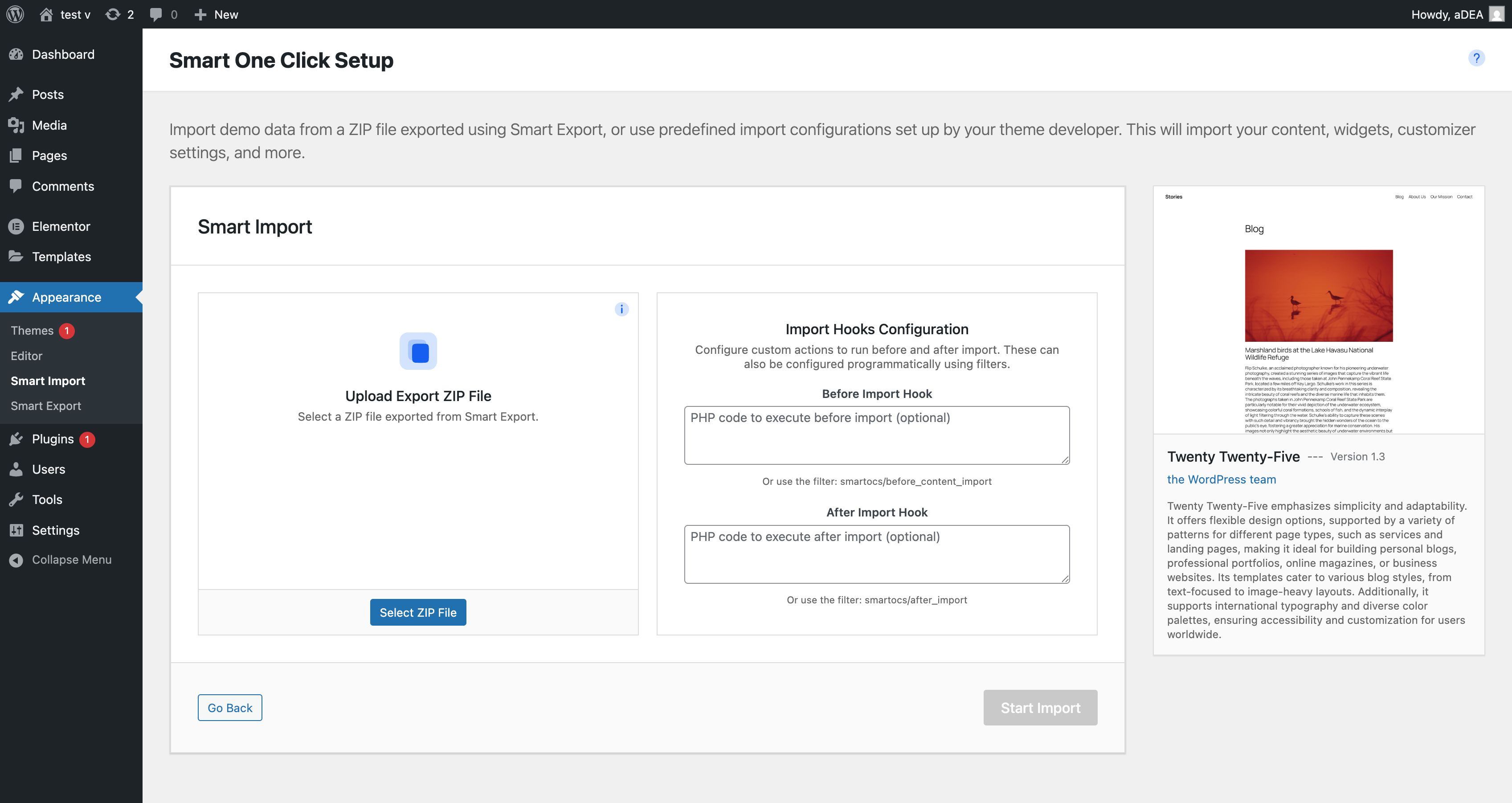
Example of multiple predefined demo imports, that a user can choose from. 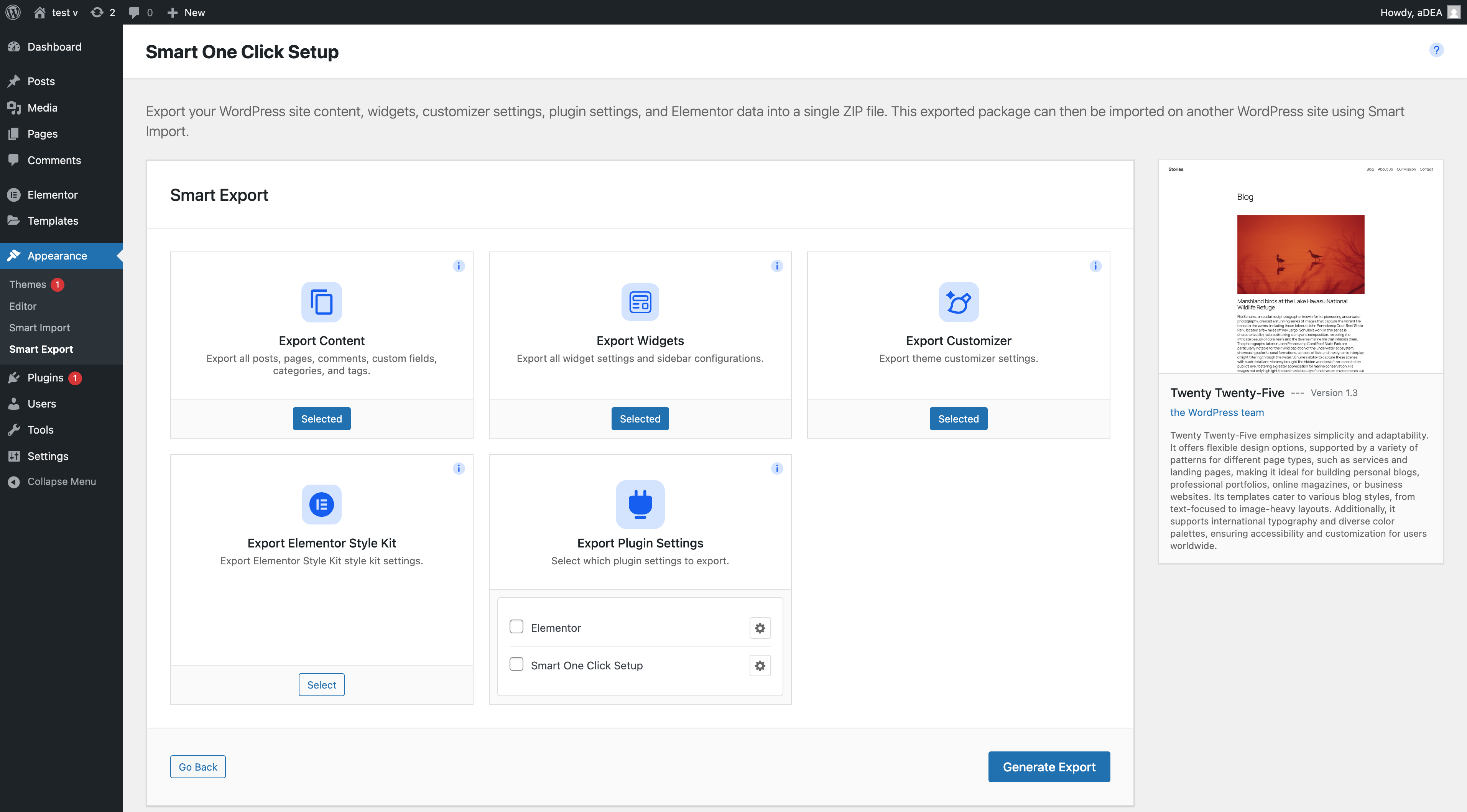
How the import page looks like, when only one demo import is predefined. 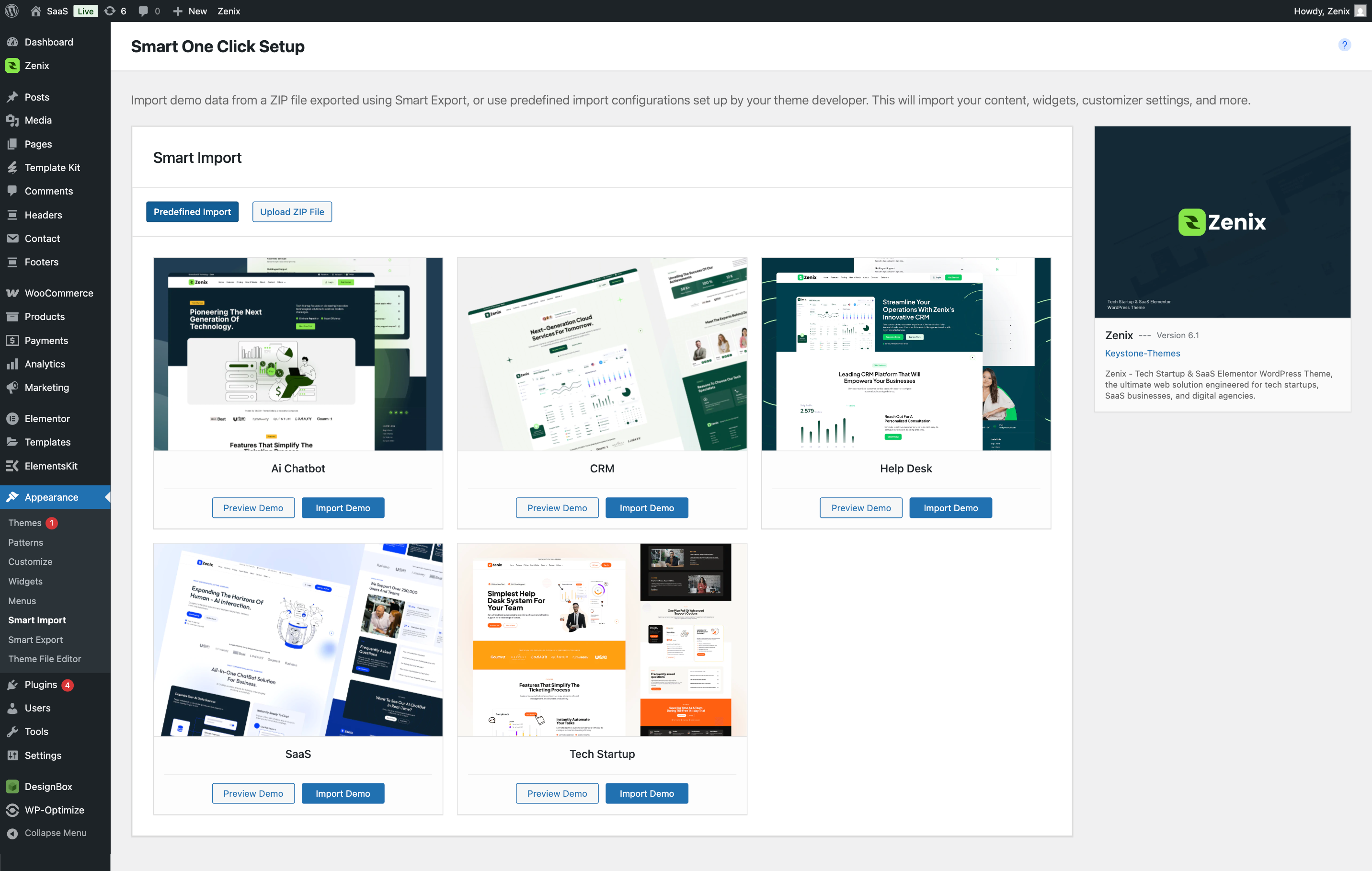
Example of how the import page looks like, when no demo imports are predefined a.k.a manual import.


Instalo
From your WordPress dashboard:
- Visit ‘Plugins > Add New’
- Search for ‘Smart One Click Setup’ and install the plugin
- Activate ‘Smart One Click Setup’ from your Plugins page
Manual Installation:
- Download ‘Smart One Click Setup’
- Upload the ‘smart-one-click-setup’ directory to your ‘/wp-content/plugins/’ directory
- Activate ‘Smart One Click Setup’ from your Plugins page
Once the plugin is activated you will find:
* Import page: Appearance -> Smart Import
* Export page: Appearance -> Smart Export
OD
-
I have activated the plugin. Where is the “Smart Import” page?
-
You will find the import page in wp-admin -> Appearance -> Smart Import.
-
How do I export my site’s data?
-
✨ Export everything to a single ZIP file!
- Go to Appearance -> Smart Export
- Select the items you want to export:
- Content (posts, pages, media)
- Widgets
- Customizer settings
- Elementor data (templates, pages, kit settings)
- Any plugin settings – choose from all active plugins
- Click the “Export” button
- Download the generated ZIP file
Key Advantage: Everything is packaged in one ZIP file, making it super easy to transfer your entire site configuration to another WordPress installation.
-
Can I import from a ZIP file?
-
✨ Yes! One ZIP file contains everything!
- Go to Appearance -> Smart Import
- Click on the “Upload ZIP File” tab (if predefined imports are available) or use the manual import section
- Upload your ZIP file
- The plugin will automatically:
- Extract the ZIP file
- Detect available import files (content.xml, widgets.json, customizer.dat, plugin-settings.json, elementor.json)
- Import all detected data in the correct order
Key Advantage: No need to upload multiple files separately – just one ZIP file and you’re done!
-
Is this plugin compatible with Elementor?
-
🎨 Yes! Full Elementor compatibility!
-
Export Elementor Data:
- All Elementor templates and page data
- Elementor kit settings (colors, typography, etc.)
- Elementor CSS and edit mode settings
- Everything packaged in one ZIP file
-
Import Elementor Data:
- Automatic detection of Elementor data in ZIP files
- Import Elementor Site Kit settings and automatically set as active kit
- Import Elementor page and template data with proper post ID mapping
- Preserves all Elementor designs and configurations
- Works seamlessly with Elementor Pro features
-
-
Can I export settings from any plugin?
-
🔌 Yes! Export settings from ANY plugin!
- Automatic Detection: Automatically detects all active plugins and shows them in a checklist
- Selective Export: Choose which plugins to include in your export
- Custom Plugin Options (NEW in 1.2.2): Add custom option names or values for any plugin
- JSON Array Format:
["option_name_1", "option_name_2"]– fetches current values from database - JSON Object Format:
{"option_name_1": "value1", "option_name_2": "value2"}– uses provided values directly - All plugin settings packaged in one ZIP file
-
What JSON formats are supported for custom plugin options?
-
Starting from version 1.2.2, you can add custom plugin options using two JSON formats:
JSON Array Format – Use when you want to fetch current values from the database. All items must be non-empty strings (option names). Values are automatically fetched from the database during export.
JSON Object Format – Use when you want to provide specific custom values. Keys must be non-empty strings (option names). Values can be any valid JSON type: strings, numbers, booleans, arrays, objects, null. Values are used directly during export (not fetched from database).
How to Use:
1. Go to Appearance Smart Export
2. Select the plugins you want to export
3. Click the settings button (⚙️) next to any plugin
4. Enter your custom options in the modal using either format
5. The plugin will validate your JSON and save it
6. Export as usual – custom options will be included automaticallyFor detailed examples and usage instructions, please refer to the plugin documentation.
-
Where are the demo import files and the log files saved?
-
The files used in the demo import will be saved to the default WordPress uploads directory (e.g.,
../wp-content/uploads/2023/03/).The log file will also be registered in the wp-admin -> Media section, so you can access it easily.
-
For Developers
-
Are you a theme author or developer looking to integrate Smart One Click Setup into your theme? For comprehensive documentation including hooks, filters, WP-CLI commands, and code examples, please visit our developer documentation.
Remote Demo Management:
Looking for a way to manage your theme demo files remotely? SmartOCS Cloud is a premium PHP script that allows theme developers to manage their theme demo files remotely for Smart One Click Setup. With SmartOCS Cloud, you can update demo files and configurations from a central location without updating your theme.
-
I can’t activate the plugin, because of a fatal error, what can I do?
-
If you see the error “Plugin could not be activated because it triggered a fatal error”, this usually means your hosting server is using a very old version of PHP.
This plugin requires PHP version 7.4 or higher (we recommend 8.0 or higher). Please contact your hosting company and ask them to update the PHP version for your site.
-
Issues with the import, that we can’t fix in the plugin
-
Please visit this docs page for more answers to issues with importing data.
Pritaksoj
There are no reviews for this plugin.
Kontribuantoj k. programistoj
“Smart One Click Setup – Complete Demo Import & Export” estas liberkoda programo. La sekvaj homoj kontribuis al la kromprogramo.
Kontribuantoj
Traduki “Smart One Click Setup – Complete Demo Import & Export” en vian lingvon.
Ĉu interesita en programado?
Browse the code, check out the SVN repository, or subscribe to the development log by RSS.
Ŝanĝprotokolo
1.4.2
Release Date – 17 Dec 2025
- Clear Cache Feature
- Added “Clear Cache” button in plugin header next to help icon
- Added “Clear Cache” link in plugin list next to deactivate button
- Clears API cache, WordPress object cache, and Elementor cache
- Includes confirmation dialog and success notifications
- Secure implementation using transients for success messages
- Enhanced Export/Import for All Post Types
- Fixed export to explicitly include all post types (public, private, and custom post types)
- Improved post type collection to ensure Elements Kit templates and all custom post types are exported
- Enhanced import to automatically register missing post types temporarily
- Better support for Elements Kit header and footer templates
- Import now handles unregistered post types gracefully by creating temporary post types
- Code Quality & Security
- Fixed nonce verification issues in cache cleared notice
- Added translators comments for all translatable strings with placeholders
- Improved security by using transients instead of GET parameters for success messages
- Enhanced WordPress.org 2025 standards compliance
1.4.1
Release Date – 17 Dec 2025
- Version bump and maintenance update
- Tested with latest WordPress version
1.4.0
Release Date – 17 Dec 2025
- Fixed Custom Plugin Options Export
- Fixed JSON encoding issue where custom plugin options like
["keystone_options"]were showing “Invalid JSON format” error - Removed FILTER_SANITIZE_FULL_SPECIAL_CHARS filter that was HTML-encoding special characters (brackets, braces), breaking JSON structure
- Changed to use sanitize_textarea_field() directly which properly sanitizes JSON strings without HTML-encoding
- Improved error messages with more specific JSON parsing error details
- Custom plugin options now export and import correctly in both array and object formats
- Fixed JSON encoding issue where custom plugin options like
1.3.9
Release Date – 07 Dec 2025
- Documentation Improvements
- Enhanced external services documentation with clearer privacy and data handling information
- Added detailed service provider information for theme demo content delivery
- Improved transparency about data sent to external servers (IP address and demo content requests)
- Better guidance for users regarding Privacy Policy and Terms of Service for external services
1.3.8
Release Date – 07 Dec 2025
- WordPress Coding Standards Compliance
- Fixed missing translators comments for translatable strings with placeholders
- Fixed unordered placeholders in translatable strings – now using ordered placeholders (%1$s, %2$s) for better translation support
- Improved internationalization compliance in WPCLICommands and ImportActions classes
- Enhanced code quality and WordPress.org standards adherence
1.3.7
Release Date – 06 Dec 2025
- WordPress Core File Loading Improvements
- No longer calling WordPress core files directly – now using proper WordPress hooks and actions
- Improved compatibility with WordPress core updates and plugin isolation
- Better adherence to WordPress coding standards for core file access
- Enhanced plugin stability and maintainability
- Version bump and maintenance update
- Tested with latest WordPress version
1.3.6
Release Date – 05 Dec 2025
- WordPress.org Standards Compliance Verification
- Verified all output buffers are properly closed – all 14 instances of
ob_start()are correctly paired withob_get_clean() - Confirmed proper file/directory location determination – uses WordPress path functions (
plugin_dir_path(),plugin_dir_url(),wp_upload_dir()) with no hardcoded paths - Validated core file loading practices – only loads acceptable admin includes files with proper
require_onceand immediate usage patterns - All code follows WordPress coding standards and best practices
- Verified all output buffers are properly closed – all 14 instances of
- Code Quality
- Enhanced code documentation and comments
- Improved error handling and validation throughout
1.3.5
Release Date – 04 Dec 2025
- Version bump and maintenance update
- Tested with latest WordPress version
1.3.4
Release Date – 03 Dec 2025
- Version bump and minor internal improvements for WordPress.org review
1.3.3
Release Date – 02 Dec 2025
- WordPress.org Standards Compliance
- Fixed file/directory location determination – replaced hardcoded ABSPATH usage with proper WordPress path functions (
trailingslashit()and proper validation) - Improved core file loading – added
is_readable()checks and better error handling for WordPress core includes - Enhanced security documentation – added comprehensive comments explaining json_decode() sanitization flow
- All fixes follow WordPress coding standards and best practices for plugin directory
- Fixed file/directory location determination – replaced hardcoded ABSPATH usage with proper WordPress path functions (
1.3.0
Release Date – 02 Dec 2025
- Version bump and general improvements
1.2.7
Release Date – 23 Nov 2025
- API Demo Fetch Improvements
- Added cache validation for API-fetched demos – automatically detects and clears invalid cache entries
- Enhanced error logging and debugging for API demo fetching process
- Improved demo registration with detailed debug information
- Better handling of malformed cached data
- Added
clear_api_cache()method to ImportHelper class for manual cache clearing
- Enhanced Debugging
- Added comprehensive debug logging for API response handling
- Better visibility into demo registration process
- Improved error messages for troubleshooting API issues
1.2.6
Release Date – 23 Nov 2025
- Initial release of API demo fetching feature
1.2.5
Release Date – 25 Dec 2024
- Elementor Cache Fix
- Added automatic Elementor cache clearing after all imports complete
- Fixes issue where list widgets on blog/WooCommerce pages don’t display correctly after import
- Ensures Elementor CSS is regenerated with correct imported data
- Cache is now cleared at the end of import process, not just during Elementor import
1.2.4
Release Date – 22 Nov 2025
- Code Quality Improvements
- Fixed WordPress.DB.SlowDBQuery.slow_db_query_tax_query PHPCS warnings in ElementorImporter class
- Added proper PHPCS ignore comments for necessary tax_query usage
1.2.3
Release Date – 22 Nov 2025
- Improved Customizer Import
- Fixed page ID remapping for home page settings (page_on_front, page_for_posts)
- Improved mapping retrieval from importer instance and transient data
- Better handling of show_on_front, page_on_front, and page_for_posts options order
- Enhanced validation and error logging for page ID remapping
- Ensures show_on_front is set before page_on_front for proper home page configuration
- Enhanced Import Process
- Added automatic rewrite rules flush after import completion to ensure permalinks work correctly
- Improved final import response with better error handling
- Always show log link after import completion (for both success and error cases)
- Better distinction between error log and regular log messages
- Code Quality Improvements
- Fixed PHPCS warnings for prepared SQL queries in Exporter class
- Improved code documentation and comments
1.2.2
Release Date – 20 Nov 2025
- NEW: Custom Plugin Options Feature
- Add custom plugin options for any selected plugin during export
- Support for JSON Array format:
["option_name_1", "option_name_2"]– fetches values from database - Support for JSON Object format:
{"option_name_1": "value1", "option_name_2": "value2"}– uses provided values directly - Beautiful modal interface with JSON validation
- Visual indicators for plugins with custom options
- Seamless integration with existing plugin settings export
- NEW: Single-Option Plugin Detection
- Automatic detection of plugins that store all settings in a single option (nested structure)
- Smart option name detection (checks database for existing options)
- Generic detection works for any plugin with nested structures
- Enhanced Plugin Settings Import/Export
- Improved JSON encoding with proper Unicode and formatting support
- Better error handling for JSON encoding failures
- Enhanced logging to show imported option counts and names
- Tracks all imported options even if values didn’t change
- Proper WordPress hooks triggering for all imported options
- Improved unserialize handling for custom JSON values
- Widget Export Format Fix
- Fixed widget export format to match importer expectations
- Widgets now export with
widget_idas key for proper import
- UI Improvements
- Added settings button next to each plugin in export list
- Modal interface for adding custom plugin options
- Better examples and descriptions in the UI
- Improved error messages and validation
1.2.0
Release Date – 20 Nov 2025
- NEW: Full Elementor Site Kit Import Support
- Import Elementor Site Kit settings (colors, typography, global styles) from exported
elementor.jsonfiles - Automatically sets the imported kit as the active Elementor Site Kit
- Import Elementor page and template data with proper post ID mapping
- Preserves all Elementor designs, CSS, and edit mode settings
- Seamless integration with Elementor Pro features
- Complete Elementor data import workflow – from export to import in one click
- Import Elementor Site Kit settings (colors, typography, global styles) from exported
- Enhanced Elementor compatibility – now supports both export and import of complete Elementor configurations
- Improved import process – Elementor data is imported after content import to ensure proper post ID mapping
- Better error handling and logging for Elementor import operations
1.1.1
Release Date – 19 Nov 2025
- Added
show_intro_textparameter tosmartocs_display_smart_import()function for controlling intro text section visibility - Added
smartocs/show_intro_textfilter for programmatic control of intro text section visibility - Added
smartocs/intro_description_textfilter for customizing the intro description text - Enhanced customization options for theme developers
1.1.0
Release Date – 19 Nov 2025
- Added
show_smart_import_tabsparameter tosmartocs_display_smart_import()function for controlling tab visibility - Added
show_file_upload_headerparameter tosmartocs_display_smart_import()function for controlling header visibility - Added
smartocs/show_smart_import_tabsfilter for programmatic control of smart import tabs visibility - Added
smartocs/show_file_upload_headerfilter for programmatic control of file upload header visibility - Enhanced template function with more customization options for theme developers
- Improved flexibility for custom page integrations
1.0.0
Release Date – 17 Nov 2025
- Initial release!
- Full import functionality: content, widgets, customizer, Redux, WPForms
- Smart Import interface with predefined demo imports and ZIP file upload
- Full export functionality: content, widgets, customizer, plugin settings, Elementor data
- Export to ZIP file for easy transfer between sites
- Before/after import hooks for custom setup
- WP-CLI commands for automated imports
- Template function
smartocs_display_smart_import()for theme integration - Full WordPress coding standards compliance
- Comprehensive developer hooks and filters
- Support for Elementor templates and kit settings export/import
