

Descripción
This plugin is constantly maintained and improved since 12 years!
Crea exámenes, encuestas y cuestionarios y muestra el resultado inmediatamente después de que el usuario complete el cuestionario. Puedes asignar calificaciones y niveles de puntos para cada grado en el examen / cuestionario. A continuación, asigna puntos a cada respuesta a una pregunta y Watu Quiz calculará la calificación basada en el número total de puntos recogidos.
Watu Quiz es una versión ligera de Watu PRO. Revísalo si quieres realizar exámenes completos con exportación de datos, inicio de sesión de los estudiantes, sistema de calificación elaborado, categorías, informes, análisis de datos, etc.
Muy rápido y fácil de empezar: Watu Quiz rellena previamente un sencillo cuestionario de demostración con 3 preguntas cuando lo instalas.
Este plugin es compatible con dispositivos móviles/táctiles. Los cuestionarios funcionarán en dispositivos móviles y teléfonos.
Por favor, dirígete a Watu Quizzes en tu escritorio para empezar a crear cuestionarios, exámenes o encuestas.
Funcionalidades
- Crea cuestionarios, encuestas, pruebas, sondeos, cuestionarios y exámenes.
- Use shortcodes to embed quizzes in posts or pages or publish them automatically.
- Preguntas de selección única.
- Preguntas de selección múltiple.
- Preguntas abiertas (ensayos).
- Preguntas obligatorias.
- Survey questions (no correct / wrong state).
- Question categories & filter by category.
- Desactivar preguntas.
- Randomize questions.
- Extraiga preguntas aleatorias de un conjunto.
- Grades / personality types.
- Muestra las respuestas al final del cuestionario o inmediatamente después de la selección.
- Lista de usuarios que realizaron las pruebas junto con sus resultados.
- Export results to a CSV file
- Importar preguntas desde un archivo CSV.
- Carga basada en Ajax de los resultados del cuestionario. Opcionalmente, se puede desactivar para volver a la carga normal.
- Facebook and Twitter sharing of the quiz results.
- Mobile / touch – friendly user interface.
- Notify admin when someone takes a quiz.
- Enviar un correo electrónico al participante del cuestionario con sus resultados.
- Programar cuestionarios para una fecha/intervalo de tiempo determinados.
- Puedes conectarte a MailChimp utilizando el plugin Puente Watu a MailChimp.
- Hay disponible un gráfico de barras básico para mostrar los puntos de los usuarios frente a los puntos medios en un cuestionario determinado.
- GDPR compliance features: not storing IP addresses. Hooks a personal data eraser into the WordPress tools.
- Regularly supported and updated since 10 years.
- PHP 6, PHP 7, PHP 8 Compatible.
Atención usuarios de la red WordPress (multi-sitio)
Cuando actives el plugin hazlo como administrador del blog y no como administrador de la red.
Demo en línea
No dudes en consultar la demostración en vivo aquí. Debería responder a la mayoría de las preguntas «previas a la descarga».
Si tienes más dudas simplemente descarga el plugin y comprueba si te funciona. Es gratuito y tarda unos segundos en instalarse y activarse.
Resolución de problemas
Cuando abras un hilo de soporte por favor proporciona la URL (enlace) donde podamos ver tu problema.
A very common problem is not being able to submit the quiz, or the quiz does not displays at all. This is usually a fatal JavaScript error caused by other plugins or your them. If you are technical you can easily find the error yourself by checking the JavaScript error console in Chrome or Firefox. Disable the offending plugin and everything will start working normally.
API para desarrolladores
In order to allow other plugins to integrate better to Watu we have started working on developers API.
The following action calls are currently available:
= do_action(‘watu_exam_submitted’, $taking_id)
Called when exam is submitted, passes the attempt ID
= do_action(‘watu_exam_submitted_detailed’, $taking_id, $exam, $user_ID, $achieved, $g_id)
Same as above but passes also the full exam object, the user ID, points and grade ID
= do_action(‘watu_exam_saved’, $exam_id)
Called when you add or edit exam (after submitting the changes). Passes the changed exam ID.
Traducciones comunitarias
- Persian (Farsi) translation provided by Reza: download zip with .po / .mo files
-
La traducción al alemán realizada por Peter Baumgartner está disponible aquí.
-
The included Romanian translation is provided by Andrei Ciuculescu
-
Portuguese translation provided by José Costa
-
Traducción al español realizada por Sebastián Cetrangolo / seeeba
-
Traducción al turco proporcionada por Muhammet AVCI
Capturas
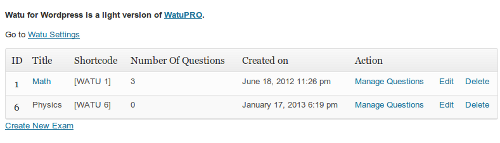
Lista de tus exámenes con shortcodes para incrustar en entradas o páginas 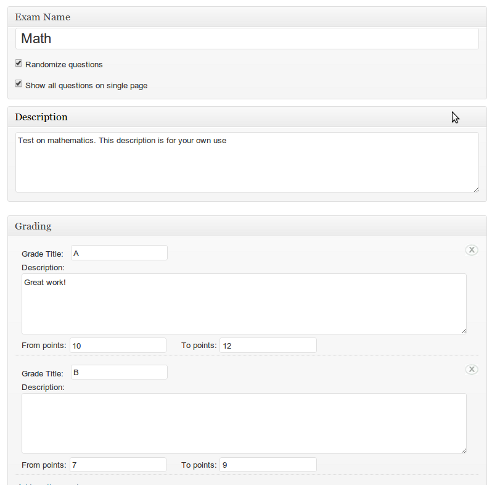
El formulario para crear y editar un examen/prueba 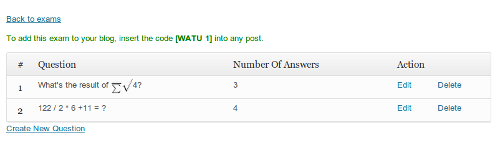
Puedes añadir un número ilimitado de preguntas en cada cuestionario o examen, y cada pregunta puede ser de respuesta única, de respuesta múltiple o de tipo abierto. 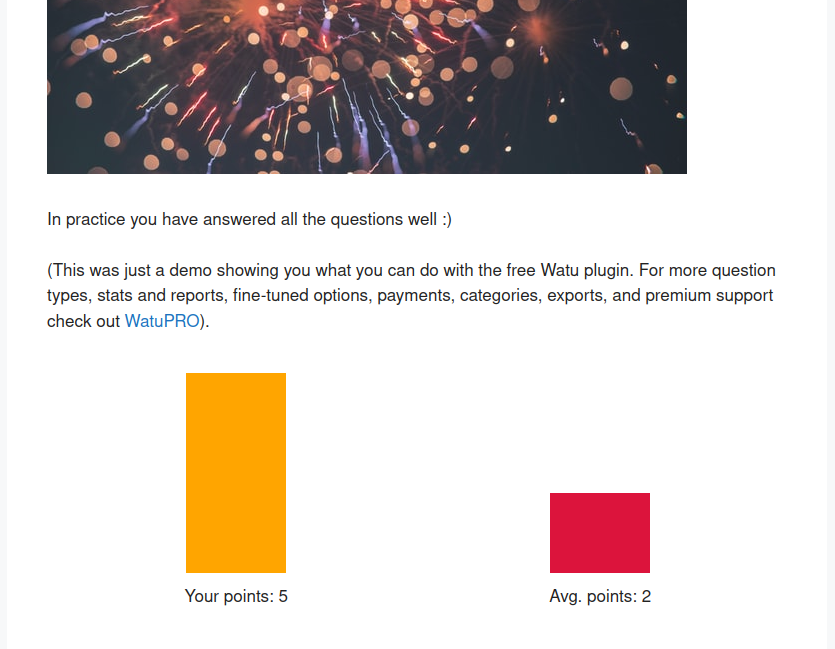


Instalación
This section describes how to install the plugin and get it working.
- Sube la carpeta completa
watual directorio/wp-content/plugins/ - Activa el plugin en menú ‘Plugins’ de WordPress
- Go to «Watu Settings» to change the default settings (optional)
- Ve a «Watu Quizzes» en el menú «Herramientas» para crear tus exámenes, añadir preguntas, respuestas y calificaciones. En la página «Gestionar preguntas» de la página del examen creado, encima de la tabla de preguntas verás un texto en verde. Te muestra el código que debes introducir en el contenido de la publicación donde deseas que aparezca el examen.
FAQ
-
¿Cómo se calculan las calificaciones?
-
Watu calcula el número total de puntos obtenidos por las respuestas dadas por el visitante. A continuación, determina la calificación. Por ejemplo: si hay 2 preguntas y las respuestas correctas dan 5 puntos cada una, el visitante obtendrá al final 0, 5 o 10 puntos. Puedes decidir definir las calificaciones «Suspenso» para 0 a 4 puntos y «Aprobado» para aquellos que hayan obtenido más de 4 puntos. En realidad, vas a tener más preguntas y respuestas, y algunas respuestas pueden ser parcialmente correctas, lo que te da total flexibilidad a la hora de asignar puntos y gestionar las calificaciones.
-
¿Puedo asignar puntos negativos?
-
Sí. Es muy recomendable para respuestas a preguntas que permiten múltiples respuestas. Si solo asignas 0 puntos a las respuestas incorrectas en este tipo de preguntas, el visitante podría marcar todas las casillas y obtener todos los puntos de esa pregunta.
-
¿Cómo se muestra el cuestionario a los visitantes de mi blog?
-
You need to create a post and embed the exam code. The exam code is shown in the green text above the questions table in «Manage questions» page for that exam.
Please do not place more than one code in one post or page. Only one exam will be shown at a time. If you wish more tests to be displayed, please give links to them!
-
¿Cómo maneja las cuentas de usuario ?
-
Watu Quiz uses the WordPress user registration / login system. So if you want to allow users to register for quizzes simply select «Require user login» in the Edit Quiz page and make sure «Anyone can register» is selected in your WordPress Settings page.
-
How to embed videos in questions?
-
Para insertar un vídeo de YouTube o un vídeo similar alojado de forma remota, utiliza el código de inserción de la siguiente manera: [embed width=»680″ height=»420″]http://www.youtube.com/watch?v=dQw4w9WgXcQ[/embed].
To embed locally hosted video you can use the «Add media» button in the rich text editor and insert your video. Sometimes this doesn’t work even in posts so you may want to install some of the many available video player plugins.
-
¿Es compatible con BuddyPress o con plugins de membresía?
-
Since it uses the standard WordPress user login system, it is compatible with BuddyPress and all membership plugins that we know about. Of course, some odd membership plugin that uses its own user login system might be incompatible with Watu.
-
Cómo traducir la interfaz del plugin a mi idioma o simplemente cambiar algunos de los textos
-
You can use the standard WordPress way of translating plugins (via Poedit and .po / .mo files) or use plugin like Loco Translate.
If using Poedit, your file names should start with «watu-«. For example: watu-de_DE.po / watu-de_DE.mo. They should be placed in wp-content/languages/plugins folder. -
Can I override the templates / views without modifying the plugin code? (For advanced users)
-
Sí. Puedes crear una carpeta llamada «watu» dentro de la carpeta del tema activo de WP. A continuación, crea una copia del archivo de vista que deseas modificar, mantén el nombre original y colócalo en la carpeta «watu». (No crees una carpeta «views»). De este modo, se utilizará la copia de la plantilla en lugar de la original.
-
I’m getting «Error Occurred» message after submitting the quiz
-
Si aparece el mensaje «Se ha producido un error» al enviar un cuestionario, suele deberse a que hay demasiados datos que enviar a través de Ajax. Watu suele utilizar Ajax para enviar cuestionarios y hacer que la experiencia del usuario sea más agradable. Si tu servidor no puede gestionar los datos de Ajax por algún motivo (demasiados datos, configuración incorrecta, etc.), puedes desactivar Ajax en la página de configuración de Watu. Navega hasta la parte inferior de la página y verás el encabezado «Ajax en cuestionarios». Selecciona las pruebas problemáticas y guarda los cambios.
-
Para que el usuario pueda volver a realizar el cuestionario, solo tienes que llevarlo de vuelta a la misma página en la que se publica el cuestionario (es decir, actualizar la página). Para ello, puedes colocar un enlace o un botón en la «pantalla final» del cuestionario y ese enlace o botón apuntará a la página del cuestionario.
-
He añadido JavaScript de terceros en la pantalla final, pero no funciona. ¿Qué puedo hacer?
-
Si el script define nuevos objetos, es posible que no funcione en modo Ajax. Intenta desactivar Ajax para este cuestionario desde la página de configuración de Watu, luego actualiza la página del cuestionario y vuelve a enviarlo. Esto suele resolver el problema.
Reseñas


Colaboradores y desarrolladores
«Watu Quiz» es un software de código abierto. Las siguientes personas han colaborado con este plugin.
Colaboradores

«Watu Quiz» está traducido en 6 idiomas. Gracias a los traductores por sus contribuciones.
Traduce «Watu Quiz» a tu idioma.
¿Interesado en el desarrollo?
Revisa el código , echa un vistazo al repositorio SVN o suscríbete al registro de desarrollo por RSS.
Registro de cambios
Changes in 3.4.2
- Added variable %%TOTAL-ENTRIES%% – The total number of users who submitted this quiz. Multiple entries of the same user are counted as individual entries.
- Fixed questions sorting issue
Changes in 3.4
- Added pagination and «per page» selector on the Manage Questions page.
- Removed default table borders from the basic chart table.
- Reordenación más sencilla de las preguntas con la función de arrastrar y soltar.
- Se han añadido categorías de preguntas para mejorar la organización administrativa. Puedes filtrar por categoría de pregunta.
- Se ha añadido la opción de programar cuestionarios.
- Se ha añadido la opción de limitar el número total de intentos (de todos los participantes) en un cuestionario.
- Added variables %%TOTAL%% for the total number of questions given, and %%AVG-QPOINTS%% for the average number of points achieved on each question for the given quiz attempt.
- Cuando se selecciona el «modo en vivo» para mostrar las respuestas, las casillas de verificación de los botones de opción se desactivarán después de seleccionar la respuesta.
- Unset «autoload» on all options to improve site’s performance.
- Database improvements: added indexes for better performance and the tables will be created on the default DB engine and collation.
Changes in 3.3
- Added two more columns to the question import file: «Is required» and «Answer explanation».
- Added filters on Manage Quizzes page to search quizzes.
- Added option to mark a question as a survey question. In this case it will not display correct / wrong checkmark at the end of the quiz. Also these questions will not be counted in correct/wrong/unanswered variables and not included in the percentage calculations.
- Fixed issues when questions contained new lines on the final screen.
- Handling of quotes in the message when sharing results on Facebook.
- Added personal data eraser and hooked to the WP tool.
- Replaced the rich text editor popup with a local instance to avoid JS errors on some installations.
- Added a new selectable quiz design: modern / buttons style. You can keep using the default one too.
- Se han añadido los estilos de columnas 2, 3, 4 y 5 para las respuestas de las preguntas de opción única y de opción múltiple.
- Added default «no ajax» setting for new quizzes.
- Se han añadido parámetros para ordenar, clasificar y limitar el shortcode [watu-takings]. Se ha documentado cómo ocultar columnas. De esta forma, se puede utilizar para crear una tabla de clasificación básica.
Changes in 3.2
- Added hook for third-party integrations right before outputting the final screen
- Fixed forced CSS rule to keep radios and checkboxes on the same line with the answer
- Added variable %%USER-NAME%% to show the logged in user name on final screen and email contents
- Added function to mass delete selected results on a quiz.
- The %%PERCENTAGE%% variable can be used to show the % correctly answered questions at the end of the quiz.
- Added option to deactivate questions. These will not be shown in the quiz and not counted but you will be able to re-activate them any time.
- Added options to use your own Twitter and Facebook social sharing buttons.
- The submit button on Ajax quizzes changes to «Please wait» to clearly show the data is processing.
- Added loading indicator for Ajax quizzes
- Added option to set email subject for the automated emails that go with the submitted quizzes.
- Email address included in exports when available.
- Added pagination on Manage Quizzes page.
Changes in 3.1
- Added buttons to Save & Reuse the current question (and Save & Add blank) to make adding multiple questions easier, especially when they have similar structure
- Added function to import questions from CSV file
- Added filters for question type, ID, and question contents on the Manage Questions page
- The plugin no longer stores IP addresses (GDPR compliance)
- Added option to mass delete questions
- Added rich text editor on answers to questions
- Removed the obsolete FB share dialog which did not work well and used the new SD kit
- Added option to mass update questions (currently change required status)
- Added option to switch off auto-scroll when user goes from page to page in the quiz. It is useful on some page designs.
Changes in 3.0
- The plugin will now count empty (unanswered) questions separately from wrongly answered. The variable %%EMPTY%% can be used at the Final screen to display the number of unanswered questions.
- Column «% correct» added to the takings page + information on the number of correctly answered, wrongly answered, and unanswered questions.
- The export file now includes information about % correct answers, num correct, num wrong, and num unanswered questions.
- Added parameters to the [watu-takings] shortcode that allow you to hide taker’s email and the columns for points and percent correct answers.
- Added option to select CSV delimiter and quotes around text fields in the CSV
- Added option to sort quizzes by name or number of questions.
- Improved integration with Namaste! LMS: you can restrict access to tests if they are required by lessons until the assigned lessons have been read.
- Improved integration with Namaste! LMS: you can now filter quiz results based on user’s course enrollment.
- Made the admin pages responsive to allow managing the quizzes in phones and other mobile devices
- Applied wp_login_url and wp_registration_url hooks for better integration with quizzes that enhance the login/registration process.
Changes in 2.9
- You can now specify sender email address which is different than the address in your global WP Settings page. You can also use the suggested format to specify sender’s name which is different than the default «WordPress».
- La página Administrar preguntas ahora muestra el tipo de pregunta y si es una pregunta requerida.
- Added user email in the taking details & takings list pages when email is available
- Points to answers and grades can contain decimals. The total in the «Final screen» will also show decimals when available.
- Added option to save and filter by source URL when taking a quiz. This can be useful if you have published the same quiz in different pages on your site.
- Added configuration for the submit button value. It can be different for every quiz.
- Varias mejoras de seguridad
- Added shortcode to display information from user’s profile. Check the internal Help page for more details.
- The plugin is integrated to MoolaMojo so when quiz is taken user can be awarded or charged virtual credits of their balance
- New option lets you define the word used for «quiz» in the system – for example «test», «exam» etc.
Changes in 2.8
- Added option «Do not alert the user when skipping a non-required question».
- The optional answer feedback will now be shown in «Show the answer of a question immediately» mode. Please note again this is not secure and shouldn’t be used for real knowledge tests.
- Added CSS overrides for themes that put radios and checkboxes on their own lines
- Added shortcode [watu-takings] to display a simplified version of the «View results» page on the front end.
- You can enable non-admin WP roles to manage the plugin so you don’t have to share your admin login with staff that has to manage quizzes.
- Added sortable columns on the «view results» page and the associated shortcode.
- Added honeypot option to prevent spam (it’s not obtrusive like captchas and almost as efficient)
- Added debug mode to display SQL errors
- Added variable %%EMAIL%% for quizzes that require login or request user’s email
- You can now specify URL to redirect the user to upon achieving a given grade
- The question feedback can be split into different content for correct and incorrect responses.
Changes in 2.7
- Added option to limit the number of logged in user attempts for quizzes that require login.
- You can specify one or more email addresses that will receive user’s results (instead of just using the admin email from your WP Settings page)
- You can now specify different content for the email sent to you when someone takes a quiz
- New option lets you to send email to user with their results. If user is not logged in this will generate a required field to enter email on the quiz page.
- You can specify different email contents of the email sent to user than the contents of the email sent to admin
- All views / templates can now be overriden by placing their copy under a folder called «watu» in your theme folder.
- Added option to switch off Ajax submitting for certain quizzes. This is useful if you are embedding javascript via shortcodes from other plugins in the final screen of the quiz as some javascripts won’t work when loaded by Ajax.
- Fixed security exploit
- Created main level menu for Watu to arrange the submenus better
- Added short Help page
- Added a basic bar chart for showing user points vs. average points on a given quiz. Use the shortcode [watu-basic-chart] in the Final Screen to display it.
Changes in 2.6
- Added optional text-based «captcha» to prevent spam bot submissions on quizzes which do not require user login
- Option to reoder the questions. Of course this takes effect only when you have not chosen «Randomize questions» in the quiz settings.
- Removed the hardcoded text «your answers are shown below» and the setting «display answers at the end of the quiz». Instead of this use the variable %%ANSWERS%% which gives far more flexibility.
- Added option to not store takings in the database. Will be useful to save DB space when you have a quiz whose resutls you don’t need to know.
- Added two new variables – %%AVG-POINTS%% and %%BETTER-THAN%% to compare your results to others who completed the quiz
- Added option to enable previous button
- Added option to automatically publish the quiz in a post at the time of saving
- Added question numbers + option to not display them (old quizzes default to it for consistency with the previous behavior)
- Added social sharing option. Currently supports Facebook sharing. You’ll need Facebook app ID.
- Added Twitter sharing option. As above, use the shortcode [watushare-buttons] to enable all sharing buttons accordingly to your sharing options.
Changes in 2.5
- Added optional answer explanation / feedback that can be shown along with the correct answers on the quiz
- Added filter / search on the «view results» page
- Added feature to andomize the answers to the questions. Works together or independent from the question randomization.
- Added compatibility with WP QuickLaTeX
- You can now be notified by email when someone takes a quiz
- Made the quiz more user-friendly by auto-generating a demo quiz for the new users
- Improvements to open end quesitons: now any special characters are handled and matching is case INSENSITIVE
- Moved the grades management out of the main quiz form for better user interface, data integrity and rich text editor for the grade descriptions
- Added «grade» filter in the «View results» page
- Added option to pull number of random questions from the quiz
- Fixed number of wpautop() issues. Now the filter is applied manually only where it’s needed
- Fixed bug with calculating points on open-end question (the bug was caused by the latest «randomize answers» feature)
Changes in 2.4
- Quizzes can now require user login. Depending on whether «Anyone can register» is selected in your main settings page, a register link will also be shown when non-logged in user tries to access such quiz
- You can now use «the_content» filter instead of «watu_content» to handle nasty problems with plugins like qTranslate. It’s not recommended to use this setting unless you have experienced such problems.
- The full details of the user answers are now recorded and can be seen via popup in the list of results page
- Added uninstall script and changed the settings regarding deleting data. Now you have to double confirm deleting your exam. This is to avoid accidential data loss.
- Removed wpframe and other obsolete code
- Made small change to the display of radio and checkbox questions to allow easier formatting on one line with CSS
- Fixed for compatibility with 3.8
- Quiz description, if entered, shows up on top of the quiz
- Option to delete single taking and delete all submitted data on a quiz
- Changed current_user_can(‘administrator’) to current_user_can(‘manage_options’) so you can allow a non-administrator role to use the quizzes
- Open-end questions can also have answers and be matched to them
- Replaced wpautop in favor of nl2br to avoid adding
<
p> tags in unexpected places like hidden fields
– Did some small styling adjustments
– Fixed the %%MAX_POINTS%% calculation to take into account the quesiton type
Changes in 2.3
- Export quiz results as CSV file (semicolon delimited)
- The exam shortcode is now easier to copy
- Animate back to top when submitting exam, and when clicking «next» after long question. This prevents confusion when user has to see the next screen.
- Fixed bug with «Question X of Y total» showing even for single-page quizzes
- Each exam / quiz has its own setting about how the answers will be shown
- As many themes started showing the choices under radio buttons or checkboxes, added explicit CSS to keep them on the same line
- Fixed new bug with missing answers when adding question
- Fixed bug with skipping «0» answers
- Changed %%TOTAL%% to %%MAX-POINTS%% for clarify and consistency. The old tag will keep working.
- Further code improvements
- Tested in multisite
- Fixed «headers already sent» message caused by premature update statement
Changes in 2.2
- Replaced ‘the_content’ filter with custom filter to avoid issues with membership plugins
- Cleanup the root folder from show_exam.php
- Another method added to the API, see the new docs
- The answers field changed to TEXT so you can now add long choices/answers to the questions
- Fixed bug in the list of taken exams
- Fixed issues with correct/wrong answer calculation
- Added %%CORRECT%% answers variable to display number of correct answers
- Watu scripts and CSS are now loaded only when you have exams on the page avoiding unnecessary page overload
- Other code fixes and improvements
Changes in 2.1
- Displaying «Question X of Y» so the user knows where they are
- Fixing incompatibility with Paid Membership PRO
- Shortcodes on the final screen
- Starting API (Not yet documented)
- Code fixes and improvements
Changes in 2.0
- Required questions (optional)
- A list of users who took an exam along with their results
- Localization of the strings in the javascript
- More flexible function to add new DB fields on update
- Code fixes and improvements
Changes in 1.9
- Grade title and description are now separated
- Shortcodes will be executed in questions and final screen
- Code fixes and improvements
- Localization issues fixed
Changes in 1.8
- the exam title links to the post with this exam if exam is already published
- «show all questions on single page» is now configurable for every exam
- Improving code continued (more to come)
Changes in 1.7
- You can now randomize the questions in a quiz
- Fixed issues with the DB tables during upgrade
- Removed more obsolete code, fixed code issues. More on this to come.
Changes in 1.6
- Removed obsolete rich text editor and replaced with wp_editor call
- Added «Essay» (open-end) question
- Resolved possible Javascript conflicts
- Internationalization ready – find the .pot file in langs/ folder
