WordPress
WordPress plugin information shortcode

GitHub
[gitrepo author=”f13dev” repo=”WP-Wordpress-plugin-information-shortcode”]
Introduction
Have you created your own WordPress plugin? Do you want to showcase it on your WordPress powered blog? Do you want the showcase on your website to show up-to-date information?
If you answered yes to the above then ‘WordPress Plugin Information Shortcode’ may be for you. This plugin utilises the WordPress API to retrieve information about a plugin and display a showcase of it on your website.
Features
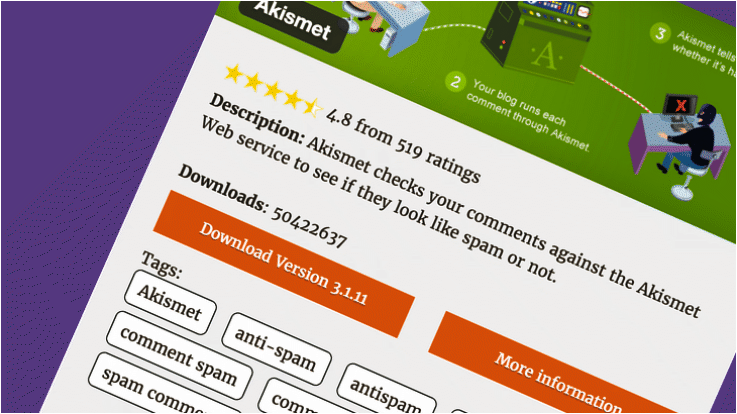
Easily display a showcase of your WordPress plugin on your WordPress powered website. Each showcase includes the following:
- Plugin banner, as shown on WordPress.org, if the plugin does not have a banner then a generic one is used
- Plugin name
- 5 star rating of the plugin, including a visual representation of the 5 star rating
- Description of the plugin
- Number of times the plugin has been downloaded
- Tags that the plugin is listed with on WordPress.org
- A download button, which links directly to the latest version on WordPress.org
- A more information button, which links to the plugins page on WordPress.org
All the above is formatted in a similar way to the plugin page, as it would display on WordPress.org. Information is also formatted in a responsive way; giving a good appearance on mobile devices as well as desktop web browsers.
Installation
- Upload the plugin files to the ‘/wp-content/plugins/plugin-name’ directory, or install the plugin through the WordPress plugins screen directly.
- Activate the plugin through the ‘Plugins’ screen in WordPress.
- Add the shortcode [wpplugin slug="my-plugin-name"] to the desired location on your blog.
Usage
Once ‘WordPress Plugin Information Shortcode’ has been installed on your WordPress powered website and the plugin has been activated:
- Find the slug of your plugin by viewing the plugin on WordPress.org. The slug is the final part of the URL, which is usually formatted: ‘my-plugin-name’.
- On the page or blog post where you wish to showcase your plugin add the following shortcode: [wpplugin slug="my-plugin-name"]
- Save the page or blog post, your plugin showcase should now be displayed on your page or blog post.
Code
Plugin code:
<?php
/*
Plugin Name: WordPress plugin information shortcode
Plugin URI: http://f13dev.com
Description: This plugin enables you to enter shortcode on any page or post in your blog to show information about a WP plugin you have written.
Version: 1.0
Author: Jim Valentine - f13dev
Author URI: http://f13dev.com
Text Domain: wp-plugin-information-shortcode
License: GPLv3
*/

/*
Copyright 2016 James Valentine - f13dev ([email protected])
This program is free software; you can redistribute it and/or modify
it under the terms of the GNU General Public License as published by
the Free Software Foundation; either version 3 of the License, or
any later version.
This program is distributed in the hope that it will be useful,
but WITHOUT ANY WARRANTY; without even the implied warranty of
MERCHANTABILITY or FITNESS FOR A PARTICULAR PURPOSE. See the
GNU General Public License for more details.
You should have received a copy of the GNU General Public License
along with this program; if not, write to the Free Software
Foundation, Inc., 51 Franklin St, Fifth Floor, Boston, MA 02110-1301 USA
*/

// How to handle the shortcode
function f13_plugin_information( $atts, $content = null )
{
    // Get the attributes
    extract( shortcode_atts ( array (
        'slug' => 'none' // Default slug won't show a plugin
    ), $atts ));

    $results = f13_getWPPluginResults($slug);

    $string = '
        <div class="f13-wp-container">
            <div class="f13-wp-header" style="background-image: url(' . f13_getBannerURL($results['slug']) . ');">
                <p class="f13-wp-name">' . $results['name'] . '</p>
            </div>
            <div class="f13-wp-information">
                <div class="f13-wp-description">
                    <div class="f13-wp-rating">' .
                        f13_getRatingStars($results['rating'] / 20) . ' ' .
                        $results['rating'] . ' from ' .
                        $results['num_ratings'] . ' ratings
                    </div>
                    <br/>
                    <p class="f13-wp-short-description">
                        <strong>Description: </strong>' . $results['short_description'] . '
                    </p>
                    <div class="f13-wp-downloads">
                        <strong>Downloads</strong>: ' . $results['downloaded'] . '
                    </div>
                </div>
                <div class="f13-wp-links">
                    <a class="f13-wp-button f13-wp-download" href="' .  $results['download_link'] . '">Download Version ' .  $results['version'] . '</a>
                    <a class="f13-wp-button f13-wp-moreinfo" href="' .  f13_getPluginURL($slug) . '">More information</a>
                </div>
                <br style="clear: both" />
                <div class="f13-wp-tags">Tags: ' . f13_getTagsList($results['tags']) . '</div>
            </div>
        </div>';
    return $string;

}

// Add the stylesheet
function f13_plugin_information_stylesheet()
{
    wp_register_style( 'f13information-style', plugins_url('css/wp-api.css', __FILE__));
    wp_enqueue_style( 'f13information-style' );
}

// Register the shortcode
add_shortcode( 'wpplugin', 'f13_plugin_information');
// Register the css
add_action( 'wp_enqueue_scripts', 'f13_plugin_information_stylesheet');

/**
 * Functions used to create the plugin information
 */

 function f13_getRatingStars($aRating)
 {
     $string = '';
     for ($x = 1; $x < $aRating; $x++ )
     {
         $string .= '<img src="' . plugin_dir_url( __FILE__ ) . 'img/star-full.png" />';
     }
     if (strpos($aRating, '.'))
     {
         $string .= '<img src="' . plugin_dir_url(__FILE__) . 'img/star-half.png" />';
         $x++;
     }
     while ($x <= 5)
     {
         $string .= '<img src="' . plugin_dir_url(__FILE__) . 'img/star-empty.png" />';
         $x++;
     }

     return $string;
 }

 function f13_getWPPluginResults($aSlug)
 {
     // start curl
     $curl = curl_init();

     // set the curl URL
     $url = 'https://api.wordpress.org/plugins/info/1.0/' . $aSlug . '.json';

     // Set curl options
     curl_setopt($curl, CURLOPT_URL, $url);
     curl_setopt($curl, CURLOPT_HTTPGET, true);

     // Set the user agent
     curl_setopt($curl, CURLOPT_USERAGENT, 'Mozilla/5.0 (Windows; U; Windows NT 5.1; en-US; rv:1.8.1.13) Gecko/20080311 Firefox/2.0.0.13');
     // Set curl to return the response, rather than print it
     curl_setopt($curl, CURLOPT_RETURNTRANSFER, true);

     // Get the results and store the XML to results
     $results = json_decode(curl_exec($curl), true);

     // Close the curl session
     curl_close($curl);

     return $results;
 }

 function f13_getBannerURL($aSlug)
 {
     $baseURL = 'https://ps.w.org/' . $aSlug . '/assets/banner-772x250';
     if (f13_remoteFileExists($baseURL . '.jpg'))
     {
         return $baseURL . '.jpg';
     }
     else if (f13_remoteFileExists($baseURL . '.png'))
     {
         return $baseURL . '.png';
     }
     else
     {
         return plugin_dir_url(__FILE__) . 'img/default_banner.png';
     }
 }

 function f13_remoteFileExists($url)
 {
     $curl = curl_init($url);
     curl_setopt($curl, CURLOPT_NOBODY, true);
     $result = curl_exec($curl);
     if ($result != false)
     {
         if (curl_getinfo($curl, CURLINFO_HTTP_CODE) == 200)
         {
             return true;
         }
     }
     else
     {
         return false;
     }
 }

 function f13_getPluginURL($aSlug)
 {
     return 'https://wordpress.org/plugins/' . $aSlug . '/';
 }

 function f13_getTagsList($tagList)
 {
     $string = '<ul>';
     foreach ($tagList as $key => $value)
     {
         $string .= '<li>' . $value . '</li>';
     }
     $string .= '</ul>';
     return $string;
 }
CSS:
.f13-wp-container
{
    width: 100%;
    max-width: 775px;
    position: inherit;
}

.f13-wp-header
{
    width: 100%;
    padding-top: 32.38%;
    box-shadow: inset 0 0 50px 4px rgba( 0, 0, 0, 0.2 ), inset 0 -1px 0 rgba( 0, 0, 0, 0.1 );
    background-repeat: no-repeat;
    background-size: 100%;
    display: block;
    position: relative;
    border-radius: 10px 10px 0 0;
}

.f13-wp-header > .f13-wp-name
{
    font-size: 20px;
    line-height: 1em;
    bottom: 4%;
    left: 3%;
    position: absolute;
    /*max-width: 682px;*/
    padding: 8px 15px;
    margin-bottom: 4px;
    color: #fff;
    background: rgba( 30, 30, 30, 0.9);
    text-shadow: 0 1px 3px rgba( 0, 0, 0, 0.4);
    border-radius: 8px;
    font-family: "Helvetica Neue", sans-serif;
    font-weight: bold;
}

.f13-wp-information
{
    padding: 30px 15px 10px 30px;
    font-size: 16px;
    line-height: 24px;
    margin: 0;
    background: #eee;
    text-shadow: 0 1px 1px #fff;
    box-shadow: inset 0 0px 42px -px rgba (100, 100, 100, 0.1);
    border-radius: 0 0 10px 10px;
}

.f13-wp-links
{
    width: 100%;
    position: relative;
    float: left;
}

.f13-wp-description
{
    width: 100%;
    position: relative;
    float: left;
}

.f13-wp-button
{
    font-size: 15px;
    color: #fff;
    display: inline-block;
    text-shadow: rgba( 0, 0, 0, 0.5) 0 1px 0;
    border: none;
    text-decoration: none;
    font-weight: normal;
    text-align: center;
    background: #d54e21;
    line-height: 44px;
    margin-bottom: 1em;
    width: 47%;
}

.f13-wp-button:hover
{
    color: #fff;
}
.f13-wp-moreinfo
{
    right: 0;
    position: absolute;
}

.f13-wp-tags > ul
{
    display: inline-block;
}

.f13-wp-tags > ul > li
{
    display: inline-block;
    background: #fff;
    padding: 5px 10px;
    margin-right: 1em;
    margin-bottom: 0.5em;
    border-radius: 7px;
    border: 1px solid black;
}

.f13-wp-rating
{
    display: inline-block;
    position: inherit;
    margin-bottom: 0;
    min-width: 350px;
    line-height: 20px;
    margin-bottom: 0.6em;
}

.f13-wp-downloads
{
    padding-top: 0;
    margin-bottom: 0.6em;
}
Screenshots

The example output from adding the shortcode [wpplugin slug="akismet"].
No comments on WordPress plugin: Plugin information shortcode