

توضیحات
Creativehone History adds a custom Elementor widget to easily search and display creative history content without any coding.
Key Features:
* Custom Elementor widget named Creativehone History
* Search and display history content dynamically
* Works with Elementor Free and Elementor Pro
* Optimized for performance and easy to configure
* Compatible with the latest WordPress version (6.8)
عکسهای صفحه
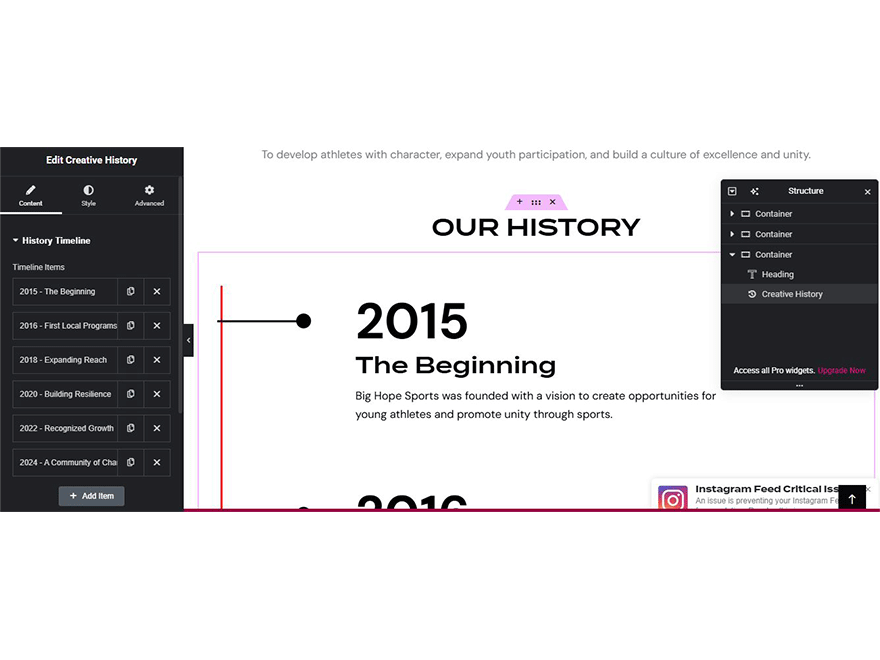
Creativehone History widget inside Elementor editor. 
Frontend view of history search results.1. Creativehone History widget inside Elementor editor.


نصب
- Upload the
creativehone-history.zipfile via the WordPress admin dashboard (Plugins > Add New > Upload Plugin). - Activate the plugin through the “Plugins” menu in WordPress.
- Make sure Elementor (Free or Pro) is installed and active.
- Open Elementor editor.
- Drag and drop the Creativehone History widget onto your page.
- Configure its settings and display creative history content.
سوالات متداول
-
Do I need Elementor Pro?
-
No. Creativehone History works with both Elementor Free and Elementor Pro.
-
What is the minimum WordPress version required?
-
WordPress 5.2 or higher.
-
What PHP version is required?
-
This plugin requires PHP 7.2 or higher.
-
Will this plugin slow down my site?
-
No. Creativehone History is lightweight and optimized for performance.
-
Where can I get support?
-
For documentation, updates, and support, please visit the official plugin page:
https://github.com/tosisoft/Creativehone-History
or the Tosisoft website:
https://tosisoft.com/creativehone-history/
نقد و بررسیها
نقد و بررسیای برای این افزونه یافت نشد.
توسعه دهندگان و همکاران
“Creativehone History” نرم افزار متن باز است. افراد زیر در این افزونه مشارکت کردهاند.
مشارکت کنندگان
ترجمه “Creativehone History” به زبان شما.
علاقه مند به توسعه هستید؟
Browse the code, check out the SVN repository, or subscribe to the development log by RSS.
گزارش تغییرات
1.0.1
- Fixed minor bugs.
- Improved Elementor widget performance.
- Updated compatibility with the latest WordPress version.
1.0.0
- Initial release of Creativehone History.
- Added Elementor widget for searching and displaying history content.
