All Activity
- Past hour
-
 AEON_FIUX joined the community
 -
 pradoll joined the community
 -
 Athoon joined the community
 -
 raphaelr joined the community
 - Today
-
 eggno joined the community
 -
 Gamestorian joined the community
 -
 Nuggiez985 joined the community
 -
 StayToked joined the community
 -

Here is a box art cover for the game, Asura The Striker
Orionsangel posted a topic in Platform Media
Asura The Striker
-
🍾🍾🍾
-
 tantofazmano joined the community
 -
 3CL1P5389 joined the community
 -
.thumb.png.c9faf450e4d2b690a819048b18173f61.png) Not sure what I did to help, but glad to hear you got it working.
Not sure what I did to help, but glad to hear you got it working. -
🍾🍾🍾
-
 I finally got it working, thank you for all of your help 👍
 - Yesterday
-

Restoring and Preserving Historical Video Game Box Art
Jonny Severn replied to Jonny Severn's topic in Game Media
CD32 version
-
Restoring and Preserving Historical Video Game Box Art
Jonny Severn replied to Jonny Severn's topic in Game Media
Myth
-
Big Box moving on its own -- UltraStik 360 joysticks
ultrez replied to dragonkoh's topic in Troubleshooting
I can confirm this. It has nothing to do with the dead zone . It's like a phantom input. I've had this for years, only one Ultrastik was affected, but now it's both. -
I couldn't find the feature request for this one, but it looks like its still not implemented as of current version 13.24. Any plans to work on this one? Or is the screensaver feature basically the only option here still? Thanks!
-
To be safe for the Holiday party tonight I will be rolling back to 13.19. Hopefully this will resolve the crashes. I would be more than happy to provide any type of log needed to hopefully understand what’s causing these multiple crashes on 13.24. Just let me know what I can provide.
-
Can we get the following missing logos (first is for Europe, and the other is for Australia) https://gamesdb.launchbox-app.com/games/details/9964-boulder-dash-construction-kit
-
Tools > Manage > Options > Automated Imports Thank you!
-
My Cooking Coach
-
QUASAR
-
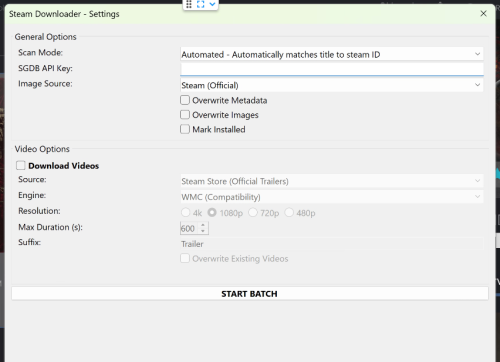 Tried one game and it worked like a charm. Thanks!
 -
Did you right-click the dll file, select Properties and check UnBlock? If there is an unblock option, it will be located here: What version of LaunchBox are you running? And you are selecting a game and right-clicking the game to find the plugin in the menu? (have to ask ) To clarify, you placed the file into /LanchBox/Plugins/Pixelcade/PixelcadeMarquees.dll (which will be fine) Download version 1.0. Open the zip file and copy everything in its PixelcadeMarquees subfolder EXCEPT the dll file, into where you placed the v1.1 dll file. So your /Plugins/Pixelcade/ will contain v1.1 of the dll file, pixSettings.xml (file) and the ffmpeg folder. (When I added the v1.1 update (over 2 years ago), I neglected to add the settings file and the ffmpeg folder/files)
-
No it doesn't show up in Launchbox...I have Pixelcade installed in it's own folder on my C:\ drive...also there was not Pixelcade folder in plug-ins so I created one and put the files from the zipped file into it.
-
After working on my own Version of a LaunchBox like Tool in Linux for over a month i can say it is definitively possible to create a great frontend in Linux......You just need to do it, there are no technical hurdles anymore !! I worked with C#/Avalonia, and i see no hard technical barrier..... But still my app sucks compared to LaunchBox so i would gladly buy the tool as soon as it is released, hell just release a toned down version. My Core-App The Wheel-View and an Arcade View which i copied/made after a theme from Attract Mode
-
It worked using the new location. thanks!
-
LaunchBox Games Database - Game Comparer
JoeViking245 commented on JoeViking245's file in Third-party Apps and Plugins
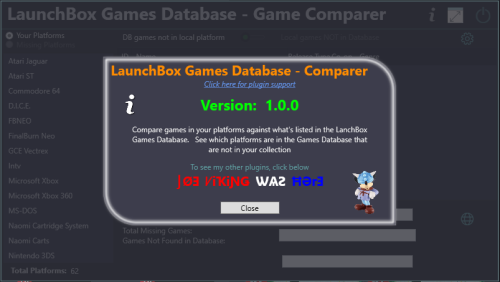 Took a look, the local database used to parse the data from doesn't contain a field for region. "I think" those are taken from your game ROMs where it [may have] has something like game_ROM_name_(Japan).zip. Similar with (promo) and (demo disks) etc. Genres. Then 28 Genres that are available in the database (I believe) are all listed in the settings menu. Adventure Shooter Stealth Action Platform Flight Simulator Sandbox Horror Role-Playing Beat 'em Up Racing Vehicle Simulation MMO Sports Party Strategy Fighting Puzzle Construction and Management Simulation Board Game Music Life Simulation Quiz Pinball Education Compilation Casino Visual Novel
 -
Thanks. I'll give that a read now. HNY!
-
Give this a read and see if it sheds any light. The location for the icons has changed in LaunchBox v13.21. And while not assuming anything, custom platform Icons does require a premium subscription. Creating Platform Clear Logo Media Packs for LaunchBox and Big Box - LaunchBox
-
Th instructions should be fairly straight forward. What exactly is not working? After selecting a game (or games), does the plugin appear when you right-click one of the selected games? When you click it, does the plugins UI appear? Do you have Pixelcade installed? Which folder was it installed into?
-
Any idea or guide on how to update each icon to a storefront Icon please?! . I have tried all options I can thin of like png, jpg sizes .transparency . renaming to the storefront name. Windows name. I am updating here as this is where my install is E:\Gaming\Launchbox\Images\Platform Icons. but nothing. they are always the Windows logo. I renamed the windows icon. Deleted it out the folder but nada changes. I have my Clear logo and banners updated no problem just cannot get those darn mini icons updated! any advice welcome. thanks
-
 Quiz Sekai wa SHOW by shobai mame arcade bezel Last one for this year, happy new year and best wishes for 2026 qzshowby.zip