Search the Community
Showing results for tags '16:9'.
-
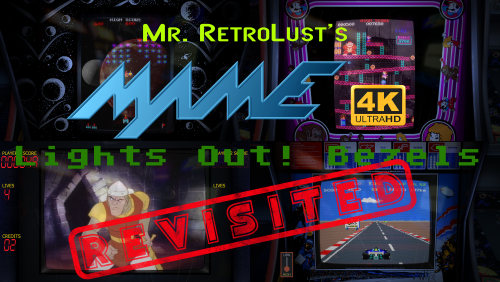
Version 0.16
34,442 downloads
LIGHTS OUT! BEZELS UPDATED TO THE NEWEST MAME CODE Mr. RetroLust created a series of bezels which is a masterpiece : Yet as he uses a rather old version of MAME, some of those bezels are not compatible with the latest releases which use a redesigned artwork system (MAME 0.226 onwards). As I intend to continue to enjoy his creations in optimal conditions, I have undertaken to update all the lay files and to correct recent incompatibilities. The original project uses a reflection and scratch layer to add a realistic effect which defines its style. You will find here the complete arcade 4K widescreen collection updated to the most recent lay code and expanded in various ways. Mainly based on the version 17.0 of the original collection : I’ve updated/edited all the lay files. Renamed files in sync with latest MAME release (0.281 at the time of this writing). Merged some archives to avoid any conflict with the classic artworks of Mr. Do and progetto-SNAPS. Converted and integrated some of Mr. RetroLust's non-MAME specific arworks*. Added Xeno Crisis bezel by Layer0730. Added blue MAME cab bezel by d66dle. Added some new artworks in the same style (Ex: Darius II Dual-Screen). Replaced most of the screen overlays based on pics with lay-coded ones according to the latest MAME sources (ex : Circus). Corrected some MAME artwork display known bugs (ex : Dead Eye). Added switchable gear shift for racing games when possible (ex : Pole Position). Added optional custom enhancements (ex : Galaga). Added color variations (ex : Barricade). Added BIOS specific bezels (ex : Deco Cassette System). Added generic horizontal and vertical bezels to use as fallback art files for every game missing individual artwork. Included a folder INI file to display a list of all games of the collection. If you spot a bug, or a game I forgot to add a gear shift, please indicate it in the comments, I will try to rectify it ASAP. * : Converted for MAME and upscaled to 4K some artworks from HD Lights Out! Retroarch Bezels 8.5. Converted for MAME the Sammy Atomiswave 4K Lights Out! Realistic Bezels 1.0.0. Converted for MAME the Sega Naomi 4K Lights Out! Realistic Retroarch Bezels 1.3. INSTALLATION Easy 'n' dirty way (not recommended) : Unzip all LightsOutRevisited0-Z archives in MAME/ARTWORK/ Install updates one after the other, just unzip and replace all files when asked. Put horizontal and vertical INIs in the root folder of your MAME installation or in MAME/INI/PRESETS/ Advanced 'n' clean way : Use the provided DAT to rebuild the collection with Clrmamepro, Romcenter or your favorite ROMs manager. Place the resulting ZIP files in MAME/ARTWORK/ Put horizontal and vertical INIs in the root folder of your MAME installation or in MAME/INI/PRESETS/ It is ESSENTIAL to use the included horizontal and vertical INIs to make the generic fallback bezels work. Optional : Put vector, vector-mono and raster INIs in the root folder of your MAME installation or in MAME/INI/PRESETS/ Put Lights Out Bezels Revisited INI in MAME/FOLDERS/ The FOLDERS INI file is entirely optional. The vector and the vector-mono INIs are highly recommended but not essential. The raster INI is ONLY to be used if you use the D3D HLSL graphics mode. I personally use the BGFX graphics mode for the rasters and the fantastic ArcCabView shader from Ducon2016 and Houb (included in UPDATE TO LIGHTS OUT 10.0 - MAME 0.276). Let's play ! All hails to Mr. RetroLust for the incredible work that he made with his original bezels. Special thanks to the following people who directly or indirectly inspired and/or helped me with this project : AntoPISA, d66dle, Ducon2016, Houb, Layer0730, Mr. Do, numerous members from MAMEWorld, Starman99x, Vaughan and Widge-5. After downloading and testing the release, if you enjoyed it, please come back and react by reviewing or liking the page. It will take you just a few seconds and help me give visibility to this project. -
![More information about "Metal Slug Collection - Themes Video [16:9]"](https://forums.cdn.launchbox.gg/monthly_2023_03/2144550753_2023-03-17(1).thumb.png.572711afa05a25c85d4ade39908c7922.png)
Version 1.0.0
414 downloads
Metal Slug Collection - Themes Video [16:9] Some Themes Video comes from Hyperspin. From 1-6 are 16:9 Mrfomt modifications. Some of them I modified and some I created from scratch and recorded everything Any comments welcome. If you possess a better quality snap video then I can substitute and record again. -
Nostalgia View File Nostalgia uses the amazing platform videos created by @viking to create a per-system theme; thanks to viking for letting me derive from and name my theme after his work. It's designed for 16:9; tested at HD but not 4k since I don't have a 4k setup. Please let me know if you spot problems or have suggestions. It relies on a set of plugin controls I created, so you'll have to unblock either the entire zip file, or more specifically the DLL files in the theme's Plugins folder (see below). Due to its reliance on certain plugin features, the current version of this theme requires LB version 10+. Bundled with Nostalgia are some clear logos from viking's silver ring set, along with a few extras. Also bundled are platform banners created by @Grila and @Omen. For the best experience (including CRT curvature effects for videos), I recommend setting BigBox to use Windows Media Player. Platform Views: Background as the current platform (from viking's video set) including a video playing within the arcade cabinet, TV screen, etc. If there is no video for the selected platform, category, or playlist, a random list of relevant game videos are played instead. If no vids are available, screenshots are used. Platform, category, or playlist details are displayed to the left of the screen. Game Views: Selected game is displayed within a platform-specific background. If no game video exists, the game's screenshots are played as a slideshow while the game's soundtrack (if found in your LB setup) is played in the background. If neither game nor screenshots exist, a video of TV static plays. Game details are displayed to the left of the screen. Filter Views: E.g., Genres, Series, etc -- in this view, a random list of game videos for the selected Series, etc. will play. KNOWN ISSUES: (1) 3DS and DS videos do not display properly. This is due to how they were captured, i.e., with both screens on these dual screen devices being squished into a single video. A potential workaround is to crop out the auxiliary screen from these videos and use on the part from the main screen. If anyone knows how to do this, please let me know. I think handbrake would work for batch cropping. (2) There are missing platform backgrounds. I tried to include the most common platforms. Viking's background set is quite thorough; please send me any requests. NOTE: Unblocking the ZIP file will also unblock the DLLs (e.g., Ao.Bigbox.Themer.dll and others) contained therein, giving your computer permission to run these DLLs. This is an issue with all plugins you might download from this forum. It's a Windows security feature. You basically have to vouch for a file before Windows will use it. I liken it to how a MS office document you download from an email runs in Protected Mode until you unblock it for printing, editing, etc. Below is the error you'll see if you don't unblock the file, as well as a screenshot of the solution. Submitter eatkinola Submitted 09/27/2017 Category Big Box Custom Themes
- 420 replies
-
- 4
-

-
- nostalgic
- per-system theme
- (and 2 more)
-
![More information about "Nintendo Game & Watch - Themes Video [16:9]"](https://forums.cdn.launchbox.gg/monthly_2023_03/1554956055_2023-03-13(52).thumb.png.9b6196eff7bcdc3b45fb2580962908bc.png)
Version 1.0.0
627 downloads
Nintendo Game & Watch - 52 Themes Video [16:9] Recorded based on themes created by Hoscarconh from hyperspin Many thanks to the creator of the original HS themes- 3 comments
- 1 review
-
- 11
-
-

-

-
- nintendo game & watch
- 16:9
- (and 1 more)
-
![More information about "Konami Handheld - [16:9] Themes Video"](https://forums.cdn.launchbox.gg/monthly_2022_10/9.thumb.png.6a0611802b3d2e696935f45695fb6257.png)
Version 1.0.2
580 downloads
Konami Handheld - [16:9] Themes Video Recorded based on themes created by Hoscarconh from hyperspin Many thanks to the creator of the original themes.- 6 comments
- 1 review
-
- 8
-
-
-
- konami handheld
- themes video
- (and 1 more)
-
Version 2.2.2
2,943 downloads
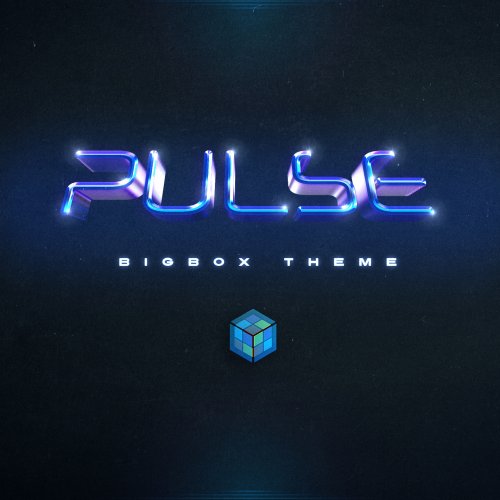
Pulse is dark, responsive BigBox theme. No need for custom images. 125 device images and 135 cropped clear logos included. Views use: Clear logos, Videos, Fan art, Box Art, 3D Box Art and device images. Made with: Community Theme Creator for BigBox 1.0.8.99 by y2guru Views included (Version 1.1): System HorizontalWheel1 HorizontalWheel2 HorizontalWheel3 PlatformWheel1 PlatformWheel2 PlatformWheel3 PlatformWheel4 TextFiltersView TextGamesView Views (Version 2.0) GameDetailsView HorizontalWheel1GamesView HorizontalWheel2GamesView HorizontalWheel3GamesView PlatformWheel2FiltersView (Viking's Colorful platform videos are recommended) PlatformWheel3FiltersView SystemView TextFiltersView TextGamesView TextListView WallGamesView Wall2GamesView (If you want this to look good please remove all the title screenshots from games) Fonts included: BarlowSemiCondensed-ExtraBold BarlowSemiCondensed-Medium BarlowSemiCondensed-Regular Barlow Semi Condensed - Google Fonts Remember to refresh wheel images from BigBox options AND INSTALL THE FONTS! Special Thanks to @Dan Patrick and @bundangdon who helped me a lot with useful feedback. Dan also provided some icons and clear logos. There were others who gave me feedback, so thank you all for your help. Screenshots and video preview uses videos and images made by others, including platform videos by @viking Not taking any requests for missing assets. Video Preview Version 2.0 Version 1.1 -
Version 4.1
4,108 downloads
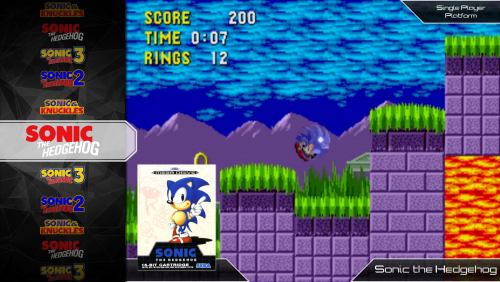
Updated to 3.0 See Details in Change log A elegant and modern feeling theme that tries to keep details to a minimum. Warning Must be using Launchbox 7.1+ to use the theme Unique Features 6 custom views Images were created from scratch especially for this theme Different view based around 16:9 or 4:3 videos Custom Favorite, Broken and Completed symbols Default Black and White theme that blends with most images Custom Futurestate Background Videos Simple Views with liberal use of game information on selection pages Install instructions Works with Launchbox version 7.1+ Do a clean unzip into your themes folder, it is recommended to not right over a previous version Make sure to install the font inside the Font Folder if you would like to use the custom font Alternative Views Alternative view are views requested by users that alter the default theme. I try to fulfill requests if they are reasonable but may not update the files in newer iterations. *use at your own risk* Futurestate no info wheelgamesview.zip - This is a 4:3 Game View that removes all text over top of the game video. Futurestate Themes *Download the skins in the Themes download tab There are a few variations for skinning Futurestate in the works. To use these create backup of your existing Images/Theme folder and copy the contents of the zip files over top of the original locations. Put my Photoshop skills to the test! Request one and I will see what I can do! **These files over write the default Futurestate skin! Futurestate Ruby Futurestate_Skin-_Ruby.zip Also check out the RetroState theme located here by Scottad! @Scottad Futurestate_Skin-_Ruby.zip -
Pulse View File Pulse is dark, responsive BigBox theme. No need for custom images. 125 device images and 135 cropped clear logos included. Views use: Clear logos, Videos, Fan art, Box Art, 3D Box Art and device images. Made with: Community Theme Creator for BigBox 1.0.8.99 by y2guru Views included (Version 1.1): System HorizontalWheel1 HorizontalWheel2 HorizontalWheel3 PlatformWheel1 PlatformWheel2 PlatformWheel3 PlatformWheel4 TextFiltersView TextGamesView Views (Version 2.0) GameDetailsView HorizontalWheel1GamesView HorizontalWheel2GamesView HorizontalWheel3GamesView PlatformWheel2FiltersView (Viking's Colorful platform videos are recommended) PlatformWheel3FiltersView SystemView TextFiltersView TextGamesView TextListView WallGamesView Wall2GamesView (If you want this to look good please remove all the title screenshots from games) Fonts included: BarlowSemiCondensed-ExtraBold BarlowSemiCondensed-Medium BarlowSemiCondensed-Regular Barlow Semi Condensed - Google Fonts Remember to refresh wheel images from BigBox options AND INSTALL THE FONTS! Special Thanks to @Dan Patrick and @bundangdon who helped me a lot with useful feedback. Dan also provided some icons and clear logos. There were others who gave me feedback, so thank you all for your help. Screenshots and video preview uses videos and images made by others, including platform videos by @viking Not taking any requests for missing assets. Video Preview Version 2.0 Version 1.1 Submitter Juketsu Submitted 05/08/2021 Category Big Box Custom Themes
-
Mr. RetroLust's MAME Lights Out Bezels Revisited View File LIGHTS OUT! BEZELS UPDATED TO THE NEWEST MAME CODE Mr. RetroLust created a series of bezels which is a masterpiece : Yet as he uses a rather old version of MAME, some of those bezels are not compatible with the latest releases which use a redesigned artwork system (MAME 0.226 onwards). As I intend to continue to enjoy his creations in optimal conditions, I have undertaken to update all the lay files and to correct recent incompatibilities. The original project uses a reflection and scratch layer to add a realistic effect which defines its style. You will find here the complete arcade 4K widescreen collection updated to the most recent lay code and expanded in various ways. Mainly based on the version 17.0 of the original collection : I’ve updated/edited all the lay files. Renamed files in sync with latest MAME release (0.281 at the time of this writing). Merged some archives to avoid any conflict with the classic artworks of Mr. Do and progetto-SNAPS. Converted and integrated some of Mr. RetroLust's non-MAME specific arworks*. Added Xeno Crisis bezel by Layer0730. Added blue MAME cab bezel by d66dle. Added some new artworks in the same style (Ex: Darius II Dual-Screen). Replaced most of the screen overlays based on pics with lay-coded ones according to the latest MAME sources (ex : Circus). Corrected some MAME artwork display known bugs (ex : Dead Eye). Added switchable gear shift for racing games when possible (ex : Pole Position). Added optional custom enhancements (ex : Galaga). Added color variations (ex : Barricade). Added BIOS specific bezels (ex : Deco Cassette System). Added generic horizontal and vertical bezels to use as fallback art files for every game missing individual artwork. Included a folder INI file to display a list of all games of the collection. If you spot a bug, or a game I forgot to add a gear shift, please indicate it in the comments, I will try to rectify it ASAP. * : Converted for MAME and upscaled to 4K some artworks from HD Lights Out! Retroarch Bezels 8.5. Converted for MAME the Sammy Atomiswave 4K Lights Out! Realistic Bezels 1.0.0. Converted for MAME the Sega Naomi 4K Lights Out! Realistic Retroarch Bezels 1.3. INSTALLATION Easy 'n' dirty way (not recommended) : Unzip all LightsOutRevisited0-Z archives in MAME/ARTWORK/ Install updates one after the other, just unzip and replace all files when asked. Put horizontal and vertical INIs in the root folder of your MAME installation or in MAME/INI/PRESETS/ Advanced 'n' clean way : Use the provided DAT to rebuild the collection with Clrmamepro, Romcenter or your favorite ROMs manager. Place the resulting ZIP files in MAME/ARTWORK/ Put horizontal and vertical INIs in the root folder of your MAME installation or in MAME/INI/PRESETS/ It is ESSENTIAL to use the included horizontal and vertical INIs to make the generic fallback bezels work. Optional : Put vector, vector-mono and raster INIs in the root folder of your MAME installation or in MAME/INI/PRESETS/ Put Lights Out Bezels Revisited INI in MAME/FOLDERS/ The FOLDERS INI file is entirely optional. The vector and the vector-mono INIs are highly recommended but not essential. The raster INI is ONLY to be used if you use the D3D HLSL graphics mode. I personally use the BGFX graphics mode for the rasters and the fantastic ArcCabView shader from Ducon2016 and Houb (included in UPDATE TO LIGHTS OUT 10.0 - MAME 0.276). Let's play ! All hails to Mr. RetroLust for the incredible work that he made with his original bezels. Special thanks to the following people who directly or indirectly inspired and/or helped me with this project : AntoPISA, d66dle, Ducon2016, Houb, Layer0730, Mr. Do, numerous members from MAMEWorld, Starman99x, Vaughan and Widge-5. After downloading and testing the release, if you enjoyed it, please come back and react by reviewing or liking the page. It will take you just a few seconds and help me give visibility to this project. Submitter kloug666 Submitted 11/29/2022 Category Platform Bezels/Overlays
-

Version 2
169 downloads
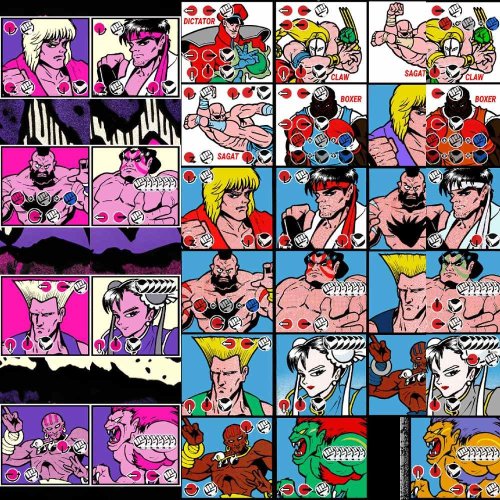
-Special moves added. -Dark Versions. -Tons of New Bezels made. They are 22 in total and come ready to be installed on MAME emulator. You can select them pressing TAB > Video. -(For Editors) 1440p Source Files. Feel free to edit any file. The Bezels are at 1080p 300kb, i feel this is the most efficient quality/size way to use them. Have fun! Credits to rodimusprimal he uploaded the original Hyper Fighting bezel eslewhere, i tweaked it and added the other ones. The post had 35 downloads. I removed it because i f*cked up.- 2 comments
-
- 4
-
-
-
- street fighter 2
- street fighter ii
- (and 29 more)
-
I was just wondering if anyone can tell me how to get my videos to display in 16:9 like the photo on the bottom for unified redux theme mine is the one the top with square 4:3 video snaps (i know i have to edit the border image in theme as well later) just unsure on how to get the video to play without the black bars, I only want to have 16:9 playback for select platforms (ps3, switch, et) I was having trouble finding a solution in the forums and I went to the discord and was recommended to switch to Unified Refried with a Queso mod for this, however I'm just trying my luck here to see if anyone has a solution as I really like the look of redux and am unfamiliar mods.

-
PSGC View File The PSGC theme has been updated with even more custom made Platform/Playlist backgrounds, Audio Clips and Controllers. New screenshots (1-10 basic theme 11-20 SE version) (see changelog below for all the info). PSGC was made to match one of my themes (skins) done for the PSMC media player. PSGC is a Netflix type theme that is great for a home theater experience. The custom colorful fanart backgrounds transition to random Platform/Game artwork on the left side of the screen and to Platform/Playlist/Game video snaps on the right side of the screen after a couple seconds. SE versions include all the bells and whistles; multiple views, textured backgrounds. SE users also have available to them: 13 platform/playlist audio packs, the platform/playlist video snaps, choice of backgrounds, custom badges that can be used in Launchbox, sound packs, custom made playlists used in the videos, and more. Listen to sample clips of the New voices Listen to sample clips with Reverb 380 Platform/Playlist Audio Clips 215 Platform Backgrounds and Devices Included: 65 Playlists Backgrounds and Devices 195 Conrollers/Keyboards Included: Requires BigBox Version 13 or above Updated Video: (11-20-23) Startup Video: Startup.mp4 Assets used in video (will link things as I upload everything): Startup Video PSGC Quiet Sound Pack Pause Theme is a slightly modified version of @Retro808's "Pulse Pause" theme Startup Theme is a modified and updated version of @Hazuki's "Starting The Game" theme NEW PSGC Video Snaps (work in progress) some custom made Playlist videos Assets used in theme: many COLORFUL Hardware PNG media for devices (thx @viking) And I can't forget @y2guru for the incredible job he has done with CTC, thanks Dave Comments, reviews, questions and suggestions are always welcome! Please like and Follow. *SE versions are only available to Members that have subscribed on my BMAC page (similar to Patreon). All my "Coffee Buyers" and "Members" will be recognized in all my future themes and the ZizzleZazzle website. Please consider supporting these projects with "buying me a cup of coffee" or even better yet, Subscribe and have access to ALL the SE versions of all my themes with additional features, views, audio pack, video snaps and support. • The Papaw 🙏❤️🙏 Submitter The Papaw Submitted 02/08/2023 Category Custom Themes
-
Street Fighter 2 Bezels Special Moves - World Warrior, Champion Edition, Hyper Fighting - Dark Version, 1080p, PSD 1440p Source File View File -Special moves added. -Dark Versions.-Tons of New Bezels made. They are 22 in total and come ready to be installed on MAME emulator. You can select them pressing TAB -> Video. -(For Editors) 1440p Source Files. Feel free to edit any file. The Bezels are at 1080p 300kb, i feel this is the most efficient quality/size way to use them. Have fun! Credits to rodimusprimal he uploaded the original Hyper Fighting bezel eslewhere, i tweaked it and added the other ones. The post had 35 downloads. I removed it because i f*cked up. Submitter EL REY BUGE Submitted 04/21/2024 Category Platform Bezels/Overlays
-
Version 1.0.3
8,656 downloads
Switch v1.0.3 BigBox Theme 8/30/2017 Display scaling over 100% will cause alignment issues with the platform wheel banner images. Switch Changelog: v1.0.3 (8/30/2017): - moved the GrilaControlLibrary.dll to the theme Plugins folder, which is an added feature since the theme release (the .dll will still need to be un-blocked before launching BigBox) - fixed the large outline bug reported by @jamesclarke555 (thanks again for reporting it to me) v1.0.2 (5/2/2017): - redesigned Text Games View (thanks for the inspiration @NahuelDS) v1.0.1 (4/21/2017): - Dark version added v1.0.0 (4/20/2017): - Initial release Theme Description ~~~~~~~~~~~~~~~~~~ Switch is a very lightweight, clean theme that was designed to be as close to the original UI as possible. There isn't much artwork in this one: banners for the platform wheel view, covers for the box game view, and a video snap in the game details screen so it should run pretty smooth on low spec systems. It includes a custom control library that I've started to build that contains the battery status indicator as well as a separate 12 and 24 hour clock (since we can't change the format of the built-in one without changing Windows settings). Theme Notes ~~~~~~~~~~~~~ * Requires the file GrilaControlLibrary.dll to be un-blocked before launching BigBox. Make sure to do this for both the light and dark versions of the theme. * Utilizes the font Oxygen-Regular, which is included in the root theme folder. Install it before running this theme. * Designed for 1920x1080. I can't guarantee it will work at any other resolutions (really only the platform wheel), even in the same aspect ratio, because of the margin that is applied to the wheel to get it off center. The box game view and all text views are NOT affected by this and will work at any resolution, although text spacing and some other misc. elements may not look as perfect as they do at 1080. * Included is a sound pack for BigBox. Move it from the theme directory to LaunchBox\Sounds and select it in the BigBox options menu. It can also be downloaded here https://forums.launchbox-app.com/files/file/467-switch/ * I've included some extra buttons and controller images along with the .PSD and .AI files to edit them if you feel the need. The extras can be swapped out to fit your system by simply copying them from the extras folder to the core image folder and renaming them. The file names have to match what's in the XAML, so you'll need to overwrite or delete the ones you are changing. Filenames are controller.png, play_button.png, and back_button.png. Alternate Versions ~~~~~~~~~~~~~~~~~ 1280x720 GPDWin focused version (video replaced with screenshot): Switch_v1.0.1_1280x720.zip 1280x800 Tablet focused version (video replaced with screenshot): Switch_v1.0.1_1280x800.zip -
 I was working with video snaps for my Windows PC games and noticed that certain BigBox themes, "like WoodPanels" use a 16:9 monitor view for video snaps for games while other consoles like PS1, N64, SNES, etc use the 4:3 CRT style TVs in the views to display the video snap. This is fine, but I noticed that when I record Windows game snaps for games that only run in 4:3 resolutions, they will be stretched across the displaying area. I've attached a snap-shot of POD Gold in the video snap view for WoodPanels for Windows Games. Would it be possible to specify the theme to adjust pillar/letterboxing for the video snaps based on the aspect ratio of the video file? Or would my best bet be to re-record video snaps with pillar/letterboxing in the video so that it displays properly in BigBox? Just asking because I have many games for Windows such as Populus 3, POD Gold, Classic PC NFS games, etc that only run in 4:3 aspect ratios so I have to letterbox these no matter what.
-
![More information about "Sammy Atomiswave - Themes Video [16:9]"](https://forums.cdn.launchbox.gg/monthly_2022_11/kofxi.thumb.jpg.2d851cb7e1fa2a7a682be29393450828.jpg)
Version 1.0.2
711 downloads
Sammy Atomiswave - Themes Video [16:9] Recorded based on themes from hyperspin 🤘 Conversion to 16:9 by Mrfomt 🤘 Some of the corrections I have made Many thanks to the creators of the original themes. 🤘 --------------------------------------------- -
Version 1.3.2
163,630 downloads
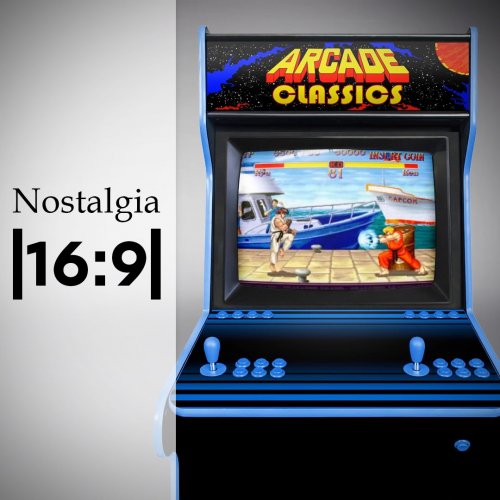
The idea of this set is to place the gameplay video in context, with the hardware of its time. A touch of nostalgia to better understand an unknown material especially for the youngest. Most of the montages use the EmuMovie gameplay videos. The others are mine. This video set is also available in 4:3 ratio here I also share the gameplay videos I create with the help of the community. On EmuMovie FTP : "Upload here > _Video Snap Submissions > Viking (Platform Video)" /!\ IMPORTANT NEWS /!\ Dad of 2 young children, I dont have enough time to make another video. Thanks to him, @dragon57 are nicely create new video for this set. You can find additional videos here. If other people are interested in creating video for this set, here is a Mega link to download a 7zip archive with some source files that will help you stay in the graphical lines. Thank you for your help and your understanding! // VIDEO // Platform = 253 videos Category = 5 videos // INFORMATION // 16:9 format HD resolution : 1920x1080px MP4 format - H264 Codec - AAC audio - most with 30fps EmuMovie or community video integration, unless not available, I created myself the games loop. // INSTRUCTION // There is 2 way to download my videos : Way 1 : The easy one In LaunchBox, go to "tools > Download platform video theme" Select "Viking's Nostalgia (16x9)" Clic "OK" Way 2 : By hand Download files here one by one and copy into : ... / LauchBox / Themes / <theme name> / Videos / Platforms / ... Rename the videos exactly as the name of the desired platform in LaunchBox. Launch BigBox // PREVIEW // -
Version 1.3.0
378 downloads
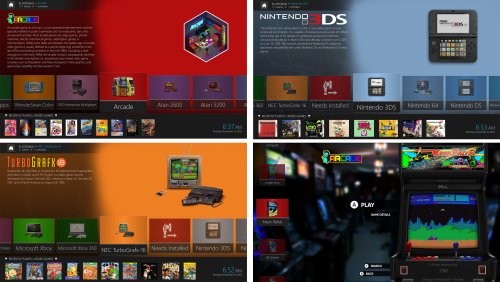
PSGC +Arcade is about the same as PSGC with an Arcade twist. The PSGC +Arcade themes have been updated with even more custom made Platform/Playlist backgrounds, Audio Clips and Controllers. New screenshots (1-12 basic theme 13-26 SE version) (see changelog below for all the info). PSGC was made to match one of my themes (skins) done for the PSMC media player. PSGC +Arcade is a Netflix type theme that is great for a home theater experience. The custom colorful fanart backgrounds transition to random Platform/Game artwork on the left side of the screen and to Platform/Playlist/Game video snaps on the right side of the screen after a couple seconds. SE versions include all the bells and whistles; multiple views, textured backgrounds. SE users also have available to them: 13 platform/playlist audio packs, the platform/playlist video snaps, choice of backgrounds, custom badges that can be used in Launchbox, sound packs, custom made playlists used in the videos, and more. Listen to sample clips of the New voices Listen to sample clips with Reverb 380 Platform/Playlist Audio Clips 215 Platform Backgrounds and Devices Included: 65 Playlists Backgrounds and Devices 195 Conrollers/Keyboards Included: Requires BigBox Version 13 or above Updated Video: (11-20-23) Startup Video Startup.mp4 Assets used in video (will link things as I upload everything): Startup Video PSGC Quiet Sound Pack Pause Theme is a slightly modified version of @Retro808's "Pulse Pause" theme Startup Theme is a modified and updated version of @Hazuki's "Starting The Game" theme NEW PSGC Video Snaps (work in progress) some custom made Playlist videos Assets used in theme: many COLORFUL Hardware PNG media for devices (thx @viking) Special thanks goes out to @faeran for letting me use some of his stuff from his awesome CoinOp theme And I can't forget @y2guru for the incredible job he has done with CTC, thanks Dave Comments, reviews, questions and suggestions are always welcome! Please like and Follow. *SE versions are only available to Members that have subscribed on my BMAC page (similar to Patreon). All my "Coffee Buyers" and "Members" will be recognized in all my future themes and the ZizzleZazzle website. Please consider supporting these projects with "buying me a cup of coffee" or even better yet, Subscribe and have access to ALL the SE versions of all my themes with additional features, views, audio pack, video snaps and more personal support and customization. • The Papaw 🙏❤️🙏 -
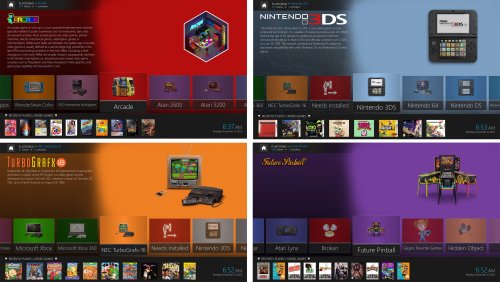
Version 4.3.1
956 downloads
The PSGC theme has been updated with even more custom made Platform/Playlist backgrounds, Audio Clips and Controllers. New screenshots (1-10 basic theme 11-20 SE version) (see changelog below for all the info). PSGC was made to match one of my themes (skins) done for the PSMC media player. PSGC is a Netflix type theme that is great for a home theater experience. The custom colorful fanart backgrounds transition to random Platform/Game artwork on the left side of the screen and to Platform/Playlist/Game video snaps on the right side of the screen after a couple seconds. SE versions include all the bells and whistles; multiple views, textured backgrounds. SE users also have available to them: 13 platform/playlist audio packs, the platform/playlist video snaps, choice of backgrounds, custom badges that can be used in Launchbox, sound packs, custom made playlists used in the videos, and more. Listen to sample clips of the New voices Listen to sample clips with Reverb 380 Platform/Playlist Audio Clips 215 Platform Backgrounds and Devices Included: 65 Playlists Backgrounds and Devices 195 Conrollers/Keyboards Included: Requires BigBox Version 13 or above Updated Video: (11-20-23) Startup Video: Startup.mp4 Assets used in video (will link things as I upload everything): Startup Video PSGC Quiet Sound Pack Pause Theme is a slightly modified version of @Retro808's "Pulse Pause" theme Startup Theme is a modified and updated version of @Hazuki's "Starting The Game" theme NEW PSGC Video Snaps (work in progress) some custom made Playlist videos Assets used in theme: many COLORFUL Hardware PNG media for devices (thx @viking) And I can't forget @y2guru for the incredible job he has done with CTC, thanks Dave Comments, reviews, questions and suggestions are always welcome! Please like and Follow. *SE versions are only available to Members that have subscribed on my BMAC page (similar to Patreon). All my "Coffee Buyers" and "Members" will be recognized in all my future themes and the ZizzleZazzle website. Please consider supporting these projects with "buying me a cup of coffee" or even better yet, Subscribe and have access to ALL the SE versions of all my themes with additional features, views, audio pack, video snaps and support. • The Papaw 🙏❤️🙏- 3 comments
-
- 12
-
-
-

![More information about "Tiger Handheld Electronics - [16:9] Themes Video"](https://forums.cdn.launchbox.gg/monthly_2022_10/17.thumb.png.e92a6de1cf1fc416d5d6f48a00e9f82a.png)
Version 1.0.0
275 downloads
Tiger Handheld Electronics - [16:9] Themes Video Recorded based on themes created by Hoscarconh from hyperspin Many thanks to the creator of the original themes.- 3 reviews
-
- 10
-
-
-
-
- tiger electronics
- themes video
- (and 1 more)
-
PSGC +Arcade View File PSGC +Arcade is about the same as PSGC with an Arcade twist. The PSGC +Arcade themes have been updated with even more custom made Platform/Playlist backgrounds, Audio Clips and Controllers. New screenshots (1-12 basic theme 13-26 SE version) (see changelog below for all the info). PSGC was made to match one of my themes (skins) done for the PSMC media player. PSGC +Arcade is a Netflix type theme that is great for a home theater experience. The custom colorful fanart backgrounds transition to random Platform/Game artwork on the left side of the screen and to Platform/Playlist/Game video snaps on the right side of the screen after a couple seconds. SE versions include all the bells and whistles; multiple views, textured backgrounds. SE users also have available to them: 13 platform/playlist audio packs, the platform/playlist video snaps, choice of backgrounds, custom badges that can be used in Launchbox, sound packs, custom made playlists used in the videos, and more. Listen to sample clips of the New voices Listen to sample clips with Reverb 380 Platform/Playlist Audio Clips 215 Platform Backgrounds and Devices Included: 65 Playlists Backgrounds and Devices 195 Conrollers/Keyboards Included: Requires BigBox Version 13 or above Updated Video: (11-20-23) Startup Video Startup.mp4 Assets used in video (will link things as I upload everything): Startup Video PSGC Quiet Sound Pack Pause Theme is a slightly modified version of @Retro808's "Pulse Pause" theme Startup Theme is a modified and updated version of @Hazuki's "Starting The Game" theme NEW PSGC Video Snaps (work in progress) some custom made Playlist videos Assets used in theme: many COLORFUL Hardware PNG media for devices (thx @viking) Special thanks goes out to @faeran for letting me use some of his stuff from his awesome CoinOp theme And I can't forget @y2guru for the incredible job he has done with CTC, thanks Dave Comments, reviews, questions and suggestions are always welcome! Please like and Follow. *SE versions are only available to Members that have subscribed on my BMAC page (similar to Patreon). All my "Coffee Buyers" and "Members" will be recognized in all my future themes and the ZizzleZazzle website. Please consider supporting these projects with "buying me a cup of coffee" or even better yet, Subscribe and have access to ALL the SE versions of all my themes with additional features, views, audio pack, video snaps and more personal support and customization. • The Papaw 🙏❤️🙏 Submitter The Papaw Submitted 10/12/2023 Category Custom Themes
-
![More information about "Sinclair ZX Spectrum - Platform Theme Video [16:9]"](https://forums.cdn.launchbox.gg/monthly_2023_03/1540906791_2023-03-09(14).thumb.png.b8b2927d5f40317a7bef4194b461e3cd.png)
Version 1.0.0
272 downloads
Sinclair ZX Spectrum - Theme Video [16:9] Recorded based on theme created by Gene from Hyperspin Attraction Many thanks to the creator of the original Hyperspin Attraction theme- 3 comments
-
- 3
-
-
- sinclair zx spectrum
- zx spectrum
- (and 2 more)
-
FB Focus View File This is a new theme based on my previous Flikbox, however it is built around blurred backdrops and foreground elements that pop out against them, and less focused on speed and more on smooth eye candy. It is currently considered as Beta, there is still tweaking to be done and some features to add but it should be perfectly functional. It is a little more intensive than the previous Flikbox due to there being many more elements involved. The theme is designed for 16:9 although other ratios might work but haven't been tested. It works best with video snaps rather than any type of themed video. VIEWS INCLUDED: System Text Lists Horizontal Coverflow Horizontal Wheel (boxes) Horizontal Wheel (logos) Vertical Wheel (boxes) Vertical Wheel (logos) Wall with info (boxes) Wall with info (logos) It uses the Source Sans Pro free typeface which is included in the zip. I have used Dan Patrick's awesome platform logos and my own controller icons, many thanks to him. Of course, thanks to y2guru for the Community Theme Creator, and Faeran's very helpful Youtube videos. I have uploaded a matching startup theme here. Submitter AsparagusTrevor Submitted 01/24/2023 Category Custom Themes
-
![More information about "NEC TurboGrafx-CD - Themes Video [16:9]"](https://forums.cdn.launchbox.gg/monthly_2023_03/975786222_DynasticHeroThe.thumb.png.0465b0c8543bdc2c1a9cbc5e50a73a6e.png)
Version 1.0.1
587 downloads
NEC TurboGrafx-CD - 46 Themes Video [16:9] Recorded based on themes created by Hoscarconh from hyperspin Many thanks to the creator of the original HS themes- 4 comments
-
- 12
-
-
-

-
-
- nec turbografx-cd
- video themes
- (and 1 more)
-
![More information about "American Laser Games - Platform Theme Video [16:9]"](https://forums.cdn.launchbox.gg/monthly_2023_03/133181603_AmericanLaserGames.thumb.png.7515cdc1b073600388f18f686b54cb89.png)
Version 1.0.0
359 downloads
American Laser Games - Platform Theme Video [16:9] Recorded based on theme created for hyperspin Many thanks to the creator of the original HS theme