Search the Community
Showing results for tags 'devices'.
Found 7 results
-

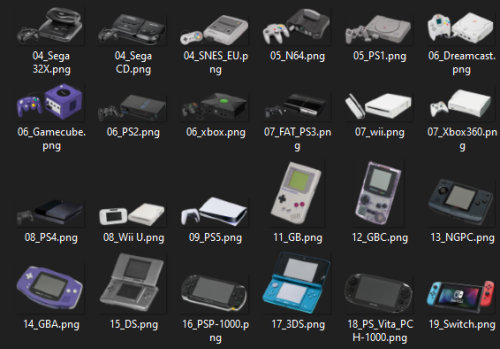
Version 3.0.0 - The final version.
648 downloads
This set contains images of various consoles, mobile, computers .png format, all drawings from the site Dimensions.com , as well as device logos on a white background: -There are several device images in the Device folder in the format .png with different orientation in space, but first, these are consoles with a horizontal arrangement (handheld tilts so that the screen is facing left. The consoles are on the right facing the center, and the controllers are on the left facing the center), then for other console models / revisions, after the image of of controllers and accessories. (Not all images are from third party sites, some are cropped by me, so there will be a lot of 'unnecessary' images in some folders in case you don't like the ones I use, such as handheld with screens not turned off (I use the first few images and number them in order, and then when the beginning of the file name is repeated, then 'unnecessary' images follow)). -The Default 3D Box folder contains controller mappings, schematics, and drawings from Dimensions.com. (You will notice that on some platforms there is no controller mapping, and this is because I downloaded them from the user: @Pyrometheous 🛐, for which I am grateful. Therefore, I will also recommend you to supplement the missing images from Controller Mapping .6). -The Default Box folder contains .png images of consoles packed in boxes (well, those that could be found (or their 'mini' editions)). Except for: Sega Saturn, Xbox One, Xbox Series (To be honest, I didn't want to add folders for these platforms at all and add drawings from the site Dimensions.com into the 4-Genesis and 7-Xbox 360 folder).- 1 comment
- 1 review
-
- 10
-

-

-

-

-
- png
- platform images
- (and 7 more)
-
Hardware / 3D Box .png images + all drawings from Dimensions.com + Controller mapping / Shemes View File This set contains images of various consoles, mobile, computers .png format, all drawings from the site Dimensions.com , as well as device logos on a white background: -There are several device images in the Device folder in the format .png with different orientation in space, but first, these are consoles with a horizontal arrangement (handheld tilts so that the screen is facing left. The consoles are on the right facing the center, and the controllers are on the left facing the center), then for other console models / revisions, after the image of of controllers and accessories. (Not all images are from third party sites, some are cropped by me, so there will be a lot of 'unnecessary' images in some folders in case you don't like the ones I use, such as handheld with screens not turned off (I use the first few images and number them in order, and then when the beginning of the file name is repeated, then 'unnecessary' images follow)). -The Default 3D Box folder contains Keymaps, Schemes and drawings from the site Dimensions.com. (You will notice that some platforms are missing Keymaps, and this is because I downloaded them from the user: @Pyrometheous 🛐, for which I am grateful. Therefore, I will also recommend you to supplement the missing images from Controller Mapping .6). -The Default Box folder contains .png images of consoles packed in boxes (well, those that could be found (or their 'mini' editions)). Except for: Sega Saturn, Xbox One, Xbox Series (To be honest, I didn't want to add folders for these platforms at all and add drawings from the site Dimensions.com into the 4-Genesis and 7-Xbox 360 folder). Submitter Dmi3y.646 Submitted 09/07/2024 Category Platform Console Images
-

Version 20230704_Images,XML,Videos
593 downloads
All my Platforms / Playlists / Categories / Icons Image Folders individually zipped up; Banners, Clear logos, 3D Boxes, 3D Carts, Boxes, Carts, Devices, Fanart My .xml files are here - My videos are here - https://drive.google.com/drive/folders/1TEUrBqH8Vbo-EAtlyGJQvlhJdDFiUxwe?usp=sharing Happy Independence Day! -
Platform / Playlist / Categories / Icons | Images| All Zipped UP | XMLs and Video links included | 20230704 - Happy 4th of July! View File All my Platforms / Playlists / Categories / Icons Image Folders individually zipped up; Banners, Clear logos, 3D Boxes, 3D Carts, Boxes, Carts, Devices, Fanart My .xml files are here - My videos are here - https://drive.google.com/drive/folders/1TEUrBqH8Vbo-EAtlyGJQvlhJdDFiUxwe?usp=sharing Happy Independence Day! Submitter -McFly- Submitted 07/04/2023 Category Platform Clear Logos
-

Version 1.0.0
153 downloads
There were no Chihiro images in any of the media that i have so i made some. @Trymado Platform Video -
Sega Chihiro Fade/Bezel/Device/Clearlogo Pack View File There were no Chihiro images in any of the media that i have so i made some. @Trymado Platform Video Submitter Rlad Submitted 02/28/2023 Category Platform Media Packs
-
Hello good afternoon! In my case I have 2 devices with LaunchBox, however I wanted to do the following: -> When I update one, where I put a ROM I can copy "only" the files it needs for this, since my folder has 80GB total, and copying from one place to another all the time is very time consuming. Example: In the External HD I put 2 roms of PS1, and when I get home to copy only those 2 roms and the files that I need for the LaunchBox to recognize what I did in the External HD. No need to copy everything again. Thank you