Search the Community
Showing results for tags 'lightweight'.
Found 4 results
-
Version 0.1.0
128 downloads
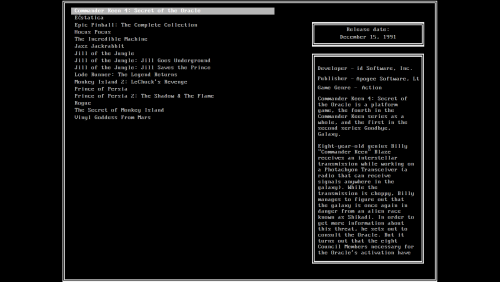
Seems like I can't stop making these types of themes. I have a soft spot for MS-DOS and terminals in general. This theme is meant to be used on a 4:3 monitor, but it will work just fine on 16:9. Files for the community theme creator are also available for download. -
Dos Terminal View File Seems like I can't stop making these types of themes. I have a soft spot for MS-DOS and terminals in general. This theme is meant to be used on a 4:3 monitor, but it will work just fine on 16:9. Files for the community theme creator are also available for download. Submitter walter10h Submitted 01/14/2023 Category Custom Themes
-
GPDWin View File GPDWin is a lightweight theme for use on the portable GPDWin computer. Since the portable has limited storage, the theme only uses clear logos and game screenshots. Along with being lightweight, an customizer application is included that lets the end user change nearly all of the theme related colors (text colors, highlight colors, star rating colors, etc.) comfortably from a GUI without having to edit any code. Even though the theme itself is pretty basic, I put a lot of love into the ability to customize it easily and visually. I hope you enjoy it as much as I enjoyed making it A couple of notes: The customizer app, GPDWinCustomizer.exe, is in the root theme folder and needs to be run from there, don't move it. The whole theme was designed around 1280x720 because of its target platform, but it does look good at 1920x1080. Anything other than those weren't tested so I can say, but it does rely on 16:9 AR. Display scaling above 100% was tested minimally, hopefully I caught everything but please let me know if you spot any weirdness above 100% The controller images on the banners I made are from the OpenEmu GitHub. I won't be making any more...head there, grab the images, and get creative. The star rating in this one is pure XAML, not images. This was done so the colors would be changeable by the end user. It's a new way of doing it (with a gradient, some math, and tons of code) but the end result is identical to image swapping. On the Text List views, the opacity of the overlay is tied to the setting in the BigBox menu. Adjust it as needed for readability. Scrolling text was not implemented to help with performance And finally, some images: The theme: The Customizer: Submitter Grila Submitted 01/18/2018 Category Big Box Custom Themes
-
Version 1.1
655 downloads
GPDWin is a lightweight theme for use on the portable GPDWin computer. Since the portable has limited storage, the theme only uses clear logos and game screenshots. Along with being lightweight, an customizer application is included that lets the end user change nearly all of the theme related colors (text colors, highlight colors, star rating colors, etc.) comfortably from a GUI without having to edit any code. Even though the theme itself is pretty basic, I put a lot of love into the ability to customize it easily and visually. I hope you enjoy it as much as I enjoyed making it A couple of notes: The customizer app, GPDWinCustomizer.exe, is in the root theme folder and needs to be run from there, don't move it. The whole theme was designed around 1280x720 because of its target platform, but it does look good at 1920x1080. Anything other than those weren't tested so I can say, but it does rely on 16:9 AR. Display scaling above 100% was tested minimally, hopefully I caught everything but please let me know if you spot any weirdness above 100% The controller images on the banners I made are from the OpenEmu GitHub. I won't be making any more...head there, grab the images, and get creative. The star rating in this one is pure XAML, not images. This was done so the colors would be changeable by the end user. It's a new way of doing it (with a gradient, some math, and tons of code) but the end result is identical to image swapping. On the Text List views, the opacity of the overlay is tied to the setting in the BigBox menu. Adjust it as needed for readability. Scrolling text was not implemented to help with performance And finally, some images: The theme: The Customizer: