Search the Community
Showing results for tags 'music'.
-
So far my experience with Bigbox is amazing but the only thing not working is the background music. Placing music into Launchbox/music/background and launching it will start it up but then crash it as soon as it tries to load the music. Having the folder empty and then placing the music file in after it's already launched plays the song fine but if you enter and exit a game, no music will play and of course closing and launching will crash it now music is being trying to be loaded. Any idea what I can do to change/fix this? I tried a few songs and also tried only having one song to load but nothing seems to stop the crash. Music isn't a BIG deal but it's a shame not to have it when the option is there and I have such a nice retro album to use. Thanks!
-
 Hello! I I might have a bit of a niche "issue", but the problem I have is that everything is kind of working as intended. For my Bigbox setup, I use the ".\music\background\platforms\(platform)" directories to have console specific music for all of my platforms. I do the same for some of the playlists I have made as well. I prefer this setup as I don't download soundtracks per game. It also helps me save on space since my setup is only 1TB, and makes up for the lack of gameplay videos. However, I've been wanting to implement genre browsing on my setup. I figured the best way to do this would be to use the "auto generate child playlists" feature. It works great, and is a good way to get playlists made for every console. The problem I have with this is that it creates a playlist for every genre including "All Games". Since it does that, and using the Nintendo Entertainment System as an example, Bigbox stops looking in the ".\music\background\platforms\Nintendo Entertainment System" directory and starts looking in ".\music\background\playlists\Nintendo Entertainment System all games". I was wondering if there was a way to change where the music is read from, so I can configure the playlists to read from the original background directory. A solution would be to just copy and paste all my tracks into the new appropriate playlist folders, but given the fact I have a 50+ platform setup, and multiply that by all of the genres, play modes, and regions, it would end up quite bulky. I tried looking in the playlists' xml files to see if there was a file path I could potentially change there, but I couldn't find anything like that in any of the .xmls I checked. I also tried configuring the playlists within Launchbox, but the only directory it seems you can change is the video directory, and not for background music. I'm not too worried if this isn't an issue that can be fixed because I kind of recognize it might be an odd once since, technically, there isn't an issue. I was just curious if this was something that I could do since I couldn't find any information on how to do something like this, if it were even possible. I've also included a small video demo in case there's any confusion as to what I'm trying to accomplish. Thank you very much! Demo.mp4
-
I'm running into issues where when I stop either LB or BB it is coming to a point where it crashes because it is trying to create a path to E:\Emulators\LaunchBox\Music\Platform (I put the generic platform because I've seen the issue now with two different platforms in the error message the issue is this tablet only has two drives C and D so of course the program trying to install anything to an E drive will cause an issue I perfectly understand that. I've used NotePad++ and opened every XML in LB folder and can't find anything looking for any type of E; path so this error is so weird.
-

Version 1.0.0
178 downloads
Here's a pack of 1150 songs for Nintendo Wii games. I named the files according to the Launchbox database. I might add more songs eventually. -

Version 1.0.0
109 downloads
Here's a pack of 560 songs for Windows games. I named the files according to the Launchbox database. I might add more songs eventually. -

Version 1.0.1
185 downloads
Here's a pack of 1097 songs for arcade games. I named the files according to the Launchbox database. I might add more songs eventually. -
Is there a way to prioritize music over video audio in BigBox? I like having music play in the platform and game selection screens instead of the audio of the video snaps. The way I set it up is having the videos muted. When there's no music for a specific game, I play a random audio file in the platform folder. The thing is, with cases like Arcade, there's no music available at all from Emumovies so I don't get any sound. Is there a setting i'm not aware of that would let me play video audio when no music is available?
-
Hi, lately I've been thinking about adding a jukebox with categories like the ones in the images I posted. Short story, great thinking minds at Launchbox, how can I achieve this? Greetings
-
.thumb.png.46720423508cea0daa4cdb60cf6ae141.png)
Version 1.0.1
499 downloads
A sound pack to go with this startup video: Also comes with optional Startup and Menu playlists. Credits (uberduck.ai): Amy Rose (Cindy Robinson) by EthanRhys Big the Cat (Jon St. Jon) by JacobLenstar Charmy Bee (Amy Birnbaum) by EthanRhys Dr. Eggman (Mike Pollock) by ShadowTB E-123 Omega (Jon St. John) by cloudy-private Espio the Chameleon (David Wills) by EthanRhys Knuckles (Travis Willingham) by EthanRhys Rouge the Bat (Karen Strassman) by EthanRhys Shadow (Jason Griffith) by IBob012 Sonic (Jaleel White) by JacobLenstar Sonic (Roger Craig Smith) by Bing95, IBob012 Tails (Colleen O'Shaughnessey) by ShadowTB Vector the Crocodile (Keith Silverstein) by ShadowTB Credits (weights.gg): Knuckles (Dave B. Mitchell) (Trained on the Russian Snowie pretrain) by timur8857 Shadow The Hedgehog (Kirk Thornton) by nibi_1 Sonic (Roger Craig Smith) by _thej Sonic The Hedgehog (Jaleel White; every DiC Sonic Cartoon) by Gendee_YT Sound sources: The VG Resource Zophar's Domain YouTube uberduck.ai (old voices) weights.gg (new voices) Programs used: Audacity Pinnacle Studio Ultimate- 1 comment
-
- 1
-

-
- soundpack
- sound pack
- (and 2 more)
-
I'm working on a music pack for Windows games based on the Launchbox database (named accordingly) I started out with my game library (125 games) but I'll be adding more. I'll be adding new games based on popularity but i'm open to requests. The launchbox db contains 21 350 windows games at the moment, I'm not planning to add all of them. Here's the link : https://emumovies.com/forums/topic/59771-windows-music-pack-in-progress/ Enjoy 🙂
-
Here's my 'full' pack of music for wii games. 🙂 I tried to prioritize title screen/main menu music. For music based games, I used a random song from the song list (for most sports games too) For some movie based games, I used the soundtrack from the movie. For some TV show based games, I used the TV show's theme. All song cut off at 5 minutes. I made sure to name the files according to the Launchbox DB but i'd like to get feedback on that. Is everything working fine on your end? I'm also open to requests if there's a game you would like me to add Here's the link to download : https://emumovies.com/files/file/5307-wii-music-pack-1150-songs/ Enjoy!
-
In Bigbox, the music will autoplay for some titles and not others. This is despite the fact Bigbox clearly finds the music successfully. Videos of said behaviour: *Edit: I first show the music plays in Launchbox. Then I move into Bigbox and show the music doesn't auto play despite Bigbox finding the music successfully when I click the "Play Music" for a given title.* Picture of my Bigbox sound settings and log file are attached. I am using the latest version of Launchbox. Any help would be appreciated. Thank you. Debug 2020-04-15 09-30-02 AM.log
-
Hello. I have been enjoying LaunchBox for a long time now and it's truly amazing. Thank you so much for all the hard work. Lately I have been adding lots of music to the Background Music folder. Browsing the game catalog in BigBox mode is wonderful while listening to great videogame melodies. And the pop-up notification with the song's name and details adds a lot to the experience. And here is my question: Which file(s) I have to edit to modify the pop-up info overlay that displays every time background music changes? I leave an image at the bottom of the post of the pop-up I'm talking about. I want to make it larger to avoid cropping the songs name so much, and if possible also change the duration it keeps on screen. If someone can point me to the files that control this feature it would help a lot. Thanks in advance.
-
ok so im having trouble with some game files playing music when highlighting a game you want to play in big box example i go to the SNES games scroll threw and some games play the games intro or in-game music on the game on the selection screen and i highlight over the Super Mario World and it starts playing some type of music that sounds like something from a Metroid game. so my question is how do i fix that and if so a game that does not have any can i make my own audio file and put it in there so that it will play when scrolling over a game 608039171_2022-12-2316-27-18.mkv
-
 I'd like to keep music playing when the window is not in focus. It seems like there used to be support for this: The proposed solution doesn't seem to work anymore. Is there any way to keep the music playing after you click away from the LB window?
 -
Sonic Big Box Collection - sound pack View File A sound pack to go with this startup video: Also comes with optional Startup and Menu playlists. Credits (uberduck.ai): Amy Rose (Cindy Robinson) by EthanRhys Big the Cat (Jon St. Jon) by JacobLenstar Charmy Bee (Amy Birnbaum) by EthanRhys Dr. Eggman (Mike Pollock) by ShadowTB E-123 Omega (Jon St. John) by cloudy-private Espio the Chameleon (David Wills) by EthanRhys Knuckles (Travis Willingham) by EthanRhys Rouge the Bat (Karen Strassman) by EthanRhys Shadow (Jason Griffith) by IBob012 Sonic (Jaleel White) by JacobLenstar Sonic (Roger Craig Smith) by Bing95, IBob012 Tails (Colleen O'Shaughnessey) by ShadowTB Vector the Crocodile (Keith Silverstein) by ShadowTB Credits (weights.gg): Knuckles (Dave B. Mitchell) (Trained on the Russian Snowie pretrain) by timur8857 Shadow The Hedgehog (Kirk Thornton) by nibi_1 Sonic (Roger Craig Smith) by _thej Sonic The Hedgehog (Jaleel White; every DiC Sonic Cartoon) by Gendee_YT Sound sources: The VG Resource Zophar's Domain YouTube uberduck.ai Programs used: Audacity uberduck.ai (old voices) weights.gg (new voices) Pinnacle Studio Ultimate Submitter biosonic417 Submitted 09/20/2022 Category Sound Packs
-
Hi Not sure if this's the right place to post this doubt but here it goes. Is there any way to prevent music from stopping playing on Launchbox? As it is , music stops when application looses focus, or when I start displaying screenshots or opening options menu etc. Personally I like to keep listening to the music of the games I like when doing other stuff (use it as a music player) or keep listening to the soundtrack as I watch the screenshots for the game in full screen for example.
-
Hi, i just wanted to know if it is possible to change the music display with just text, instead of the default OSD that appears on the bottom middle. Something like "Now playing: Saga Frontier - Blue Town 🎵" on the bottom left for example. Any response would be much appreciated.
-
Hey guys, I have a question, each rom can have more than 1 mp3 archive, I mean, like I want to a game have 4 or five mp3 songs, but the edition of the game just can take one mp3 archive I can add only one song per game? I want to know if there is a posibility Thanks
-
Hey! So I have my BigBox set up as a front-end for my Multicade, with numerous arcade titles to play, going so far as to add arcade music to the "Launchbox/Music/Background" folder so that it will shuffle through various arcade musics while the game screen is up. It works excellently and I even added album art and info for each game so it displays the song name, game it's from and who the artist is, along with a nice image of the game box art when a new song plays. To make sure the album art is retained for every song, I have each game's music in a different folder within the Background folder. It displays everything fine, but the issue I'm having is it's not shuffling the music, no matter how I set it up. Here's a better description of the problem: When I launch Big Box, it does select a random song, but afterwards it will sequentially play every song from that game (folder), before moving to the next game alphabetically and playing all the music from it as well. If I force it to next song with the BigBox binding, it will indeed select a random song, but afterwards will go back to playing them alphabetically. I have shuffle turned on in settings, but no matter what it won't actually shuffle them if I leave it sitting. It's annoying, as I want it to ideally shuffle every track together, while also retaining album art and info (if I stick them all in a folder together it will mess up the album art). Does anybody have any suggestions?
-
Hello, I put a bunch of custom music into the Music/Background folder for Big Box to play but it seems to want to keep coming back to the same song. It will usually play the same song when Big Box is first started and maybe play another song after but will keep cycling back to the same song and then usually looping it. Any idea how I can get around this or what's causing it? I have over 100 songs in the folder. Thanks!
- 22 replies
-
- 1
-

-
- big box
- background
- (and 1 more)
-
Hey, I was wondering if anybody else has a problem with their background music not shuffling properly in Big Box even if the option is checked in the Big Box settings? Mine just go alphabetically down the folders in Launchbox/Music/Background and no matter what I can't seem to have them properly shuffle. ??
-
I'm trying to figure out good music choices for my Big Box platforms beyond just game themes which doesn't appeal to me, I perfer the kind of thing the SNES/NES Classic did with it's music. Reccomend me some good music for NES, SNES, Genesis, PS1, PS2, N64, Game Boy, GBA, DS, Wii, Gamecube, Wii U, PSP, and Windows please?
-
Version 1.0.2
30 downloads
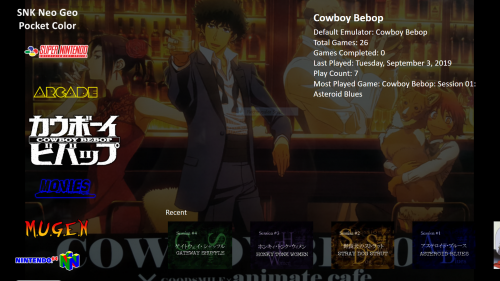
I put this out there for my fellow Cowboy Bebop fans to have something cool, and to let people out there know, that Bigbox can handle more than just games. That being said it doesn't scrape movies or TV shows vary well. You need to basically find the images yourself and insert them manually, if you were trying to put your movies in Bigbox. Of course, I have gone though the trouble of doing that work for all of us on this one. What I have done here is create a console theme if you will, for setting up your Cowboy Bebop Anime as a device in LaunchBox/BigBox, that has all the images for every single Cowboy Bebop episode/sessions, and that will appear as its own identity along side the rest of your consoles. The collection includes: The Cowboy Bebop Movie, all episode/session titles, fan art for the backgrounds, Art/images for the "Device" selection screen, and the clear logo for the title at the device selection screen (Bigbox will think that "Cowboy Bebop" is a video game system like the rest of your stuff) Lastly I included the Cowboy Bebop Theme song. Just in case you would like it to play in the background when you are choosing what episode/session to watch. It adds a really nice element to the whole setup. This updated version 1.0.2 is as easy as it gets to set up. It contains everything you need neatly packed, and comes with clear and concise instructions on a note pad file in the download. To get the theme song to play in the background place the song in launchbox/music/background/platforms/Cowboy Bebop You can also get the Cowboy Bebop theme song as your main background theme song by copying it to launchbox/music/background/platforms NOTE: place the song below the platforms folder, not inside of it. I provided a screenshot above if your confused. Obviously I can not give you the actual episodes/sessions as they were called, but if your reading this you probably already have them. If you don't, whats wrong with you? Do what LaunchBox/BigBox fans do best, and get yourself a good download/torrent, and dust off this award winning classic! Hope you all enjoy this setup, and I hope more people end up putting stuff like this out there for everyone to get even more out of BigBox. NOTE: If your not a fan of cluttering your game collection things that are not games, then I would just like to remind everyone you can have multiple LaunchBox/BigBox setups, and that they are portable. You could have one for games and another just for your media. While I am on the topic, if you get an Nvida Shield you can stream your LaunBox/BigBox setup to any TV in your house. Obviously this is great for gaming, but also makes the BigBox media setup much more viable too. An excellent tutorial video on this was made by ETA Prime on youtube. I'll leave a link and youtube search instructions, if your interested. You can search youtube for "stream launchbox to nvidia shield" and it will be the first video, or use the link below. Big thanks to everyone who gave this setup a try. I hope you all enjoy! Stay classy retro fans- 4 comments
-
- 2
-
-

-
- cowboy bebop pack
- cowboy
- (and 36 more)
-
Cowboy Bebop: Setup for the episodes/Sessions to run in Bigbox View File I put this out there for my fellow Cowboy Bebop fans to have something cool, and to let people out there know, that Bigbox can handle more than just games. That being said it doesn't scrape movies or TV shows vary well. You need to basically find the images yourself and insert them manually, if you were trying to put your movies in Bigbox. Of course, I have gone though the trouble of doing that work for all of us on this one. What I have done here is create a console theme if you will, for setting up your Cowboy Bebop Anime as a device in LaunchBox/BigBox, that has all the images for every single Cowboy Bebop episode/sessions, and that will appear as its own identity along side the rest of your consoles. The collection includes: The Cowboy Bebop Movie, all episode/session titles, fan art for the backgrounds, Art/images for the "Device" selection screen, and the clear logo for the title at the device selection screen (Bigbox will think that "Cowboy Bebop" is a video game system like the rest of your stuff) Lastly I included the Cowboy Bebop Theme song. Just in case you would like it to play in the background when you are choosing what episode/session to watch. It adds a really nice element to the whole setup. This updated version 1.0.2 is as easy as it gets to set up. It contains everything you need neatly packed, and comes with clear and concise instructions on a note pad file in the download. To get the theme song to play in the background place the song in launchbox/music/background/platforms/Cowboy Bebop You can also get the Cowboy Bebop theme song as your main background theme song by copying it to launchbox/music/background/platforms NOTE: place the song below the platforms folder, not inside of it. I provided a screenshot above if your confused. Obviously I can not give you the actual episodes/sessions as they were called, but if your reading this you probably already have them. If you don't, whats wrong with you? Do what LaunchBox/BigBox fans do best, and get yourself a good download/torrent, and dust off this award winning classic! Hope you all enjoy this setup, and I hope more people end up putting stuff like this out there for everyone to get even more out of BigBox. NOTE: If your not a fan of cluttering your game collection things that are not games, then I would just like to remind everyone you can have multiple LaunchBox/BigBox setups, and that they are portable. You could have one for games and another just for your media. While I am on the topic, if you get an Nvida Shield you can stream your LaunBox/BigBox setup to any TV in your house. Obviously this is great for gaming, but also makes the BigBox media setup much more viable too. An excellent tutorial video on this was made by ETA Prime on youtube. I'll leave a link and youtube search instructions, if your interested. You can search youtube for "stream launchbox to nvidia shield" and it will be the first video, or use the link below. Big thanks to everyone who gave this setup a try. I hope you all enjoy! Stay classy retro fans Submitter fasteddy88 Submitted 09/06/2019 Category Game Media Packs