Search the Community
Showing results for tags 'simple'.
Found 15 results
-
Version 4.0.2
671 downloads
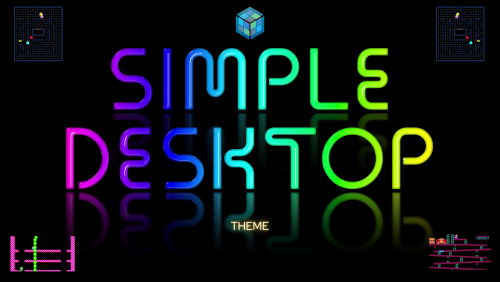
I wanted to change the theme to a more Retro look in Version 4. See changelogs and last few screenshots. I will only be going forward with the two v4 version as it has been to much to keep up with all the versions. I will try to update most of the screenshots soon. I plan on adding vertical and coverflow views soon. I'll leave v3 online as they look quite a bit different. Looking back, I probably should have separated them as different themes Simple Desktop v4 - Uploaded Simple Touch v4 - Uploaded (last 2 screenshots) Simple Desktop v3 (light) - FINAL Simple Desktop v3 (dark) - FINAL (screenshots close to end) Some of the features: New custom Neon platform, platform categories and few playlist Clear Logos (close to 200 of them). Also available in separate DOWNLOAD now. device bezels for game videos (200+ platforms) - (special thanks @Duimon for many of them). Also extra ones in a folder named "unused" and a psd template added Partial Gamepad badge support like Steam does (add a custom field in LB named "Partial Gamepad Support" with a value of "Yes") - dll file below displays nice little message when no game notes are present (see screenshot 5) displays colorful "No Video image" when no game video is present in the bezel ability to choose scratches & smudges on game videos (delete "Scratches.png" file in ..\Themes\Simple Desktop v3 (light)\Media\Overlays) font changes for better visibility colorful 3 second popup for games marked as Completed, Broken or Not Installed in Horizonal & Wall views (see screenshot 7,8,9) Audio announces 200+ Platforms New matching neon "Startup" videos Clean, with a modern look. Works well with all the screen sizes I have been able to test, including large screens and 4K TVs. Responsive and simple, thus "Simple Touch". I needed this for a A-I-O Touch Screen PC I will be installing in a false wall soon. I'll be doing a home remodeling project soon and thought a touch screen jukebox in the wall would be a cool look. I found a great deal on a Lenovo 700 22ish touchscreen on ebay and have been setting it all up before I start the remodel. I wanted to create a BB theme with a similar look to the Jukebox (media center) software I put on the PC. (Most of the Platform videos in the videos in v3 and previous were the Bigbox Cinematic videos, in v4 they showcase the Colorful videos with a few I made) NEW VIDEO: Simple Desktop v4 (11-04-22) VIDEO: Simple Desktop v3 Light (10-07-22) - Sorry it's so long, I was trying to show all the bezels I used to show the game videos for all the platforms. VIDEO: Simple Desktop v3 Dark (10-13-22) Here is the dll file for adding the "Touch Badge" in Launchbox. Drop it into your ..\Launchbox\Plugins folder. (not required, just shows the Touch Badge in Launchbox) Badge Touch.dll Startup Videos: (10 seconds) NEW - Simple Desktop (available in 1080 & 4K) BigBox Simple Desktop (3840 × 2160 px).mp4 NEW - Simple Touch (available in 1080 & 4K) * (you can disable the audio by renaming or deleting the Audio folder within the ..\theme name\Media\Audio folder. If you want to remove the family logo image in the settings page, you can do the same thing with it, located in the ..\theme name\Media\Images folder) "Simple Touch v3" (light or dark), "Simple Desktop v3" (light or dark) are the older versions. * Simple Touch Vertical (vertical version) This one is more of a test version. It's made using 3:4 aspect ratio per request. I had to re-size some things and move a few things around a bit, but pretty much the same. I have nothing to test it with, so not sure how well it will look or work on a actual vertical screen. If you give this one a try, feedback would be awesome (especially some screenshots or a video). As always, special thanks goes out to: @JoeViking245 for helping me with the touch issues @y2guru for sharing CTC with us, thank you @faeran for allowing me to use a bit of his code @Johnny T for all the MFME Fruitbox Machine help @viking for the awesome Colorful stuff and sharing some of his knowledge with me ALL THE USERS Don't forget to leave feedback, post comments, questions or suggestions. Will do the best I can to get back. - Enjoy! BigBox Simple Desktop (1920 × 1080 px).mp4- 10 comments
-
- 9
-

-

-
- touch screen
- simple
- (and 2 more)
-
Version 1.0.0
316 downloads
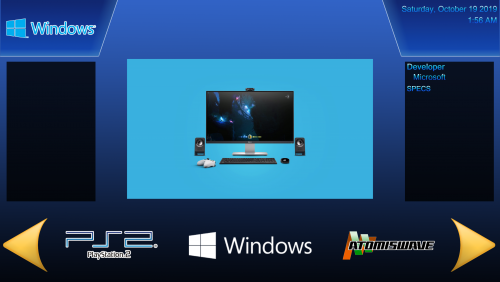
This is a Bigbox theme I made for my Vewlix cabinet using The Community Theme Creator so a shout out goes to y2guru for his amazing app. This is a Simple theme I wanted something basic that looked good running on my cab. I plan on tweeting a few things in the future but i'm done messing with it for now Enjoy -
Welcome to the Unified Widescreen Platform Video Theme Project! This video project is based on the Unified Megatheme project which was originally created for HyperSpin by Gibbawho and eventually continued and expanded by various other users as well. The themes of this project are designed for widescreen displays and share all the same basic structure to give all themes a simple and unified look. My goal is to recreate all Unified Megathemes as video files so that they can be used within other Front End’s like LaunchBox as well. I’m using Adobe After Effects to create the videos with their original source files (when they were available) and try to stay as accurate as possible to the HyperSpin originals. So far I’ve done 124 platforms (including some region variants and compilations) + 84 alternative versions! Preview: List of all videos (206 videos; 6GB in size total): You can download these videos only on EmuMovies as I’m using their gameplay videos for most of them and don’t want to rip off the guys over there in any way. I won't upload these videos anywhere else and neither should you! Download: Platforms A-C Platforms D-M Platforms N Platforms O - S (Part 1) Platforms S (Part 2) Platforms S (Part 3) Platforms S (Part 4) - Z If you need a nice theme which is optimized for using these kind of videos than I would suggest to check out my BigBox theme CriticalZone: To everyone who has a request: The structure of the unified themes is pretty simple, so with the right images I could create some new ones for you. I will do all your requests BUT you have to provide me all of the following source files: - Neutral Background image (no characters, consoles or controller). If possible in 1920x1080. - Gameplay video (NO trailer / features at least 3 or more games) - Clear Logo (transparent background / high resolution) - Picture of the system (transparent background / high resolution) [I don't need that for arcade systems] - Picture of a gamepad for this system (transparent background / high resolution) [I don't need that for arcade, handheld and computer systems] - Character of a popular game which can be played on this system (transparent background / high resolution) I have zero Photoshop skills, so all images already have to be properly edited to fit the requirements or I have to refuse your request Also be aware that most of the themes were just recreated and slightly modified by me. Similar goes for the platform videos which I mostly just took from EmuMovies. So full credits go to their original creators. Thanks guys! Credits: Circo and the whole EmuMovies team Gibbawho CriticalCid Styphelus Unknown50862 Klopjero Knewlife Creloce Viking Rkh Rondar Neonrage Scooter1974 Zinger19 aloner187 guyverjay MetalThrix SophT Ledgerewskie

- 68 replies
-
- 17
-
-
-
- criticalzone
- hyperspin
- (and 4 more)
-

Version 1.0.0
563 downloads
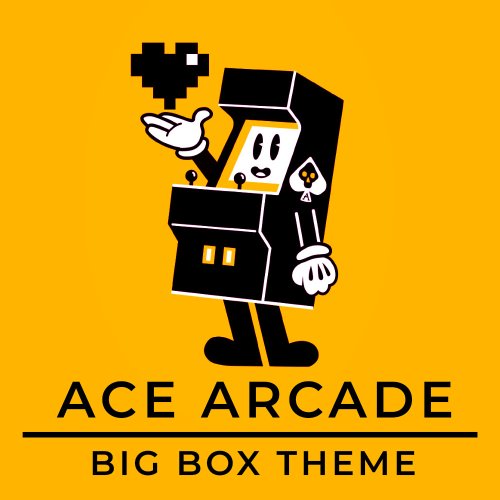
Hi everyone This theme was made for my arcade cabinet that had a 4:3 screen for old games. But I made compatible for 16:9. Because I build this machine and made the logo myself I wanted something really simple theme without animation and a simple wall. There is two colors : choose wheel and Wall 2 for the Yellow I was inspired by POC , ColorFull , Nes compendium,switch online. There is a lot of stuff that I would like to add - Arrow left and right - a selection on the wall ( square yellow outline) Hope you like it ! and if you can help me on these topic please comment. This theme exist because of the work of other people from the Community, thanks for sharing- 3 comments
-
- 14
-
-
-

-
Ace Arcade Theme - Inspired by Switch Online/Nes Compendium 4:3 and 16:9 View File Hi everyone This theme was made for my arcade cabinet that had a 4:3 screen for old games. But I made compatible for 16:9. Because I build this machine and made the logo myself I wanted something really simple theme without animation and a simple wall. There is two colors : choose wheel and Wall 2 for the Yellow I was inspired by POC , ColorFull , Nes compendium,switch online. There is a lot of stuff that I would like to add - Arrow left and right - a selection on the wall ( square yellow outline) Hope you like it ! and if you can help me on these topic please comment. This theme exist because of the work of other people from the Community, thanks for sharing Submitter taketoch Submitted 04/01/2023 Category Custom Themes
-
Version 0.1.0
128 downloads
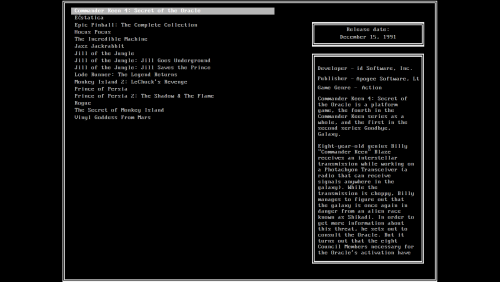
Seems like I can't stop making these types of themes. I have a soft spot for MS-DOS and terminals in general. This theme is meant to be used on a 4:3 monitor, but it will work just fine on 16:9. Files for the community theme creator are also available for download. -
Version 0.1.3
40 downloads
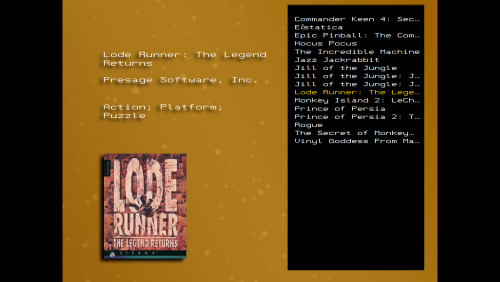
This is a recreation of what I seem to remember was a Snes Emulator. I remember playing with it as a kid, it didn't have any sound, probably dos based. Anyway, here's a theme made out of scrambled, possibly made-up childhood memories. I decided to add box art, just so it wouldn't look so empty, but the supposed emulator was too old for that. Also, this time I actually enabled notifications, so I can read your comments instead of forgetting about it for a million years. Files for the community theme creator are also available for download. -
![More information about "[OUTDATED] MS-DOS BigBox Theme"](https://forums.cdn.launchbox.gg/monthly_2017_01/LBdos1.thumb.png.19e83f4f62277155926b8192f96e701a.png)
Version Beta 0.3
335 downloads
ATTENTION: This theme is severely outdated. Use DOS Matrix by faeran instead! -------------------------------------ARCHIVED----------------------------------------------------------- This theme is meant to be used with the view "Text list with details" for both Platforms and Games. Do away with all those clunky boxes, videos and logos, and just enjoy the simplicity the good old days. NOTE: Install the font included with the theme! Perfect DOS VGA 437 NOTE2: Goes best with my sound pack here: -
Dos Terminal View File Seems like I can't stop making these types of themes. I have a soft spot for MS-DOS and terminals in general. This theme is meant to be used on a 4:3 monitor, but it will work just fine on 16:9. Files for the community theme creator are also available for download. Submitter walter10h Submitted 01/14/2023 Category Custom Themes
-
Forgotten Emulator View File This is a recreation of what I seem to remember was a Snes Emulator. I remember playing with it as a kid, it didn't have any sound, probably dos based. Anyway, here's a theme made out of scrambled, possibly made-up childhood memories. I decided to add box art, just so it wouldn't look so empty, but the supposed emulator was too old for that. Also, this time I actually enabled notifications, so I can read your comments instead of forgetting about it for a million years. Files for the community theme creator are also available for download Submitter walter10h Submitted 01/14/2023 Category Custom Themes
-
Simple Touch & Simple Desktop View File I wanted to change the theme to a more Retro look in Version 4. See changelog and last 4-5 screenshots. I will be updating Simple Touch to match Simple Desktop and will leave the v3 online, but to much to keep up with the dark versions. Simple Desktop v4 - Uploaded Simple Touch v4 - Uploaded (last 2 screenshots) Simple Desktop v3 (light) - FINAL Simple Desktop v3 (dark) - FINAL (screenshots close to end) Some of the features: smaller in size device bezels for game videos (200+ platforms) - (special thanks @Duimon for many of them). Also extra ones in a folder named "unused" and a psd template added Partial Gamepad badge support like Steam does (add a custom field in LB named "Partial Gamepad Support" with a value of "Yes") displays nice little message when no game notes are present (see screenshot 5) displays colorful "No Video image" when no game video is present in the bezel ability to choose scratches & smudges on game videos (delete "Scratches.png" file in ..\Themes\Simple Desktop v3 (light)\Media\Overlays) font changes for better visibility colorful 3 second popup for games marked as Completed, Broken or Not Installed in Horizonal & Wall views (see screenshot 7,8,9) *updating videos and screenshots I update them 5 versions to choose from. "Simple Touch" (light or dark), "Simple Desktop" (light or dark), and a "Simple Touch Vertical". * Simple Touch Vertical (vertical version) This one is more of a test version. It's made using 3:4 aspect ratio per request. I had to re-size some things and move a few things around a bit, but pretty much the same. I have nothing to test it with, so not sure how well it will look or work on a actual vertical screen. If you give this one a try, feedback would be awesome (especially some screenshots or a video). Clean, with a modern look. Works well with all the screen sizes I have been able to test, including large screens and 4K TVs. Responsive and simple, thus "Simple Touch". Audio announces 200+ Platforms now. * (you can disable the audio by renaming or deleting the Audio folder within the ..\theme name\Media\Audio folder. If you want to remove the family logo image in the settings page, you can do the same thing with it, located in the ..\theme name\Media\Images folder) I needed this for a A-I-O Touch Screen PC I will be installing in a false wall soon. I'll be doing a home remodeling project soon and thought a touch screen jukebox in the wall would be a cool look. I found a great deal on a Lenovo 700 22ish touchscreen on ebay and have been setting it all up before I start the remodel. I wanted to create a BB theme with a similar look to the Jukebox (media center) software I put on the PC. (Most of the Platform videos in the videos in v3 and previous were the Bigbox Cinematic videos, in v4 they showcase the Colorful videos with a few I made) VIDEO: Simple Desktop v4 (11-04-22) VIDEO: Simple Desktop v3 Light (10-07-22) - Sorry it's so long, I was trying to show all the bezels I used to show the game videos for all the platforms. VIDEO: Simple Desktop v3 Dark (10-13-22) Here is the dll file for adding the "Touch Badge" in Launchbox. Drop it into your ..\Launchbox\Plugins folder. (not required, just shows the Touch Badge in Launchbox) Badge Touch.dll Startup Videos: (10 seconds) NEW - Simple Desktop (available in 1080 & 4K) BigBox Simple Desktop (3840 × 2160 px).mp4 NEW - Simple Touch (available in 1080 & 4K) COMIN SOON As always, special thanks goes out to: @JoeViking245 for helping me with the touch issues @y2guru for sharing CTC with us, thank you @faeran for allowing me to use a bit of his code @Johnny T for all the MFME Fruitbox Machine help @viking for the awesome Colorful stuff and sharing some of his knowledge with me ALL THE USERS Don't forget to leave feedback, post comments, questions or suggestions. Will do the best I can to get back. - Enjoy! BigBox Simple Desktop (1920 × 1080 px).mp4 Submitter The Papaw Submitted 06/09/2022 Category Custom Themes
-
[OUTDATED] MS-DOS BigBox Theme View File This is a simple MS-DOS based theme for BigBox. After the new release of Launchbox on MS-DOS, I realized "Wow... This simplicity just feels so much better!" So I went ahead and started making this. It is my very first Bigbox theme, so chances are there will be stuff that's not correct. If so, please comment so I can try and fix it. The design is based on (As in pretty much ripped off) Launchbox for MS-DOS. This theme is meant to be used with the view "Text list with details" for both Platforms and Games. Do away with all those clunky boxes, videos and logos, and just enjoy the simplicity the good old days. NOTE: Install the font included with the theme! Perfect DOS VGA 437 NOTE2: Goes best with my sound pack here: Submitter walter10h Submitted 01/21/2017 Category Custom Themes
-
Simple Vewlix View File This is a Bigbox theme I made for my Vewlix cabinet using The Community Theme Creator so a shout out goes to y2guru for his amazing app. This is a Simple theme I wanted something basic that looked good running on my cab. I plan on tweeting a few things in the future but i'm done messing with it for now Enjoy Submitter necroticart Submitted 10/19/2019 Category Big Box Custom Themes
-
PC-Beeps View File Sound pack to go along with my MS-DOS Theme. Simple beeps from a PC speaker to give some life to your minimalistic box. Submitter walter10h Submitted 01/21/17 Category Big Box Sound Packs





.jpg.bfccbeb594e17bc9c73192fd40cf58b4.jpg)