Image

Joe Wainer

Updated 7 months ago

Free and easy to use mind mapping tool

Mind maps are an excellent tool for you to sort through your thoughts. Mapping out your ideas allows you to produce creative and unique concepts in less time. Unlike linear thinking, mind maps allow your consciousness to flow. They are typically drawn by hand, which creates a new problem as you are literally losing your ideas. If this is an issue you’re familiar with, you need a mind mapping software like FreeMind

What is Freemind software used for?

FreeMind is a productivity program that helps you capture your ideas visually. It’s suitable for users that are planning a project, writing long-form content, or ideating a campaign. By using a non-linear approach to brainstorming, you will be able to create a diagram that can be easily edited (unlike in Word or Excel where you’re confined to linear structures). 

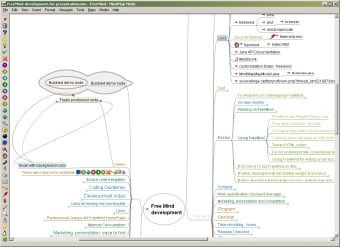
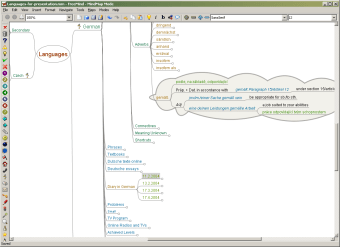
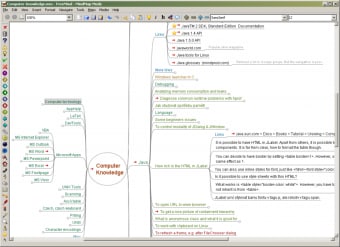
The programs’ mind maps are created using notes and are joined by branches. Just like drawing on paper, you can rearrange the notes in any way that you want or need. Those that are new to mind maps may want to have the program arrange nodes and branches for you. It’s a useful function that helps introduce mind maps to beginners. 

Other designs include folding branches, icons on individual nodes, and clouds around branches. You can also reference external files; you can add HTML links and links to files stored in your local drive. If you need to share your mind map, you can export your work into HTML, XHTML, PDF, PNG, JPEG, SVD, and OpenDocument. 

Is FreeMind map software good?

It is unique from mind mapping tools since its source code is available online. Also classified as an open-source program, coders that want to debug and patch its program are welcome to do so since it ensures that it always runs smoothly. This also means programmers are allowed to contribute new features to the software. 

These developers likely use this program too so you’re sure to get new features. The downside of FreeMind is that it’s written in Java. While it is a cross-platform program, it will only run on a system with a Java Runtime Environment. XMind is a good alternative to FreeMind since it is also available on desktop and mobile.

It has all the capabilities of this program while offering a bit more in terms of extra features. New users can easily use this since it has a catalog of templates you can choose from. It also has features relevant to corporate work and clients such as Slide-Base Presentations, Gantt View, and integration with office suites.

Dated but worthwhile productivity program 

FreeMind has all the capabilities of a good productivity program to help you gather your thoughts and ideas. It’s open-source, offers manual and automatic editing, and is portable. The catch is that you need to have JRE installed on your computer. If you prefer to create mind maps on your computer’s current settings, then there are other similar programs available like XMind.


Image

Joe Wainer

    Joe Wainer is a content writer with a strong interest in technology and software. He enjoys exploring new apps, games, and tools, translating his findings into reviews that are clear and accessible. His background also includes coding projects, adding practical insight to his evaluations.

    • Pros

      • Open-source, cross-platform program
      • Create mind maps using nodes and branches
      • Save mind maps in multiple file formats
      • OpenLink HTML and files into your mind map
    • Cons

      • Requires Java Runtime Environment
    Image
     0/3

    App specs

    Also available in other platforms

    Program available in other languages


    Icon of program: FreeMind

    FreeMind for PC


    User reviews about FreeMind

    3.5

    10 reviews

    Add review

    Main reviews for you

    • Image

      Anonymous user

      Excellent and one of the best tool for task planning. it will provide the connectivity of subsystems in any project

    • Image

      Anonymous user

      A flexible tool, super-easy to use. Perfect for organizing life.. A flexible tool, super-easy to use. Recommend it to everyone for keeping and organizing ideas.I use it for my todo list, for writing essays and papers, for keeping up with all the little gotchas of life. Pros: drag and dropflexible copy / paste Cons: export to outlinebetter export to excel

    • Image

      Anonymous user

      Fantastic software. Fantastic easy to use and small software I use for years.You can lear this in 5 minutes and get it running.I use this for project planing, personal planing and case stuff.

    • Image

      Anonymous user

      Excellent tool on many levels and professions.. . I use it on a variety of subjects and hobbies. It's gives me the ability to get seriously organized, while keeping track of notes, websites, and other information that's important to a specific project. Color coding the information makes grouping easy and quickly accessible. Overall, I love this software.

    • Image

      Anonymous user

      Priceless program.. Intuitive and best of all, it's FREE!I loved it from the first time I used it until now.It's been a while now and I always highly recommend this program to everyone I know that needs mind mapping guidance. Pros: FREE!Easy to use. Cons: Possible integration issues with other main programs which can be improved, other than that the program is a work of art.

    • Image

      Anonymous user

      FreeMind. Considering it is free, I find that the ease of use and featurers are excellent and compare well with other programs. I like to be able to "link" between items, not always available elsewhere. Pros: Easy to use and good range of functions Cons: I would like a few more "bits" but, considering it overall, none.

    More

    You may also like

    Alternatives to FreeMind

    Explore Apps

    Latest articles

    Laws concerning the use of this software vary from country to country. We do not encourage or condone the use of this program if it is in violation of these laws.
    Softonic

    Is FreeMind safe?

    99/100

    Score result: Clean

    This file passed a comprehensive security scan using VirusTotal technology. It is safe to download.
    • Virus free
    • Spyware free
    • Malware free
    • Verified by Security Partners

      VirusTotal logo

    Scan Info

    Last scan
    Tuesday, April 23, 2024
    Scan provider
    VirusTotal · Full report

    File Integrity

    File
    FreeMind-Windows-Installer-1.1.0.exe
    SHA256
    785565ac4cf379c857f97890070e7f82afdf72f9e65e1a71902732af0fc00110
    SHA1
    c952a9f91587fa661a9e66741a472d7bb70c192f

    Softonic security commitment

    FreeMind has been thoroughly scanned by our advanced security systems and verified by industry-leading partners. This file comes from the official developer and has passed all our security checks, showing no signs of viruses, malware, or spyware. For more information, visit our Security and Trust Center