

Descrición
This plugin integrates with the WPVulnerability API to provide real-time vulnerability assessments for your WordPress core, plugins, themes, PHP version, Apache HTTPD, nginx, MariaDB, MySQL, ImageMagick, curl, memcached, Redis, and SQLite.
It delivers detailed reports directly within your WordPress dashboard, helping you stay aware of potential security risks. Configure the plugin to send periodic notifications about your site’s security status, ensuring you remain informed without being overwhelmed. Designed for ease of use, it supports proactive security measures without storing or retrieving any personal data from your site.
Fiabilidade dos datos
A información proporcionada pola base de datos de información procede de diferentes fontes que foron revisadas por terceiros. Non hai responsabilidade de ningún tipo pola información. Actúa baixo o teu propio risco.
Uso do plugin
WP-CLI
You can use the following WP-CLI commands to manage and check vulnerabilities:
- Núcleo:
wp wpvulnerability core - Plugins:
wp wpvulnerability plugins - Temas:
wp wpvulnerability themes - PHP:
wp wpvulnerability php - Apache HTTPD:
wp wpvulnerability apache - nginx:
wp wpvulnerability nginx - MariaDB:
wp wpvulnerability mariadb - MySQL:
wp wpvulnerability mysql - ImageMagick:
wp wpvulnerability imagemagick - curl:
wp wpvulnerability curl - memcached:
wp wpvulnerability memcached - Redis:
wp wpvulnerability redis - SQLite:
wp wpvulnerability sqlite
To configure the plugin you can use:
- Hide component:
wp wpvulnerability config hide <component> [on|off] - Notification email:
wp wpvulnerability config email <emails>(comma separatted) - Notification period:
wp wpvulnerability config period <never|daily|weekly> - Log retention:
wp wpvulnerability config log-retention <0|1|7|14|28>(in days) - Cache duration:
wp wpvulnerability config cache <1|6|12|24>(in hours)
All commands support the --format option to specify the output format:
--format=table: Displays the results in a table format (default).--format=json: Displays the results in JSON format.
Need help?
wp wpvulnerability --help: Displays help information for WPVulnerability commands.wp wpvulnerability [command] --help: Displays help information for a WPVulnerability command.
REST API
The WPVulnerability plugin provides several REST API endpoints to fetch vulnerability information for different components of your WordPress site.
- Core:
/wpvulnerability/v1/core - Plugins:
/wpvulnerability/v1/plugins - Themes:
/wpvulnerability/v1/themes - PHP:
/wpvulnerability/v1/php - Apache HTTPD:
/wpvulnerability/v1/apache - nginx:
/wpvulnerability/v1/nginx - MariaDB:
/wpvulnerability/v1/mariadb - MySQL:
/wpvulnerability/v1/mysql - ImageMagick:
/wpvulnerability/v1/imagemagick - curl:
/wpvulnerability/v1/curl - memcached:
/wpvulnerability/v1/memcached - Redis:
/wpvulnerability/v1/redis - SQLite:
/wpvulnerability/v1/sqlite
The WPVulnerability REST API uses Application Passwords for authentication. You need to include a valid Application Password in the Authorization header of your requests.
Example Request with Authentication
curl -X GET https://example.com/wp-json/wpvulnerability/v1/plugins -u username:application_password
Replace username with your WordPress username and application_password with your Application Password.
Extra Configurations
“From:” mail (since: 3.2.2)
Se, por algún motivo, precisas que os correos electrónicos enviados polo complemento teñan un De diferente ao administrador do sitio, podes cambialo desde o wp-config.php engadindo unha constante:
define( 'WPVULNERABILITY_MAIL', '[email protected]' );
If the constant is active, it will be visible in the configuration screen.
Force hiding checks (since: 4.1.0)
If you want to always hide a specific component, you can define a constant in wp-config.php. When set to true, the option will be checked automatically in the settings screen and the related analysis will be skipped.
Example:
define( 'WPVULNERABILITY_HIDE_APACHE', true );
Available constants: WPVULNERABILITY_HIDE_CORE, WPVULNERABILITY_HIDE_PLUGINS, WPVULNERABILITY_HIDE_THEMES, WPVULNERABILITY_HIDE_PHP, WPVULNERABILITY_HIDE_APACHE, WPVULNERABILITY_HIDE_NGINX, WPVULNERABILITY_HIDE_MARIADB, WPVULNERABILITY_HIDE_MYSQL, WPVULNERABILITY_HIDE_IMAGEMAGICK, WPVULNERABILITY_HIDE_CURL, WPVULNERABILITY_HIDE_MEMCACHED, WPVULNERABILITY_HIDE_REDIS, WPVULNERABILITY_HIDE_SQLITE.
Cache duration (since: 4.1.0)
By default, data from the API is cached for 12 hours. To change this, define WPVULNERABILITY_CACHE_HOURS in wp-config.php with one of 1, 6, 12 or 24. This value overrides the setting screen and WP-CLI command.
define( 'WPVULNERABILITY_CACHE_HOURS', 24 );
Log rotation (since: 4.2.0)
WPVulnerability stores the most recent API responses so you can review recent calls from the new log tab. Define WPVULNERABILITY_LOG_RETENTION_DAYS in wp-config.php to control how many days of entries are preserved. Supported values are 0, 1, 7, 14 or 28; using 0 disables logging entirely.
define( 'WPVULNERABILITY_LOG_RETENTION_DAYS', 14 );
When the constant is present its value is enforced in the settings UI and through WP-CLI, ensuring consistent log rotation across environments.
Compatibilidade
- WordPress: 4.7 – 6.9
- PHP: 5.6 – 8.4
- WP-CLI: 2.3.0 – 2.11.0
Seguridade
O plugin adhírese ás seguintes medidas de seguridade e protocolos de revisión para cada versión:
- Manual de plugins de WordPress
- Seguridade de plugins de WordPress
- APIs de seguridade de WordPress
- Estándares de programación en WordPress
- Comprobación de complementos (PCP)
Privacidade
- Este plugin ou a API da base de datos de WordPress Vulnerability non recolle ningunha información sobre o teu sitio, a túa identidade, os plugins, temas nin o contido que ten o sitio.
Vulnerabilidades
- No vulnerabilities have been published up to version 4.2.1.
Atopaches unha vulnerabilidade de seguranza? Infórmano de forma privada no repositorio de GitHub de WPVulnerability.
Colaboradores
Podes contribuir a este plugin no repositorio de GitHub de WPVulnerability.
Capturas

Escritorio do widget WP-Admin. 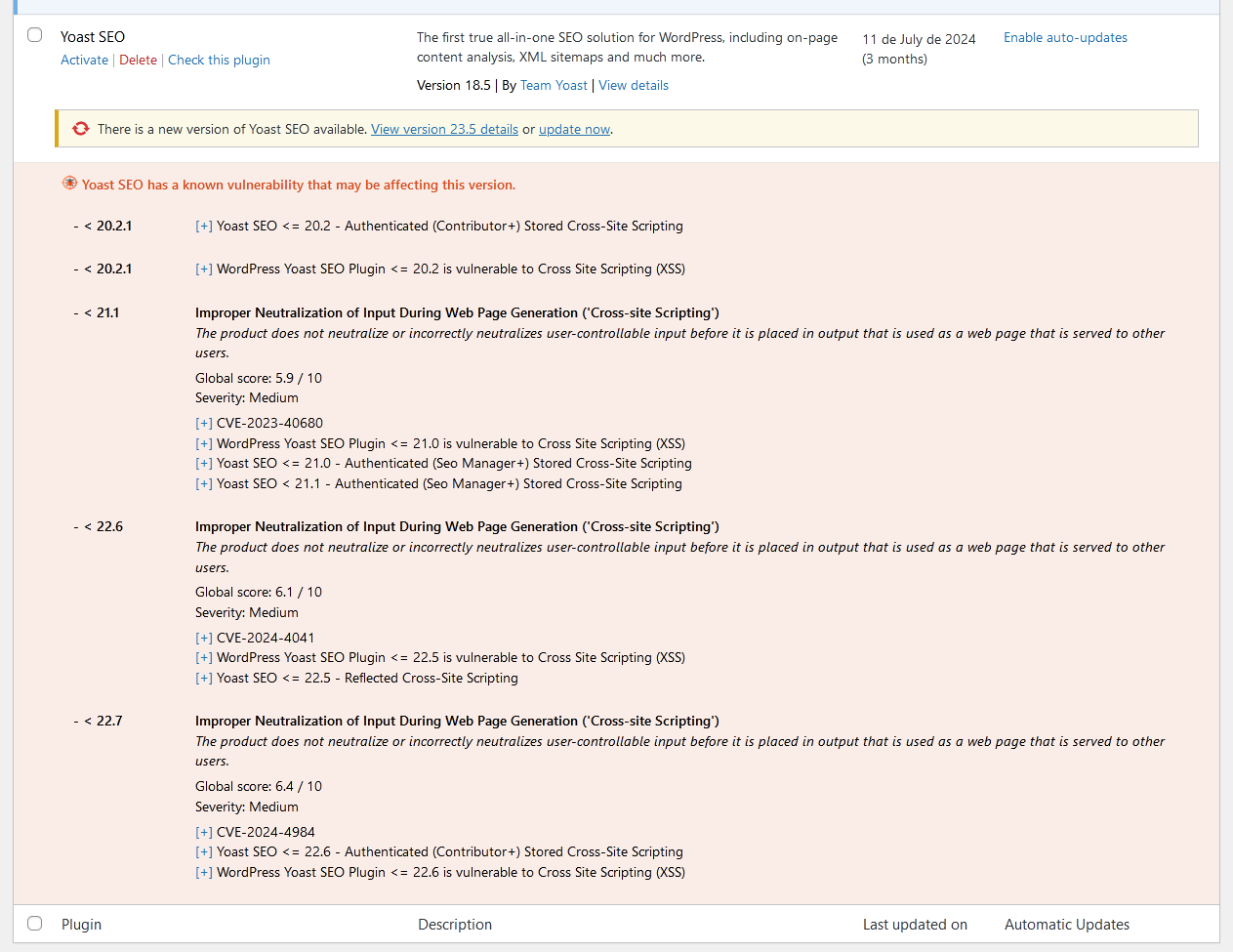
Lista de vulnerabilidades na lista de plugins. 
Lista de vulnerabilidades na saúde do sitio.


Instalación
Descarga automática
Visita a sección de plugins no seu WordPress, busca [wpvulnerability]; descarga e instala o plugin.
Descarga manual
Extrae os contidos do ZIP e sube os contidos ao directorio /wp-content/plugins/wpvulnerability/. Unha vez subidos, aparecerán na túa lista de plugins.
Preguntas frecuentes
-
De onde procede a información sobre a vulnerabilidade?
-
A orixe está na API de WPVulnerability.com. As vulnerabilidades que aparecen nesta API proceden de diferentes fontes, como CVEs.
-
Envíanse os datos do meu sitio a algún sitio?
-
Non. Nunca. A túa privacidade é moi importante para nós. Non comercializamos os teus datos.
-
Qué vulnerabilidades vou atopar?
-
Vulnerabilities in WordPress Core, Plugins, Themes, PHP, Apache HTTPD, nginx, MariaDB, MySQL, ImageMagick, curl, memcached, Redis, and SQLite are documented.
-
Qué fago se o meu sitio ten unha vulnerabilidade?
-
First of all, peace of mind. Investigate what the vulnerability is and, above all, check that you have the latest version of the compromised element. We actively recommend that you keep all your WordPress and its plugins up to date. Contact your hosting provider to patch non-WordPress vulnerabilities (like web server, databases, and other software).
Comentarios


Colaboradores e desenvolvedores
“WPVulnerability” é un software de código aberto. As seguintes persoas colaboraron con este plugin.
Colaboradores


“WPVulnerability” foi traducido a 14 idiomas. Grazas aos desenvolvedores polas súas contribucións.
Traduce “WPVulnerability” ao teu idioma.
Interesado no desenvolvemento?
Revisa o código, bota unha ollada aorepositorio SVN, ou subscríbete ao log de desenvolvemento por RSS.
Rexistro de cambios
[4.2.1] – 2025-12-17
Corrixido
- Clear legacy WPVulnerability cron events from multisite subsites so updates and log cleanup only run on the main site.
Compatibilidade
- WordPress: 4.7 – 6.9
- PHP: 5.6 – 8.4
- WP-CLI: 2.3.0 – 2.11.0
Probas
- PHP Coding Standards: 3.13.5
- WordPress Coding Standards: 3.3.0
- Plugin Check (PCP): 1.7.0
[4.2.0] – 2025-12-16
Engadido
- GUI reorganized with tabs.
- New log tab, listing API calls made in the last days.
- Added some tests to check email.
- Constant
WPVULNERABILITY_LOG_RETENTION_DAYSto enforce log rotation fromwp-config.php. - WP-CLI command to configure log retention from the terminal.
- Automated pruning of stored logs based on the configured retention window.
Updated
- New logo and assets.
- PHP syntax to avoid errors.
- Access level control in all the options.
- Uninstall deletes everything.
- POT (translations) file.
- Software versions detection.
- Documentation improvements.
- Improved the content for Slack and Microsoft Teams notifications (in a more old-fashion way).
- Fine-tuned settings labels to reflect enforced log retention values when the constant is present.
Corrixido
- Mail unsubscription.
- Mail sending failed.
- Enforced the cache (a lot).
- Core versions (beta and RC) with invalid format.
- Normalize stored notification preferences to avoid stale values after upgrades.
Compatibilidade
- WordPress: 4.7 – 6.9
- PHP: 5.6 – 8.4
- WP-CLI: 2.3.0 – 2.11.0
Probas
- PHP Coding Standards: 3.13.4
- Estándares de codificación de WordPress: 3.2.0
- Comprobación de plugins (PCP): 1.6.0
- Revisión do código de SonarCloud
- Amplify Code Check
Previous versions
Se queres ver o rexistro de cambios completo, visita o arquivo changelog.txt.
