

A safe, free-hosted VPN solution
Hamachi is a free hosted VPN from LogMeIn Inc. that enables secure network extensions in both personal and professional capacities. It is a desktop tool that creates and manages a personalized virtual private network between remote computers for distributed teams, mobile workers, or gaming friends. With encryption and security details rivaling NordVPN and ExpressVPN, Hamachi is an excellent product for connecting multiple networks together.
Hamachi secures confidential information between multiple computers through the use of a virtual tunnel encrypted with AES 256-bit. It’s used to ensure private Internet access and communication over a safe network, establishing direct links between any computers behind a network address translation (NAT) firewall. Available in three pricing tiers (Standard, Premium, and Multi-Network), the Standard version of Hamachi is free and can be outfitted on up to five computers. Besides Windows, this VPN service also works on Mac and Linux operating systems.
Maintain and protect multiple computers
LogMeIn Hamachi is a VPN that’s easy to use, highly customizable, and free of charge. You can use it to create your own virtual private network, where the program simulates a real local area network between various remote computers. This can be used to establish private communication conducive to everything from professional file sharing to chatting over your favorite multiplayer game.
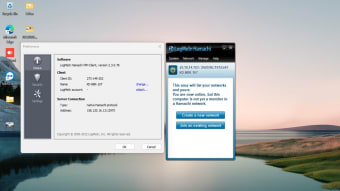
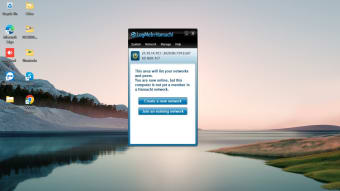
Hamachi works intuitively, with a user interface that’s simple to pick up. You can use the VPN to easily create, manage and maintain virtual private networks from practically anywhere. While it’s great for Windows PC, it can also extend secure LAN-like network connectivity to mobile users. There are various customization options for all your managed networks, available right under the ‘Networks’ tab on the left panel.
If you expand this tab you can add additional new networks by clicking ‘My Networks.’ Simply name your network and choose whether you want to give it a description. Then choose between three possible network types: Gateway, Hub-and-spoke, and Mesh. Each one has its own benefits.
- Gateway, for example, provides remote users with secure access to any and all private networks/LANs. It does so from a centralized LogMeIn Hamachi gateway and doesn’t modify any of your active firewalls or network routers.
- Hub-and-spoke, on the other hand, is a model that qualifies certain computers as hubs, using the rest of the devices as spokes. Similar to how a wheel operates, the hub serves as a nexus point, maintaining centralized access to all attached spokes. This enables the hub computer to specify certain other computers that users have access to. This can aid with controlling network access and usage, and extends to facets such as password management, network authentication, network locking, or ongoing network membership.
- Thirdly, there’s the mesh network feature. This allows each remote computer in the network to connect with one another. Instead of the spokes of a wheel connecting to a singular hub, this option is more like a spiderweb, with connections intersecting at multiple angles. It’s a quicker, easier way to directly connect remote machines with each other. This gives users basic network access control with any and all network resources that they might need.
Gaming and safety
Hamachi is an excellent tool for Windows in today’s atmosphere of remote networks and virtual business, it’s also a popular app for modern gamers. Much like Hamachi can set up a virtual corporate LAN, it can be put to equal use with gaming. Hamachi can set up gaming servers to emulate a local area network. This is especially valuable for competitive gamers and streamers looking to mitigate lag and server interruptions. Besides offering privacy and faster connections, this also offers another layer of protection against DDoS attacks.
Security is paramount for any VPN service, and Hamachi is no different. All incoming and outgoing communication is encrypted, and only authorized users can connect to a designated Hamachi network. All exchanges are done via a P2P (peer-to-peer) protocol, keeping connections private and secure from hacking attempts. More so than gaming, this aspect is inherently paramount when it comes to the workplace.
Besides Internet connections, Hamachi’s protection also extends to your computer’s local files. You can play games just as safely as you might print your PC’s local documents from the office. LogMeIn Hamachi safely encrypts your private data with military-grade encryption through the use of its tunneling protocol. To do so, however, it must collect your personal data. As is the case with many free VPN services, it does so for various marketing purposes, including affiliate commissions and ad tracking. Hamachi will keep you safe but at the cost of some of your privacy. It does take into account your personal IP address.
Hamachi vs. NordVPN
Hamachi sets up your little private network like you're all in the same room, which is great for gaming with friends or grabbing files off your home computer. It's free to start, though you'll need to tinker with settings. Security? Well, that's mostly up to you, but it's perfect if you just need to connect a few devices directly.
NordVPN, on the other hand, hides your online activity and lets you pretend to be in another country. It's super easy to use and secures your internet on public Wi-Fi, but you'll need a subscription. If you're mainly looking to directly connect a few devices, and you are comfortable with setting up your own network, then Hamachi might be the easier option.
Essential VPN software on a budget
LogMeIn Hamachi is used by professional teams that work remotely and it’s intrinsic to its design. The software lets you work closely with distributed teams on emulated LANs, and you can remotely deploy software to connected computers. The centralized software deployment works in tandem with this, making it fast and easy to provision a virtual network client interface to new computers. Fully embracing today’s remote atmosphere, Hamachi lets you troubleshoot any occurring issues without ever needing to be onsite.
A valuable VPN for Windows, Hamachi is a great help in efficiently creating and managing VPN connections on multiple computers. If you’re trying to connect two or more networks together through a virtual private network, or if you want a more secure gaming experience, LogMeIn Hamachi is worth looking into. Be aware that LogMeIn is a reputable developer, but Hamachi’s privacy policy does have some holes.












.png)