

Deskripsi
Enhance your WordPress site’s image security and branding. Image Watermark allows you to apply image or text overlays to new uploads and bulk process existing Media Library images with ease.
Key Features:
- Watermark Types: Choose from image-based or text-based watermarks with full customization.
- Flexible Application: Automatic watermarking on uploads, manual/bulk apply/remove via Media Library.
- Advanced Customization: Position watermarks precisely, adjust sizes, opacity, and more.
- Backup & Restore: Secure backups for easy watermark removal.
- Image Protection: Prevent copying via right-click, drag-and-drop, and developer tools.
- Technical Excellence: Supports JPEG, PNG, WebP; ImageMagick/GD engines; preserves metadata.
Perfect for photographers, bloggers, and businesses looking to safeguard their visual content.
For more information, check out the plugin page, documentation, or support forum.
Feature Breakdown:
Watermarking Types:
* Support for image-based watermarks (upload custom images as watermarks)
* Support for text-based watermarks (customizable fonts, colors, and sizes)
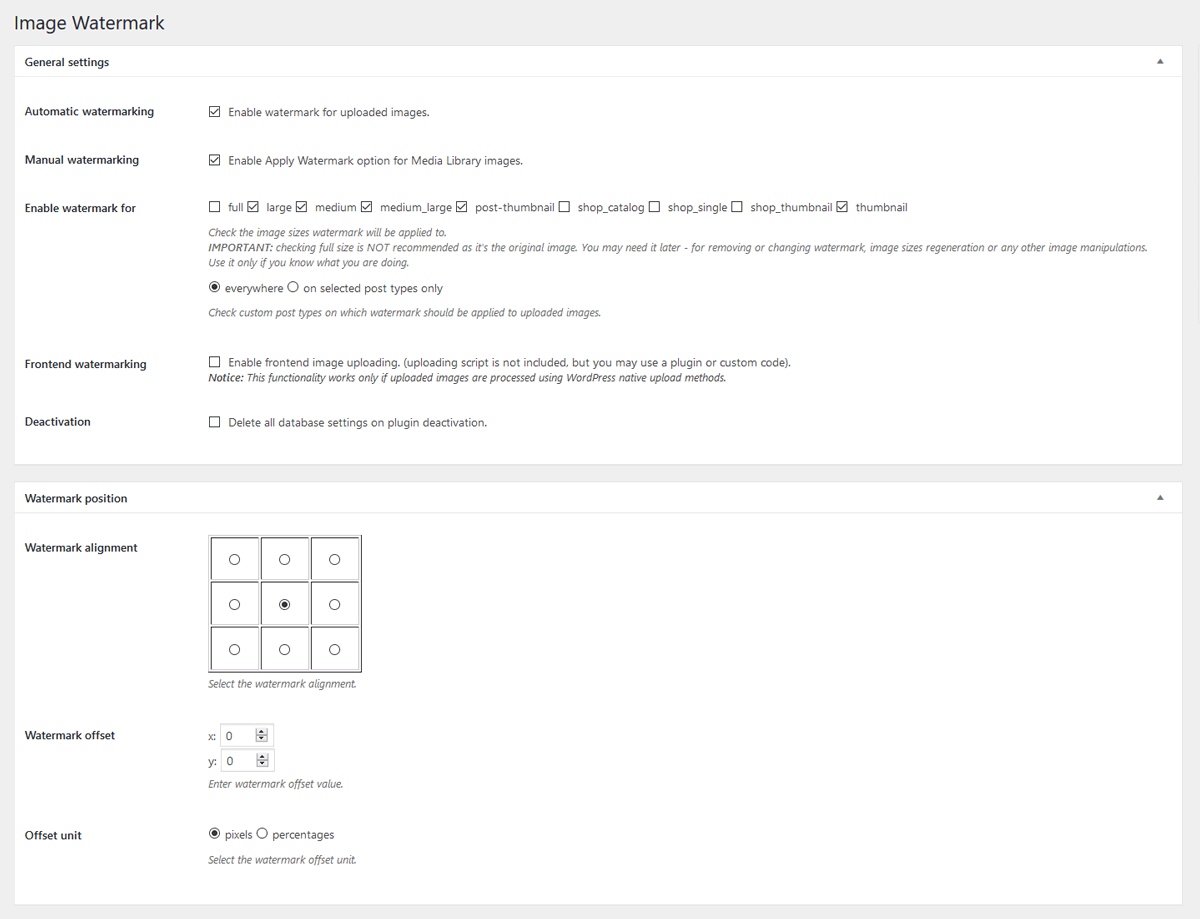
* Automatic watermarking on new uploads to the Media Library
* Manual and bulk watermarking for existing images (apply or remove via Media Library actions)
Customization & Settings:
* Flexible watermark positioning (9 alignment options with pixel or percentage-based offsets)
* Three watermark size modes: original, custom dimensions, or scaled to image size
* Adjustable watermark transparency and opacity
* Watermark image preview for real-time adjustments
* Selective application: Choose specific post types or enable everywhere (including frontend uploads)
* Image format selection (baseline or progressive JPEG)
* Configurable image quality settings
Backup & Management:
* Automatic image backup functionality (stores originals for easy restoration)
* Option to remove watermarks (restores from backups when available)
* Secure backup storage with .htaccess protection
Image Protection:
* Disable right-click context menus on images
* Prevent image copying via drag-and-drop
* Block access to developer tools for image inspection
* Customizable protection notice/toast message displayed to users attempting to copy images
Technical Information:
* Support for JPEG, PNG, and WebP image formats
* Dual image processing engines: ImageMagick (preferred) with GD library fallback
* EXIF and IPTC metadata preservation (where supported)
* Cache-busting for immediate thumbnail updates after watermark changes
* Translation-ready with included .pot file
Tangkapan Layar
screenshot-1.png 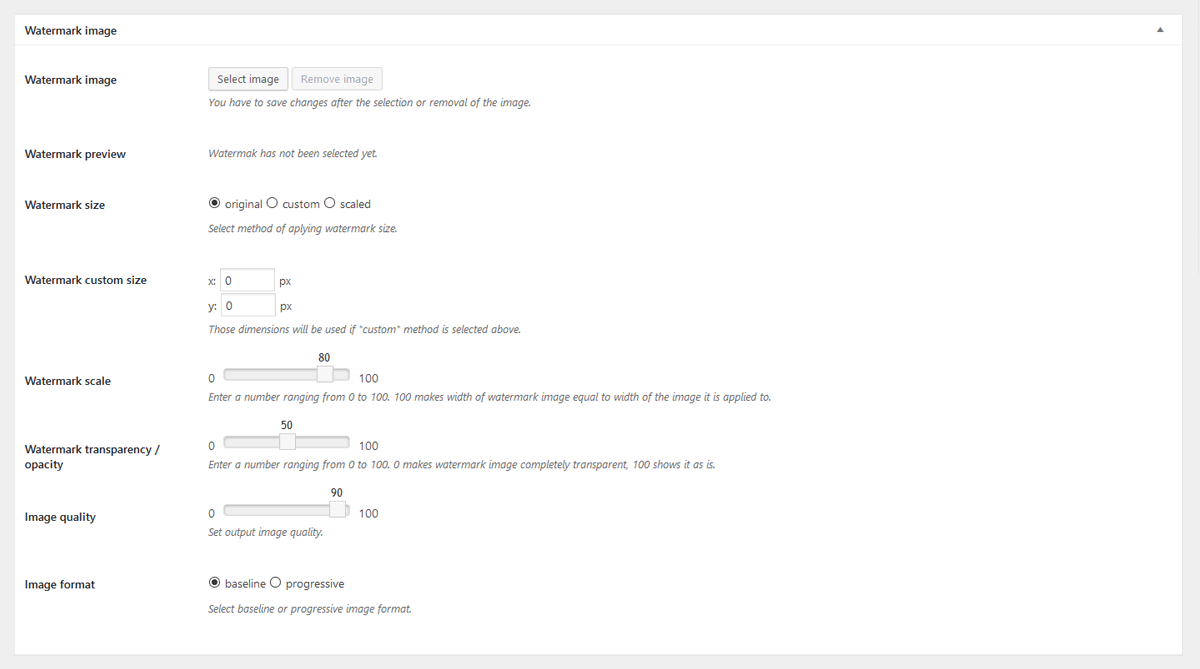
screenshot-2.png 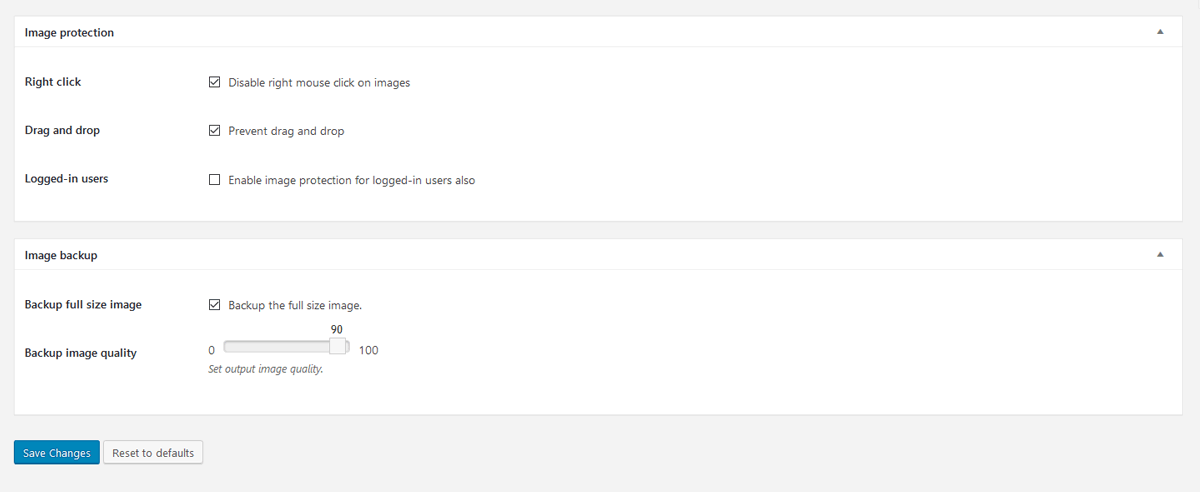
screenshot-3.png


Instalasi
-
Install the Plugin:
- Via WordPress.org: Go to Plugins > Add New, search for “Image Watermark,” and click Install Now.
- Manual Upload: Download the plugin ZIP from WordPress.org, then upload it via Plugins > Add New > Upload Plugin.
-
Activate the Plugin:
- After installation, activate Image Watermark through the ‘Plugins’ menu in WordPress.
-
Configure Settings:
- Navigate to Settings > Watermark in your WordPress admin dashboard.
- Choose your watermark type (image or text) and upload/select a watermark image if using image-based.
- Adjust positioning, size, opacity, and other options as needed.
- Select post types for automatic watermarking or enable for all uploads.
-
Enable and Test:
- Toggle the plugin on to start automatic watermarking for new uploads.
- For existing images, go to Media Library > Bulk Select, choose images, and use the “Apply Watermark” bulk action.
- Preview watermarks in the settings page and test on a sample image to ensure everything works.
Requirements: WordPress 6.0+, PHP 7.4+, and either GD or ImageMagick library. If issues arise, check server compatibility in Settings > Watermark > Status tab.
Tanya Jawab
No questions yet.
Ulasan


Kontributor & Pengembang
“Image Watermark” adalah perangkat lunak open source. Berikut ini mereka yang sudah berkontribusi pada plugin ini.
Kontributor
“Image Watermark” telah diterjemahkan dalam 9 bahasa. Terima kasih kepada para penerjemah untuk kontribusi-nya.
Terjemahkan “Image Watermark” dalam bahasa Anda.
Tertarik mengembangkan?
Lihat kode, periksa repositori SVN , atau mendaftar ke log pengembangan melalui RSS.
Log Perubahan
2.0.0
- New: Text watermark support
- New: Enhanced watermark preview with real-time updates.
- New: Support for additional watermark alignment options and percentage-based scaling.
- Tweak: Improved user interface for settings page with modern design elements.
- Tweak: Optimized image processing for faster bulk operations.
- Fix: Enhanced error handling for unsupported image formats.
1.9.1
- New: Bulk Apply/Remove Watermark buttons in Media Library grid view with native styling.
- Fix: Cache-busting for thumbnails and attachment details so watermark changes show immediately.
- Fix: Bulk actions now ignore unsupported/non-image files for safer processing.
1.9.0
- Fix: Watermarked image not refreshing in attachment edit screen after watermark is applied or removed
- Fix: Updated image reload selectors to support modern WordPress attachment details page structure
- Tweak: Complete modern rewrite of Right click blocking feature
1.8.0
- New: WebP image files support
1.7.4
- Fix: Potential security issue with capability check – props WordFence
- Fix: Saving post types settings issue
- Tweak: WordPress 6.5 compatibility
1.7.3
- Tweak: WordPress 6.2 compatibility
- Tweak: PHP 8.2 compatibility
1.7.2
- Fix: Missing admin-media.js file
1.7.1
- Fix: Watermark option not available in Media Library
1.7.0
- Tweak: WordPress 5.9 compatibility
- Tweak: PHP 8.x compatibility
1.6.6
- Tweak: PHP 7.3 compatibility
1.6.5
- Fix: Improved support for PHP 7 and above
- Fix: Backup folders handling of date based organized uploads
1.6.4
- Fix: Transparent PNG issues with ImageMagick library
1.6.3.1
- Fix: The plugin directory upload fix.
1.6.3
- Fix: PNG files watermarking issue
1.6.2
- New: Option to select watermark offset unit – pixels or percentages
- Tweak: Added values to slider settings fields
1.6.1
- Fix: Minor bug with AJAX requests, thanks to JoryHogeveen
- Fix: Prevent watermarking the watermark image, thanks to JoryHogeveen
- Tweak: Code cleanup
1.6.0
- New: Image backup functionality, thanks to JoryHogeveen
- New: Option to remove watermark (if backup is available)
1.5.6
- New: PHP image processing library option, if more than one available.
- Fix: Manual / Media library watermarking not working.
- Fix: Image sizes not being generated properly in GD library.
1.5.5
- Fix: Determine AJAX frontend or backend request
- Tweak: Remove Polish and Russian translations, in favor of GlotPress
1.5.4
- Fix: Use of undefined constant DOING_AJAX
1.5.3
- New: ImageMagic support
1.5.2
- Tweak: Switch from wp_get_referer() to DOING_AJAX and is_admin().
1.5.1
- New: Introducing plugin documentation
- Tweak: Improved transparent watermark support
1.5.0
- Tweak: Plugins setting adjusted to WP settings API
- Tweak: General code cleanup
- Tweak: Added Media Library bulk watermarking notice
1.4.1
- New: Hungarian translation, thanks to Meszaros Tamas
1.4.0
- New: Option to donate this plugin 🙂
1.3.3
- New: Russian translation, thanks to Sly
1.3.2
- New: Chinese translation, thanks to xiaoyaole
1.3.1
- Fix: Option to disable right click on images not working
1.3.0
- Tweak: Manual watermarking now works even if selected post types are selected
- Tweak: UI improvements for WP 3.8
- Fix: Image protection options not saving properly
1.2.1
- New: German translation, thanks to Matthias Siebler
1.2.0
- New: Frontend watermarking option (for front-end upload plugins and custom front-end upload code)
- New: Introducing iw_watermark_display filter
- New: Option to delete all plugin data on deactivation
- Tweak: Rewritten watermark application method
- Tweak: UI enhancements for settings page
1.1.4
- New: Arabic translation, thanks to Hassan Hisham
1.1.3
- New: Introducing API hooks: iw_before_apply_watermark, iw_after_apply_watermark, iw_watermark_options
- Fix: Wrong watermark watermark path
- Fix: Final fix (hopefully) for getimagesize() error
1.1.2
- New: Image quality option
- New: Image format selection (progressive or baseline)
- Fix: Error when getimagesize() is not available on some servers
- Tweak: Files & class naming conventions
1.1.1
- New: Added option to enable or disable manual watermarking in Media Library
- Fix: Apply watermark option not visible in Media Library actions
- Fix: Warning on full size images
1.1.0
- New: Bulk watermark – Apply watermark in Media Library actions
- New: Watermark images already uploaded to Media Library
1.0.3
- Fix: Error during upload of file types other than images (png, jpg)
- Fix: Limit watermark file types to png, gif, jpg
- Tweak: Validation for watermark size and transparency values
- Tweak: Remove unnecessary functions
- Tweak: Code cleanup
- Tweak: Added more code comments
- Tweak: Small css changes
1.0.2
- New: Add watermark to custom image sizes registered in theme
- Tweak: Admin notices on settings page if no watermark image selected
- Tweak: JavaScript enqueuing on front-end
- Tweak: General code cleanup
- Tweak: Changed label for enabling image protection for logged-in users
1.0.1
- Fix: Using image ID instead of image URL during image upload
1.0.0
Initial release
