Image

Kristina Schulz

Updated 4 years ago

Play with ink

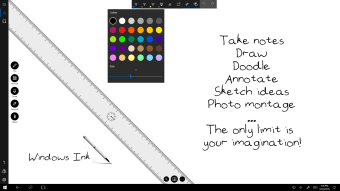
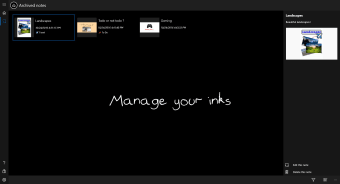
Inkodo is a multipurpose productivity tool that serves as an electronic notepad. You can do almost anything with it, from taking notes, drawing doodles, to creating multimedia presentations. It is an all-around tool that can prove to be essential in performing your daily activities and accomplishing important tasks in an easy and convenient way. Whatever you create with Inkodo can also be saved as a PNG, JPEG, and other image file formats, which can also be shared to different social media platforms. Carrying Inkodo around with you is definitely a must.


Image

Kristina Schulz

    Kristina has professional experience in Europe, the United States, and Asia, specializing in communication and languages. She values adaptability in multicultural settings and brings this perspective to her writing. Her content reflects clarity, cross-cultural awareness, and practical expertise in connecting ideas through language.

    • Pros

      • Easy to use
      • Convenient
      • Has many advanced features
      • Multipurpose
    • Cons

      • A bit slow in turning pages
    Image
     0/3

    App specs

    • License

      Free

    • Version

      1.1.49.0

    • Latest update

    • Platform

      Windows

    • OS

      Windows 11

    • Language

      English

    • Downloads

      57.9K

      Last month's downloads

      • 237
    • Developer

    Program available in other languages


    Icon of program: Inkodo

    Inkodo for PC

    • Free
    • 4.4
      103
    • 57.9K
    • V1.1.49.0

    User reviews about Inkodo

    4.4

    1 reviews

    Add review

    Main reviews for you

    • Image

      Anonymous user

      I had used it for making digital hand-writing notes and this is the best free digital note making app ever I had found! I use it with a digital drawing tablet.

    More

    You may also like

    Alternatives to Inkodo

    Explore Apps

    Latest articles

    Laws concerning the use of this software vary from country to country. We do not encourage or condone the use of this program if it is in violation of these laws.

    Softonic

    Is Inkodo safe?

    Score result: Clean

    This file passed a comprehensive security scan using VirusTotal technology. It is safe to download.

    • Virus free
    • Spyware free
    • Malware free
    • Verified by Security Partners

      VirusTotal logo

    Scan Info

    Last scan
    Friday, November 24, 2023
    Scan provider
    VirusTotal

    Softonic security commitment

    Inkodo has been thoroughly scanned by our advanced security systems and verified by industry-leading partners. This file comes from the official developer and has passed all our security checks, showing no signs of viruses, malware, or spyware. For more information, visit our Security and Trust Center