
説明
The Custom Login Page Customizer is an excellent solution for your WordPress website if you want to customize the login page to match your website’s branding. By customizing the login page, you can provide your users with a better experience, improve the security of your website, and make your website look more professional and trustworthy.
With Custom Login Page Customizer, you can change the login page’s background, colors, and fonts and add custom logos or images. Moreover, login Customizer allows you to create a login page that matches your website’s design, making it more visually appealing and professional-looking.
Why Use Login Customizer?
The Login Customizer plugin is an excellent solution for WordPress website owners who want to customize the login page to match their website’s branding. Here are some of the benefits of using Login Customizer:
-
Customization options: The plugin offers a wide range of customization options that allow you to change the login page’s appearance to match your website’s branding. You can customize the logo, background image, color scheme, font size, and more.
-
ユーザーエクスペリエンス:ログインページをカスタマイズすることで、ユーザーにより良いエクスペリエンスを与えることができます。ブランド化されたログインページは、ウェブサイトをより本格的で信頼できるものに見せ、ユーザーの関心と信頼を高めるのに役立ちます。
Login Customizer の機能
Login Customizer プラグインは、あなたのウェブサイトのブランドに合わせてログインページをカスタマイズできる機能がたくさんあります。主な機能をいくつかご紹介します:
-
ユーザーフレンドリーなインターフェイス: LoginCustomizer はユーザーフレンドリーなインターフェイスを備えており、初心者でも上級者でも簡単にカスタマイズできます。ログインページやフォームをカスタマイズするのに、コーディングや技術的な知識は必要ありません。
-
簡単なカスタマイズ: Custom Login Page Customizer では、ロゴ、背景色、テキスト色、フォントサイズ、ボタンスタイルなど、ログインページのあらゆる面をカスタマイズできます。また、カスタム CSS コードを追加して、さらにカスタマイズすることもできます。
-
ライブプレビュー: ライブプレビュー機能により、ログインページやフォームへの変更をリアルタイムで確認することができます。これにより、希望の見た目になるまで素早く簡単に調整することができます。
-
レスポンシブデザイン: このプラグインは完全にレスポンシブです。つまり、カスタムログインページとフォームは、デスクトップ、ノートパソコン、タブレット、スマートフォンなど、あらゆるデバイスで美しく表示されます。
-
マルチサイト対応: カスタムログインページカスタマイザーは WordPress マルチサイトに対応しています。ネットワーク内のすべてのサイトのログインページとフォームを1ヶ所でカスタマイズすることができます。
-
カスタムロゴ: ログインページにロゴをアップロードし、大きさと位置を調整することができます。
-
背景画像: ログインページに背景画像、静止画像、またはスライドショーを追加できます。
-
配色: 様々な配色から選択することができますし、カスタム配色を作成することもできます。
-
フォントサイズ: ログインフォーム、リンク、またログインページの他の要素のフォントサイズを調整することができます。
-
カスタム CSS:独自の CSS を追加して、ログインページをさらにカスタマイズすることができます。
スクリーンショット
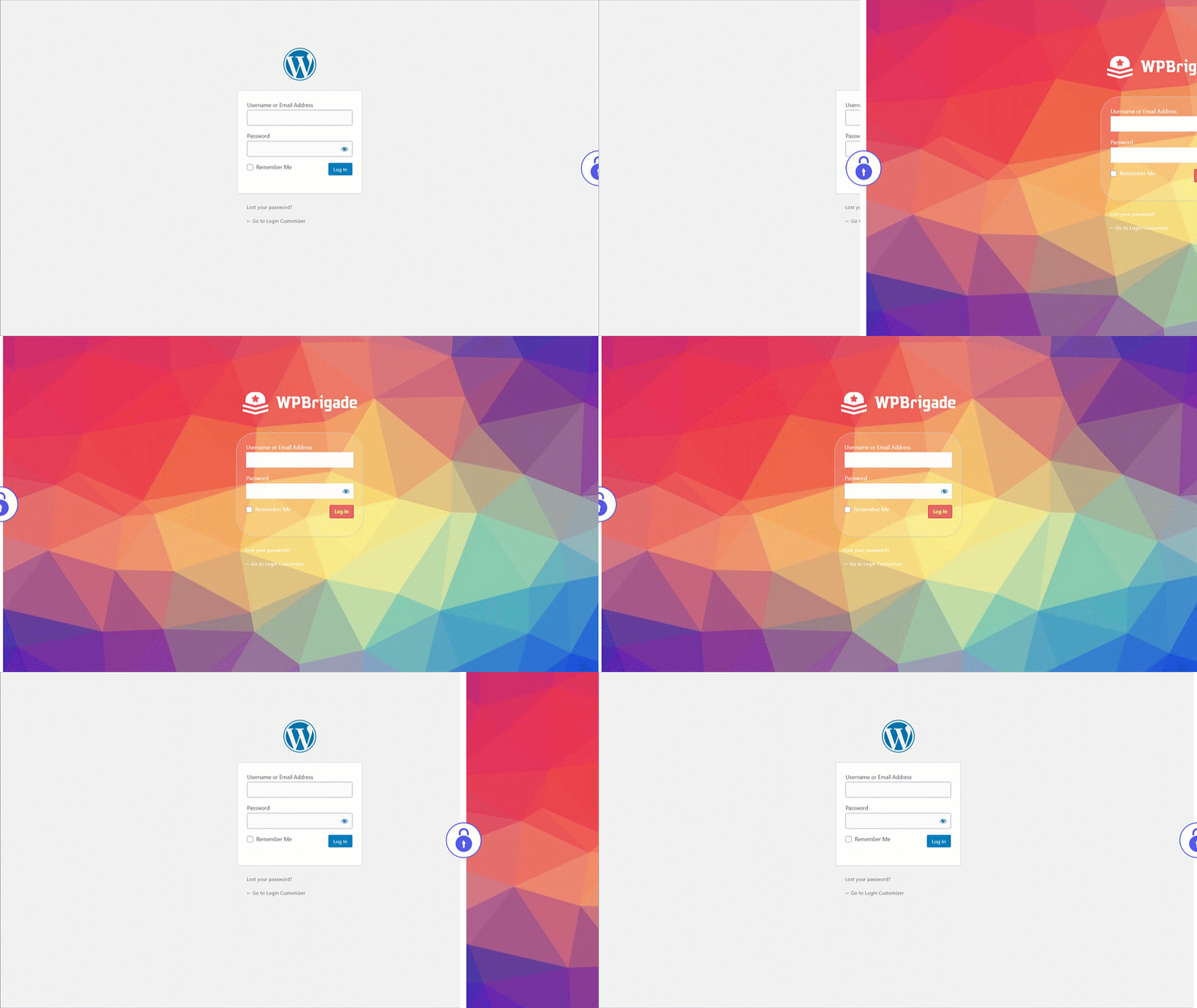
Custom Login – Before and After customized login page demo after setting up Login Customizer 
Custom Login – Select Login Page Templates from settings 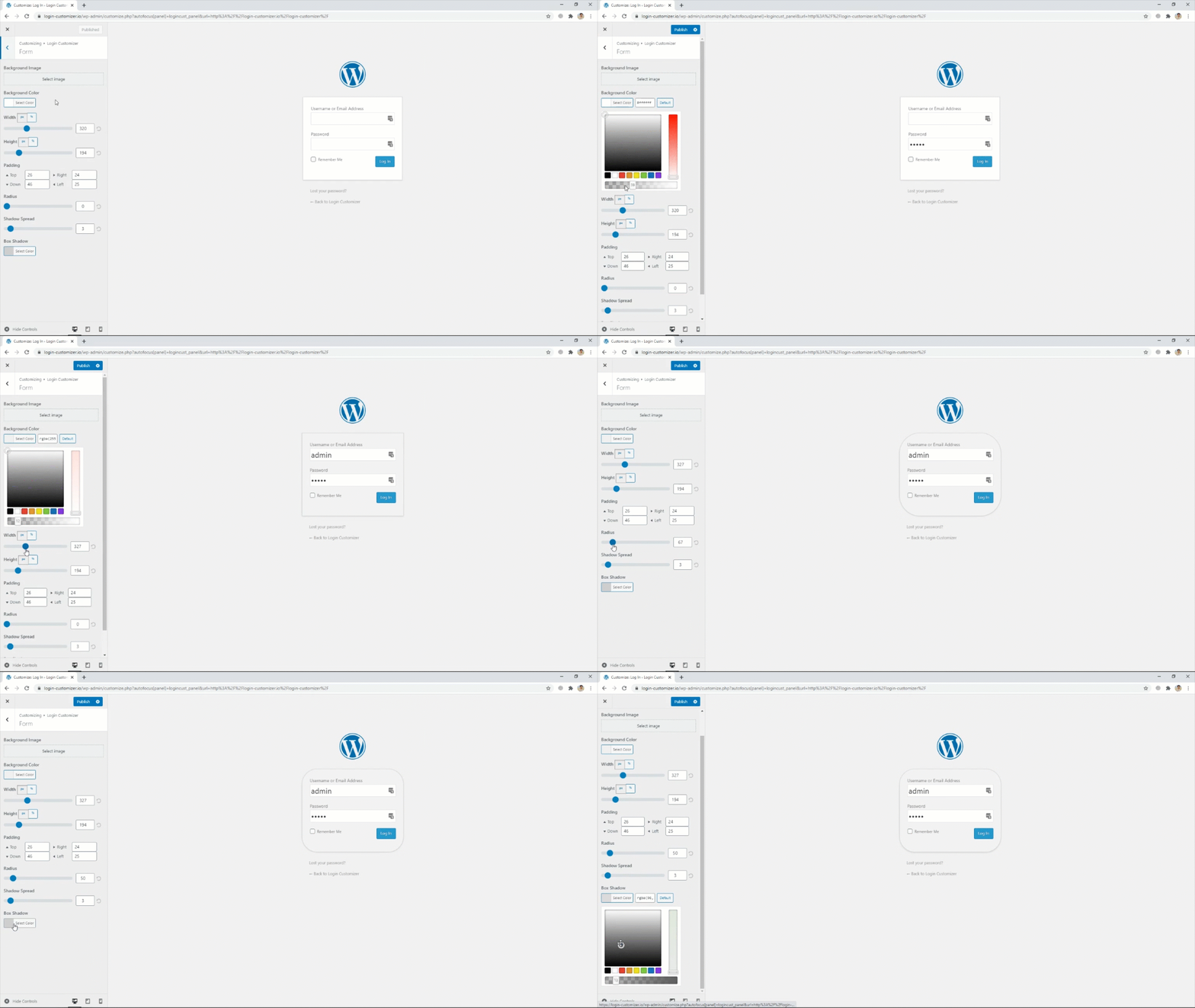
Custom Login – Login Form settings 
Custom Login – Select login page background images 
Custom Login – Add logo of your own choice from settings


インストール
- プラグインをあなたの ‘wp-content/plugins’ フォルダーにアップロードするか、管理画面から自動でダウンロード・インストールしてください。
- 「プラグイン」メニューからプラグインを有効化します。
FAQ
-
Login Customizer とは何ですか ?
-
Login Customizer は、WordPress ウェブサイトのデフォルトログインページをカスタマイズできる WordPress プラグインです。
-
Login Customizer はどのようにインストールするのですか ?
-
ログインカスタマイザープラグインは、WordPress のプラグインリポジトリから直接インストールすることもできますし、WordPress のダッシュボードでプラグインを検索し、プラグインリポジトリのウェブサイトからダウンロードすることもできます。
-
Login Customizer ではどのようなカスタマイズが可能ですか ?
-
Login Customizer を使用すると、ロゴ、背景画像、配色、フォントサイズの変更など、様々な方法でウェブサイトのログインページをカスタマイズすることができます。また、カスタム CSS を追加することもできます。
-
Login Customizer はすべての WordPress テーマと互換性がありますか ?
-
はい、Login Customizer はすべての WordPress テーマと互換性があります。デフォルトのログインページと連動し、カスタマイズされたログインページに置き換えます。
-
公開前に変更をプレビューできますか ?
-
はい、Login Customizer は保存する前に変更点をプレビューできます。この機能により、ウェブサイトに変更を反映させる前に、変更内容を確認することができます。
-
Login Customizer はウェブサイトの速度を低下させますか ?
-
いいえ、Login Customizer は軽量のプラグインであなたのウェブサイトのパフォーマンスや速度に大きく影響することはありません。
-
変更した内容が気に入らなかった場合、デフォルトのログインページに戻すことはできますか ?
-
はい、Login Customizer プラグインを無効にするかアンインストールすることで、デフォルトのログインページに戻すことができます。
-
Login Customizer は無料ですか ?
-
はい、Login Customizer は無料のプラグインで、費用をかけずにダウンロードしあなたのウェブサイトで利用できます。
-
寄付や貢献をするにはどうすればいいですか?
-
Please visit this link for more info.
評価


貢献者と開発者


変更履歴
2.5.3 – 2025-08-06
- Enhancement: Excluded the
Login Customizerpage from theRank Math SEOplugin’s sitemap. - Compatibility: Compatible with WordPress 6.8
2.5.2 – 2025-04-19
- Bugfix: Redirect issue on the plugin settings page open 1st time installation.
- Bugfix: Set min height of the login form.
- Compatibility: Compatible with WordPress 6.8
2.5.1 – 2025-02-20
- Enhancement: Updated the Freemius latest SDK v2.11.0.
- Compatibility: Compatible with WordPress 6.7
2.5.0 – 2025-01-03
- Bugfix: PHP Warning for translation hook.
- Compatibility: Compatible with WordPress 6.7
2.4.1 – 2024-11-18
- Bugfix: Apply Customized style on the Password Reset page.
- Compatibility: Compatible with WordPress 6.7
2.4.0 – 2024-07-08
- Bugfix: Remove the depreciated warning from login customizer.
- Enhancement: Updated the Freemius latest SDK v2.7.2
- Compatibility: Compatible with WordPress 6.6
2.3.2 – 2023-12-21
- Enhancement: Excluded the
Login Customizerpage from sitemap. - Compatibility: Compatible with WordPress 6.4
2.3.1 – 2023-11-07
- Enhancement: Updated the Freemius latest SDK v2.6.0.
- Compatibility: Compatible with WordPress 6.4
2.3.0 – 2023-10-25
- Bugfix: Reset Password button styling issues on login page.
- Enhancement: Update the rage control layout in login customizer.
- Compatibility: Compatible with WordPress 6.3
2.2.3 – 2023-07-20
- Enhancement: Updated the Freemius latest SDK v2.5.10.
- Compatibility: Compatible with WordPress 6.2
2.2.2 – 2023-07-10
- Enhancement: Updated the Freemius SDK v2.5.9.
2.2.1 – 2023-03-24
- Enhancement: Updated the Freemius SDK v2.5.5.
- Enhancement: Update the .pot file.
- Compatibility: Compatible with WordPress 6.2
2.2.0 – 2023-01-26
- New Feature: Introduced Help Page with System Info.
- Compatibility: Compatible with WordPress 6.1
2.1.9 – 2022-05-19
- BugFix: Uninstall plugin settings from database for Multi-sites.
- Compatibility: Compatible with WordPress 6.0
2.1.8 – 2022-03-08
- Security Fix: Updated the Freemius SDK v2.4.3.
2.1.7 – 2022-02-18
- New Feature: Introducing Language Switcher (On / Off) setting.
- Compatibility: Compatible with WordPress 5.9.
2.1.6 – 2021-09-07
- Bugfix: Fixed PHP error for default Logo Height.
- Bugfix: Login Customizer Page deletion issue.
- Enhancement: Create Uninstall.php for removing plugin options from DB & Login Customizer Page on uninstalling the plugin.
2.1.5 – 2021-07-23
- Enhancement: Optimized Code.
- Compatibility: Compatible with WordPress 5.8.
2.1.4 – 2021-06-16
- New Feature: Introducing a new control for change wp-login.php page title.
- Enhancement: Optimized Code & fix PHP 8.0 Error.
2.1.3 – 2021-04-17
- Enhancement: Compatible with 2FA Two Factor Authentication plugin.
- Compatibility: Compatible with WordPress 5.7.
- Compatibility: Compatible with PHP 8.0.
2.1.2 – 2021-02-20
- New Feature: Introducing new control for customizing privacy policy link on login page.
2.1.1 – 2021-01-27
- New Feature: Introducing new Login Customizer settings page.
- New Feature: Introducing “Remember Me” option already checked on login form.
- New Feature: Introducing “Custom Register Password Fields” which creates custom password field so you don’t have to reset the password for the first time through a link in order to login (settings will be shown only if you enable register users for your site).
- New Feature: Introducing “Login Order”, Enable users to login using their username or email address or both.
- New Feature: Introducing “Log Data Page” with System Info for troubleshooting.
- Enhancement: Code optimization and plugin speed improvements.
- Enhancement: Introducing Login Customizer dashicon.
- Compatibility: Compatible with WordPress 5.6.
2.1.0 – 2021-01-12
- Bugfix: Fixed live preview issues.
- Bugfix: Fixed WordPress function deprecation error.
- Bugfix: Fixed customizer settings irregularities.
- Enhancement: Optimized Code.
- Compatibility: Compatible with WordPress 5.6.
2.0.0 – 2018-08-06
- Added Template Feature
- Added Instant Refresh for Controls
- Fixed issue with Security plugins and Multisite
2.0 – 2018-03-09
- Fixed issues with security plugins
- Added Instant Refresh
- Improved UX
- Added more controls
1.2.1 – 2018-01-05
- Improves Compatible with latest WordPress version.
- Sync ThemeIsle SDK.
1.2.0 – 2017-10-16
- WP4.8での動作検証が追加されました。
- ダッシュボードのウィジェットの改善、巻き戻し。
v1.0.8の新機能
- 通知を削除しました
v1.0.7の新機能
- カスタマイザーの設定を改善しました
- 無料版における、セキュリティのアドオンの言及を削除しました
