

説明
Search & Filter is a simple search and filtering plugin for WordPress – it is an advancement of the WordPress search box.
カテゴリ、タグ、カスタム分類、投稿タイプ、投稿日、または、これらの任意の組み合わせで簡単に絞り込み検索することができます。検索ボックスを削除して、投稿とページのフィルタリングシステムとして使用することもできます。フィールドは、ドロップダウン、チェックボックス、ラジオボタン、または、複数選択として表示できます。
Links: Search & Filter Documentation | Follow us on Twitter
Search & Filter Proでより多くの機能を手に入れる
- View live demo >>
- カスタムフィールド、投稿メタ、作成者、投稿タイプ、投稿日、分類法、タグ、カテゴリを検索
- AJAX を使って結果を表示します。ページの再読み込みは不要です。
- チェックボックス、ラジオボタン、ドロップダウン、複数選択、コンボボックスを使って投稿メタやカスタムフィールドを検索
- jQuery範囲スライダー、日付ピッカー、 オートコンプリートコンボボックス 選択および複数選択用
- 注文結果フィールド – ユーザーは、メタ値、投稿 ID、著者、タイトル、名前、日付、変更日、親ID、ランダム、コメント数、およびメニューの順序で結果を注文できます。
- ドラッグ& ドロップ エディタ
- カスタムテンプレートを使用する
- あなたが好きなだけ多くのフィールドと異なる検索フォームを作成する
- ブログ、レビューサイト、ニュースサイト、プロパティサイトなどに使用します。
- オンラインショップで使用可能です。 WooCommerce 、 WP eCommerce 、 Easy Digital Downloads で互換性テスト済みです。
- ショートコードとウィジェットを使用して、テーマと投稿のどこにでも配置できます
- WPMLで動作します
- Advanced Custom Fieldsで動作します
- WP 3.8以降と完全に統合された、非常に使いやすい管理UI
- 専用サポート
- More info >>
スクリーンショット
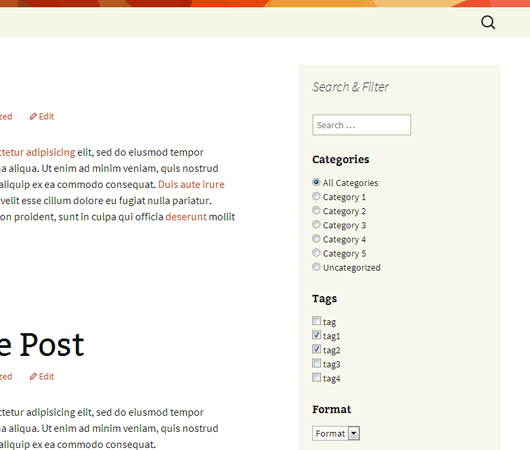
Search & Filterは、チェックボックスやラジオボタン、選択機能付きのウィジェットとして使用できます。 
簡単な例として、Search & Filterをヘッダーに貼り付けできます。 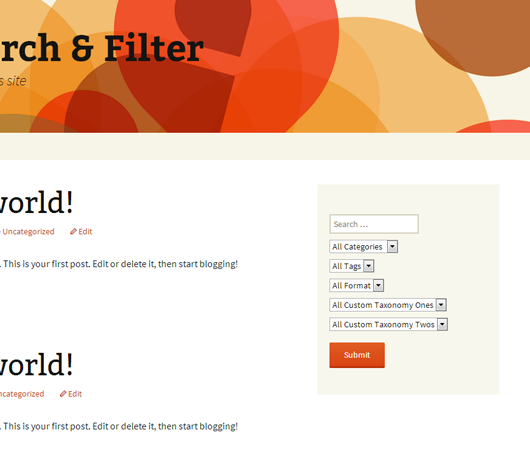
簡単な例として、Search & Filterをウィジェットに貼り付けできます。 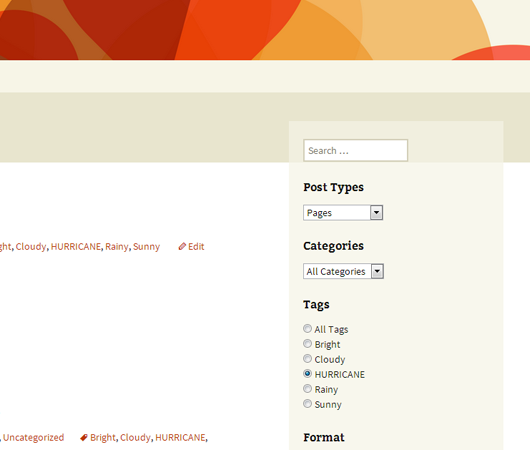
検索の例 :フィルターを使用した投稿タイプフィルター


インストール
- 全体をアップロード
search-filterフォルダーに/wp-content/plugins/ディレクトリ。 - 「プラグイン」メニューからプラグインを有効化します。
WordPress 管理パネルに “Search & Filter” メニューがあります。
For basic usage, you can also have a look at the documentation or refer to the Search & Filter menu in your WordPress admin panel.
FAQ
-
How can I report security bugs?
-
You can report security bugs through the Patchstack Vulnerability Disclosure Program. The Patchstack team helps validate, triage and handle any security vulnerabilities. Report a security vulnerability.
-
どうやってxxxxxできますか?
-
The documentation has been updated to include examples almost all configurable options with screenshots – please refer to the Search & Filter Docs.
評価


貢献者と開発者


変更履歴
1.2.18
- Security enhancement – prevent unauthorised redirects when submitting the form.
1.2.17
- Fixed – PHP notice about frmqreserved not being initialised.
- Bump – version number + tested upto.
1.2.16
- Fixed – a potential security issue with escaping
- Fixed – add support for block editor themes which don’t use
get_header() - Fixed – prefixed classes to avoid conflicts with other plugins + themes
1.2.15
- Fixed – a PHP 8 warning when using the taxonomy walker class – thanks @jules-colle + @superthin
1.2.14
- Admin notice added – Version 3 is coming soon – beta testers wanted + tons of improvements and changes coming – make sure you know what’s in store.
- Update docs URLs
- Fix – an issue with an
<option>element self closing in the multiselect field (thanks @matzeatweb)
1.2.13
- Fix – a PHP warning when using Beaver Builder
1.2.12
- Fixed – some PHP warnings when using radio, checkbox and multiselects
- Fixed – a typo (thanks sunjunkie)
- Tested with WP 5.3
1.2.11
- 修正済み – 管理画面のいくつかのタイプミス
- WP 5.0 RC2でテスト済み
1.2.10
- 修正済み – ショートコードを修正する構文強調表示スクリプトの問題
1.2.9
- 修正済み – WP 4.4との互換性
- 修正:大文字と小文字が区別される問題:大文字と小文字が区別されなくなりました
1.2.8
- 修正:リライトの問題を修正 @iohannisに感謝
1.2.7
- 修正:新しいタクソノミーの書き換えと、チェックボックスを使用する際の複数選択に関する問題の修正
- Fixed – added previously hidden
multiselectfield type
1.2.6
- 修正済み – WP 4.2.xとの互換性の問題
1.2.5
- Fixed a PHP error when setting defaults for taxonomies – many users did not see this but resulted in unexpected behaviour
- 空の検索に対して投稿日が未定義になることがあるエラーを修正
- Added argument
empty_search_url– when a users submits the search form without any search preferences selected they will be redirected to this URL - Updated argument
add_search_param– setting to1will force add a “?s=” to all urls generate by the plugin – this may help with the loading of search templates in some themes
1.2.4
- バージョン1.2.3で、空の検索を行うときに作成されたバグを修正しました
1.2.3
- Added arguement
all_items_labelswhich allows for support for customall_itemslabels in taxonomies, categories, post tags and post types when usingselectandradiotypes – the default text displaying “All Categories” for example can now be defined usingall_items_labels - Added
show_countto arguments – this shows how many posts are in a particular term, in brackets after the term name – works only for categories, tags and taxonomies - 「すべての投稿タイプ」を使用するときに使用すると、結果が表示されないバグを修正しました。
- 1.2.2からの動作を元に戻しました – 検索が空白の場合に検索テンプレートを強制的にロードしなくなりました – WPに再度処理させます。
- Added argument
add_search_param– setting it to1will force a “?s=” or “&s=” to be added to the url even when the search is blank – in some circumstances this will force load the search template, instead of other WP templates, such as taxonomy or category templates
1.2.2
- Added support for multi selects – use
multiselectas the type for your field - Added support for AND & OR operators when using checkboxes or multiselects – use the
operatorsargument with allowed values ofand&or - 検索が空白の場合は検索テンプレートを強制的に読み込み、検索フィールドがショートコードに含まれていない場合は含めないようにしました。
- Fixed an issue with navigation disappearing when using post_types
1.2.1
- バージョンアップ – 間違ったコミット
1.2.0
- 警告:この更新には、ショートコードの構造に対するいくつかの主要な変更が含まれています。これがセットアップにどのように影響するかを把握するまでアップグレードしないでください。
- Renamed the
taxonomiesargument tofields–taxonomiesis now no longer appropriate as this list contains field types other than taxonomies – this list now contains taxonomies,post_type,post_dateandsearch–taxonomiesas an argument is still supported however will be deprecated - Search box can now be positioned anywhere, simply include
searchin the fields list in the position desired. Upgrading from previous versions will cause you to lose your search box, simply includesearchin the fields list to show it again - Drop support for
searchargument as no longer relevant – control display of search input by adding it to thefieldslist - Labels have been completely rewritten –
labelhas been renamed toheadingsto avoid confusion with internal taxonomy labels – theheadingsargument now allows for any text to be added and displayed as a heading for each field – this allows for much more flexibility and no longer uses internal taxonomy labels – to hide a label simply leave blank - すべての入力タイプ (checkbox、radio、select) の階層的タクソノミーのサポートを追加
- Added support for ordering of taxonomies – use
order_byargument – allowed values areid,name,slug,count,term_group - Added support for ordering direction of taxonomies – use
order_dirargument – allowed values are ‘asc’ or ‘desc’ - Added support to show or hide empty taxonomies – use
hide_emptyargument -
search_placeholderのサポートを追加しました - Updated
post_datefunctionality to work with older versions of WP – can be displayed either asdateordaterange– thepost_datefield uses the HTML 5 input type ofdate– browsers that do not support it will simply show a text box – a tutorial of integrating jquery for graceful degredation is in the works - Renamed
submitlabeltosubmit_label–submitlabelstill works for now. - Renamed
typetotypes–typestill works for now. - チェックボックスとラジオボタンの表示が更新され、入力が順序付けられていないリストにラップされるようになりました。これは、スタイルに影響を与える可能性があります。
- 様々なバグ修正
- Thanks to
bradaricfor help with hierarchical dropdown lists and date input types – https://github.com/bradaric
1.1.3
- Added support for post_date to be displayed either as
dateordaterange(WP 3.7+) type
1.1.2
- Added support for all public and custom post types (the
attachmentpost type is excluded) – all post types can be user searchable or predfined and hidden from the user. This allows for users to add multiple search widgets to their site which work on specific post types independantly from eachother. - Added offical updated documentation, created and moved to Search & Filter Docs
1.1.1
- 修正:空の検索 / フィルターを送信すると、 “?s=” がURL(空の検索)に追加され、結果ページを強制的に読み込むようになりました。以前は、多くのケースで機能しないホームページにリダイレクトしていました。
1.1.0
- チェックボックスとラジオボタンのサポートを追加し、個々のタクソノミーごとにこれを制御するオプションを追加しました。
- 個々のタクソノミーの見出しを表示、または、非表示にするサポートが追加されました。
- Added support to pass a class name through to Search & Filter widgets, this allows styling of different instances of Search & Filter
- 検索ボックスで、出力のエスケープに関する問題を修正
- 注意:この更新により、タクソノミードロップダウンに、見出しが自動的に追加されます。使用方法と無効にする方法の例を参照してください。
1.0.3
- いくつかのドキュメントとプラグインページのスクリーンショットを追加
1.0.2
- WordPress プラグインサイトのバージョンバンプ
1.0.1
- Updated to use
label->all_itemsin taxonomy object for dropdowns before usinglabel->name - Notice: This update may cause some labels to break, ensure you have set up your taxonomy properly including setting
label->all_items
1.0.0
- 最初のリリース
