
Aprašymas
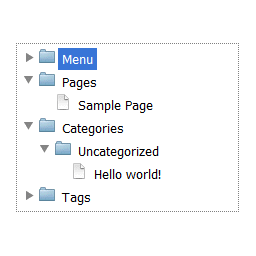
Complete dropdown tree navigation that contain pages, categories with posts, tags, authors and own menu.
Features and highlights
- Whole site in one place
- Excluding pages and authors from navigation
- Simple widget
- 4 skins
Translations/Languages
This plugin is available in your WordPress language on site and in English and Polish in Dashboard.
Skins
- iOS Lion
- Windows 8
- Windows 7
- Windows XP
Ekrano nuotraukos

Options page 
Adding widget 
Widget 
Configuring the Menusection in EasyTree


Diegimas
- Unpack and upload easytree.zip to the
/wp-content/plugins/directory - Activate the plugin through the ‘Plugins’ menu in WordPress
- Add a EasyTree widget to your theme, or use
[easytree]shortcode on any page or post.
DUK
- Where can I change plugin settings?
-
Go to Dashboard -> Settings -> EasyTree
Atsiliepimai

25 sausio, 2017
Damian,
Thank you so much for the plugin! I edited a section myself, and I don’t even know PHP. I wish you allowed for a lot more customization with regards the sections we’d like in the menu, but I did it with the edit.
Thanks again. Since I need static HTML, and this extracts the best in static, I love your plugin!
Shri

3 rugsėjo, 2016
I’ve summarized the results of the review.
It is my site.
Programuotojai ir komandos nariai
“EasyTree” yra atviro kodo programa. Prie jos sukūrimo prisidėję žmonės surašyti toliau.
Autoriai
Išverskite “EasyTree” į savo kalbą.
Domina programavimas?
Peržiūrėkite kodą, naršykite SVN repozitorijoje, arba užsiprenumeruokite kodo pakeitimų žurnalą per RSS.
Pakeitimų istorija
1.3
- Support for page status class
1.2
- Remove support for cache
1.1
- Support for cache
1.04
- Better support for private posts and pages
1.03
- Added support for private posts and pages
1.02
- Default setting values
1.01
- Improved easytree styles
- Folders are expanding with single click
1.0
- Assets added
0.1
Initial version
