

Beskrivelse
Dashboard Builder has produced is a unique and powerful plugin for WordPress to present data fetches from the WordPress database using data visualization techniques that display responsive and dynamic charts using the D3.js library in a graphical layout with the most relevant information, understandable at a glance. For more information visit https://dashboardbuilder.net
- No Programming Skills Required: It is easy to install and configure.
- Easy way of setting: Just set a) Database connectivity b) Write SQL Query c) Define X-axis and Y-axis
- Fully D3.js Responsive & Dynamic Chart
- Ability to connect any MySQL database even outside of WordPress
- Supports variety of charts type such as Area, Bar, Line and scatter charts
- Supports custom color of chart
Support
- Visit https://dashboardbuilder.net/support for help from our support team.
Skjermbilder
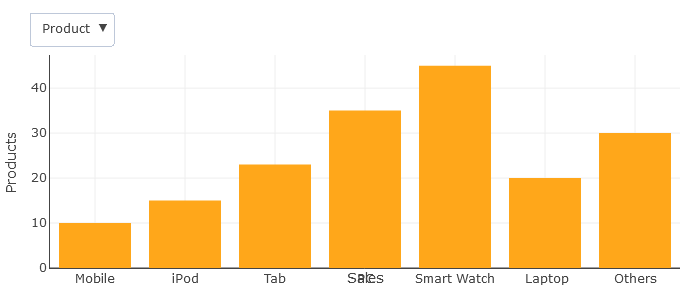
Combination Chart 
Scatter Chart 
Area Chart 


Installasjon
- Upload the plugin files to the
/wp-content/plugins/dashboardbuilderdirectory, or install the plugin through the WordPress plugins screen directly. - Activate the plugin through the ‘Plugins’ screen in WordPress
- Use the Settings->DASHBOARDBUILDER screen to configure the plugin
- Use short code i.e [show-dashboardbuilder] in your WP page, OR call the function in your template’s default.php file.
Ofte stilte spørsmål
Q1. How it works?
A1. This plugin connect with your MySQL database and fetch data through SQL query and show graph/chart on your WP site.
Q2. Where I can find service Terms of Use and the Privacy Policy
A2. The Terms of Use and the Privacy Policy can be found at https://dashboardbuilder.net/license and https://dashboardbuilder.net/privacy-policy
Q3. How can I enable this plugin.
A3. Install and active the plugin
a. Enter your database credentail
b. Enter SQL query
c. Enter your x-axis and y-axis column name
Vurderinger

Bidragsytere og utviklere
«DASHBOARD BUILDER – WordPress plugin for Charts and Graphs» er programvare med åpen kildekode. Følgende personer har bidratt til denne utvidelsen:
Bidragsytere
Oversett “DASHBOARD BUILDER – WordPress plugin for Charts and Graphs” til ditt språk.
Interessert i utvikling?
Bla gjennom koden, sjekk ut SVN-repositoriet, eller abonner på utviklingsloggen med RSS.
Endringslogg
1.0.0
- First release
1.5.0
- This release brings compatable issue fixes with WP 5.6
- Barchart added
1.5.1
- Area and Scatter charts added
1.5.2
- Updated plugin description
1.5.3
- This release brings compatable issue fixes with WP 5.8
1.5.4
- This release was tested with WP 5.9
1.5.5
- This release was tested with WP 6.0
1.5.6
- This release was tested with WP 6.3
1.5.7
- This release was tested with WP 6.6
