
Beschrijving
The Custom Login Page Customizer is an excellent solution for your WordPress website if you want to customize the login page to match your website’s branding. By customizing the login page, you can provide your users with a better experience, improve the security of your website, and make your website look more professional and trustworthy.
With Custom Login Page Customizer, you can change the login page’s background, colors, and fonts and add custom logos or images. Moreover, login Customizer allows you to create a login page that matches your website’s design, making it more visually appealing and professional-looking.
Why Use Login Customizer?
The Login Customizer plugin is an excellent solution for WordPress website owners who want to customize the login page to match their website’s branding. Here are some of the benefits of using Login Customizer:
-
Customization options: The plugin offers a wide range of customization options that allow you to change the login page’s appearance to match your website’s branding. You can customize the logo, background image, color scheme, font size, and more.
-
User experience: By customizing the login page, you can give your users a better experience. A branded login page makes your website look more professional and trustworthy, which can help increase user engagement and loyalty.
Features of Login Customizer
The Login Customizer plugin has many features that allow you to customize the login page to match your website’s branding. Here are some of the key features:
-
User-Friendly Interface: LoginCustomizer has a user-friendly interface that makes it easy for both beginner and advanced developers. You don’t need coding or technical knowledge to customize your login page and form.
-
Easy Customization: Custom Login Page Customizer allows you to customize every aspect of your login page, including the logo, background color, text color, font size, button style, and many more. You can also add custom CSS code to enhance the customization further.
-
Live Preview: With the live preview feature, you can see your changes to your login page and form in real time. It lets you make quick and easy adjustments until you achieve the desired look and feel.
-
Responsive Design: The plugin is fully responsive, which means your custom login page and form will look great on all devices, including desktops, laptops, tablets, and smartphones.
-
Multisite Support: Custom Login Page Customizer is compatible with WordPress multisite. You can customize the login page and form for all sites in your network from a single location.
-
Custom Logo: You can upload your logo to the login page and adjust its size and position.
-
Background Image: You can add a background image to the login page, a static image, or a slideshow.
-
Color Scheme: You can choose from various color schemes or create your custom color scheme.
-
Font Size: You can adjust the font size for the login form, links, and other elements on the login page.
-
Custom CSS: You can add your own CSS to customize the login page further.
Schermafbeeldingen
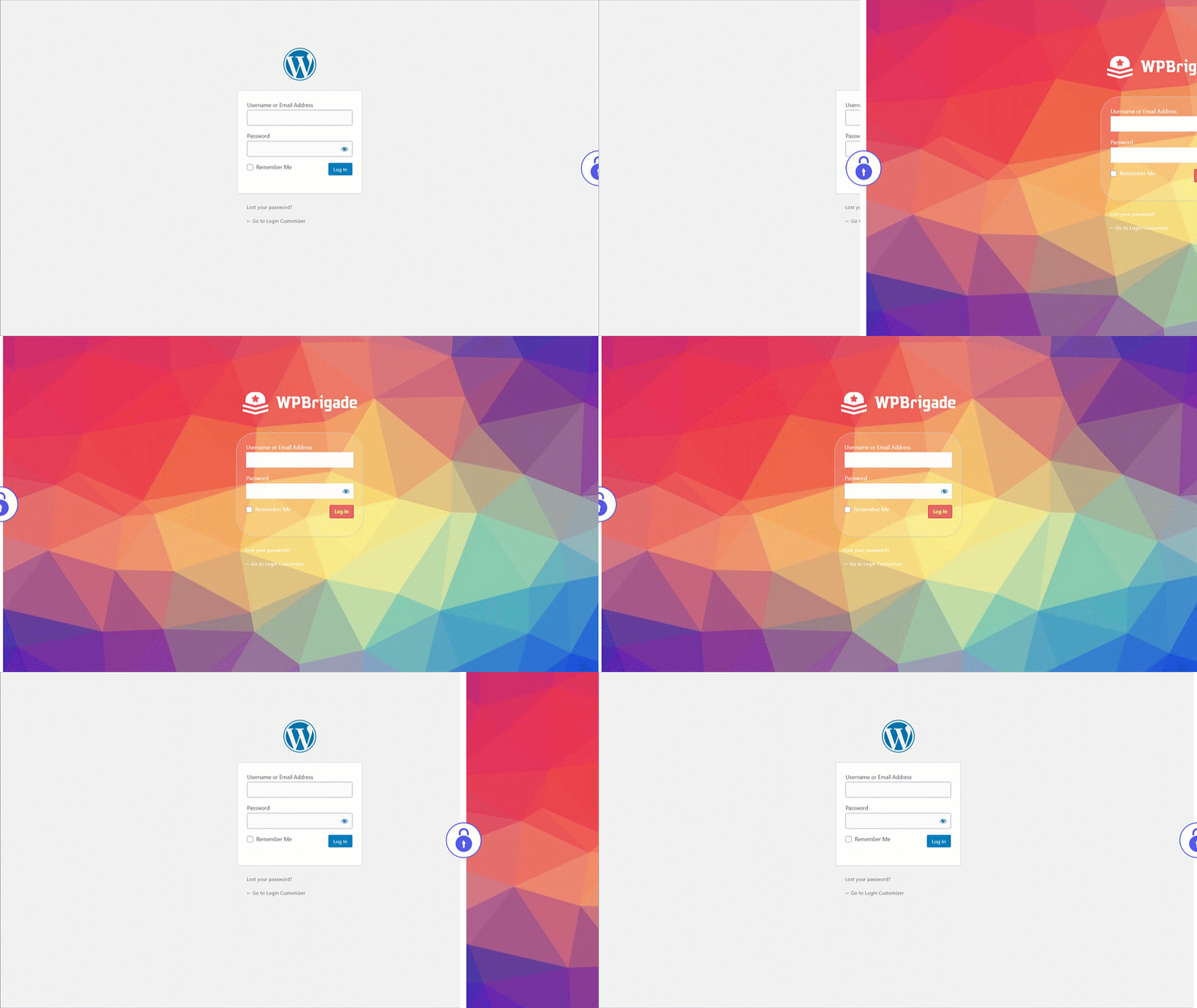
Custom Login – Voor en na aangepaste login pagina demo na het instellen van Login Customizer 
Custom Login – Selecteer Aanmeldingspagina-template uit instellingen 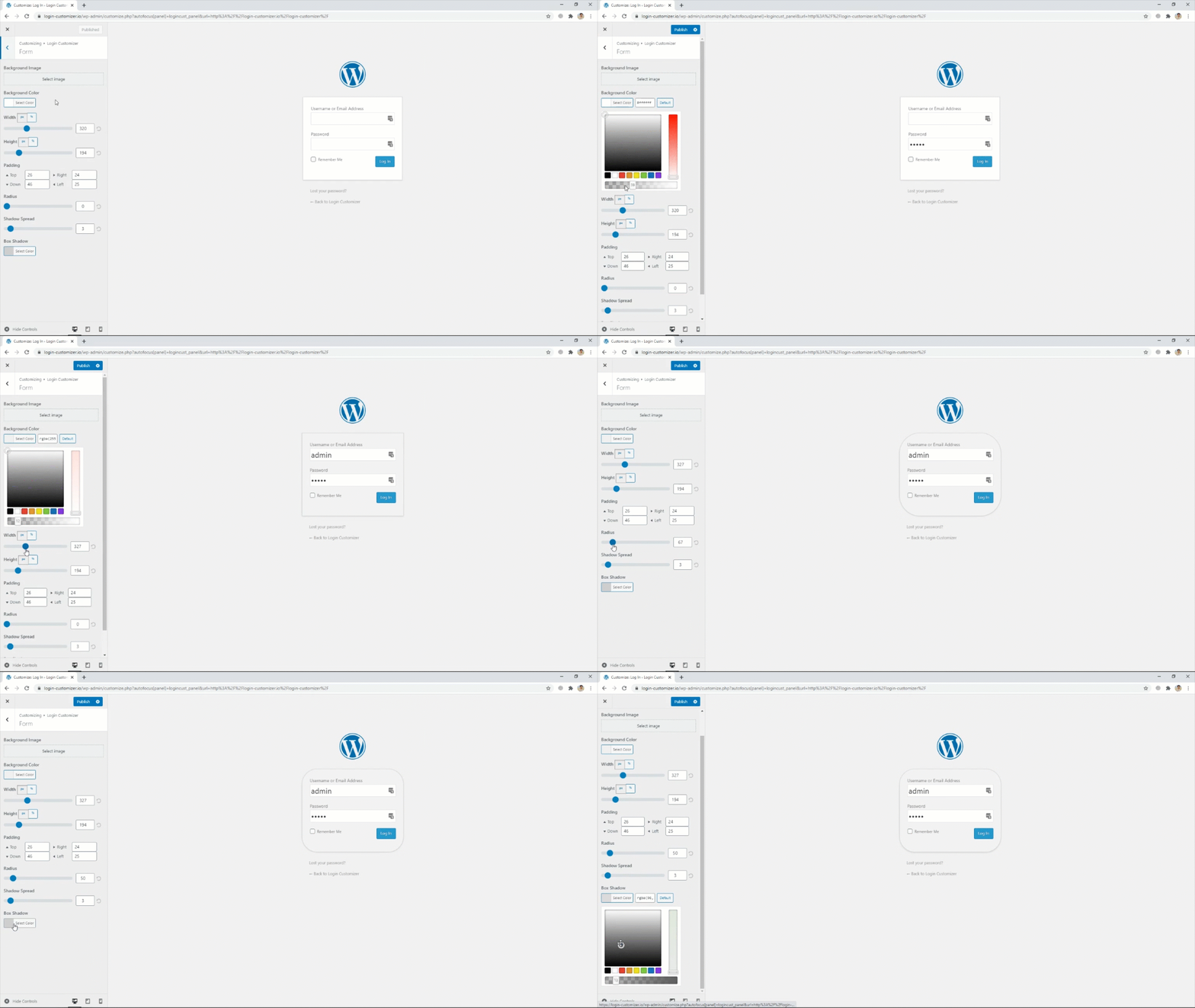
Custom Login – Instellingen voor aanmeldingsformulier 
Custom Login – Selecteer achtergrondafbeeldingen van de aanmeldingspagina 
Custom Login – Voeg een logo van je eigen keuze uit de instellingen toe


Installatie
- Upload de plugin naar je folder ‘wp-content/plugins’ of download en installeer automatisch via je beheerderspaneel.
- De plugin activeren via het ‘Plugin’ menu in WordPress.
FAQ
-
What is Login Customizer?
-
Login Customizer is a WordPress plugin that allows you to customize your WordPress website’s default login page.
-
How do I install Login Customizer?
-
You can install the Login Customizer plugin directly from the WordPress plugin repository, or You can search for the plugin in the WordPress dashboard and download it from the plugin repository website.
-
What customization options are available with Login Customizer?
-
With Login Customizer, you can customize your website’s login page in various ways, such as changing the logo, background image, color scheme, and font size. You can also add custom CSS.
-
Is Login Customizer compatible with all WordPress themes?
-
Yes, Login Customizer is compatible with all WordPress themes. It works with the default WordPress login page and replaces it with your customized login page.
-
Can I preview my changes before making them live?
-
Yes, Login Customizer lets you preview your changes in real time before saving them. This feature ensures you are happy with the changes before making them live on your website.
-
Does Login Customizer slow down my website?
-
No, Login Customizer is a lightweight plugin that does not significantly affect your website’s performance or speed.
-
Can I revert to the default login page if I don’t like the changes I made?
-
Yes, you can revert to the default login page anytime by disabling or uninstalling the Login Customizer plugin.
-
Is Login Customizer free?
-
Yes, Login Customizer is a free plugin you can download and use on your WordPress website without cost.
-
Hoe doneren of bijdragen?
-
Ga naar deze link voor meer informatie.
Beoordelingen


Bijdragers & ontwikkelaars
“Custom Login Page Customizer” is open source software. De volgende personen hebben bijgedragen aan deze plugin.
Bijdragers

“Custom Login Page Customizer” is vertaald in 8 localen. Dank voor de vertalers voor hun bijdragen.
Vertaal “Custom Login Page Customizer” in je eigen taal.
Interesse in ontwikkeling?
Bekijk de code, haal de SVN repository op, of abonneer je op het ontwikkellog via RSS.
Changelog
2.5.3 – 2025-08-06
- Enhancement: Excluded the
Login Customizerpage from theRank Math SEOplugin’s sitemap. - Compatibility: Compatible with WordPress 6.8
2.5.2 – 2025-04-19
- Bugfix: Redirect issue on the plugin settings page open 1st time installation.
- Bugfix: Set min height of the login form.
- Compatibility: Compatible with WordPress 6.8
2.5.1 – 2025-02-20
- Enhancement: Updated the Freemius latest SDK v2.11.0.
- Compatibility: Compatible with WordPress 6.7
2.5.0 – 2025-01-03
- Bugfix: PHP Warning for translation hook.
- Compatibility: Compatible with WordPress 6.7
2.4.1 – 2024-11-18
- Bugfix: Apply Customized style on the Password Reset page.
- Compatibility: Compatible with WordPress 6.7
2.4.0 – 2024-07-08
- Bugfix: Remove the depreciated warning from login customizer.
- Enhancement: Updated the Freemius latest SDK v2.7.2
- Compatibility: Compatible with WordPress 6.6
2.3.2 – 2023-12-21
- Enhancement: Excluded the
Login Customizerpage from sitemap. - Compatibility: Compatible with WordPress 6.4
2.3.1 – 2023-11-07
- Enhancement: Updated the Freemius latest SDK v2.6.0.
- Compatibility: Compatible with WordPress 6.4
2.3.0 – 2023-10-25
- Bugfix: Reset Password button styling issues on login page.
- Enhancement: Update the rage control layout in login customizer.
- Compatibility: Compatible with WordPress 6.3
2.2.3 – 2023-07-20
- Enhancement: Updated the Freemius latest SDK v2.5.10.
- Compatibility: Compatible with WordPress 6.2
2.2.2 – 2023-07-10
- Enhancement: Updated the Freemius SDK v2.5.9.
2.2.1 – 2023-03-24
- Enhancement: Updated the Freemius SDK v2.5.5.
- Enhancement: Update the .pot file.
- Compatibility: Compatible with WordPress 6.2
2.2.0 – 2023-01-26
- New Feature: Introduced Help Page with System Info.
- Compatibility: Compatible with WordPress 6.1
2.1.9 – 2022-05-19
- BugFix: Uninstall plugin settings from database for Multi-sites.
- Compatibility: Compatible with WordPress 6.0
2.1.8 – 2022-03-08
- Security Fix: Updated the Freemius SDK v2.4.3.
2.1.7 – 2022-02-18
- New Feature: Introducing Language Switcher (On / Off) setting.
- Compatibility: Compatible with WordPress 5.9.
2.1.6 – 2021-09-07
- Bugfix: PHP-fout opgelost voor standaard logo-hoogte.
- Bugfix: Login Customizer pagina delatatie kwestie.
- Verbetering: maak Uninstall.php aan voor het verwijderen van plugin opties uit DB & Login Customizer pagina over het verwijderen van de plugin.
2.1.5 – 2021-07-23
- Verbetering: geoptimaliseerde code.
- Compatibiliteit: compatibel met WordPress 5.8.
2.1.4 – 2021-06-16
- Nieuwe functie: introductie van een nieuw besturingselement voor het wijzigen van de paginatitel van wp-login.php.
- Verbetering: geoptimaliseerde code & herstel PHP 8.0-fout.
2.1.3 – 2021-04-17
- Verbetering: compatibel met de plugin 2FA Two Factor Authentication.
- Compatibiliteit: compatibel met WordPress 5.7.
- Compatibiliteit: compatibel met PHP 8.0.
2.1.2 – 2021-02-20
- Nieuwe functie: introductie van nieuwe controle voor het aanpassen van de link naar het privacybeleid op de inlogpagina.
2.1.1 – 2021-01-27
- Nieuwe functie: introductie van een nieuwe pagina met instellingen voor Login Customizer.
- Nieuwe functie: introductie van de optie “Onthoud mij” die al is aangevinkt op het inlogformulier.
- Nieuwe functie: Introductie van “Aangepaste wachtwoordvelden voor registreren” waarmee een aangepast wachtwoordveld wordt gemaakt, zodat je het wachtwoord niet voor de eerste keer opnieuw hoeft in te stellen via een link om in te loggen (instellingen worden alleen weergegeven als je gebruikersregistratie voor je site inschakelt ).
- Nieuwe functie: introductie van “Inlogvolgorde”, stelt gebruikers in staat om in te loggen met hun gebruikersnaam of e-mailadres of beide.
- Nieuwe functie: introductie van “Loggegevenspagina” met systeeminfo voor het oplossen van problemen.
- Verbetering: code-optimalisatie en snelheidsverbeteringen van plugins.
- Verbetering: introductie van Login Customizer dashicon.
- Compatibiliteit: compatibel met WordPress 5.6.
2.1.0 – 2021-01-12
- Bugfix: problemen met livevoorbeeld opgelost.
- Bugfix: fout bij afschrijving van WordPress functie opgelost.
- Bugfix: onregelmatigheden in de instellingen van de customizer opgelost.
- Verbetering: geoptimaliseerde code.
- Compatibiliteit: compatibel met WordPress 5.6.
2.0.0 – 2018-08-06
- Template functie toegevoegd
- Direct vernieuwen toegevoegd voor bedieningselementen
- Probleem opgelost met beveiligingsplugins en Multisite
2.0 – 2018-03-09
- Problemen met beveiligingsplugins opgelost
- Direct vernieuwen toegevoegd
- Verbeterde UX
- Meer bedieningselementen toegevoegd
1.2.1 – 2018-01-05
- Verbeter de compatibiliteit met de nieuwste WordPress versie.
- Sync ThemeIsle SDK.
1.2.0 – 2017-10-16
- Advertenties getest tot wp 4.8.
- Verbeteringen aan de dashboad widget, rollback.
Nieuw in v1.0.8
- Berichten verwijderd
Nieuw in v1.0.7
- Verbeterde instellingen voor customizers
- Meldingen van beveiligingstoevoeging verwijderd uit de gratis versie
