

Skildring
Use this plugin to apply floating shares to your posts and pages.
This is very similar to the one found on mashable.com.
Skjermbilete
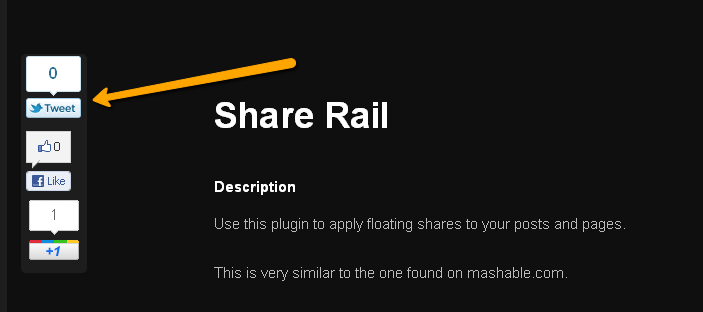
Floating share in its default position 
When the user scrolls the share rail stays in view


Installasjon
This section describes how to install the plugin and get it working.
- Upload «share-rail» to the «/wp-content/plugins/» directory
- Activate the plugin through the «Plugins» menu in WordPress
- Find the ID or the Class you want to attach the rail to
- Change the settings on the «Share Rail» settings page, «Element Class attachment» needs to be changed to the correct ID or class
Omtalar
There are no reviews for this plugin.
Bidragsytarar og utviklarar
“Share Rail” is open source software. The following people have contributed to this plugin.
Contributors
Omset “Share Rail” til ditt eige språk.
Interested in development?
Les kjeldekoden, sjekk SVN-lageret eller abonner på utviklingsloggen med RSS.
Endringslogg
2.2
- Fixed issues with sorting array
2.1
- Added button sort page 🙂
- Added Digg button
- Added Tumblr button
- Fixed issue with Pinterest
2.0
- Complete overhaul of the Share Rail plugin
- Plugin system developed, this makes updating Share Rail sections easy
- Google+ problem fixed
- Settings screen updated to reduce clutter
- Added Reddit button
1.3
- Fixed facebook overflow problem
1.2
- Fixed pinterest button
1.1
- Added pinterest button
1.0
- Core library inclusions improved
- Debug options added
- jQuery prefix default set WordPress default
- Element Class attachment now has a prediction button
- Added share icon to menu
0.9
- Update to enhance sharing functions
0.8
- Added link to Share Rail Custom CSS Engine
0.7
- Improved Twitter feed to follow current standards
- Fixed GA Social Interaction Analytics (Facebook)
- Fixed GA Social Interaction Analytics (Twitter)
0.6
- Added GA Social Interaction Analytics
0.5
- Custom content rendering fixed
0.4
- Added the option to stop Google +1 script from loading twice
- Added LinkedIn
- Added Stumble Upon
0.3
- Added custom content option area to settings page
- Added custom CSS option area to settings page
0.2
- Updated settings page
- Added options to Share Rail
- jQuery modifications added, these allow more flexability
- Added screenshots as requested
0.1
Initial testing release
