
Opis
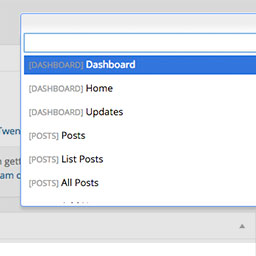
Dashy gives you a search field to get to admin pages quicker. More keyboard shortcuts right inside of WordPress. Get to pages, post, plugins, custom post types, faster. You can even search and get a to single post with the keyboard. To activate, use Control+Space.
To get to a specific page, type „list” and choose „List Pages”. From there you will be showing all of your pages that you can edit. Start searching the page name, and hit enter to go directly to editing that page. This supports posts, pages, and custom post types.
Zrzuty ekranu

View of Dashy when activated. 
Search for menu items to get to them quickly. 
Go directly to pages, posts, and CPTs from the „List ___” option.


Instalacja
- Upload 'dashy’ to the
/wp-content/plugins/directory - Activate the plugin through the 'Plugins’ menu in WordPress
- Press Control+Shift+D to activate.
Recenzje
Wtyczka nie ma jeszcze żadnej recenzji.
Kontrybutorzy i deweloperzy
„Dashy” jest oprogramowaniem open source. Poniższe osoby miały wkład w rozwój wtyczki.
Zaangażowani
Przetłumacz wtyczkę “Dashy” na swój język.
Interesuje cię rozwój wtyczki?
Przeglądaj kod, sprawdź repozytorium SVN lub czytaj dziennik rozwoju przez RSS.
