Automate power tasks with PowerOff

PowerOff, developed by Jorgen Bosman, is a free Windows utility that simplifies how users manage system shutdowns, restarts, and logoffs. It’s a straightforward solution for anyone who wants to automate power-related tasks without complex setup. Whether for conserving energy or managing a home PC after long downloads, PowerOff provides reliable scheduling options that help streamline computer use and reduce manual effort in everyday operations.

Simplified scheduling and remote access

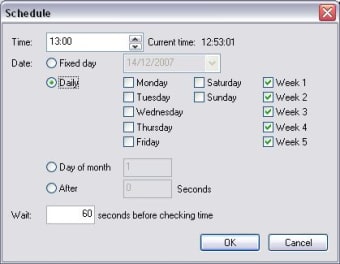
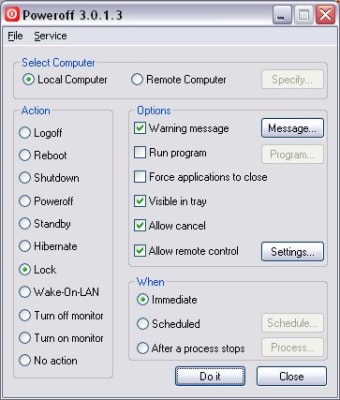
PowerOff makes automation accessible through its clear, no-frills interface. Users can schedule shutdowns, restarts, hibernation, or standby actions to run immediately or on recurring daily or weekly routines. Its remote feature allows one computer to control another, provided both systems have PowerOff configured properly. This function works best for small setups, such as managing a secondary PC, and adds flexibility for users seeking light remote administration without enterprise-level tools.

Practical features with modest limitations

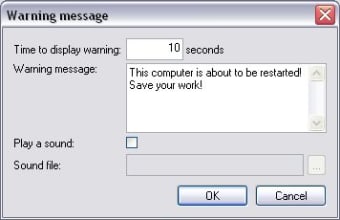
PowerOff’s design emphasizes convenience, offering warning messages before shutdowns to help prevent data loss. Its straightforward scheduling ensures tasks run smoothly, though it lacks deeper customization or awareness of ongoing network activity. The remote control capability functions one-to-one, not across multiple systems, which may limit use in larger environments. Despite these constraints, PowerOff performs its core functions effectively and remains a dependable choice for simple automation needs.

Final thoughts

PowerOff stands out as a lightweight, reliable utility for managing power tasks on Windows. It’s particularly suited for personal users and those managing a few PCs, rather than IT administrators seeking advanced controls. The balance between functionality and ease of use keeps it relevant even among newer system tools, offering just enough flexibility for everyday automation without unnecessary complexity.


  • Pros

    • Simple interface with clear scheduling options
    • Supports remote control between configured PCs
    • Warning messages prevent unintended shutdowns
  • Cons

    • No awareness of ongoing downloads or activity
    • Limited to one-to-one remote connections
    • Lacks advanced scheduling or enterprise-level tools
Image
 0/3

App specs

  • License

    Free

  • Version

    3.0.1.3

  • Latest update

  • Platform

    Windows

    Other platforms (1)
  • OS

    Windows 98

  • Language

    English

    Available languages

    • English
    • Italian
  • Downloads

    56.2K

    Last month's downloads

    • 158
  • Size

    297.03 KB

  • Developer

    • Jorgen Bosman

Also available in other platforms

Program available in other languages


Icon of program: PowerOff

PowerOff for PC

  • Free
  • 4.2
    93
  • 56.2K
  • V3.0.1.3

User reviews about PowerOff

4.2

1 reviews

Add review

Main reviews for you

  • Image

    Anonymous user

    Good for single task launching now, delayed, or scheduled. My Win XP task manager quit working and I can't fix it, so this little program works great for almost any single application run once or on a timed schedule service. It can be launched from Start - Run, as a shortcut, or within a Dos batch file and you can include any needed parameters. Pros: Small CPU usageCan be used in Run, shortcut or Dos Batch Cons: Would be nice to have a save command line feature.

More

You may also like

Alternatives to PowerOff

Explore Apps

Latest articles

Laws concerning the use of this software vary from country to country. We do not encourage or condone the use of this program if it is in violation of these laws.


Softonic

Is PowerOff safe?

100/100

Score result: Clean

This file passed a comprehensive security scan using VirusTotal technology. It is safe to download.

  • Virus free
  • Spyware free
  • Malware free
  • Verified by Security Partners

    VirusTotal logo

Scan Info

Last scan
Sunday, December 24, 2023
Scan provider
VirusTotal · Full report

File Integrity

File
pwroff30-setup.zip
SHA256
51f194e25b8638992b92a060b3f1608837a62613f20be1047966ef252578ac8a
SHA1
7fa8a532a335a62c8e5059346f8b472aaff729f7

Softonic security commitment

PowerOff has been thoroughly scanned by our advanced security systems and verified by industry-leading partners. This file comes from the official developer and has passed all our security checks, showing no signs of viruses, malware, or spyware. For more information, visit our Security and Trust Center