Handy free calendar for your desktop

Rainlendar is a lightweight and customizable calendar for your desktop.

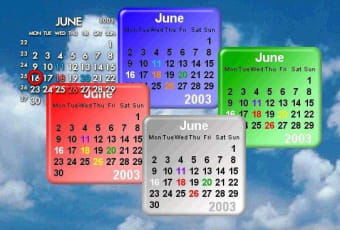
When I first launched Rainlendar I was impressed by the widget-like appearance. Widget are small, handy gadgets that can pop up on your screen to show you all types of information, from weather forecasts, to stock charts or the time and date. They are usually small, attractive and very discreetly fit on your desktop. Rainlendar’s elements similarly have that cloud-like feel. The notes, events and calendar windows float around on your desktop and can be moved about your screen and disappear or reappear in a touch.

Rainlendar stands out from classic calendar programs thanks to a highly customizable interface and the possibility to quickly and effortlessly jot down notes and important events. Although it only comes with two different skins, the program offers a link to www.customize.org, where you should find the style which suits your tastes. But Rainlendar doesn’t stop there. You can set up hotkeys to manage Rainlendar at the push of a key and, thanks to various plug-ins present in the program, integrate Rainlendar directly to other utilities like Outlook and iCalendar. Rainlendar is always within reach as a tray icon on your desktop and bringing it up just takes a click of your mouse.

Unfortunately Rainlendar’s real originality is also its weakness. The program offers a wide range of skins but adding these to the program is far from straightforward. You have to drag your downloaded skin into the Skins folder for the Rainlendar program file and then browse to the new skin from the ‘Edit Skin’ option in Rainlendar’s drop down menu.

If you like to keep your calendar on your PC, but find the one offered by Windows too dull, Rainlendar is a good alternative. You’ll enjoy setting your own style and the way it discreetly fits onto your desktop.

Changes

The due date for Google tasks changed to the previous day because of timezone conversion Newlines in the task description were not stored properly to Google tasks The Google calendar is only shown as the target if the events/tasks are actually read from the server Edit control was left visible when the window was hidden. This showed a small black dot on the desktop


  • Pros

    • Discreet yet original interface
    • Take notes and jot down events
    • You can add a lot of new skins
  • Cons

    • Downloading and importing new skins is not straightforward
Image
 0/1

App specs

Program available in other languages


Icon of program: Rainlendar

Rainlendar for PC

  • Free
  • 4
    889
  • 177.8K
  • V2.22.1

User reviews about Rainlendar

4

4 reviews

Add review

Main reviews for you

  • Image

    Anonymous user

    I chose rainlendar because it had versions for Windows and Linux. I have a desktop which boots to either and I wanted to have a single calendar visible to either. It wasn't as simple as it sounds. Linux has a mounted disc view of an area of disc also visible to Windows as a drive letter. This was my chosen location, but there were complications when I initially set it up in Linux and then tried to access the same calendar with Windows, and Windows set up its own calendar and overwrote the Linux ini file so that next time I booted to Linux, Linux set up yet another calendar with a Windows style name (Drive letter:\folder\Calendar). I had to edit the Linux .ini file with the location in Linux terms (/mnt/user/calendar) then use the command line to use the -c option to identify the mounted location, and from there the calendar file itself. That tested OK. Then I uninstalled the Windows version, and installed it again with the default settings and added an event to the calendar to create a calendar in the default location. Then I had to use the Options menu item to add the calendar that Linux sees to the available calendar list, then manually set the Windows reference to that version. Finally I deleted the Windows default calendar. It took 2 days to work it all out, but it does now work. It is actually a good product, but the set-up instructions for anything other than Windows were woefully inadequate.

  • Image

    Anonymous user

    I like the program..it fits my needs very well. Could it be possible to fit a church notation into the list for people that have church duties and such

  • Image

    Anonymous user

    Não dou nota 10 por falta de não poder aumentar o tamanho do calendário na tela

  • Image

    Anonymous user

    NO LINUX VERSION!?. Link leads to Windows version with a heap of mobile options BUT NO LINUX OPTION!!!"RAINLENDAR" SHOULD NOT BE ON DEBIAN LINUX FORUM!!!

More

You may also like

Alternatives to Rainlendar

Explore Apps

Latest articles

Laws concerning the use of this software vary from country to country. We do not encourage or condone the use of this program if it is in violation of these laws.
Softonic

Is Rainlendar safe?

99/100

Score result: Clean

This file passed a comprehensive security scan using VirusTotal technology. It is safe to download.

  • Virus free
  • Spyware free
  • Malware free
  • Verified by Security Partners

    VirusTotal logo

Scan Info

Last scan
Saturday, May 31, 2025
Scan provider
VirusTotal · Full report

File Integrity

File
Rainlendar_V2.22.1.exe
SHA256
70c72b0855b320848f68e0b38be056ea730b5b045a2a3deade3fc6d78fd78757
SHA1
da1f5acc6ff31527943836f00f81fed1901cac91

Softonic security commitment

Rainlendar has been thoroughly scanned by our advanced security systems and verified by industry-leading partners. This file comes from the official developer and has passed all our security checks, showing no signs of viruses, malware, or spyware. For more information, visit our Security and Trust Center