

Descriere
„PHP version” is very simple and lightweight plugin that will help you for showing up the current PHP version in WordPress dashboard.
If you satisfied with this plugin, please rate it. Your rate will encourage to do better in the future.
Capturi ecran

banner-772×250.png 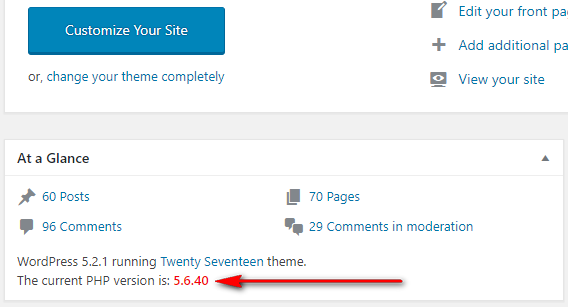
icon-256×256.png


Instalare
How to install the PHP Version Plugin?
- Dashboard -> Plugins -> Add New.
- Write „PHP Version” in the search box and hit enter.
- Find out the PHP Version plugin from suggested all and click on Install Now .
- Now click on Activate.
- Go to your WordPress dashboard page and see the current PHP version is showing.
Recenzii

Contributori și dezvoltatori
„PHP Version” este un software open-source. La acest modul au contribuit următoarele persoane.
Contributori
Tradu „PHP Version” în limba ta.
Te interesează dezvoltarea?
Răsfoiește codul, vezi depozitarul SVN, sau abonează-te la jurnalul de dezvoltare prin RSS.
Istoric modificări
1.0.7 – 10 Dec, 2025
Compatible with Latest WordPress Version
Main File’s version updated
1.0.6 – 24 May, 2025
Compatible with Latest WordPress Version
Main File’s version updated
1.0.5 – 18 December, 2024
Compatible with Latest WordPress Version
1.0.4 – 16 September, 2024
Compatible with Latest WordPress Version
1.0.3 – 12 June, 2024
Compatible with Latest WordPress Version
1.0.2 – 18 October, 2023
Compatible with Latest WordPress Version
1.0.1 – 16 July, 2021
Compatible with latest WordPress Version
1.0.0 – 16 June, 2019
Initial Release
