
Descriere
Seamlessly organize your information into interactive steps or tabs.
Stepped Content | Pricing | Support | Demo
Stepped Content is a powerful Gutenberg plugin that transforms long content into engaging, guided steps. Instead of overwhelming visitors with large blocks of text, you can break information into simple, digestible sections, boosting readability and user engagement.
Whether you’re creating tutorials, onboarding flows, guides, lessons, courses, or feature walkthroughs, Stepped Content gives you clean navigation, customizable layouts, and flexible design controls.
Key Features – Free Version
Everything you need to build a clean and modern content display:
-
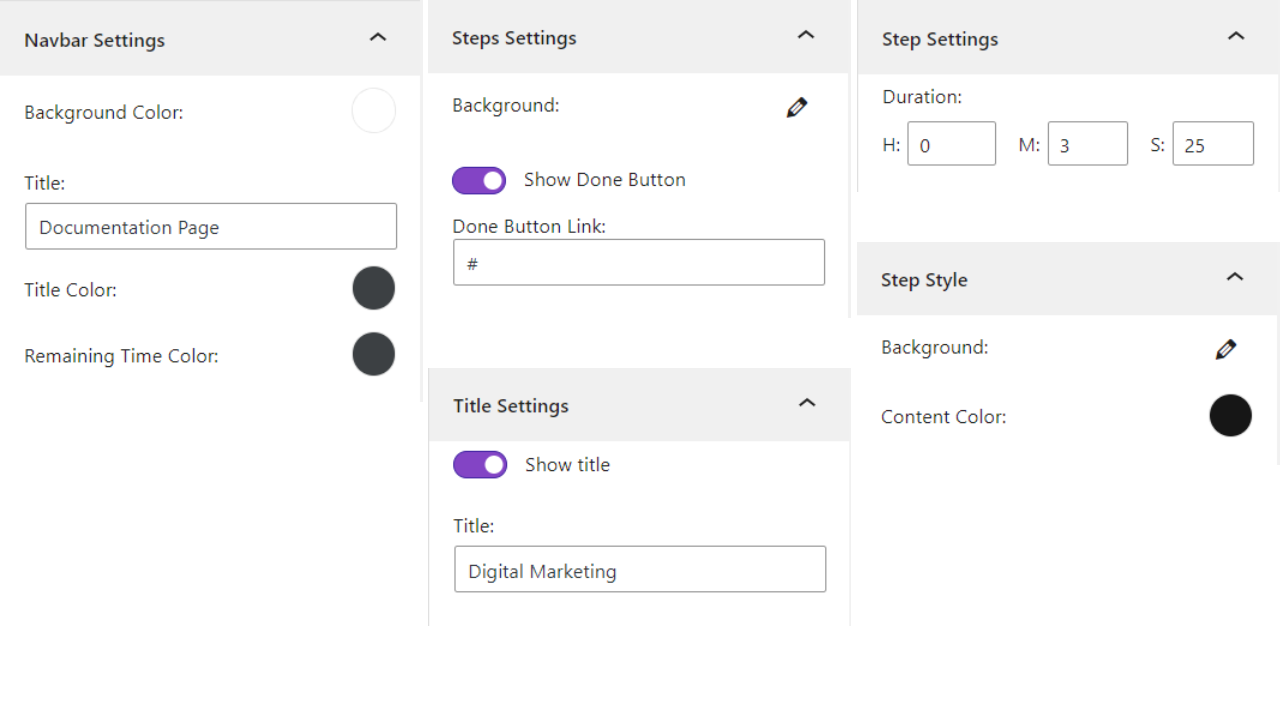
Show the remaining duration needed to finish reading the content.
-
Set a custom height for the step content.
-
Customize the navbar with a custom title and colors.
-
Apply different colors to the sidebar menu.
-
Change the text color and background for each step.
-
Show or hide the step title, or set a custom title instead of the default.
-
Set custom colors for the Back, Next, and Done buttons.
Pro Version – Unlock Premium Power
Stepped Content Pro adds precision filtering, layout enhancements, and deeper content control for advanced users and high-performing websites.
What’s Included in Pro:
-
Show or hide the top navigation bar.
-
Change the sidebar theme for better appearance.
-
Customize Back button with icon, prev step title, or custom text.
-
Customize Next button with icon, next step title, or custom text.
-
Set custom text for the Done button.
-
Change the tab in which the Done button link opens.
How to use
- First, install the Stepped Content plugin
- Add the Stepped Content block from the block category called „Widgets” in the Gutenberg editor.
- You can change block settings from the right-side settings sidebar.
-
Enjoy!
-
For installation help click on Installation Tab
User Feedback
⭐⭐⭐⭐⭐ Perfect for my site
❛❛I needed some specialized version of the stepped content plugin and contacted support. Within a week they added the features I needed to their premium version, which was more than I expected. It works perfectly.❜❜
–cs
– Did you like this plugin? Dislike it? Have a feature request? Please share your feedback with us
Check out the Parent Plugin of this plugin-
B Blocks – A blocks collection and page building tool for Gutenberg.
Check out our other WordPress Plugins-
Html5 Video Player – Display videos as single and playlist in multiple skins.
PDF Poster – Display/Embed PDF files with different styles.
Html5 Audio Player – Listen audios with awesome visuals.
StreamCast – Customizable radio player with different skins.
3D Viewer – Embed 3D models and 3D products with interaction.
Advanced Post Block – Show posts and custom posts in different layouts.
Capturi ecran
Settings 
Stepped Content


Blocuri
Acest modul oferă 2 blocuri.
- Stepped Content Seamlessly organize your information into interactive steps.
- Step Single step for step content.
Instalare
From Gutenberg Editor:
- Go to the WordPress Block/Gutenberg Editor
- Search For Stepped Content
- Click on the Stepped Content to add the block
Download & Upload:
- Download the Stepped Content plugin (.zip file)
- In your admin area, go to the Plugins menu and click on Add New
- Click on Upload Plugin and choose the
step.zipfile and click on Install Now - Activate the plugin and Enjoy!
Manually:
- Download and upload the Stepped Content plugin to the
/wp-content/plugins/directory - Activate the plugin through the Plugins menu in WordPress
Întrebări frecvente
-
What is Stepped Content?
-
Stepped Content is a Gutenberg plugin that breaks long content into interactive steps or tabs, improving clarity and user engagement.
-
Do I need coding skills to use it?
-
No. All customization options are available directly in the Gutenberg editor with simple visual controls.
-
Can I customize the design?
-
Yes. You can customize colors, backgrounds, titles, buttons, themes, and step layouts with ease.
-
Does it work with any WordPress theme?
-
Yes. Stepped Content is compatible with all modern, well-coded WordPress themes.
-
Is there a free version?
-
Yes. Many core features are available for free, with additional advanced options unlocked in Pro.
-
Can I hide step titles?
-
Absolutely. You can show, hide, or replace step titles with custom text.
-
Does it affect website speed?
-
No. The plugin is lightweight and optimized for performance, ensuring fast loading and smooth transitions.
-
Yes. You can choose whether the Done button opens a link in a new tab or the current tab.
-
Is the reading duration accurate?
-
Reading time is estimated using industry-standard methods based on average reading speed.
-
Can I use it for tutorials or onboarding?
-
Yes! It’s perfect for tutorials, onboarding flows, documentation, lessons, courses, and multi-step guides.
-
Where can I get support?
-
You can post your questions on the support forum here
Recenzii

Contributori și dezvoltatori
„Stepped Content – Organize Content into Step-by-Step Format” este un software open-source. La acest modul au contribuit următoarele persoane.
Contributori


Tradu „Stepped Content – Organize Content into Step-by-Step Format” în limba ta.
Te interesează dezvoltarea?
Răsfoiește codul, vezi depozitarul SVN, sau abonează-te la jurnalul de dezvoltare prin RSS.
Istoric modificări
1.0.5 – 30 Nov 2025
- Add Admin Dashboard.
- Performance Improvement.
1.0.4 – 27 Jan 2025
- Update SDK.
1.0.3 – 04 Jul 2024
- Fix the title visible issue.
1.0.2 – 29 Jun 2024
- Upgrade for multiple features.
1.0.1 – 7 Jan 2024
- Performance Improvement.
1.0.0
- Initial Release.
