

Описание
Commandify is a modern command palette for WordPress, designed to help you work faster, stay focused, and control your entire site with a single keyboard shortcut. Cmd/Ctrl + K!
Whether you manage a blog, a learning community or membership platform, an agency portfolio, or a WooCommerce store, Commandify gives you instant access to navigation, content search, settings, maintenance tools, and powerful admin actions from any screen inside WordPress.
Built for creators, developers, store owners, and productivity lovers, Commandify replaces slow menu-clicking with a clean command palette or keyboard-first workflow powered by Cmd/Ctrl + K.
Features | Documentation | Pricing
Commandify Free Features at a Glance
A clean, fast, and lightweight command palette available to all WordPress users.
- Global Command Palette (Cmd/Ctrl + K) — Works in admin and frontend
- Frontend Command Palette — Access commands from any page with theme-independent styling
- Instant Admin Navigation across settings, tools, and CPTs
- Universal Content Search for posts, pages, media, and users
- Plugin & Theme Control (install/activate/deactivate)
- Keyboard-First Workflow optimized for speed and focus
- Fuzzy Search for fast results, even on large sites
- Lightweight & Performance-friendly, works with all major themes and plugins
- Smart and user-friendly interface
Commandify Pro Features at a Glance
Advanced features designed for power users, agencies, and WooCommerce stores.
- Smart Default View (Favorites, Recent, Most Used)
- Context-Aware Commands based on your current screen
- WooCommerce Order Actions (status, notes, coupons, totals, emails)
- Product & Variation Editing (stock, SKU, pricing, delete, view)
- WooCommerce Customer Management (view/update billing & shipping addresses, order insights)
- Contact Form 7 Integration (search forms, manage submissions, view form usage)
- Flamingo Submissions (search, view details, manage spam, delete submissions)
- Bricks Builder Integration (edit templates, manage Bricks-enabled post types)
- Elementor Integration (search templates, edit with Elementor, template management)
- Dynamic Pattern Recognition (#postID, @userID, emails)
- Quick Maintenance Tools (clear transients, delete spam, regenerate thumbnails)
- Advanced Settings Forms (site title, timezone, discussion, more)
- Toggle Commands including maintenance mode
- Beacon-powered Smooth UX for consistent palette state
Why Use Commandify?
The WordPress admin is powerful, but as your website grows (more plugins, more settings, more custom post types, more business operations) the dashboard becomes slower and harder to navigate. Every task requires clicking, scrolling, loading new screens, and dealing with constant context switching.
Commandify brings a modern, keyboard-first workflow to WordPress with a Spotlight-style command palette that helps you navigate, search, and perform admin actions instantly using Cmd/Ctrl + K.
Where most admin search tools stop at navigation, Commandify focuses on actions, workflow automation, contextual intelligence, and WooCommerce-first capabilities. These make Commandify valuable for creators, developers, agencies, and online stores managing complex, high-volume sites.
Detailed LITE Feature Breakdown
Spotlight-Style Global Command Palette (Cmd/Ctrl + K)
The command palette is the center of Commandify. Open it from any screen, type what you need, and execute instantly. Fast fuzzy search makes it easy to find settings, tools, content, or pages even if you don’t remember the exact name.
This offers a focused, keyboard-first experience for users who want to work without breaking their flow.
Frontend Access: Commandify works on both admin and frontend. Access the command palette from any page on your site (for administrators only). The frontend palette features theme-independent styling, ensuring a consistent, professional appearance regardless of your active theme.
Admin Menu Navigation- Without Hunting Through Submenus
Commandify automatically mirrors your full admin menu structure whatever plugin and theme you have. Just type the page name and jump straight there, perfect for large sites with long, complex admin menus.
Universal Content Search & Quick Actions
Search for: Posts, Pages, Media items, Users or any registered customer post types. Each result includes context (date, status, author) and quick actions such as: Edit, View, Preview and Trash/Permanent Delete. This drastically speeds up work for content-heavy websites, editorial teams, creators, and publishers.
Plugin & Theme Management
You can manage plugins and themes without leaving the palette:
- Search WordPress.org plugins
- Install plugins
- Activate or deactivate plugins
- Switch themes
- Install new themes
A single, centralized launcher for setup, testing, or client site maintenance.
User Lookup & Quick Profile Access
Search users by name or email and open profiles instantly. Ideal for sites with memberships, communities, customer logins, or LMS dashboards.
Personal Preferences for a Flexible Workflow
Each user can customize Commandify to fit their preference:, Change shortcut, Adjust search command size, Modify debounce timing, Clearing cache. It adapts to your personal workflow for maximum productivity.
Detailed PRO Feature Breakdown
Smart Default View: Do More Before Typing Anything
Instead of starting with an empty input field, Commandify Pro shows:
- Favorites (commands+actions)
- Recent commands
- Most used actions
- Gloabl commands
Ideal for workflows where you repeat key actions throughout the day.
Context-Aware Command Packs
Commandify Pro adapts based on the screen you’re viewing, providing relevant commands instantly. For example: In post editor the context command will be Publish, Update, Save draft and Preview. Same like on list table the contextual commands will be See all post, Add post. This dynamic behavior reduces navigation steps even further.
Dynamic Pattern Recognition
Commandify Pro intelligently detects patterns and offers relevant actions:
- #123 Open post with ID 123
- @58 Open user ID 58
- [email protected] Find user or customer profile
- Order numbers Jump directly into WooCommerce order management (Upcoming)
This feature is extremely useful for support teams, developers, online store managers, and administrators working with IDs or copied references.
Advanced Settings Forms & Toggle Commands
Perform key configuration updates without navigating through settings pages. Update most of the required wordpress settings using command palette. Secure REST-powered forms make updates faster and more reliable.
Full WooCommerce Feature Set
Commandify Pro includes the most comprehensive WooCommerce command system available in any WordPress command palette.
WooCommerce Order Management
- Search order by order number, Customer name or customer email.
- Each order there are lots of actions like Edit order, Change order status, Add order notes, Apply coupons, Recalculate totals, Resend order emails, Copy customer email or order number, View order, Send order details email. No other command palette offers this level of WooCommerce depth.
WooCommerce Product & Variation Management
Search products with variations easily. Which also include lots of actions like: Edit product, View product, Trash or permanently delete, Copy product link, Copy SKU, Update stock, Update regular price, Update sale price, Update SKU, Change stock status. Perfect for large stores managing hundreds or thousands of SKUs.
WooCommerce Customer Workflow
Search customers instantly by name or email. Each customer includes powerful actions: Open customer profile, View associated orders, Show billing and shipping address (read-only modal with formatted display), Update billing address (form modal with searchable country/state dropdowns), Update shipping address (form modal with searchable country/state dropdowns), Copy customer details(Upcoming), Email the customer. Address management features match WooCommerce field order and provide dynamic state updates based on selected country. This drastically speeds up support and order management workflows.
Quick Maintenance Tools
Easy one-click maintenance actions designed to handle large volumes of data without timing out:
Clear Transients
Safely removes expired and active transients, even on databases with 100k+ records.
Regenerate Thumbnails
Rebuild all image sizes for theme changes, bulk uploads, or redesigns.
Delete All Spam Comments
Deletes thousands of spam comments instantly — ideal for high-traffic blogs.
These tools replace multiple plugins and keep your site running efficiently.
Contact Form 7 & Flamingo Integration
Commandify Pro provides comprehensive Contact Form 7 management directly from the command palette:
Form Management
— Search all Contact Form 7 forms with instant access
— Edit forms, copy shortcodes, duplicate forms, delete forms
— View submissions for any form or post/page containing CF7 shortcodes
— Search posts, pages, and custom post types containing CF7 shortcodes with form-specific actions
Flamingo Submissions
— Search all form submissions by email, name, or content
— View submission details with full form data
— Copy email addresses directly from submissions
— Mark submissions as spam or not spam
— Move submissions to trash or delete permanently
— Efficient database-level searching matching Flamingo admin behavior
Perfect for support teams, form managers, and administrators handling high volumes of form submissions.
Bricks Builder Integration
Seamlessly integrate Bricks Builder into your workflow:
- Edit with Bricks action appears on all Bricks-enabled post types (respects Bricks settings)
- Search and manage Bricks templates
- Dynamic support for all post types enabled in Bricks settings
- Consistent action system integrated with Commandify’s unified post actions
Works automatically with Bricks Builder — no configuration needed.
Elementor Integration
Full Elementor template and page management:
- Search Elementor templates by name or type
- Edit with Elementor action on posts, pages, and all Elementor-supported post types
- Export, copy, duplicate, and rename templates
- Create new templates (all types: pages, sections, headers, footers, etc.)
- Regenerate CSS, sync library, clear cache
- Frontend contextual commands for quick editing
- Works seamlessly in Elementor editor with enhanced keyboard shortcut handling
Check more plugins
Pollify – Feedback Polls, Anonymous Polls, Up/down Voting, NPS Surveys, Export data
Pollify lets you create a poll website in WordPress with awesome polling/online voting capabilities and unlock a series of advanced features to engage your audience like never before.
Author
Created by wpRigel
Support
For help or bug reports, please visit the support forum or contact us at https://wprigel.com/contact/.
Скриншоты
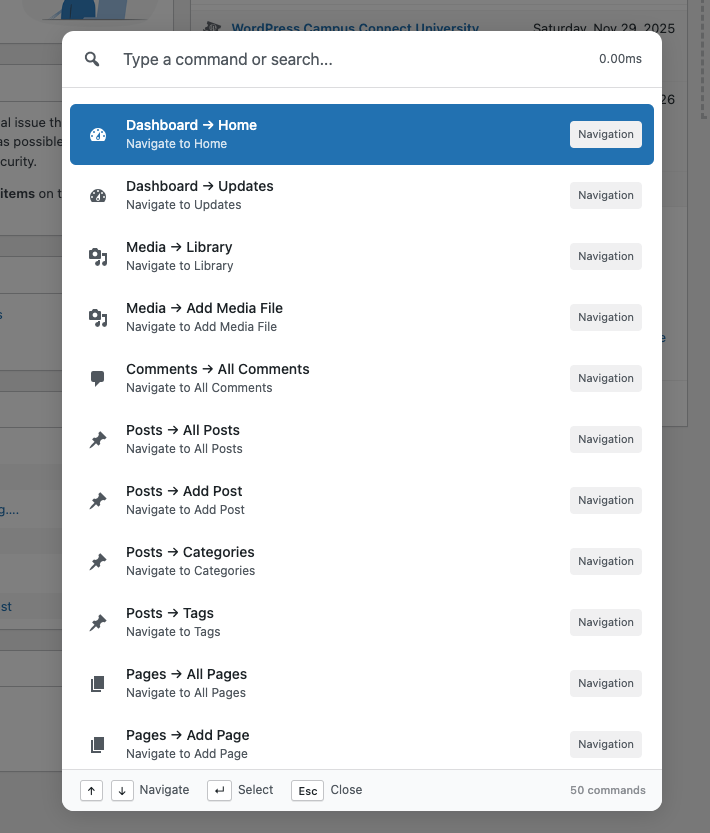
Command Palette – main interface 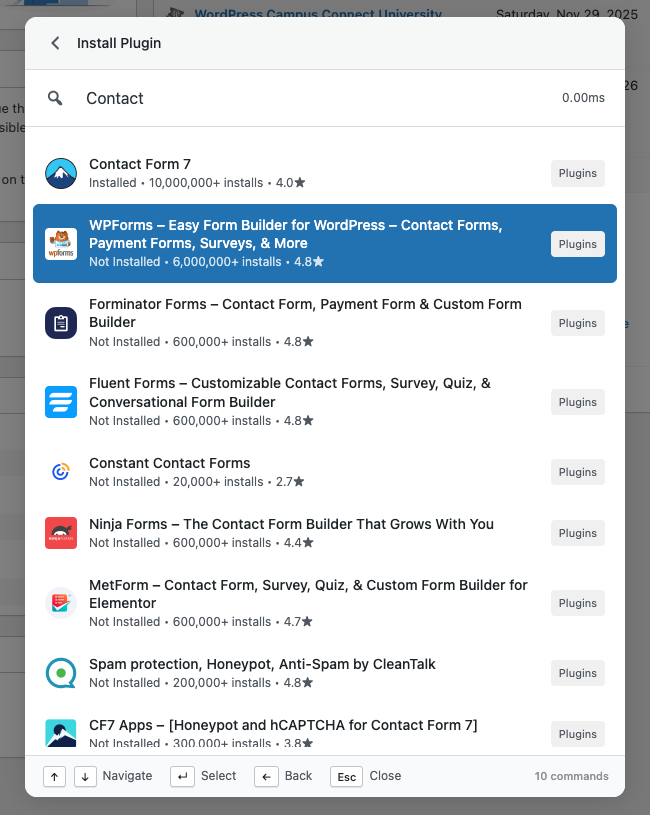
Install Plugins – search and install plugins 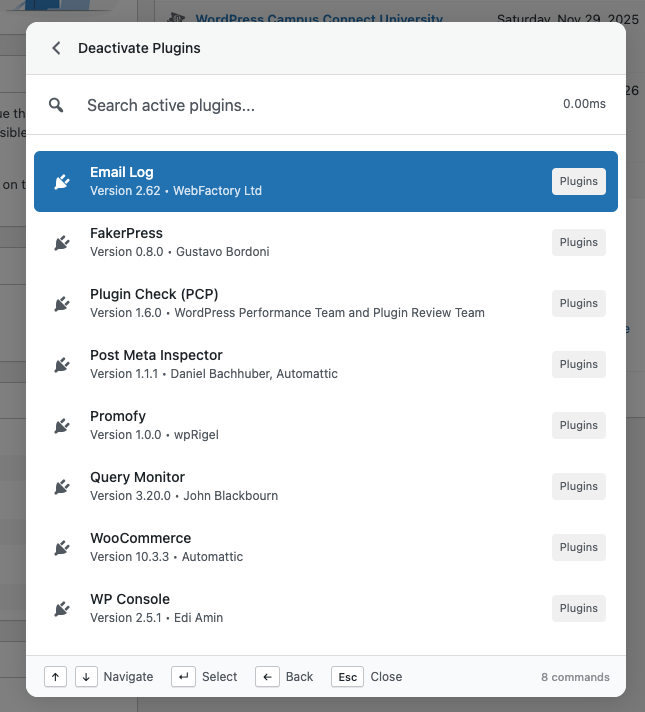
Activate/Deactivate Plugins – manage existing plugins 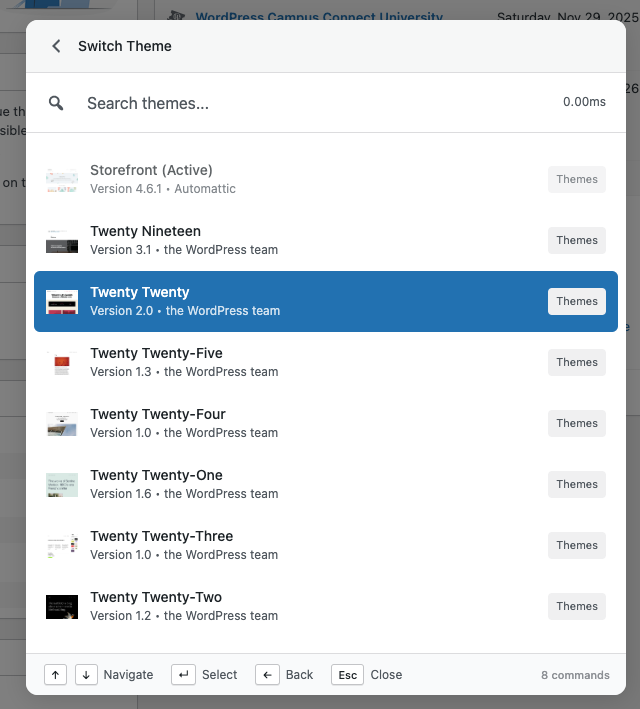
Switch Themes – install and activate themes 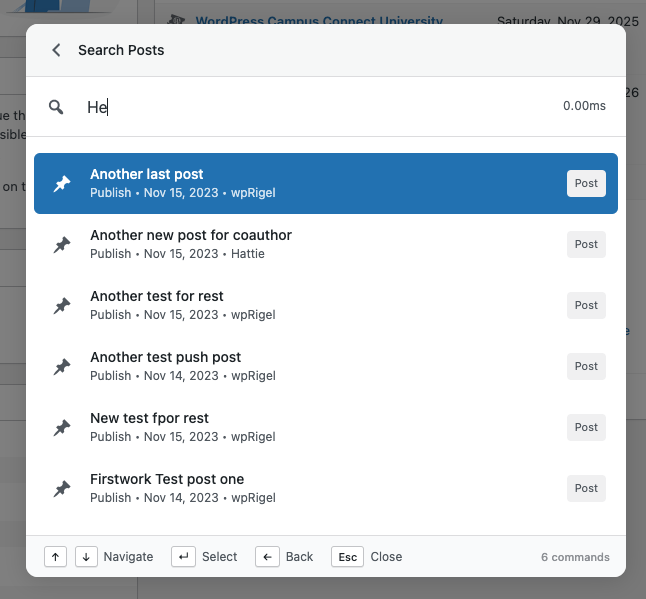
Search Posts – access and manage content 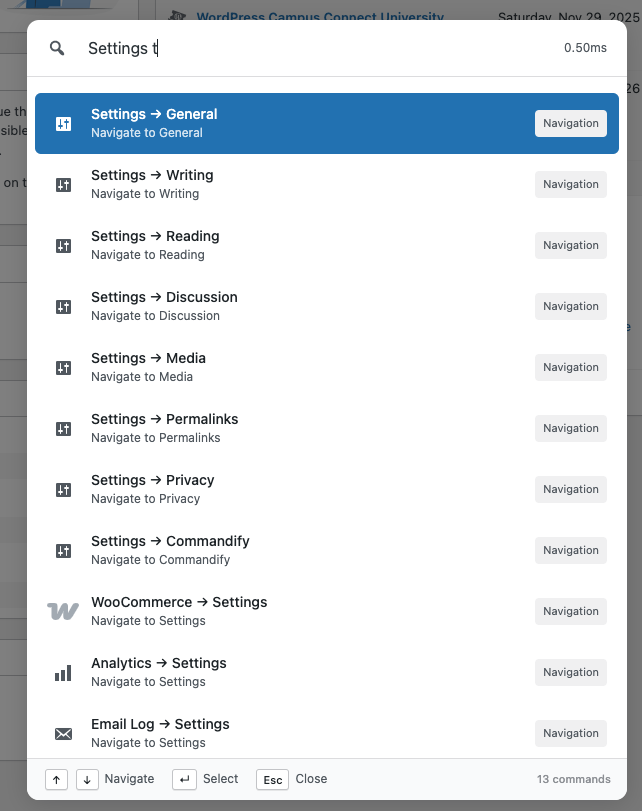
Navigation Commands – open any admin screen 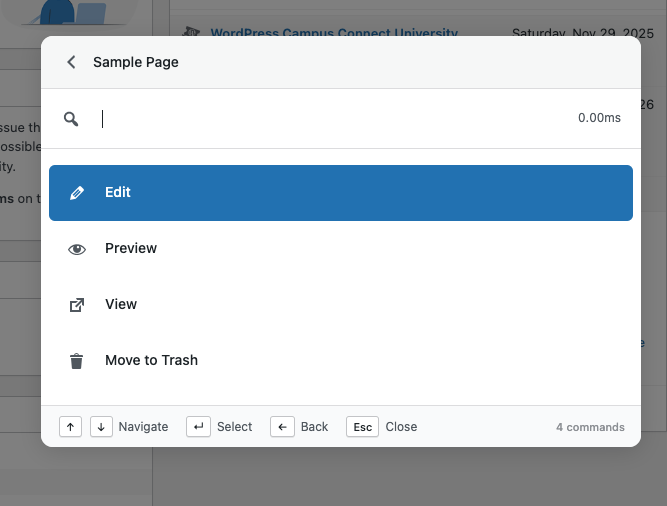
Post Actions – edit, preview, and view content 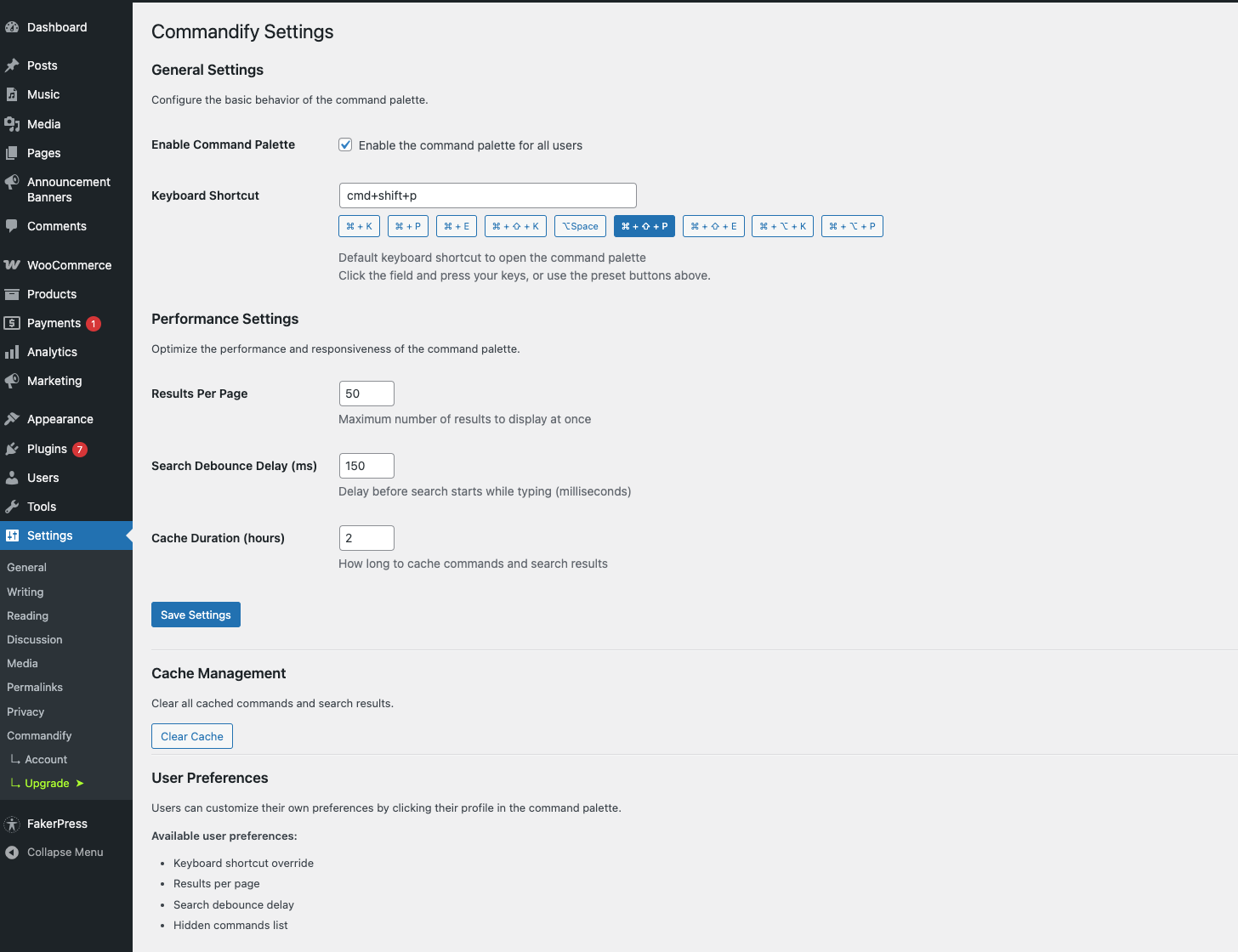
User Preferences – customize palette behavior


Установка
- Navigate to Plugins Add New in your WordPress admin.
- Search for «Commandify».
- Click Install Now, then Activate.
- Press Cmd/Ctrl + K to open the command palette anywhere in the admin or frontend (for administrators).
- Explore settings under Preferences to customize your workflow.
- Upgrade to Commandify Pro for advanced actions, WooCommerce tools, Contact Form 7, Bricks, Elementor integrations, and contextual commands.
Часто задаваемые вопросы
-
Does Commandify slow down my website?
-
No. Commandify is lightweight and optimized for speed. All scans and lookups are done efficiently, and Pro maintenance tools are designed to safely handle large datasets.
-
Does Commandify work with WooCommerce?
-
Yes. Commandify Pro includes the most advanced WooCommerce command system available, including orders, products, variations, and customer actions.
-
How is Commandify different from CommandUI or WP Spotlight?
-
Other command palettes focus primarily on search.
Commandify focuses on actions — order actions, product updates, settings toggles, contextual commands, and deep workflow automation.
It’s built for users who want to do more without leaving the current screen. -
Does it work with all themes and plugins?
-
Yes. Commandify works across the entire WordPress admin and frontend, including page builders (Elementor, Bricks), SEO tools, LMS plugins, membership systems, WooCommerce extensions, and form plugins (Contact Form 7 with Flamingo). Commandify Pro includes dedicated integrations for WooCommerce, Contact Form 7, Flamingo, Bricks Builder, and Elementor.
-
Can I customize the keyboard shortcut?
-
Yes. You can change the shortcut inside Preferences.
-
Does it work on large sites?
-
Absolutely. Commandify is designed and tested on high-volume and WooCommerce-heavy sites.
Pro cleanup actions handle 100k+ records safely. -
Is it compatible with multisite?
-
Yes, Commandify works on multisite installations.
-
Can I install plugins from the command palette?
-
Yes. Type “Install Plugin” and search the WordPress.org plugin directory. You can install and activate plugins from within the palette.
-
Can I switch themes from the palette?
-
Yes. You can install themes from the directory or activate installed themes.
-
Where can I learn more?
-
Documentation: https://wprigel.com/docs/commandify/
Pricing: https://wprigel.com/commandify/#commandify-pricing-section
Отзывы
Нет отзывов об этом плагине.
Участники и разработчики
«Commandify – Command Palette, Content Search, Themes Control, Product Edits, Context Actions» — проект с открытым исходным кодом. В развитие плагина внесли свой вклад следующие участники:
Участники
Заинтересованы в разработке?
Посмотрите код, проверьте SVN репозиторий, или подпишитесь на журнал разработки по RSS.
Журнал изменений
1.0.4 – December 18, 2025
- [New] Unified Post Actions: «Change Status» action now appears consistently in both search results and dynamic pattern lookups for all post types.
- [New] WooCommerce Customer Actions (Pro): Added «Show billing and shipping address» action — displays read-only address information in a modal with proper formatting.
- [New] WooCommerce Customer Actions (Pro): Added «Update billing address» action — form modal with searchable country/state dropdowns matching WooCommerce field order.
- [New] WooCommerce Customer Actions (Pro): Added «Update shipping address» action — form modal with searchable country/state dropdowns matching WooCommerce field order.
- [New] WordPress 6.9 Compatibility: Added setting to disable default WordPress command palette, preventing conflicts with Commandify’s Cmd/Ctrl+K shortcut.
- [New] Frontend palette: Command palette styles are now theme-independent, ensuring consistent design across all themes on both backend and frontend.
- [New] Dynamic Country/State Selection: WooCommerce address forms now use searchable select dropdowns with dynamic state updates based on selected country.
- [Improvement] Icon Alignment: Fixed vertical alignment of icons in command palette (command items, back button, search icon) for better visual consistency.
- [Improvement] WooCommerce Customer Actions: Updated to use centralized UserActions class for consistent action generation across different contexts.
- [Improvement] Bricks Integration: Updated to use centralized commandify_post_actions filter for better consistency with other integrations.
- [Improvement] Elementor Integration: Frontend contextual «Edit with Elementor» command now shows for all Elementor-supported post types, not just pages built with Elementor.
- [Improvement] Keyboard Shortcut Handling: Enhanced keyboard event handling to work seamlessly in Elementor editor iframe, with automatic iframe detection and event capture.
- [Improvement] Modal Sizing: Added support for large and extra-large modal sizes for address display and update forms.
- [Improvement] Form Modal: Added keyboard scroll support (Arrow Up/Down) for scrollable modal content.
- [Fix] Duplicate Post Action: Fixed issue where duplicating a post created two copies instead of one and incorrect toast message.
- [Fix] Contact Form 7 Delete Action: Fixed delete action not working and added proper confirmation modal before deletion.
- [Fix] Contact Form 7 Copy Shortcode: Fixed escaped quotation marks (") appearing in copied shortcode.
- [Fix] Contact Form 7 Search: Fixed search contact form command not showing all forms — now includes all post statuses and increased limit.
- [Fix] Post Actions: Fixed undefined variable error in frontend contextual commands when generating edit URL.
- [Fix] Elementor Frontend: Fixed «Edit with Elementor» action not appearing on frontend post views.
1.0.3 – December 09, 2025
- [New] Bricks integration: «Edit with Bricks» action now respects Bricks settings — only shows for post types enabled in Bricks settings (Settings Post Types).
- [New] Bricks integration: Dynamic bricks support for all Bricks-enabled post types based on settings.
- [New] Contact Form 7 integration (Pro): Search all CF7 forms with actions (Edit Form, Copy Shortcode, Duplicate Form, Delete Form, View Submissions).
- [New] Contact Form 7 integration (Pro): Search posts, pages, and custom post types containing CF7 shortcodes with form-specific actions.
- [New] Contact Form 7 integration (Pro): Flamingo submissions search — Search all form submissions with actions (View Details, Copy Email, Mark as Spam/Not Spam, Move to Trash, Delete Permanently).
- [New] Contact Form 7 integration (Pro): «View Submissions» action on forms and posts/pages — Shows 10 recent submissions per form with full action support.
- [New] Contact Form 7 integration (Pro): Search functionality uses WordPress’s
sparameter for efficient database-level searching (matching Flamingo admin behavior). - [Fix] Contact Form 7 integration: Fixed email display and copy — properly extracts email from «Name email@domain.com» format.
- [Fix] Contact Form 7 integration: Fixed HTML entity encoding issues in email addresses and descriptions.
- [Fix] Contact Form 7 integration: Fixed search contact form command not appearing — filter registration timing issue resolved.
- [Improvement] Contact Form 7 integration: Performance optimization — cached form channel mapping, removed unnecessary loops, optimized ID retrieval.
- [Improvement] Contact Form 7 integration: Security enhancements — added capability checks for all submission actions, proper input validation, escaped all URLs and user data.
- [Improvement] Contact Form 7 integration: Search submissions now includes spam submissions with «Mark as Not Spam» option.
- [Improvement] Contact Form 7 integration: Post search shows post type label in description (e.g., «Post • Contains form: Contact Form 1»).
- [Improvement] Contact Form 7 integration: Optimized SQL queries for faster post/page search with CF7 shortcodes.
1.0.2 – December 02, 2025
- [New] Elementor integration (Free & Pro): Search templates, add «Edit with Elementor» action to posts and pages, export/copy/duplicate/rename templates, create new templates (all types), regenerate CSS, sync library, clear cache.
- [New] User Switching integration (Pro): «Switch to User» command (shows 20 recent users), adds «Switch To» action in user search, switch back to original account, «User Switch Status» command showing session, clean multisite-compatible URLs, direct switching/toast on all actions.
- [New] Instant Results for search commands (loads static results instantly).
- [New] Dynamic action handler system for extensible command execution.
- [New] Static results preloading in Registry for zero-latency commands.
- [New] HTML entity decoding for redirect URLs (REST API compatibility).
- [New] Added
commandify_user_actionsfilter (for user actions via third parties — works in search and pattern lookups). - [New] Added
commandify_search_{post_type}_actionsandcommandify_search_post_type_argsfilters (customize CPT actions and queries). - [New] COMMANDIFY_DEV_MODE constant for local Pro development.
- [Fix] Fixed ampersand (&) issues in URLs for navigation/redirects.
- [Fix] Fixed «Command not found» for dynamic main action commands.
- [Fix] Fixed duplicate «Templates Theme Builder» command (Elementor).
- [Fix] «Switch Back» action in status command now executes correctly.
- [Improvement] WooCommerce «Search Orders» now shows 10 recent orders by default (Processing, On-hold, Completed, Pending).
- [Improvement] WooCommerce «Search Customers» now shows 10 recent customers by registration date by default.
- [Improvement] Consistent search experience across WooCommerce, Posts, Users, and Media commands with instant results.
- [Improvement] Better code organization and dedicated integration folders.
- [Improvement] Consistent file structure for all integrations (WooCommerce, Elementor, User Switching).
- [Improvement] Architecture: moved User Switching redirects to PHP callbacks, better integration load order, checks use WordPress core capabilities (e.g. edit_users).
- [Improvement] Dynamic form options now evaluate callables before frontend.
- [Improvement] Added comprehensive testing docs and implementation guides.
1.0.1 – December 01, 2025
- [New] Visit Site command lets you quickly open your site in a new tab.
- [New] Added the ability to log out instantly using the palette.
- [New] You can now change post status directly from post action options.
- [Fix] Search users command now displays a user icon.
- [Fix] Media search now shows thumbnail images for each file.
- [Fix] By default, search commands for posts, users, and media display the latest 10 results.
- [Fix] The palette now stays open after running cache clear, rewrite flush, or update checks.
- [Fix] Improved the search experience with debounced (delayed) API requests in JavaScript.
1.0.0 – November 28, 2025
- Initial release
- Navigation for all admin pages and custom post types
- Search for posts, pages, media, and users
- Plugin search, installation, activation, and deactivation
- Theme search, installation, and switching
- Quick actions for updates, trash, and cache clearing
- User preferences for shortcuts and display options
- Keyboard navigation and accessible UI
- Client-side caching for faster command filtering
