

Description
Improve purchase conversion tracking accuracy for WooCommerce with server-side tracking
Browser tracking can be blocked or restricted by modern privacy settings and ad blockers, which can lead to missing purchase conversions in GA4 and ad platforms. This plugin utilizes server-side tracking through Google Tag Manager to minimize data loss, ensuring more consistent purchase conversion reporting without requiring custom code.
In a published WooCommerce case study, a global paint brand improved conversion tracking after implementing Conversios server-side tracking with GTM. Within weeks, they reported a 90% increase in Meta Ads conversions and a 50% uplift in Google Ads conversions, along with reduced GA4 vs WooCommerce reporting gaps.See the case study: Global paint brand sees 90% lift in Meta Ads with Conversios SST
Reviews
“All-in-One solution with exceptional support. Integration is seamless and the team is responsive.”
@tizianokappa (Read full review)
What Problem We Solve
Server side tracking setup is usually complex. Store owners often need to create a GTM server container, configure Google Cloud hosting, set up tags manually, and build a reliable dataLayer for WooCommerce events.
This plugin removes that complexity. It provides an automated setup that includes GTM configuration, a Google Cloud server for server side GTM, and automated WooCommerce dataLayer events. You can complete the setup with no code in about 15 minutes and start sending Purchase and Checkout conversion data to GA4, Meta CAPI, and Google Ads without writing custom code.
Features We Provided
1. Supported Platforms & Server-Side Setup
Send conversion and ecommerce data to analytics and multiple advertising platforms from a single setup:
- Google Analytics 4 (GA4)
- Google Ads
- Meta Ads via Conversions API
- TikTok Ads
- Snapchat Ads
The plugin includes an automated server-side setup using Google Tag Manager and a Google Cloud server provided as part of the configuration. This removes the need to create or manage server infrastructure manually.
2. First Party Cookie Implementations
Enables first-party cookie tracking to overcome third-party cookie restrictions on Safari and iOS browsers.
3. Reporting & Insights
Most store owners end up checking conversions in multiple places (GA4, ad platforms, and WooCommerce), which makes reporting slow and confusing. Conversios brings key reports into one place so you can review performance and validate tracking faster.
View and analyze your tracking data through platform-specific reports:
- GA4 basic reporting for events and conversions
- GA4 Ecommerce funnel reporting
- Google Ads conversion reporting
- Meta Ads conversion reporting
These reports help validate tracking, monitor conversion performance, and compare platform data with WooCommerce orders.
Premium Features
Upgrade for higher capacity and hands-on help. See pricing
- Higher server-hit quota for high-traffic stores
- Help configuring server-side GTM and conversion APIs
- Priority support (email and WhatsApp)
- Help with Consent Mode v2 and custom add to cart tracking when required
- Enhanced Conversions support for Google Ads
Supported Payment Methods
Purchase conversions work with common WooCommerce payment gateways, including:
– Stripe
– PayPal
– WooCommerce Payments
– Authorize.Net
– Razorpay
Important: Purchase tracking works when the payment flow redirects customers to the WooCommerce Order Received / Thank You page.
Any payment gateway that returns users to this page after successful payment will be tracked correctly.
Supported WooCommerce Events
Conversios tracks the complete WooCommerce shopping journey using standard ecommerce events:
Store and product browsing
– page_view (page visit)
– view_item_list (category / product list)
– select_item (product clicked)
– view_item (product page)
Cart actions
– add_to_cart (add to cart)
– remove_from_cart (remove from cart)
– view_cart (cart page)
Checkout steps
– begin_checkout (checkout started)
– add_shipping_info (shipping selected)
– add_payment_info (payment selected)
Purchase
– purchase (order completed)
Add to Cart works out of the box for standard WooCommerce themes. Stores using drawer carts, AJAX carts, or custom flows may require customization. Get help with us at [email protected]
Consent Mode v2 Support
- Consent Mode v2 (works with your CMP): Conversios does not provide a consent banner. It sends or blocks tracking based on your existing CMP settings. To enable and configure Consent Mode, contact our support team at [email protected].
Best Fit for Which Stores
-Woocommerce DTC brand and stores running paid ads and needing more consistent purchase conversion reporting in GA4 and ad platforms
– WooCommerce stores selling physical or digital products where purchase conversions drive ROAS decisions
– High-traffic WooCommerce stores that need server-side tracking capacity beyond browser-only tracking limits.
Setup in Minutes & Faster Time to Value
Store owners can get started in about 15 minutes with a no-code setup. And because Conversios combines multi-platform tracking + reporting in one plugin, there’s no need to install or manage multiple separate plugins.
Support
Need help with setup, event validation, custom cart/checkout, payment gateways, or Consent Mode? Email [email protected] or chat with us on WhatsApp.
You can also use our free tool to quickly check if tracking is working or not on your site and overall website tracking score:
Website Tracking Checker Tool
Troubleshooting guide for validating server-side GTM:
How to validate server-side GTM
Privacy Policy
You can view our detailed privacy policy here.
Third-Party Services
Google APIs – authentication and data exchange.
Terms | Privacy
Google Tag Manager – tag management.
Terms | Privacy
Google Analytics – traffic and event reporting.
Terms | Privacy
Tatvic API – supplementary plugin functionality.
Privacy
Screenshots

GTM Web & Server Container Configuration 
GA4 Setup Panel 
Google Ads Conversion Setup 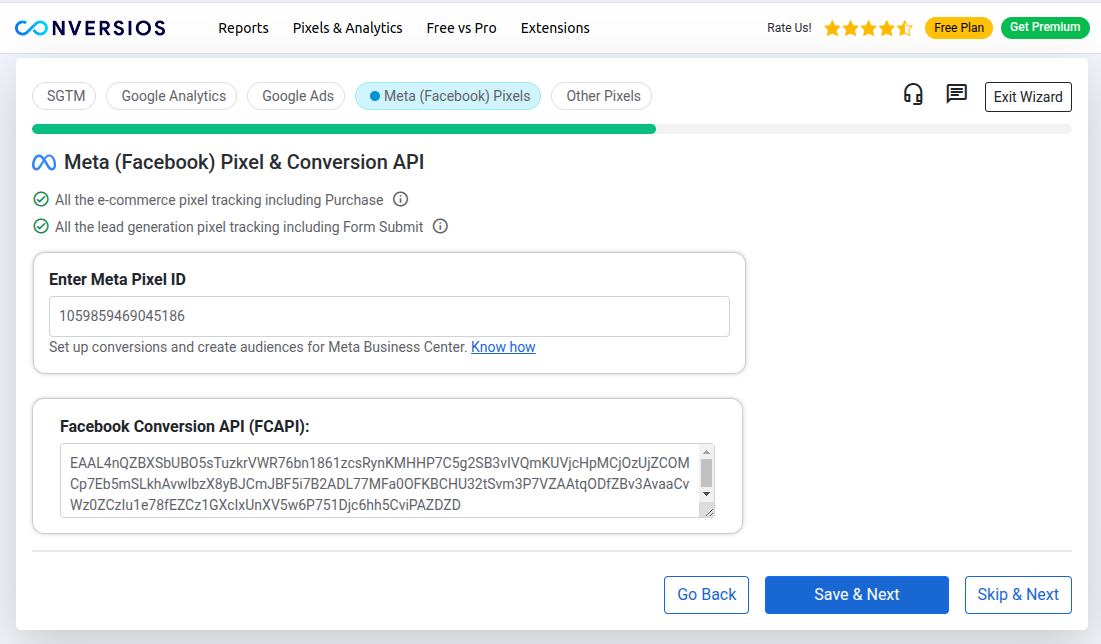
Meta Pixel & CAPI Configuration 
TikTok & Snapchat Pixel Configuration 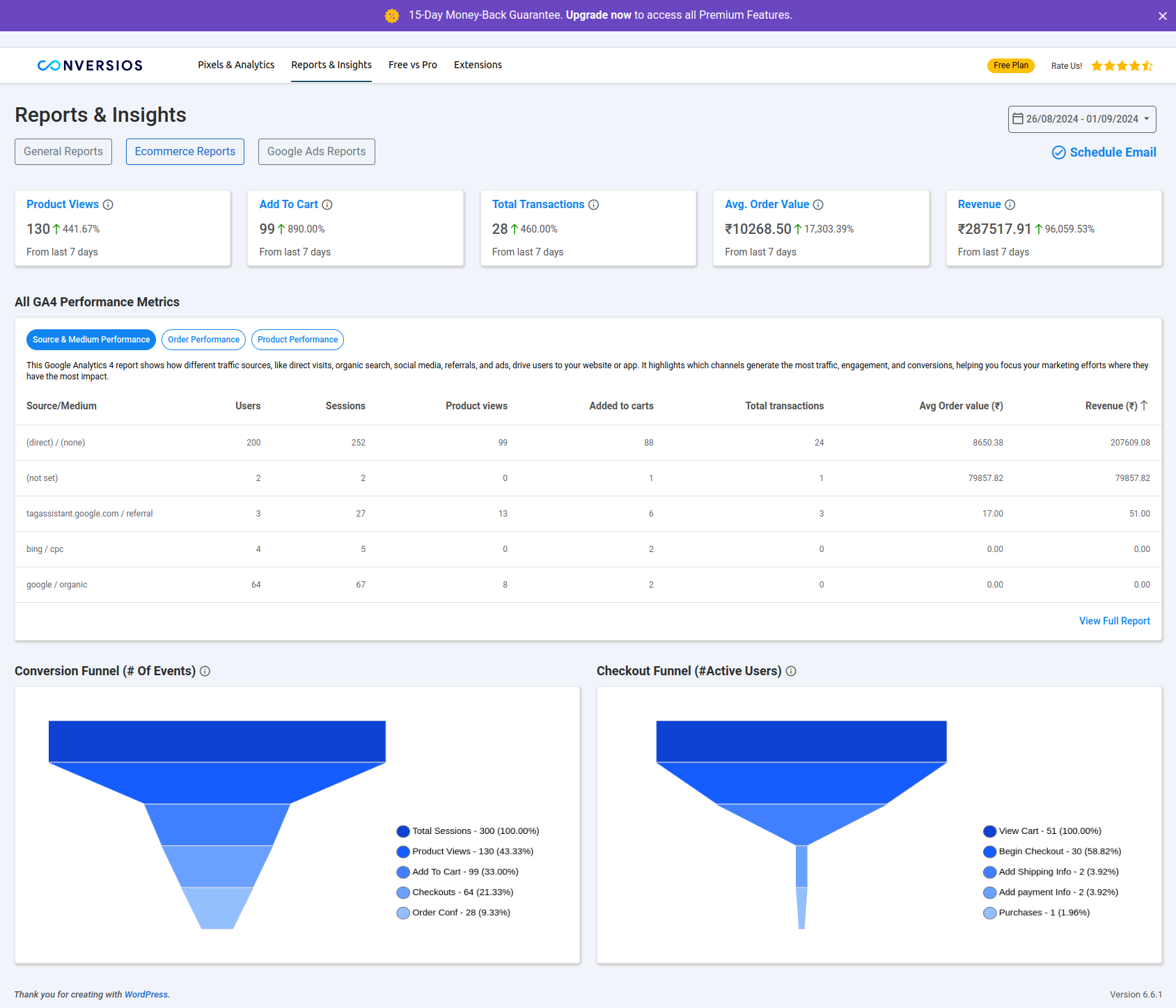
GA4 and Google Ads Reporting Dashboard 
Advanced Settings Panel


Installation
-
Install and activate the plugin from Plugins > Add New.
-
Open Conversios > Server Side Tagging via GTM in your WordPress dashboard.
-
Set up tracking (choose one):
- Wizard: Click “Start Your Setup Now” and connect your GTM Web Container, Server Container, and Server Set-up URL.
- Manual: Enter the same GTM details directly in the sGTM tab, then add IDs in GA4 / Google Ads / Meta / Other Pixels tabs.
-
Save settings and verify tracking using GTM Preview and platform diagnostics.
Notes:
– Purchase conversion is counted when checkout completes and the customer reaches the order confirmation (thank-you) page.
– If your store uses a custom cart, cart drawer, or AJAX add to cart flow, tracking may need customization. Contact us at [email protected].
– For Consent Mode v2 setup help, contact us at [email protected].
FAQ
-
Does this plugin work only with WooCommerce?
-
WooCommerce is recommended for full purchase conversion tracking. If WooCommerce is active, the plugin can track key store actions like add to cart, checkout, and purchase conversion.
-
What counts as a purchase conversion?
-
A purchase conversion is counted when the customer completes checkout and reaches the order confirmation (thank-you) page.
-
Which platforms can I send purchase conversions to?
-
You can send purchase conversion data to Google Analytics 4 (GA4), Google Ads (including Enhanced Conversions), Meta Pixel with Conversions API (CAPI), and other supported pixels like TikTok, Snapchat, and Pinterest.
-
Which payment methods are supported for purchase tracking?
-
Purchase conversions support common WooCommerce payment gateways, including Stripe, PayPal, WooCommerce Payments, Authorize.Net, and Razorpay.
-
What if my store uses a custom cart, cart drawer, or AJAX add to cart?
-
If your theme uses a custom cart flow, cart drawer, or AJAX add to cart, add to cart or purchase tracking may need customization. Contact us at [email protected] and we will help you map it correctly.
-
Do I need Google Tag Manager (GTM) to use this plugin?
-
Yes. This plugin works with Google Tag Manager. You will connect your GTM Web Container and GTM Server container details in the plugin settings.
-
Do you have a tool to check if tracking is working?
-
Yes. You can use our free Website Tracking Checker Tool to validate your setup:
Website Tracking Checker Tool
You can also follow this troubleshooting guide:
How to validate server-side GTM -
Does this support Consent Mode v2?
-
Yes. Consent Mode v2 is supported. If you want help configuring Consent Mode with your cookie banner, contact us at [email protected].
-
How can I verify that purchase conversions are working?
-
Use GTM Preview to confirm requests are reaching your GTM Server container. Then place a test order and verify purchase conversions in GA4 / Meta / Google Ads diagnostics.
Reviews


Contributors & Developers
“Server Side GTM Tracking for Google Analytics 4, Meta Conversions API & Google Ads” is open source software. The following people have contributed to this plugin.
Contributors

“Server Side GTM Tracking for Google Analytics 4, Meta Conversions API & Google Ads” has been translated into 6 locales. Thank you to the translators for their contributions.
Interested in development?
Browse the code, check out the SVN repository, or subscribe to the development log by RSS.
Changelog
1.1.1 – 11 Jul 2025
- Security Updates.
1.1.0 – 17 Feb 2025
- Major Update: Automates tracking and grants 300K lifetime server hits.
- Free Lifetime Hits: Track server-side events at no cost.
- Automated Web & Server Containers: Faster setup with no manual effort.
- Cloud-Run Deployment: Hassle-free server-side infrastructure.
- Wizard-Based UI: Step-by-step onboarding experience.
- Performance & Stability Fixes: Speed optimizations and bug resolutions.
1.0.9 – 23 Sep 2024
- Knowledge-Base Docs Added
- GA4 & Google Ads Validation Fixes
- User-Experience Enhancements
1.0.8 – 10 Sep 2024
- E-commerce Reports Added
- Multiple Bug Fixes & Stability Improvements
1.0.7 – 14 Aug 2024
- UI Improvements
- Extensions Page Added
1.0.6 – 31 Jul 2024
- Free vs Pro Menu Template Updated
- WooCommerce-less Design Break Fixed
1.0.5 – 26 Jul 2024
- Uninstall Feedback Form Added
- Minor UI Changes
1.0.4 – 22 Jul 2024
- PHP 8.3 Compatibility
1.0.3 – 02 Jul 2024
- Initial Release
