


What Is an MX Record?
An MX record is a type of DNS record that tells email servers where to deliver emails for your domain.
When someone sends an email to your address, the MX record directs that email to the correct mail server so it can reach your inbox.
For example, if you receive emails at your domain (like [email protected]), your MX records tell other mail servers which server handles incoming mail for yourdomain.com.
What Does MX Stand For?
MX stands for Mail Exchange. Mail Exchange records are specifically designed to route incoming email messages to the appropriate mail server.
Every domain that receives email needs at least one MX record in its DNS settings. Without an MX record, other mail servers wouldn’t know where to deliver emails sent to your domain.
How Do MX Records Work?
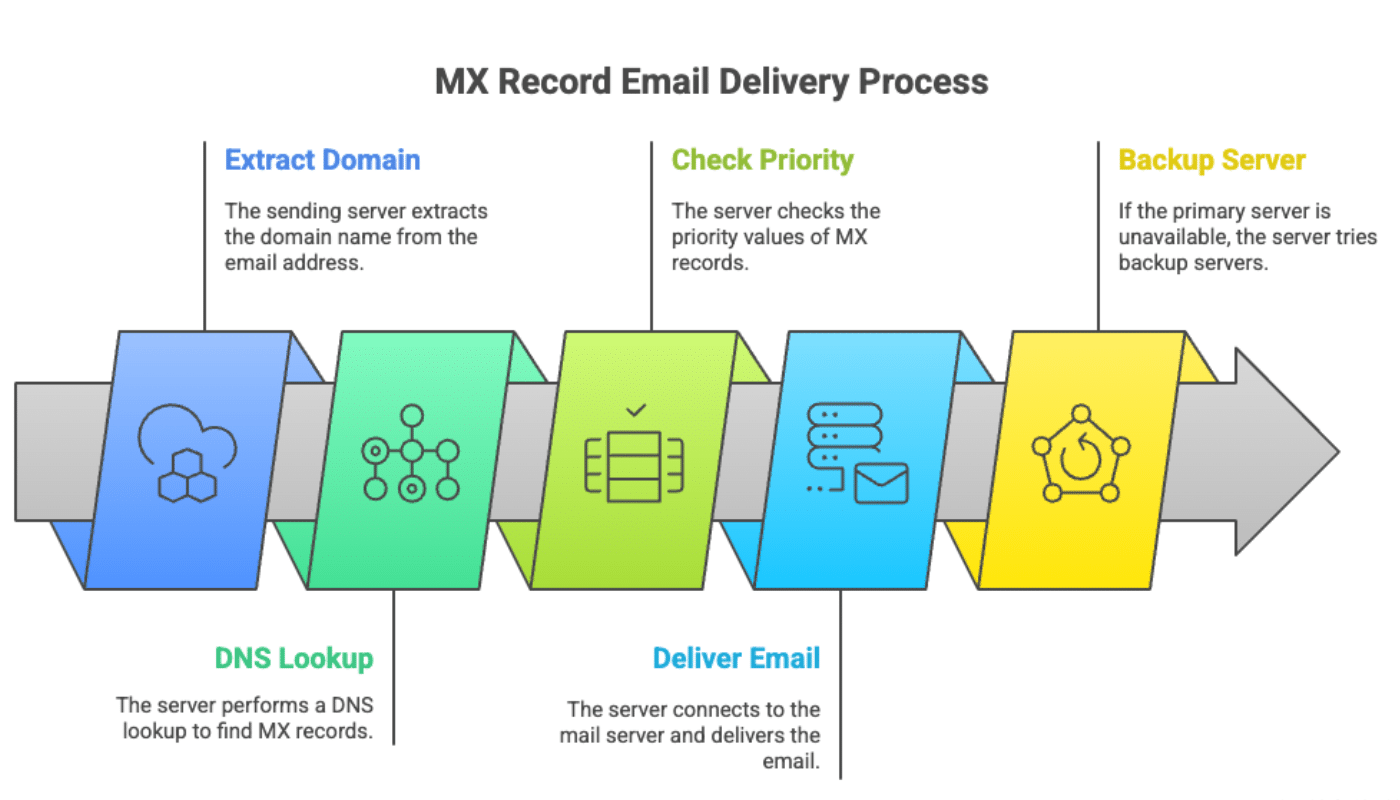
When someone sends you an email, their mail server needs to find out where to deliver it. Here’s what happens:
Extract the Domain
The sending mail server extracts the domain name from the recipient’s email address. For example, if you’re sending to [email protected], it extracts example.com.
DNS Lookup
The server performs a DNS lookup to find the MX records for that domain. This is similar to looking up a phone number in a directory.
Check Priority
If there are multiple MX records, the sending server checks the priority values and attempts to deliver to the server with the lowest priority number first.
Deliver the Email
The sending server connects to the mail server specified in the MX record and delivers the email. If the primary server is unavailable, it tries the backup servers in priority order.
This entire process happens automatically within seconds, ensuring your emails reach the right destination.
What Is MX Record Priority?
MX record priority (also called preference) is a number that determines which mail server should be used first when delivering email to your domain.
The priority value works in reverse, where lower numbers have higher priority. For example:
- An MX record with priority 10 will be tried before priority 20
- Priority 0 has the highest priority
- If two records have the same priority, the sending server picks one randomly
Many domains have multiple MX records with different priorities to provide backup mail servers. If the primary mail server is down or unavailable, the sending server will automatically try the next server in the priority list.
For example, a typical MX record setup might look like this:
| Priority | Mail Server | Purpose |
|---|---|---|
| 10 | mail1.example.com | Primary mail server |
| 20 | mail2.example.com | Backup mail server |
| 30 | mail3.example.com | Second backup |
Where Are MX Records Stored?
MX records are stored in your DNS settings alongside other DNS records like TXT records, CNAME records, and A records.
You can typically find and edit your MX records in one of these places:
- Your domain registrar’s control panel (where you purchased your domain name)
- Your web hosting provider’s control panel
- A third-party DNS service like Cloudflare
If you’re not sure where your DNS records are managed, contact your domain registrar or web hosting provider for assistance.
Do I Need MX Records to Send Email?
No, you don’t need MX records to send email. MX records are used only to receive email. They tell other servers where to deliver incoming messages to your domain.
To send email, you need different types of DNS records:
- SPF records to specify which servers are allowed to send email from your domain
- DKIM records to digitally sign your outgoing emails
- DMARC records to tell receiving servers how to handle emails that fail authentication
When you authorize your domain with SendLayer, you’ll add these authentication records to your DNS settings. This helps improve your email deliverability and ensures that receiving servers trust emails sent from your domain.
However, if you also want to receive email replies at your domain, you’ll need to set up MX records that point to your email hosting provider’s mail servers.
That’s it! Now you know what MX records are.
If you’d like to learn more about DNS records and email delivery, check out these resources:
