Get VR games from external sources
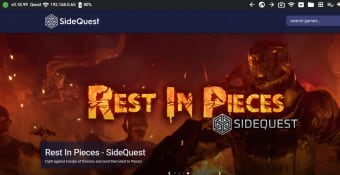
SideQuest is a free video game utility software that enables you to browse and install content on your Oculus Quest VR headset via side loading. A third-party program for virtual reality gaming, this tool is used when you’d like to try out Quest content that you can’t find in the Oculus Store, such as pre-release builds from developers and custom content. This software is compatible with Oculus Quest and Oculus Quest 2.
With the rise of virtual reality, the demand for diverse and innovative content has grown exponentially. However, the official Oculus Store, despite its extensive library, often has limitations on the type of content it offers. This is where SideQuest steps in, providing a platform for developers and users alike to explore a wider array of VR experiences.
What is Oculus Quest SideQuest?
SideQuest is a desktop app that lets you do sideloading, a method of loading VR content from sources not explicitly approved by the appropriate official sites. While it easily sounds sketchy and you should proceed with caution when performing it, sideloading is usually beneficial in testing apps by users—especially when the specific content isn’t accepted by the Oculus Store or Facebook yet. Thus, if you’d like to get this tool, here’s how to do it:
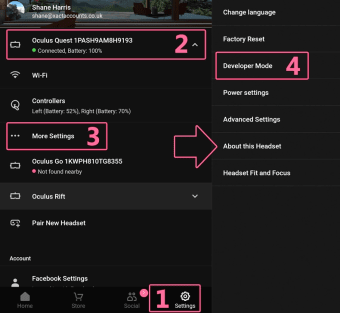
First, download the program to your computer. Take note that some operating systems may require additional packages to be installed. Then, you need to enable Developer Mode on your account on the Oculus website—which you can do on your Oculus app, too. Create an “organization” as a developer on the website and install the necessary drivers for your headset. Afterward, enable Developer Mode, reboot your device, and connect it to your PC.
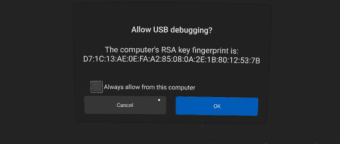
Connect via a USB cable, which is recommended to do with a Type-C port. Then, allow USB debugging on your device when prompted and check “Always allow from this computer.” It’s best to disable the unlock pattern on your mobile app, as well. After that, you should now see a green dot on the top left and the name of your headset. You’re ready to start sideloading, which the program makes easy work of.
However, it's important to be aware of the potential downsides of using the program. One significant con is the risk associated with sideloading content from unofficial sources. Unlike apps and games in the Oculus Store, sideloaded content does not undergo the rigorous vetting process to ensure security and stability. This means that users might inadvertently install software that could compromise their headset's performance or, in worst-case scenarios, introduce malware. Consequently, it's crucial to only download content from trusted developers and sources and to remain vigilant about the permissions and access requests for these apps.
Gets easier after this
All in all, there are many uses for SideQuest, and it all comes together in a nice intuitive interface. While not all operating systems follow the same installation steps precisely, these are always a one-time process. Not only is the program an alternate Oculus Store, but it also allows you to manage your VG gaming by enabling TV screencasting and streaming. This is recommended for anyone looking to go beyond the official store’s contents.
Unlocking Oculus Quest's full potential
SideQuest serves as a powerful gateway to a broader and more diverse VR experience for Oculus Quest users. It opens up a world of possibilities beyond the official Oculus Store, allowing access to a variety of experimental and custom content that enriches the VR ecosystem.
While it comes with certain risks, such as the potential for security vulnerabilities from unofficial sources, these can be mitigated with cautious and informed usage. By adhering to best practices and only downloading from reputable developers, users can safely enjoy the expanded capabilities that it provides. This tool is indispensable for VR enthusiasts eager to explore and push the boundaries of their virtual reality adventures.