
Popis
WPEngine is a fantastic WordPress hosting provider with an absolutely fantastic function – the one click staging environment. This plugin is built to make it super easy to limit access to that button so that people don’t accidentally overwrite the staging environment.
Obrázky
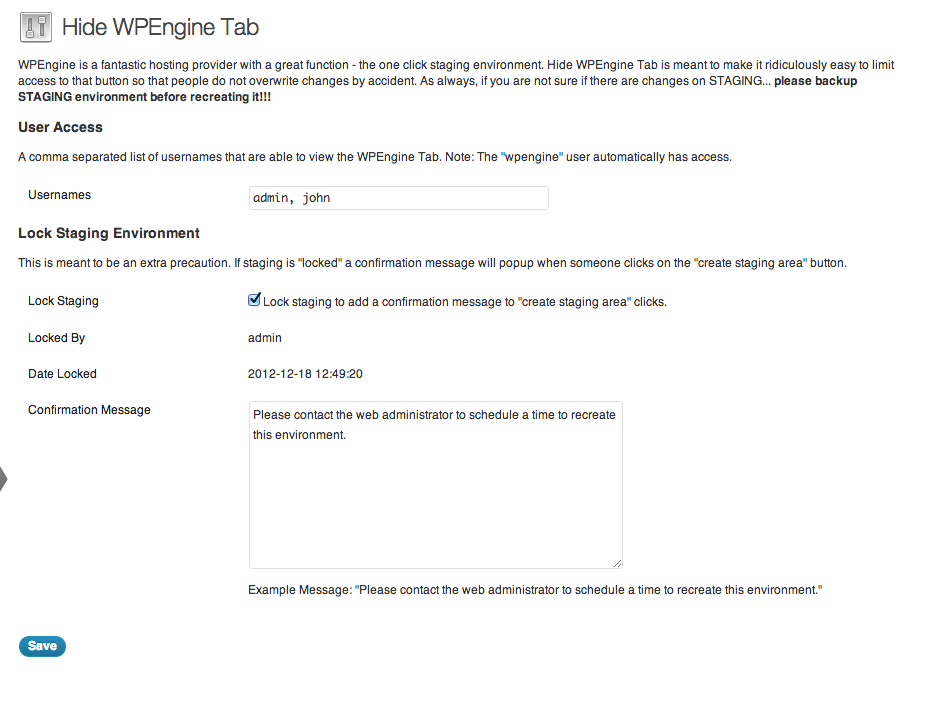
Settings page

Inštalácia
- Upload ‚hide-wpengine-tab‘ to the ‚/wp-content/plugins/‘ directory
- Activate the plugin through the ‚Plugins‘ menu in WordPress
- Click on the new menu item „Hide WPEngine Tab“ under settings!
- Add a comma separated list of users that should have access to the tab. (Note: wpengine gets added automatically.)
Časté otázky
None yet. Please ask questions if you have any.
Recenzie
Pre tento plugin nie sú žiadne recenzie.
Prispievatelia a vývojári
“Hide WPEngine Tab” je softvér s otvoreným zdrojovým kódom. Do tohto pluginu prispeli nasledujúci ľudia.
Prispievatelia
Preložiť „Hide WPEngine Tab“ do vašho jazyka.
Máte záujem o vývoj?
Prehľadávajte zdrojový kód, preskúmajte SVN repozitár, alebo sa prihláste na odber vývojárskeho logu cez RSS.
Zoznam zmien
1.1.3
- Check for WPEngine is_wpe() function
1.1.2
- Updated to run on WordPress 4.3
1.1.1
- Added urlencoding so that special characters can be used in lock messages.
1.1
- Added ability to lock the staging environment so that it cannot be rebuild without unlocking. This is done by capturing the click on the „Create staging area“ button and displaying a friendly message letting the user know it’s locked, who locked it, and when.
1.0.1
- Updated descriptions
1.0
- Wrote plugin
