Digital paint application for PC
SmoothDraw is a free graphic and design software developed for use with PCs. It's a painting and drawing program that lets artists do free-hand digital sketches. It offers a collection of tools and features that cater to all types of needs, be it personal or professional in nature.
Top Recommended Alternative

Combining the functionalities of both Paint.NET and something like Sketch Board, SmoothDraw does double duty and can cater to the needs of digital painters and sketch artists alike. It also supports layers that let you add multiple elements to a single canvas for more complex and intricate works and applications.
Free-hand drawing
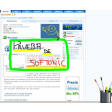
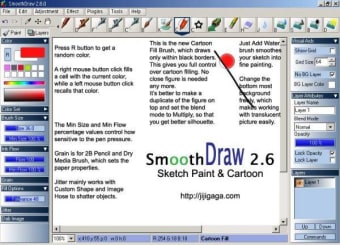
If you've used a paint application before, SmoothDraw will feel familiar with a similar look and UI layout. Pair it with a proper pen tablet and digital stylus, and you can do some intricate free-hand sketches or painting. There are various brush types and tips to choose from, including pen, pencil, airbrush, and many more. Depending on your device, they'll even respond to different levels of pressure sensitivity.
Starting with the canvas, this app lets you resize it however you want and even change the paper texture. If you're importing files to edit, you can utilize the various effects and image adjustment options available, such as contrast, saturation, and gamma sliders. You can use some built-in stencils to add a bit more flair to your work like stars and grass, to name a few.
Arguably the main highlight feature here, though, is support for layers, a feature usually found on professional-grade solutions from Adobe and the like. With it, you'll be able to have multiple elements in a single canvas, and quickly switch between. As for cons, there aren't that many, but the ones that should be addressed promptly are the lack of tooltips and limited hotkey shortcuts.
Great for what it is
SmoothDraw is a great painting and drawing program that has a lot going for it, from its intuitive UI to its good set of tools, and support for layers. It does not have the most advanced features that professionals need, but it's not for those users, in the first place. Just manage your expectations, and you'll be surprised how much you can do with this application. Recommended.





.png)