Image

PostgreSQL

Canonical Publisher Verified account Verified account

Install 16/stable of PostgreSQL

Ubuntu 16.04 or later?

Make sure snap support is enabled in your Desktop store.

Install using the command line

sudo snap install postgresql

Don't have snapd? Get set up for snaps.

Channel Version Published

Details for PostgreSQL

License

  • Apache-2.0

Last updated

  • 9 December 2025 - 16/stable
  • 17 December 2025 - 18/edge

Websites


Contact


Source code


Command › Alias

  • postgresql.clusterdb › clusterdb
  • postgresql.createdb › createdb
  • postgresql.createlang › createlang
  • postgresql.createuser › createuser
  • postgresql.dropdb › dropdb
  • postgresql.droplang › droplang
  • postgresql.dropuser › dropuser
  • postgresql.ecpg › ecpg
  • postgresql.initdb › initdb
  • postgresql.oid2name › oid2name
  • postgresql.pgarchivecleanup › pg_archivecleanup
  • postgresql.pgbasebackup › pg_basebackup
  • postgresql.pgconfig › pg_config
  • postgresql.pgcontroldata › pg_controldata
  • postgresql.pgctl › pg_ctl
  • postgresql.pgdump › pg_dump
  • postgresql.pgdumpall › pg_dumpall
  • postgresql.pgisready › pg_isready
  • postgresql.pgreceivewal › pg_receivewal
  • postgresql.pgreceivexlog › pg_receivexlog
  • postgresql.pgrecvlogical › pg_recvlogical
  • postgresql.pgresetwal › pg_resetwal
  • postgresql.pgresetxlog › pg_resetxlog
  • postgresql.pgrestore › pg_restore
  • postgresql.pgrewind › pg_rewind
  • postgresql.pgstandby › pg_standby
  • postgresql.pgtestfsync › pg_test_fsync
  • postgresql.pgtesttiming › pg_test_timing
  • postgresql.pgupgrade › pg_upgrade
  • postgresql.pgwaldump › pg_waldump
  • postgresql.pgxlogdump › pg_xlogdump
  • postgresql.pgbench › pgbench
  • postgresql.pltcldelmod › pltcl_delmod
  • postgresql.pltcllistmod › pltcl_listmod
  • postgresql.pltclloadmod › pltcl_loadmod
  • postgresql.postgres › postgres
  • postgresql.postmaster › postmaster
  • postgresql.psql › psql
  • postgresql.reindexdb › reindexdb
  • postgresql.vacuumdb › vacuumdb
  • postgresql.vacuumlo › vacuumlo
  • postgresql.pgverifychecksums › pg_verify_checksums
  • Show more

Report a bug


Report a Snap Store violation

Share this snap

Generate an embeddable card to be shared on external websites.

The world's most advanced open-source relational database.

PostgreSQL is a powerful, open source object-relational database system. It has more than 20 years of active development and a proven architecture that has earned it a strong reputation for reliability, data integrity, and correctness.

Install the snap

If you are an Ubuntu user, snapd is pre-installed and ready to go on all recent Ubuntu releases. Simply click on the drop-down menu at the upper right-hand corner of this page, select your channel of choice (e.g. 16/stable), and paste the command in your terminal, e.g.:

sudo snap install postgresql

If you are not using Ubuntu, scroll further down this page to find installation instructions for other distributions.

Use the snap

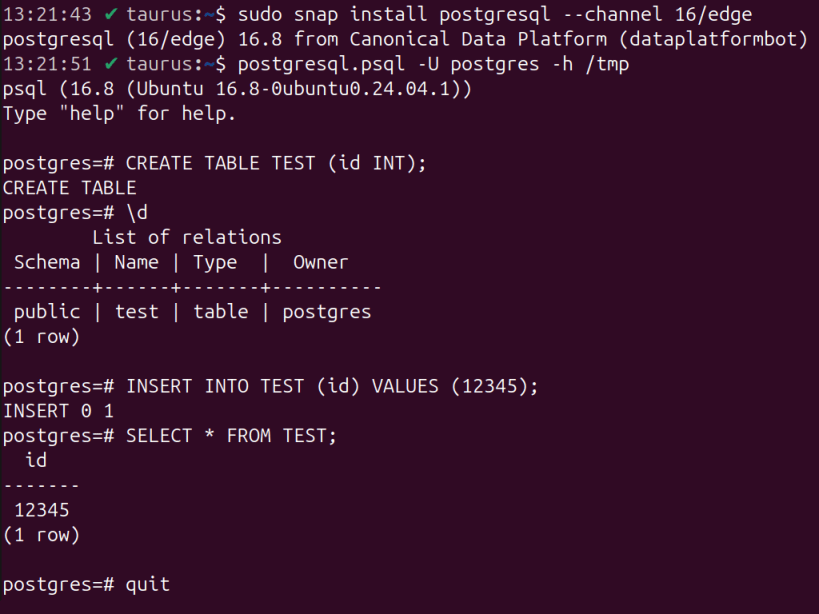
Once installed, PostgreSQL will start automatically. To log in, run:

postgresql.psql -U postgres -h /tmp

It is highly recommended to set a new password in the postgres console:

\password postgres

For convenience, the snap alias psql is pre-created:

psql -U postgres -h /tmp

See more PostgreSQL snap documentation on GitHub: https://github.com/canonical/postgresql-snap/blob/16/edge/docs


Install PostgreSQL on your Linux distribution

Choose your Linux distribution to get detailed installation instructions. If yours is not shown, get more details on the installing snapd documentation.


Where people are using PostgreSQL

Users by distribution (log)

Ubuntu 24.04
Ubuntu 22.04
Ubuntu 25.10
Ubuntu 20.04
Ubuntu 25.04
pop 22.04
Zorin OS 17
Zorin OS 18
Ubuntu 24.10
Ubuntu 18.04
Manjaro
Linux Mint 22.1
Kali Linux 2025.4
Linux Mint 22.2
Ubuntu 23.04