

Përshkrim
“PHP version” is very simple and lightweight plugin that will help you for showing up the current PHP version in WordPress dashboard.
If you satisfied with this plugin, please rate it. Your rate will encourage to do better in the future.
Foto ekrani

banner-772×250.png 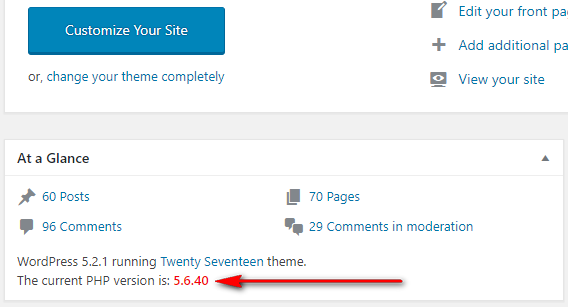
icon-256×256.png


Instalim
How to install the PHP Version Plugin?
- Dashboard -> Plugins -> Add New.
- Write “PHP Version” in the search box and hit enter.
- Find out the PHP Version plugin from suggested all and click on Install Now .
- Now click on Activate.
- Go to your WordPress dashboard page and see the current PHP version is showing.
Shqyrtime

Kontribues & Zhvillues
“PHP Version” është software me burim të hapur. Në këtë shtojcë kanë dhënë ndihmesë personat vijues.
Kontribues
Përkthejeni “PHP Version” në gjuhën tuaj.
Ju intereson zhvillimi?
Shfletoni kodin, shkarkoni depon SVN, ose pajtohuni përmes RSS-je te regjistri i zhvillimeve.
Regjistër ndryshimesh
1.0.7 – 10 Dec, 2025
Compatible with Latest WordPress Version
Main File’s version updated
1.0.6 – 24 May, 2025
Compatible with Latest WordPress Version
Main File’s version updated
1.0.5 – 18 December, 2024
Compatible with Latest WordPress Version
1.0.4 – 16 September, 2024
Compatible with Latest WordPress Version
1.0.3 – 12 June, 2024
Compatible with Latest WordPress Version
1.0.2 – 18 October, 2023
Compatible with Latest WordPress Version
1.0.1 – 16 July, 2021
Compatible with latest WordPress Version
1.0.0 – 16 June, 2019
Initial Release
