
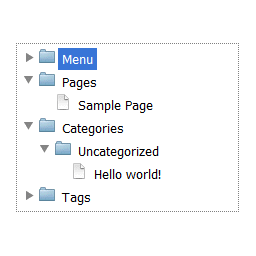
Опис
Complete dropdown tree navigation that contain pages, categories with posts, tags, authors and own menu.
Features and highlights
- Whole site in one place
- Excluding pages and authors from navigation
- Simple widget
- 4 skins
Translations/Languages
This plugin is available in your WordPress language on site and in English and Polish in Dashboard.
Skins
- iOS Lion
- Windows 8
- Windows 7
- Windows XP
Снимци екрана

Options page 
Adding widget 
Widget 
Configuring the Menusection in EasyTree


Постављање
- Unpack and upload easytree.zip to the
/wp-content/plugins/directory - Activate the plugin through the ‘Plugins’ menu in WordPress
- Add a EasyTree widget to your theme, or use
[easytree]shortcode on any page or post.
ЧПП
- Where can I change plugin settings?
-
Go to Dashboard -> Settings -> EasyTree
Прегледи

25. јануар 2017.
Damian,
Thank you so much for the plugin! I edited a section myself, and I don’t even know PHP. I wish you allowed for a lot more customization with regards the sections we’d like in the menu, but I did it with the edit.
Thanks again. Since I need static HTML, and this extracts the best in static, I love your plugin!
Shri

3. септембар 2016.
I’ve summarized the results of the review.
It is my site.
Сарадници и градитељи

Преведите „EasyTree“ на свој језик.
Заинтересовани сте за градњу?
Прегледајте код, проверите SVN складиште или се пријавите на белешку градње преко RSS-а.
Белешка о изменама
1.3
- Support for page status class
1.2
- Remove support for cache
1.1
- Support for cache
1.04
- Better support for private posts and pages
1.03
- Added support for private posts and pages
1.02
- Default setting values
1.01
- Improved easytree styles
- Folders are expanding with single click
1.0
- Assets added
0.1
Initial version
