Open-source 2D animation software for PC
Synfig Studio is a free graphic and design program developed by Syngig and is available for use with PC devices. This open-source software helps users create and edit vector-based 2D animations. It aims to make the process of creating feature-film quality works possible with limited resources and animators.
Top Recommended Alternative

Just like with Pencil or Toom Boom Studio, Synfig Studio was specifically created with 2D animators in mind. As such, it provides plenty of drawing tools and various layer types that enables creating anything from simple to more complex animations. It also serves as an alternative to manual tweening.
What is it?
In a nutshell, Synfig Studio is an end-to-end vector-based 2D animation software. It also happens to be open-source, making it a viable option if you are limited in resources or you are just starting out with animator work. With it, you can design an animation that you want, and be able to render it using a single standalone solution.
The idea behind Synfig Studio's inception was for it to serve as 2D animation program that would make it possible to create "feature film" quality animations with limited resources and people involved. This is a common scenario for individual animators who are starting out or for those project-based animation work that only has a small team working on them.
Another major highlight of this program is that it essentially eliminates the need for manual tweening or inbetweening, a process that involves generating intermediate frames between two keyframes. It does this by using sprites and digital tweening rather than having you manually adding to your illustration workload. It removes the need to draw each and every frame every time.
What's it like using it?
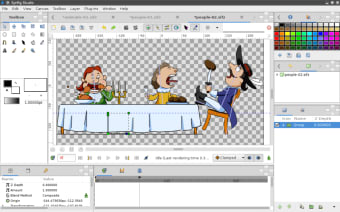
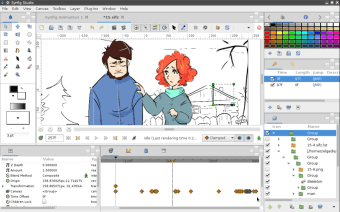
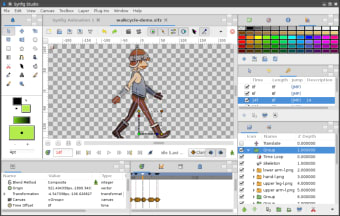
Synfig Studio has a standard and familiar layout and will be a consistent experience whether you are a new or advanced user. Before starting a new project, you should go to the Canvas Menu (or F8 key) to set parameters such as your canvas size and the number of frames you want your animations to be rendered in.
Its drawing toolkit is standard fare, with shape tools, a bezier pen, a paint bucket, and others included for you to choose from. Alternatively, you can also import pre-made assets so you can just continue working on them. From there, you can use the various object control options and you can start animating at any point by clicking on the record (person-shaped) button.
You can also use various effects and animation tricks through different layers types to simulate actions like mouth movement. You can even add a soundtrack to your animations if you want. Come rendering time, you can make final touches, such as adjusting Quality and Anti-Aliasing levels before saving them. The only thing that works against Synfig Studio is its rather steep learning curve.
A robust and open-source alternative
All in all, Synfig Studio is a capable and solid option that is worth considering if you're looking for an open-source solution. It provides a good selection of drawing tools and animation features to choose from and veteran users will appreciate that this software essentially lets them bypass the time-consuming process of manual tweening. Recommended.




.png)

.png)