Efficient text editing program
TextPad is an easy-to-use text editor that is developed by Helios Software Solutions. While the user interface is simple, the user experience is dynamic. The TextPad download is lightweight, which allows the program to launch quickly on your Microsoft Windows PC 32-bit or 64-bit operating system.
Atom, EditPlus, Notepad++, Sublime Text, UltraEdit, and Visual Studio Code are additional text editors that you can use instead of TextPad. Atom, Notepad++, Sublime Text, and VSC are freeware, while EditPlus, UltraEdit, and TextPad are trialware. In case you are looking for a complete Integrated Development Environment instead of a plain text editor, then NetBeans is a popular IDE software.
Is Notepad better than TextPad?
Notepad++ is free, while TextPad costs money. However, TextPad offers a free trial that lets you test the product for a limited period before purchasing. TextPad is not open-source, even though the project began as shareware.
Notepad++ is an open-source project that lets you edit the source code. Another popular alternative to TextPad is Visual Studio Code since the editor is free, open-source, and user-friendly.
What is TextPad used for?
TextPad is used as an online notepad for plain text editing and integrates with Java to let you run your code. TextPad predicts if your code has errors in the ‘Tool Output’ section, along with the correct text that will resolve the issue for you to successfully run the code. TextPad allows you to import text files from your PC directory.
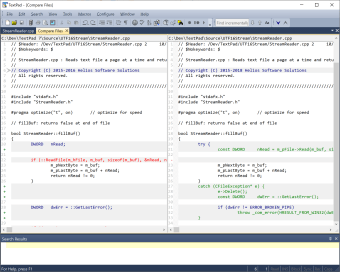
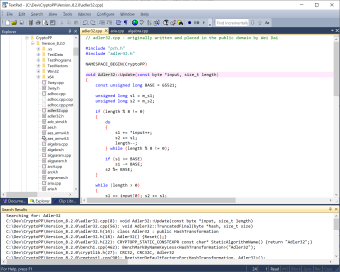
Another benefit of TextPad is that the software handles large files that go up to the virtual memory limits of 32-bit. A built-in file manager enables you to copy, delete, rename, and manage files directly on the platform. TextPad features a viewer for binary files that use the hexadecimal display format. A file comparison tool allows you to look at two files at the same time.
TextPad is built to be an efficient program that helps both beginners and experts to navigate the coding and writing processes quickly. The interface launches impressively fast since TextPad is light in size. Keyboard shortcuts are another benefit to TextPad that let you work efficiently and the tabbed interface allows you to work on multiple files at the same time.
Whether the files are .Java or .Txt, the intuitive interface lets you label files to easily navigate between the tabs. There are also two available views for each file when you enter the tabs and the drag and drop design makes the user experience even easier.
TextPad is used to write programming code and actual words. Each text line is preceded by a number to distinctly organize the lines from one another and the bookmark feature allows you to mark certain lines to refer to. The program also comes with a spell checker that includes dictionaries of 10 languages to check your spelling.
How do I download TextPad?
TextPad has an easy installation process. In case you want to use Java with the editor, then you can install the Java Development Kit. Since TextPad is a small program, the installation is quick. TextPad may automatically integrate with your JDK software, however, you might have to manually sync the platforms together.
If Java is already linked to TextPad, then ‘Java’ will be listed within the ‘Tools’ tab. In case your Java program did not get connected, then you can tap on the ‘Configure’ tab to get to the ‘Preferences’ window. The ‘Tools’ section in the treemap lets you add new programs to TextPad.
TextPad launches your PC directory to allow you to find the Java application, which gets directly added to the ‘Tools’ section in the treemap and menu bar tab. ‘Tool Output’ interacts with code that you have written in the text editor when you click on the ‘Java’ button in the ‘Tools’ tab.
Reliable text editor
The interface is easy to use and filled with features, like bookmarks, file comparison, spell checker, and more. Multiple languages are available for you to use, like English, French, German, Italian, Spanish, etc. TextPad lets you work rapidly to write literal text or code with keyboard shortcuts and swift loading speeds.
What’s new?
Since TextPad became a paid program to support the development costs, the developers release new software updates on a frequent basis. The most recent software release includes improved memory use and additional macro commands.