Article Summary
- We buy every VPN ourselves, test on multiple platforms, and run all checks in controlled conditions so results reflect the VPN – not our network.
- Core privacy tests cover IPv4/IPv6, DNS, and WebRTC, plus a stressed kill-switch check and a focused look at obfuscation for censorship resistance.
- Performance is measured across regions and times of day with latency and jitter, then validated with short real-world tasks like 1080p streaming or a quick video call.
- Streaming and P2P get practical treatment: we panel-test major services on multiple servers per region and verify torrenting rules, port forwarding, and peer connectivity.
- Trust signals are tracked alongside features and price: audits, ownership and jurisdiction, transparency reports, incidents, support quality, refunds, and account security.

Unlike many “best VPN” lists that skim features or recycle press releases, we test every VPN with our own money and a consistent, repeatable methodology. That means controlled environments, documented steps, screenshots for every critical check, and the same scoring logic across providers.
Below you’ll find exactly how we review VPNs today – piece by piece.
Before we start
We set a fair baseline so differences you see come from the VPN, not our lab setup.
- We buy each service ourselves and use public plans.
- We test on Windows, macOS, Android or iOS, and add Linux for major providers.
- The main bench is a wired EU connection with a secondary 5 GHz Wi-Fi baseline.
- Popular VPNs are re-tested periodically, with date stamps where results change fast (streaming, speed).

The 13 steps
1. We standardize the test environment
Consistency first. Each test run logs the device, OS version, app version, protocol, server label, server load (if shown), time of day, and our baseline (no-VPN) connection metrics. This lets us compare apples to apples across providers and over time.
Why it matters: Without a stable baseline, speed, leak, and reliability data are noisy. We remove as many variables as possible so the results reflect the VPN – not our network.
2. We verify identity protection (IPv4/IPv6/DNS/WebRTC)
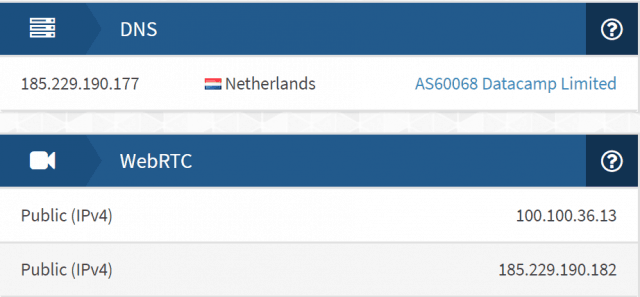
A VPN’s core job is to shield your IP and DNS queries. For each platform, we run repeatable checks for:
- IPv4 and IPv6 exposure
- DNS leaks (own DNS vs third-party, resolver location)
- WebRTC leaks in modern browsers
We capture screenshots and call out any failures immediately in the review. We also note how IPv6 is handled (blocked vs natively tunneled), because proper IPv6 support is increasingly important.
3. We validate the kill switch – under stress
We don’t just toggle a setting and hope for the best. We intentionally break the connection (switch networks, drop the adapter, force crashes) and confirm that no traffic escapes while the VPN reconnects. We document whether the kill switch is app-level or system-level, and whether it’s always-on.
4. We test obfuscation and censorship evasion
Modern blocks use traffic fingerprinting and DPI. We evaluate the provider’s obfuscation modes (e.g., OpenVPN with obfs, proprietary stealth, WireGuard-based variants) on restrictive networks and log:
- Connection success rate and time-to-connect
- Stability during a short, packet-loss-sensitive run (ping/jitter)
- Which protocols are supported by obfuscation
We summarize with a Censorship Readiness note (typical networks vs restrictive environments).
5. We measure real-world performance – beyond raw Mbps

Throughput is only part of the story. For WireGuard (or vendor variant) and OpenVPN-UDP, we test across multiple regions (nearest, EU, US-East, US-West, Asia, Australia) and capture:
- Download & upload speeds
- Latency and jitter
- A short real-use check (1080p video playback, or a quick video call sanity test)
6. We panel-test streaming (and retest often)
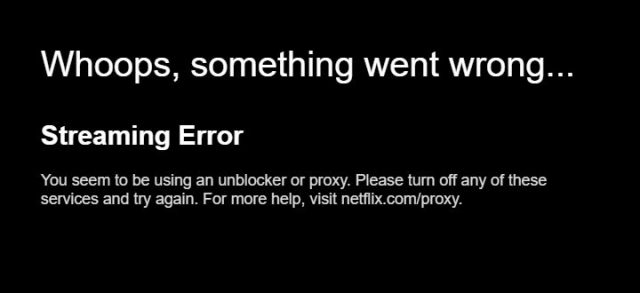
Unblocking changes fast, so we don’t rely on a single server. For major services (e.g., Netflix US/UK/DE/JP, BBC iPlayer, Disney+, Prime Video, Max, Hulu), we try 3–6 servers per region and log:
- Works/doesn’t work and the exact error (proxy block, catalog mismatch, buffering)
- Whether SmartDNS succeeds where the app fails
In each review you’ll see a panel hit-rate (e.g., “9/12 servers worked this week”), which is far more honest than a yes/no.
7. We assess torrenting and P2P specifics
We check whether P2P is allowed, whether it’s restricted to certain locations, and whether port forwarding is offered. We run a short test with a legal torrent and note peer connectivity and any policy caveats (traffic shaping, special servers, etc.).
8. We inspect security features and protocol depth
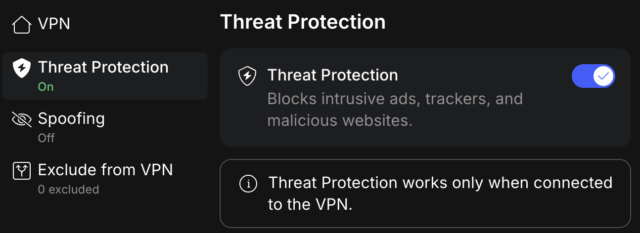
Marketing badges rarely tell the whole story. We verify what exists and where it works:
- Protocols and crypto – WireGuard or variant, OpenVPN UDP/TCP, IKEv2, AES-256 or ChaCha20 families, handshake and PFS claims
- Controls that protect identity – kill switch type, split tunneling by app or route, DNS behavior when split is used
- Advanced privacy – multi-hop, Tor over VPN, ad/track/malware blocking, rotating IPs, static or dedicated IPs, port forwarding
- Server model transparency – RAM-only servers, virtual locations, co-lo vs rented, SmartDNS footprint
We log feature parity by OS and capture screenshots of settings and results.
9. We evaluate app quality, telemetry, and permissions
We evaluate stability and UX, first-run defaults, and privacy settings. We check whether telemetry and crash analytics can be disabled, call out notable mobile trackers and permissions, and note open-source clients or components where applicable. These observations appear in an App Integrity and Telemetry line.
10. Compatibility and integrations – the real-world matrix
We keep compatibility practical and user-focused. In each review we note the most common ways people run a VPN beyond a laptop or phone, without deep configuration guides.
- Home setups – router support or profile export (OpenVPN/WireGuard) and whether SmartDNS is available.
- TVs and consoles – paths for Fire TV, Apple TV, Roku or game consoles (usually SmartDNS or router).
- Power users – Linux/CLI availability and what browser extensions actually proxy.
11. We read the logging policy – and the fine print
“No-logs” claims vary. We comb through the privacy policy, terms, and support docs to identify:
- What is collected (diagnostics, timestamps, IPs, identifiers)
- Where data is processed and for how long
- Third-party involvement (e.g., payment processors, analytics)
- Money-back and data deletion policies that actually apply to you
If the wording is vague or self-contradictory, we say so plainly.
12. We track audits, ownership, and incidents
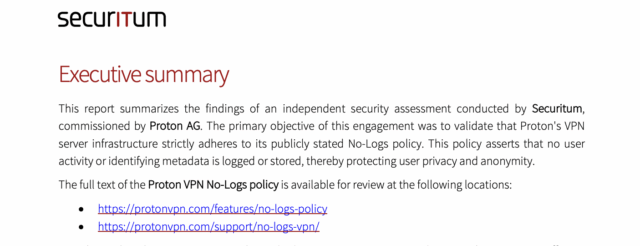
Trust is earned, not assumed. Each review includes a Trust & Transparency box with:
- Independent audits (who, when, what scope: apps, extensions, infrastructure, “no-logs”)
- Ownership & corporate structure (parent company, notable acquisitions)
- Jurisdiction and relevant surveillance alliances or data-retention rules
- Transparency reports/warrant canaries
- Incident timeline (publicized breaches, misconfigurations, or noteworthy bugs and how fast they were addressed)
This section is updated as new events happen.
13. We test support like real customers (including refunds)

We contact support with realistic issues and record time to first response and resolution quality. We attempt a refund inside the stated window on a rotating schedule and report the outcome. Finally, we weigh price vs value – speed consistency, privacy posture, unblocking hit-rate, feature depth, account security – and then rank accordingly.
How we keep reviews current
VPNs are living products. Providers add servers, update apps, rotate IP ranges for streaming, and push security fixes. For popular services, we:
- Re-run streaming panels (especially Netflix/iPlayer) and annotate dates
- Spot-check speeds and latency
- Track audits/incidents and update the Trust & Transparency box
- Note feature parity changes across platforms after major releases
If a big change occurs, we refresh the full review.
What we don’t do
- We don’t accept free accounts, “reviewer” servers, or private endpoints that ordinary users can’t access.
- We don’t publish lab numbers we can’t reproduce on everyday networks.
- We don’t bury policy red flags in footnotes.
Why this process exists
People use VPNs for different reasons – privacy, streaming, travel, work, gaming. A single number or a vague “works or doesn’t” claim does not help you choose. Our process highlights exposure risks like leaks and telemetry, practical performance with latency and consistency in view, real unblocking based on a rotating server panel, trust signals such as audits and incidents, and platform fit with clear feature parity. With that context, you can pick a VPN that matches what you actually do online.
How to read our reviews
Each review follows the steps above and ends with:
- A clear verdict – who this VPN is best for and who should skip it
- Pros and cons tied to real test findings
- A short What changed note – streaming shifts, new audits, major feature releases
Dated screenshots and panel results are included so you can verify claims yourself.
Want to help?
- Share your experience on the product’s page (good, bad, or mixed – it all helps others).
- Spot something new (policy change, audit, incident)? Send us a note via our contact page.
We buy. We test. We publish. That’s our promise.
