

Deskripsyon
“PHP version” is very simple and lightweight plugin that will help you for showing up the current PHP version in WordPress dashboard.
If you satisfied with this plugin, please rate it. Your rate will encourage to do better in the future.
Mga Screenshot

banner-772×250.png 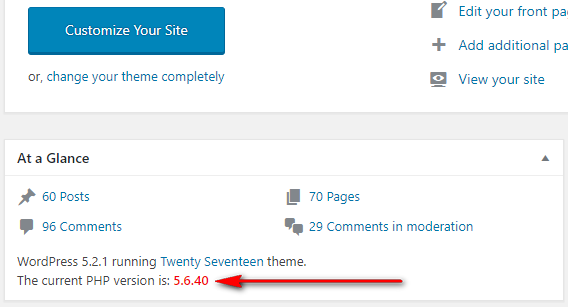
icon-256×256.png


Pag-install
How to install the PHP Version Plugin?
- Dashboard -> Plugins -> Add New.
- Write “PHP Version” in the search box and hit enter.
- Find out the PHP Version plugin from suggested all and click on Install Now .
- Now click on Activate.
- Go to your WordPress dashboard page and see the current PHP version is showing.
Mga Review

Mga Contributor at Developer
Ang “PHP Version” ay open source software. Ang mga sumusunod na tao ay nag-ambag sa plugin na ito.
Mga Contributor
Isalin ang “PHP Version” sa iyong wika.
Interesado sa development?
Tingnan ang code, i-check ang SVN repository, o mag-subscribe sa development log sa pamamagitan ng RSS.
Changelog
1.0.7 – 10 Dec, 2025
Compatible with Latest WordPress Version
Main File’s version updated
1.0.6 – 24 May, 2025
Compatible with Latest WordPress Version
Main File’s version updated
1.0.5 – 18 December, 2024
Compatible with Latest WordPress Version
1.0.4 – 16 September, 2024
Compatible with Latest WordPress Version
1.0.3 – 12 June, 2024
Compatible with Latest WordPress Version
1.0.2 – 18 October, 2023
Compatible with Latest WordPress Version
1.0.1 – 16 July, 2021
Compatible with latest WordPress Version
1.0.0 – 16 June, 2019
Initial Release
